
Product Overview
The BOBOVR P4U Strap with B100 Battery System is designed to enhance your virtual reality experience by providing extended playtime and improved comfort for your Pico 4 Ultra or Pico 4 Ultra Enterprise headset. This upgrade combo features a high-capacity battery system, magnetic hot-swappable battery modules, an intuitive LED battery indicator, and an ergonomic memory foam head strap.

Image: The complete BOBOVR P4U Strap with Battery Upgrade Combo, showcasing the head strap and battery module.
What's in the Box
- B100 Battery Pack x1
- Strap x1
- Flexible Support x1
- PU Pads x1
- Honeycomb Pads x1
- Top PU Soft Strap x1
- Metal Pull Ring x1
- Cable Retainer x1
- Disassembly Stick x1
- USB-C Cable x1
- Instructions x1
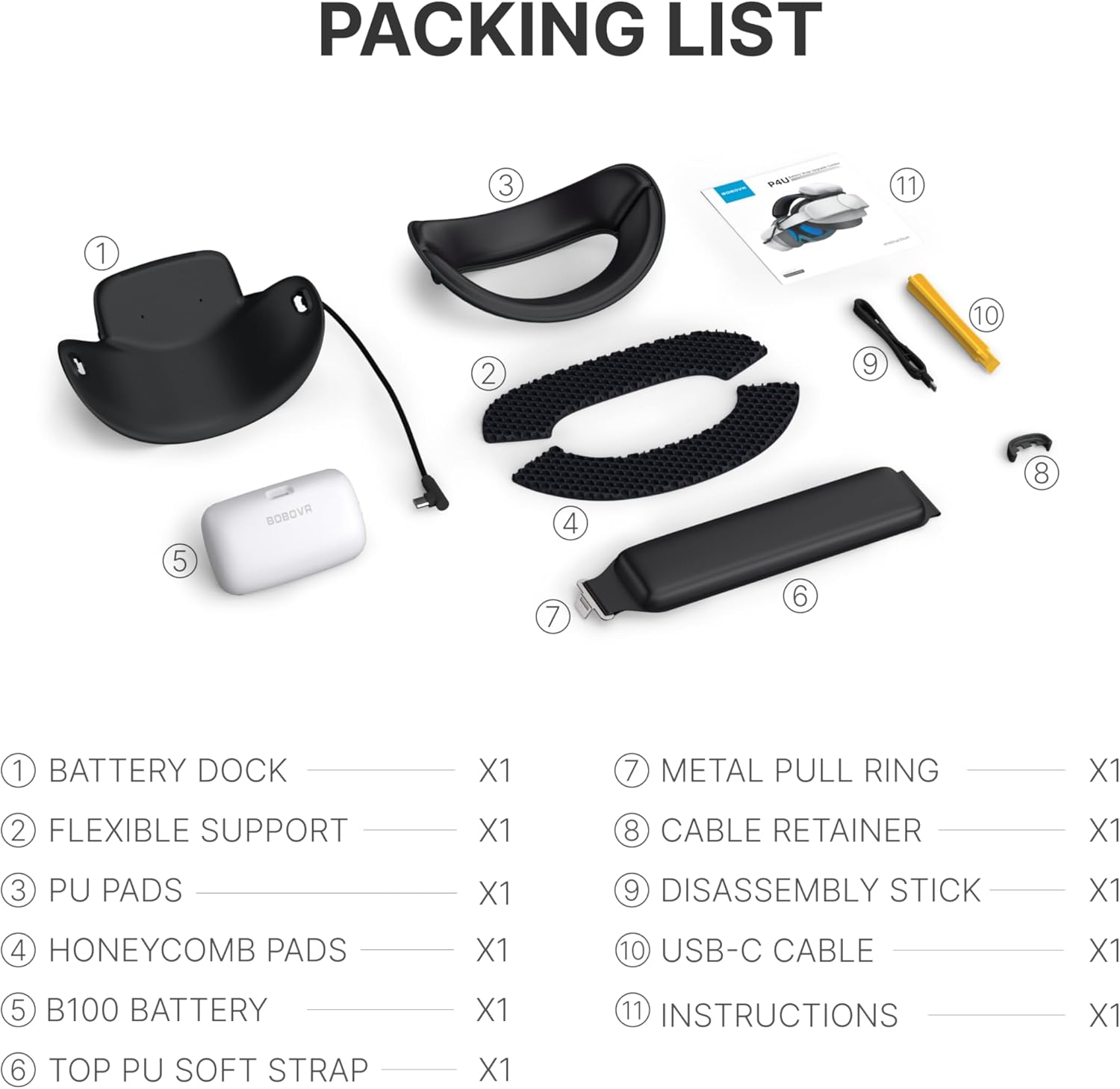
Image: A visual representation of all components included in the BOBOVR P4U package, clearly labeled with quantities.
Setup Instructions
- Attach the Head Strap: Carefully align the head strap arms with the attachment points on your Pico 4 Ultra headset. Press firmly until you hear a click, ensuring both sides are securely fastened.
- Install Top Strap and Pads: Attach the top PU soft strap and any desired padding (PU pads or honeycomb pads) to the main head strap for enhanced comfort and stability.
- Connect the B100 Battery: The B100 battery module features a magnetic hot-swappable design. Align the battery with the magnetic connector on the head strap and gently push until it snaps into place.
- Connect USB-C Cable: Plug the provided USB-C cable from the battery module into the Pico 4 Ultra headset's charging port. Use the cable retainer to manage excess cable and keep it tidy.
- Adjust for Fit: Use the adjustment knob at the back of the head strap to tighten or loosen the fit around your head. Ensure the headset is snug but comfortable, distributing weight evenly to reduce pressure points.
Video: A demonstration of the BoboVR S3 Pro head strap installation and features. While not the exact P4U model, the installation process for similar BoboVR head straps is often comparable, showing how to attach the battery and adjust the fit.
Operating Instructions
- Power On/Off: The B100 battery system automatically powers on when connected to the headset and provides power. To check battery status, press the button on the battery module.
- Battery Indicator: The bottom-lit LED system on the battery module provides real-time status:
- Solid Light: 100% charge.
- Blinking Light: Low charge (<20%).
- No Light: Fully depleted.
- Hot-Swap Functionality: The magnetic design allows for effortless battery replacement while the headset is powered on. Simply detach a depleted battery and attach a fully charged one in under 30 seconds for uninterrupted use.
- Charging: Dock depleted B100 battery modules into the optional BD3 Charging Dock (sold separately) for 22.5W fast charging.

Image: Close-up of the BOBOVR P4U battery module showing the bottom-lit LED indicator with different light patterns for charge status.

Image: A visual demonstration of the magnetic hot-swappable battery feature of the BOBOVR P4U head strap.
Maintenance
- Cleaning: Regularly wipe down the head strap and battery module with a soft, dry cloth. For the pads, use a damp cloth with mild soap if necessary, and allow to air dry completely before reattaching.
- Storage: Store the head strap and battery in a cool, dry place away from direct sunlight and extreme temperatures.
- Battery Care: Avoid fully discharging the battery for extended periods. Charge regularly to maintain battery health.
Troubleshooting
- Battery Not Charging: Ensure the USB-C cable is securely connected to both the battery module and the headset. If using the BD3 Charging Dock, ensure the dock is powered and the battery is correctly seated.
- Headset Not Receiving Power: Check that the B100 battery module is fully charged and properly attached to the head strap. Verify the USB-C cable connection to the headset.
- Uncomfortable Fit: Adjust the rear knob and top strap to find the optimal fit. Experiment with different padding options (PU pads or honeycomb pads) to improve comfort and weight distribution.
- Loose Head Strap: Tighten the adjustment knob at the back of the head strap until it feels secure without being too tight. Ensure all clips are properly engaged.
Specifications
- Battery Capacity: 10,000 mAh (2x 5,000 mAh modules)
- Charging: 22.5W Fast Charging (with BD3 Charging Dock)
- Compatibility: Pico 4 Ultra, Pico 4 Ultra Enterprise
- Item Weight: 11.5 ounces (326 grams)
- Package Dimensions: 9.33 x 6.54 x 2.91 inches
- Color: White
- Connectivity Technology: USB
- Included Components: B100 Battery Pack, Strap

Image: An illustration highlighting the 10,000 mAh cell capacity of the B100 battery system, indicating extended runtime.
Warranty and Support
This product is manufactured by ShenZhen XiaoZhai Technology Co., Ltd. For specific warranty details and support, please refer to the documentation included in your package or contact BOBOVR customer service directly.
Return Policy: This product is eligible for a refund/replacement within 30 days of purchase, subject to Amazon's return policy.
Protection Plans: Extended protection plans are available for purchase separately, including 2-Year and 3-Year Protection Plans, and a Complete Protect plan covering multiple eligible purchases.


