The Elitech ApexLink HVAC Elite Bundle is a comprehensive solution designed for HVAC professionals. This master pack integrates three essential tools: the EMG-40V Intelligent Digital Manifold Gauge, the LMC-310 Wireless Refrigerant Scale, and the ILD-100H Heated Diode Leak Detector. This bundle provides precision, connectivity, and comprehensive functionality, leveraging advanced Bluetooth integration for real-time data monitoring and analysis. It is ideal for system installation, maintenance, and advanced diagnostics, ensuring superior performance and reliability in HVAC operations.
Product Components Overview
Image: The complete Elitech ApexLink HVAC Elite Bundle, showcasing the EMG-40V digital manifold gauge, LMC-310 wireless refrigerant scale, and ILD-100H heated diode leak detector.
1. EMG-40V Intelligent Digital Manifold Gauge
The EMG-40V is designed for intelligent measurements, offering real-time data synchronization and monitoring via the Elitech Tools App. It supports over 140 types of refrigerants and features a 5-inch touch screen for intuitive operation.
Image: The EMG-40V digital manifold gauge highlighting key features such as APP monitoring, OTA updates, intelligent vacuum leakage judgment, offline data recording, temperature compensation, and support for 140+ refrigerants.
Image: Visual representation of the EMG-40V's data analysis capabilities, showing real-time monitoring and offline data recording/export via the Elitech app and cloud integration.
Image: Close-up of the EMG-40V's display showing real-time superheating and subcooling calculations, along with tightness testing accuracy with temperature compensation.
2. LMC-310 Wireless Refrigerant Scale
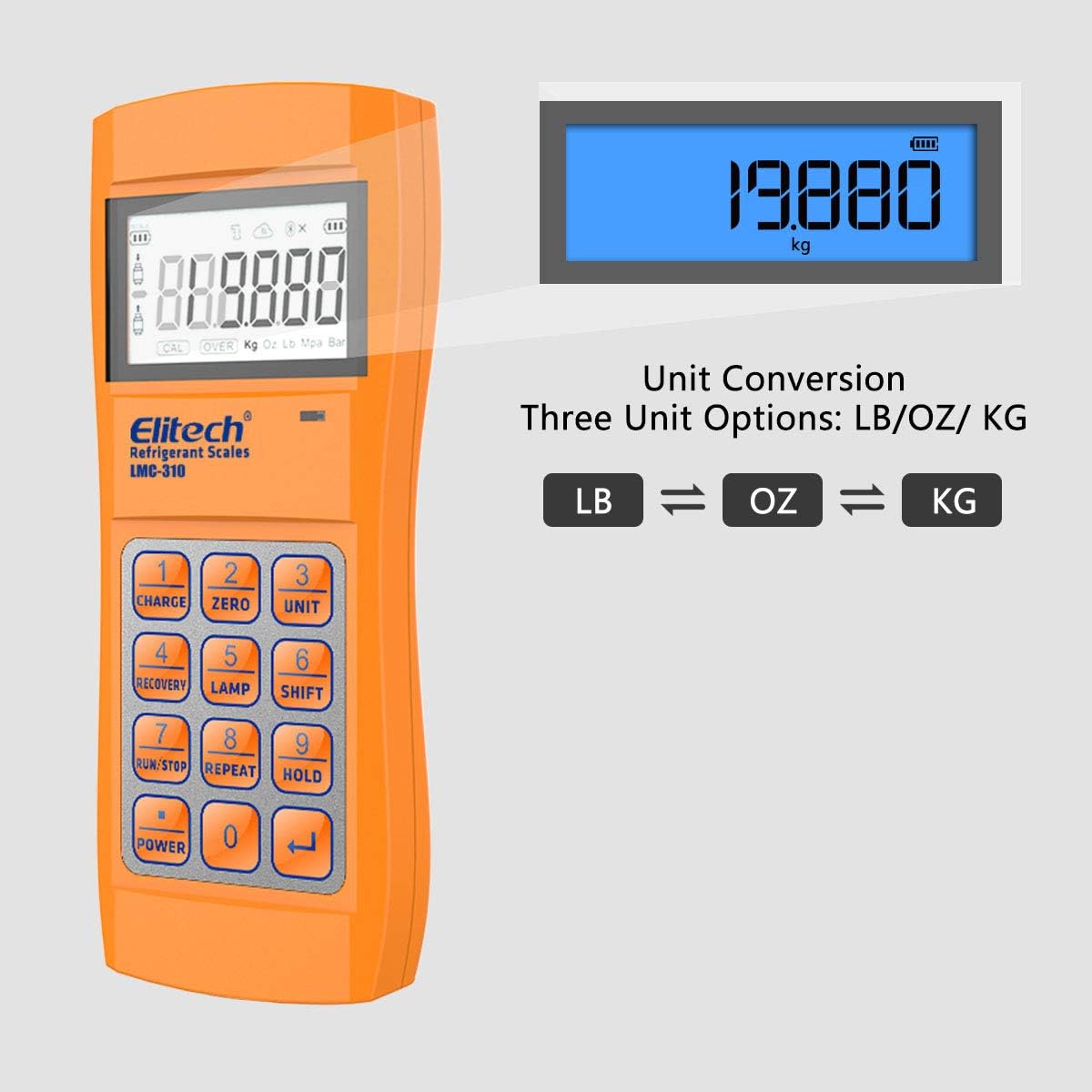
The LMC-310 provides high precision refrigerant weighing with an accuracy of ±0.05%. It features wireless connectivity for remote monitoring and offers three unit options: LB, OZ, and KG, with a capacity of up to 150KG/330LB.
Image: The LMC-310 wireless refrigerant scale with a refrigerant tank placed on its platform, demonstrating its use for weighing.
Image: The LMC-310's remote display unit, illustrating the three available unit conversion options: LB, OZ, and KG.
Image: The LMC-310 package contents, including the scale, user manual, AAA batteries, charge valve, and carrying bag.
3. ILD-100H Heated Diode Leak Detector
The ILD-100H features a heated diode sensor for sensitive and accurate leak detection of halogen refrigerants. It offers adjustable sensitivity, audible and light alarms, immediate response, and two different display modes (Pinpoint and Curve).
Image: The ILD-100H halogen leak detector, highlighting its features: adjustable sensitivity, audible & light alarm, immediate response, and two different modes.
Image: The ILD-100H's large display, showing both Pinpoint Display for exact leak location and Curve Display for general leak area identification.
Setup and Initial Use
General Setup
Unpacking: Carefully remove all components from the packaging. Verify that all items listed in the respective product manuals are present.
Battery Installation: Install the required batteries for each device as per their individual instructions. For the LMC-310, 5 AAA batteries are included.
Elitech Tools App: Download and install the Elitech Tools App on your smartphone or tablet. This app is crucial for real-time data monitoring, analysis, and firmware updates for the EMG-40V and LMC-310.
EMG-40V Setup
Power on the EMG-40V by pressing the power button.
Follow the on-screen prompts to select your preferred language and units.
Enable Bluetooth on the device and pair it with the Elitech Tools App on your mobile device.
Connect the manifold hoses to the appropriate ports on the HVAC system.
LMC-310 Setup
Place the scale on a flat, stable surface.
Power on the remote display unit.
Press the "ZERO" button to tare the scale before placing the refrigerant tank.
Ensure the remote display is wirelessly connected to the scale platform.
ILD-100H Setup
Power on the ILD-100H.
Allow the heated diode sensor to warm up (indicated by the device).
Select the desired sensitivity level using the "SENS" button.
Choose between "Pinpoint" or "Curve" display modes as needed.
Operating Instructions
Using the EMG-40V Digital Manifold Gauge
Pressure Measurement: Connect the high and low-pressure hoses to the system. The display will show real-time pressure readings.
Temperature Measurement: Attach temperature clamps to the refrigerant lines for accurate superheating and subcooling calculations.
Vacuum Test: Initiate a vacuum test from the menu. The device will monitor vacuum levels and provide intelligent leakage judgment.
Refrigerant Charging/Recovery: Use the integrated functions to manage refrigerant charging or recovery processes, monitoring progress on the display and via the app.
Data Logging: The device automatically records data. Access and export this data via the Elitech Tools App for reporting and analysis.
Using the LMC-310 Wireless Refrigerant Scale
Weighing Refrigerant: Place the refrigerant tank on the scale platform. The weight will be displayed on the remote unit.
Unit Conversion: Press the "UNIT" button on the remote display to cycle through LB, OZ, and KG.
Charging/Recovery: Monitor the refrigerant weight change during charging or recovery operations to ensure precise amounts are added or removed.
Zero Function: Use the "ZERO" button to tare the scale before each measurement or to reset the current weight.
Using the ILD-100H Heated Diode Leak Detector
Leak Detection: Move the probe slowly around suspected leak areas. The device will emit an audible alarm and display visual indicators (LEDs, screen graph) when a leak is detected.
Sensitivity Adjustment: Adjust sensitivity based on the expected leak size or environmental conditions. Higher sensitivity is for smaller leaks.
Display Modes:
Pinpoint Display: Provides a precise indication to help locate the exact leak source.
Curve Display: Shows a trend graph, useful for identifying the general area of a leak or monitoring changes in leak concentration.
Mute Function: Use the "MUTE" button to silence the audible alarm if needed.
Maintenance
Cleaning: Wipe down all devices with a soft, damp cloth. Do not use abrasive cleaners or solvents. Ensure no moisture enters the electronic components.
Sensor Care (ILD-100H): The heated diode sensor is sensitive. Avoid touching it directly. If it becomes contaminated, refer to the specific ILD-100H manual for cleaning or replacement instructions.
Battery Replacement: Replace batteries promptly when the low battery indicator appears. Use only the specified battery types. Remove batteries if the devices will not be used for an extended period.
Storage: Store all components in their original carrying cases or a clean, dry environment away from extreme temperatures and direct sunlight.
Firmware Updates: Regularly check for firmware updates via the Elitech Tools App to ensure optimal performance and access to new features.
Troubleshooting
Problem
Possible Cause
Solution
Device not powering on
Low or dead batteries; incorrect battery installation.
Replace batteries with fresh ones; ensure correct polarity.
Bluetooth connection issues
Bluetooth disabled on device or phone; out of range; interference.
Ensure Bluetooth is enabled on both devices; move closer; restart devices.
LMC-310 inaccurate readings
Scale not tared; unstable surface; exceeding weight capacity.
Press "ZERO" before use; place on a flat, stable surface; ensure weight is within 150KG/330LB.
ILD-100H not detecting leaks
Low sensitivity setting; contaminated sensor; sensor not warmed up.
Increase sensitivity; clean or replace sensor; allow sufficient warm-up time.
App not displaying data
App not connected to device; outdated app version.
Verify Bluetooth connection in the app; update the Elitech Tools App to the latest version.
Specifications
Component
Specification
Elitech ApexLink HVAC Elite Bundle
ASIN: B0DT3Z3B2T Date First Available: January 15, 2025
EMG-40V Digital Manifold Gauge
Display: 5-inch TFT Touch Screen
Refrigerant Support: 140+ types
Connectivity: Bluetooth for Elitech Tools App
Features: Real-time superheating/subcooling, vacuum leakage judgment, offline data recording.
All devices within the Elitech ApexLink HVAC Elite Bundle come with a one-year warranty from the date of purchase. For any technical assistance, troubleshooting, or warranty claims, Elitech provides 24/7 US-based technician support.
Please refer to the contact information provided in the individual product manuals or visit the official Elitech website for support details.
Note: Unauthorized repairs or modifications may void the product warranty.
Ask a question about this manual
Ask about setup, troubleshooting, compatibility, parts, safety, or missing instructions. Manuals+ will review the question and use this page’s manual context to help answer it.