
1. Introduction
This instruction manual provides essential information for the proper setup, operation, and maintenance of your FUTABA 6PV Transmitter. The 6PV is a high-performance radio control unit designed for various RC models, offering advanced features and compatibility with multiple communication systems. Please read this manual thoroughly before using the product to ensure safe and optimal performance.
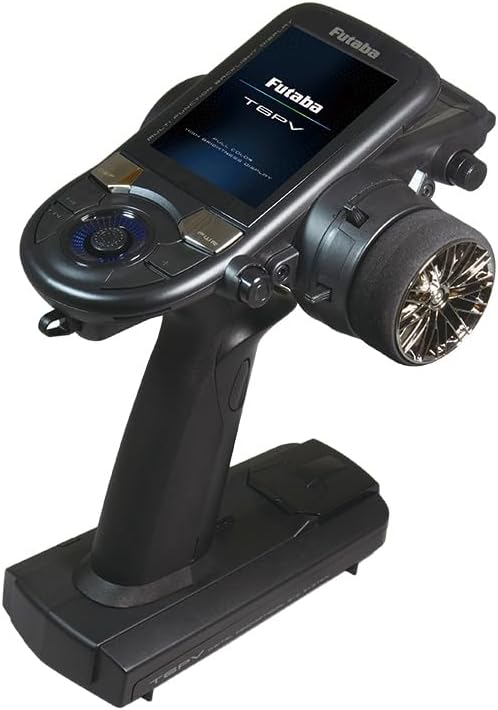
Figure 1: The FUTABA 6PV Transmitter. This image displays the FUTABA 6PV Transmitter, a black handheld radio control unit featuring a full-color display screen. The screen shows the brand 'Futaba' and model 'T6PV'. The transmitter has various control buttons and a steering wheel on the right side, designed for precise control of RC models.
2. Key Features and Compatibility
The FUTABA 6PV Transmitter is equipped with advanced features and supports multiple receiver systems, ensuring versatility and high-speed response for your RC applications.
- F-4G System: Utilizes Futaba's 4th generation fastest response system for ultra-quick control.
- T-FHSS System: Supports telemetry functions, allowing real-time data feedback from your model to the transmitter.
- S-FHSS System: Compatible with standard S-FHSS receivers.
- Kyosho MINI-Z EVO Series Compatibility: Directly compatible with Kyosho 82042, 82044, and 82046 receivers.
- Kyosho MINI-Z FHSS Compatibility: Requires the separately sold Kyosho FS-RM005 module for use with MINI-Z FHSS systems.
- Telemetry Function: Integrated telemetry capabilities for monitoring various parameters of your RC model.
3. Package Contents
Please verify that all the following items are included in your package:
- FUTABA 6PV Transmitter (with Japanese technical conformity mark)
- Dry Battery Box for Transmitter
- Various Genuine Accessory Parts
- Instruction Manual
- Warranty Card
If any items are missing or damaged, please contact your retailer or FUTABA customer support immediately.
4. Setup
This section outlines the general steps for setting up your FUTABA 6PV Transmitter. For detailed instructions, refer to the comprehensive instruction manual included in your package.
- Battery Installation: Open the battery compartment on the transmitter and insert the required dry batteries into the provided battery box, observing correct polarity. Securely close the compartment.
- Power On/Off: Press and hold the power button to turn the transmitter on or off.
- Binding with Receiver: Follow the specific binding procedure outlined in the detailed manual to establish a secure connection between your 6PV transmitter and the compatible receiver in your RC model.
- Model Memory Selection: If applicable, select or create a new model memory slot for your RC model.
- Initial Settings: Configure basic settings such as servo directions, endpoints, and trims according to your model's requirements.
5. Operating Instructions
Once the transmitter is set up and bound to your receiver, you can begin operating your RC model. Always ensure you are in a safe and appropriate environment for RC operation.
- Pre-Flight Checks: Before each use, perform a range check and verify all control surfaces and functions are responding correctly.
- Steering Control: Use the steering wheel for directional control of your model.
- Throttle Control: Use the throttle trigger for speed and braking control.
- Auxiliary Functions: Utilize the various switches and buttons for auxiliary functions as configured for your model (e.g., gear, lights).
- Telemetry Monitoring: If using a T-FHSS system, monitor real-time telemetry data on the transmitter display for critical information such as battery voltage or temperature.
Always maintain visual contact with your model and be aware of your surroundings.
6. Maintenance
Proper maintenance will extend the life and ensure the reliability of your FUTABA 6PV Transmitter.
- Cleaning: Wipe the transmitter with a soft, dry cloth. Do not use solvents or abrasive cleaners.
- Storage: Store the transmitter in a cool, dry place away from direct sunlight and extreme temperatures. Remove batteries if storing for extended periods.
- Battery Care: Replace dry batteries when they show signs of depletion. Ensure battery contacts are clean.
- Inspection: Periodically inspect all switches, buttons, and the steering wheel for proper function and any signs of wear or damage.
7. Troubleshooting
If you encounter issues with your FUTABA 6PV Transmitter, refer to the following basic troubleshooting steps. For more complex problems, consult the full instruction manual or contact customer support.
- No Power: Check battery installation and ensure batteries are fresh. Verify the power button is pressed correctly.
- No Response from Model: Confirm the transmitter and receiver are properly bound. Check receiver power and connections. Ensure the model memory is correctly selected.
- Erratic Control: Check for interference sources. Ensure antenna is properly positioned. Verify all servo connections and functions.
- Display Issues: If the display is blank or unreadable, try restarting the transmitter. Ensure sufficient battery power.
8. Specifications
| Product Size | 14.8 x 25.9 x 26.1 cm |
| Product Weight | 1.09 kg |
| Manufacturer | FUTABA |
| Product Model Number | T6PV |
| ASIN | B0DT3WJVCZ |
| Country of Origin | China |
9. Safety Information
Important Safety Warning:
Do not use this product for purposes other than RC models.
Always operate your RC equipment responsibly and adhere to all local regulations and guidelines for radio control models. Failure to do so may result in injury or damage.
10. Warranty and Support
For warranty details, please refer to the warranty card included in your product package. For technical support, service, or additional information, please visit the official FUTABA website or contact your authorized FUTABA dealer.
Manufacturer's Website: rc.futaba.co.jp


