
1. Introduction
Thank you for choosing the USHA AeroEdge Plus 1200mm BLDC Ceiling Fan. This fan is designed for energy efficiency and high performance, featuring a Brushless Direct Current (BLDC) motor, infrared (IR) remote control, and LED indicators. This manual provides essential information for the safe installation, operation, and maintenance of your new ceiling fan.
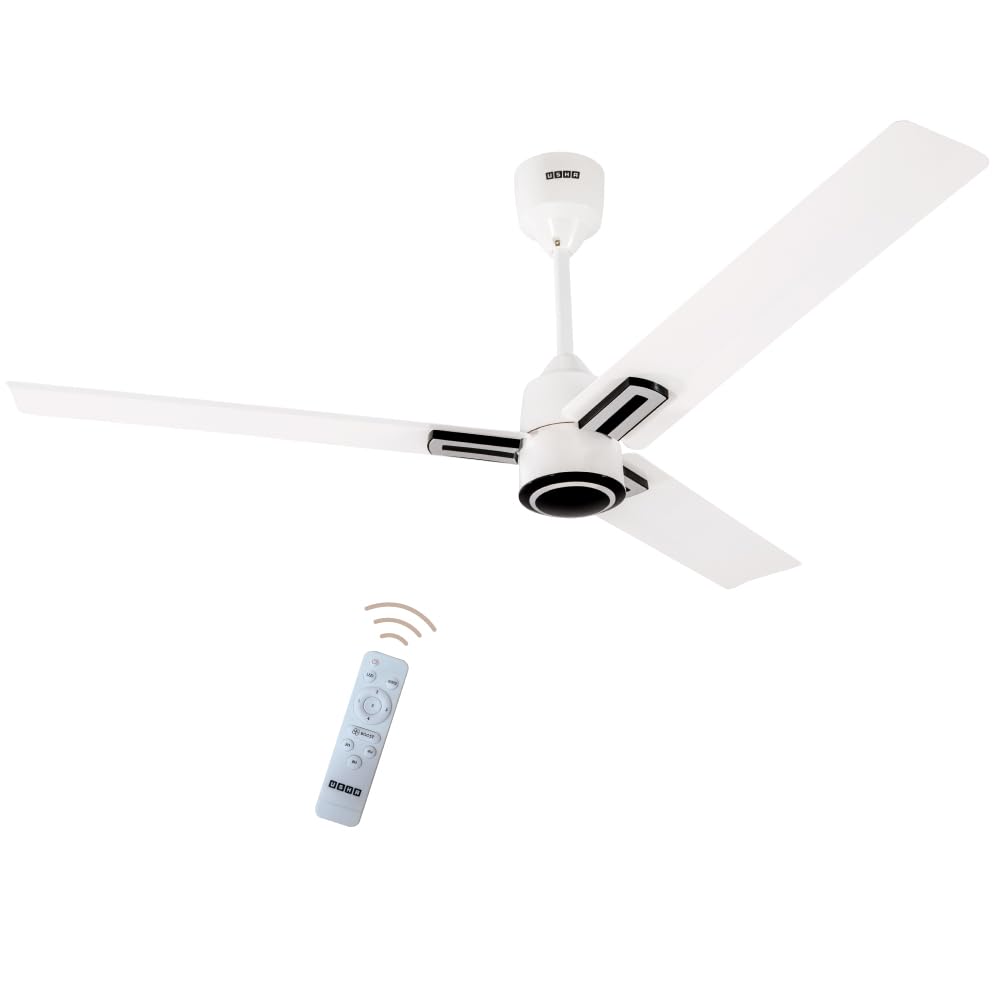
Figure 1: USHA AeroEdge Plus 1200mm BLDC Ceiling Fan (Rich White)
2. Safety Instructions
Please read all safety instructions carefully before installation and use to prevent injury or damage.
- Electrical Safety: Ensure the main power supply is disconnected before installation, cleaning, or maintenance. All electrical connections must comply with local codes and regulations.
- Installation: Installation should be performed by a qualified electrician. The fan must be securely mounted to a ceiling structure capable of supporting its weight.
- Blade Clearance: Ensure there is adequate clearance between the fan blades and any obstructions (walls, furniture) and the floor.
- Motor Protection: The fan features a 100% copper motor. Avoid exposing the motor to excessive moisture or dust.
- Remote Control: Keep the remote control away from water and extreme temperatures. Replace batteries as needed.
- Children and Pets: Keep children and pets away from the fan during operation.
3. Package Contents
Verify that all components are present in the package:
- Ceiling Fan Motor Assembly
- Fan Blades (3 units)
- Downrod
- Canopy (Upper and Lower)
- IR Remote Control
- Mounting Bracket
- Hardware Kit (screws, washers, nuts)
- Cord
- Light Kit (integrated LED)
- Instruction Manual
4. Setup & Installation
Installation of this ceiling fan requires electrical wiring knowledge. It is highly recommended to have the fan installed by a certified electrician.
4.1 Pre-Installation Checks
- Ensure the power supply to the installation area is turned off at the circuit breaker.
- Confirm the ceiling joist or support structure can hold the fan's weight (approximately 3.3 kg).
- Unpack all components and inspect for any damage.
4.2 Assembly Steps (General Guidance)
- Mounting Bracket Installation: Secure the mounting bracket to the ceiling outlet box or support structure using appropriate hardware.
- Downrod Assembly: Attach the downrod to the motor housing. Ensure the safety wire is properly connected for additional protection.
- Wiring: Connect the fan's electrical wires to the household wiring according to the wiring diagram provided in the full installation guide (not included here). Ensure the BLDC circuit board is correctly connected.
- Hanging the Fan: Carefully lift the fan assembly and hang it onto the mounting bracket.
- Blade Attachment: Securely attach the aerodynamic blades to the motor housing.
- Canopy Installation: Slide the canopies up to cover the mounting bracket and wiring, securing them in place.

Figure 2: Internal Components Diagram showing Safety Wire, BLDC Circuit Board, and Copper Motor.

Figure 3: Overview of the fan's sleek design, 100% copper motor, and IR remote control.
5. Operating Instructions
Your USHA AeroEdge Plus fan can be operated using the included IR remote control or manually via a wall switch.
5.1 Remote Control Functions
The IR remote control provides convenient access to all fan functions:

Figure 4: IR Remote Control with labeled functions.
- Power Button (O): Turns the fan On or Off.
- Speed Control (1-5): Adjusts the fan speed from 1 (lowest) to 5 (highest). The LED indicator on the fan will display the current speed.
- Boost Mode: Activates maximum speed for rapid cooling.
- Timer Mode (2H, 4H, 8H): Sets the fan to automatically turn off after 2, 4, or 8 hours.
- Reverse Rotation: Changes the direction of blade rotation for bi-directional airflow.
- LED Indicator: The fan features an LED light that indicates the current speed and can also function as a night lamp.

Figure 5: Bi-directional rotation for year-round comfort (Summer: downward airflow; Winter: upward airflow).
5.2 Manual Control
In case the remote control is misplaced or malfunctions, the fan speed can be controlled using a standard wall switch. Turning the switch off and on repeatedly within a short interval will cycle through the available speeds. This method does not allow access to timer or reverse functions.
6. Maintenance
Regular maintenance ensures optimal performance and longevity of your fan.
- Cleaning: Dust the fan blades and motor housing regularly with a soft, damp cloth. Do not use abrasive cleaners or solvents. Ensure the fan is turned off and power is disconnected before cleaning.
- Blade Balance: If the fan wobbles, check that all blades are securely fastened and balanced.
- Motor: The BLDC motor is designed for long-term, maintenance-free operation. No lubrication is required.
7. Troubleshooting
Refer to the following table for common issues and their solutions.
| Problem | Possible Cause | Solution |
|---|---|---|
| Fan does not turn on. | No power supply; loose wiring; remote control battery depleted. | Check circuit breaker. Ensure all wiring connections are secure. Replace remote control batteries. |
| Remote control not working. | Depleted batteries; obstruction between remote and fan; remote not paired (if applicable). | Replace batteries. Ensure clear line of sight. Refer to full manual for pairing instructions. |
| Fan makes clicking noise. | Loose screws on blades or motor housing; unbalanced blades. | Tighten all screws. Check blade balance. If noise persists, contact customer support. |
| Low air delivery. | Fan running at low speed; blades are dirty. | Increase fan speed using the remote. Clean fan blades. |
8. Specifications
| Feature | Detail |
|---|---|
| Brand | USHA |
| Model Number | 11APSWHT5BPRB1DEXI |
| Electric Fan Design | Ceiling Fan |
| Colour | Rich White |
| Power Source | Corded Electric |
| Product Dimensions (D x W x H) | 61.5D x 22.5W x 32.5H Centimeters |
| Special Features | Lightweight, Quiet Operation, Remote Controlled, LED Indicator, Bi-directional Movement |
| Controller Type | Remote Control |
| Number of Speeds | 5 |
| Noise Level | 60 Decibels |
| Wattage | 32 Watts |
| Number of Blades | 3 |
| Air Flow Capacity | 220 CMM (Cubic Meters Per Minute) / 350 Cubic Centimeters Per Minute |
| Speed | 350 RPM |
| Voltage | 230 Volts |
| Material Type | Aluminium |
| Item Weight | 3300 Grams |
| Country of Origin | India |
9. Warranty Information
The USHA AeroEdge Plus BLDC Ceiling Fan comes with a comprehensive warranty:
- Motor Warranty: 3 Years
- PCB Warranty: 2 Years
Please retain your purchase receipt for warranty claims. The warranty covers manufacturing defects under normal use conditions. For detailed terms and conditions, refer to the warranty card included with your product or contact customer support.
10. Customer Support
For any queries, assistance, or service requests, please contact USHA customer support:
- Manufacturer: USHA INTERNATIONAL LTD.
- Registered Office: Surya Kiran Building, 19 K.G. Marg, New Delhi-110 001, India
- Toll Free No.: 1800 1033 111
When contacting support, please have your model number (11APSWHT5BPRB1DEXI) and purchase details ready.