
FiiO ECHO MINI
FiiO Echo MINI HiFi Bluetooth MP3 Player Instruction Manual
Model: ECHO MINI
1. Introduction
The FiiO Echo MINI is a portable HiFi Bluetooth MP3 player designed for high-quality audio playback. It features a retro-inspired design with modern functionalities, including Bluetooth 5.3 connectivity, extensive audio format support, and expandable storage. This manual provides essential information for setting up, operating, and maintaining your device.

Image 1.1: FiiO Echo MINI MP3 Player (Sky Blue)
2. Safety Information
- Do not expose the device to extreme temperatures, direct sunlight, or high humidity.
- Avoid dropping or subjecting the device to strong impacts.
- Keep the device away from water and other liquids.
- Use only the provided charging cable or a certified equivalent.
- Do not attempt to disassemble or repair the device yourself. Contact authorized service personnel for assistance.
- Listen at moderate volume levels to prevent hearing damage.
3. Setup
3.1. Package Contents
Verify that all items are present in the package:
- FiiO Echo MINI MP3 Player
- USB Charging Cable
- User Manual (this document)
3.2. Charging the Device
Before first use, fully charge the device. Connect the provided USB cable to the device's USB-C port and to a compatible USB power adapter (not included) or a computer's USB port. The battery indicator on the screen will show charging status. A full charge typically takes approximately 2 hours.
3.3. Inserting a MicroSD Card
The FiiO Echo MINI has 8GB of built-in memory and supports MicroSD cards up to 256GB for expanded storage. To insert a MicroSD card:
- Locate the MicroSD card slot on the side of the device.
- Gently insert the MicroSD card into the slot until it clicks into place.
- To remove, push the card inward until it springs out.

Image 3.1: Inserting a MicroSD card into the FiiO Echo MINI
3.4. Powering On/Off
- To Power On: Press and hold the Power button until the screen illuminates.
- To Power Off: Press and hold the Power button, then confirm shutdown on the screen.
4. Operating Instructions
4.1. Device Layout and Controls
The Echo MINI features classic button controls for intuitive operation. Refer to the device for specific button locations for Play/Pause, Volume Up/Down, and Track Skip functions.

Image 4.1: FiiO Echo MINI showing various color options and button controls
4.2. Basic Music Playback
The device supports a wide range of audio formats, including DSD, WAV, FLAC, APE, MP3, M4A, and OGG. Navigate through your music library using the IPS full-view color screen and physical buttons. Use the Play/Pause button to control playback and the volume buttons to adjust audio levels.

Image 4.2: Supported Audio Formats
4.3. Bluetooth Connectivity
The Echo MINI features Bluetooth 5.3 for wireless audio streaming to headphones or speakers.
- Ensure your Bluetooth headphones or speaker are in pairing mode.
- On the Echo MINI, navigate to the Bluetooth settings.
- Select 'Search Device' to find available Bluetooth devices.
- Choose your device from the list to pair.

Image 4.3: Bluetooth 5.3 Connectivity
4.4. Connecting Wired Headphones
The device includes both 3.5mm and 4.4mm headphone outputs for versatile wired listening. Simply plug your headphones into the appropriate port.
4.5. Transferring Files
Connect the Echo MINI to your computer using the provided USB cable. The device will appear as a removable storage drive, allowing you to drag and drop music files to its internal storage or the inserted MicroSD card.
4.6. Retro UI Navigation
Experience a unique user interface with dynamic retro themes, reminiscent of classic cassette players. Navigate through menus and settings using the intuitive controls.
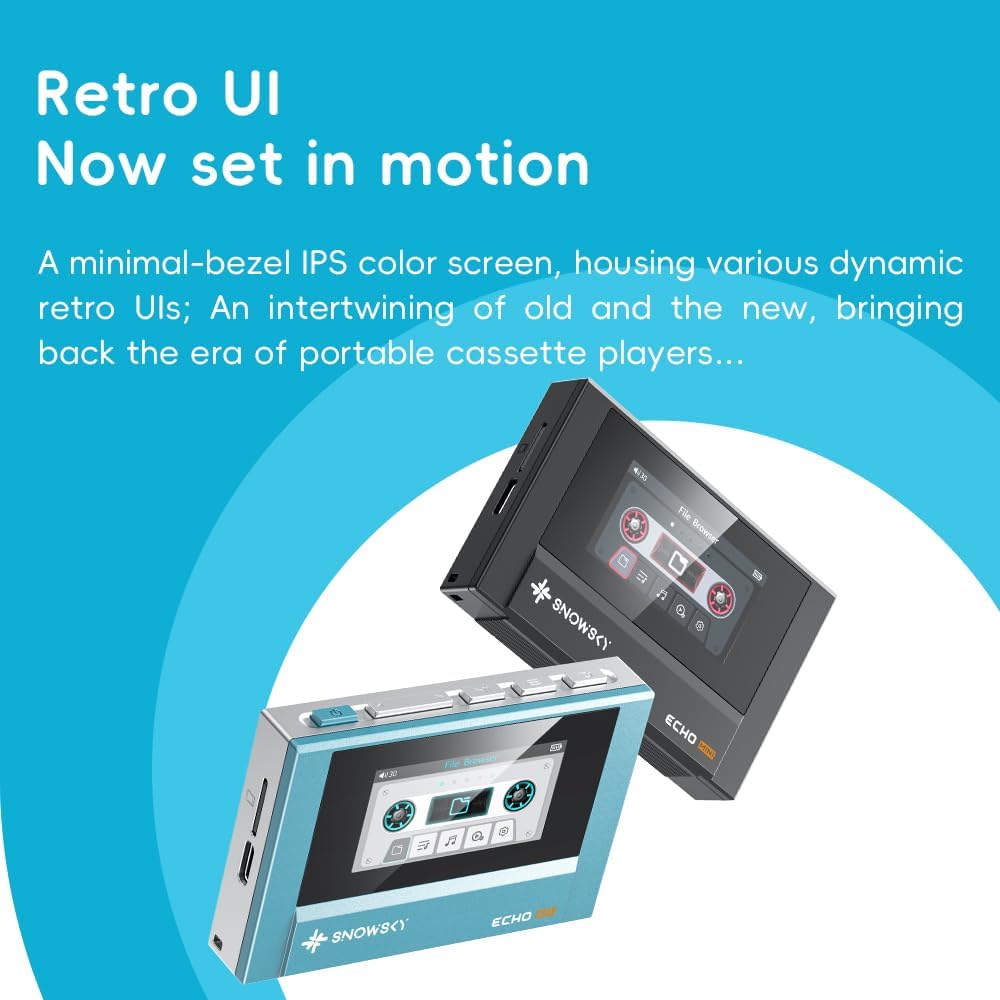
Image 4.4: Retro UI in Motion
4.7. Official Product Video: Retro MP3 Player with Dynamic Retro UI
Video 4.1: This video demonstrates the dynamic retro user interface and various features of a retro MP3 player, similar to the FiiO Echo MINI.
5. Maintenance
5.1. Cleaning
Wipe the device with a soft, dry cloth. Avoid using harsh chemicals or abrasive materials that could damage the screen or casing.
5.2. Battery Longevity
The Echo MINI is equipped with a 1100mAh battery, providing over 15 hours of playback. To maximize battery life, avoid fully discharging the device frequently and store it in a cool, dry place when not in use for extended periods.

Image 5.1: Extended Battery Life for the FiiO Echo MINI
5.3. Firmware Updates
Periodically check the FiiO official website for available firmware updates. Firmware updates can improve performance, add new features, and resolve potential issues. Follow the instructions provided with the firmware update carefully.
6. Troubleshooting
- Device not powering on: Ensure the battery is charged. Connect to a power source and try again.
- No sound: Check headphone connections (wired or Bluetooth). Verify volume levels are not muted or too low.
- Bluetooth pairing issues: Ensure the device is in pairing mode and within range. Restart both the Echo MINI and the Bluetooth accessory.
- Audio clipping or poor sound quality: Ensure the audio files are not corrupted. Try a different audio file or adjust equalizer settings. Consider updating firmware if available.
- Slow performance: Close any unnecessary applications. Ensure sufficient free storage space.
7. Specifications
| Feature | Detail |
|---|---|
| Model Name | ECHO MINI |
| Product Dimensions | 0.57 x 3.15 x 2.15 inches |
| Item Weight | 1.94 ounces |
| Manufacturer | FiiO |
| Batteries | 1 9V battery required (included) |
| Special Feature | Hi-Res Audio |
| Connectivity Technology | Aux, Bluetooth |
| Memory Storage Capacity | 8 GB (expandable up to 256GB via MicroSD) |
| Color | Sky Blue |
| Screen Size | 1.99 Inches |
| Compatible Devices | Headphones |
| Media Type | Micro SD |
| Included Components | Cable |

Image 7.1: Dual HiFi DACs for Powerful Output
8. Warranty and Support
For warranty information and technical support, please refer to the official FiiO website or contact your local distributor. Keep your proof of purchase for warranty claims.
Online resources and FAQs may also be available on the FiiO support page.
Related documentsECHO MINI


Ask a question about this manual
Ask about setup, troubleshooting, compatibility, parts, safety, or missing instructions. Manuals+ will review the question and use this page’s manual context to help answer it.