
1. Introduction
Welcome to the user manual for your new Huuger 63x28 Electric Standing Desk. This manual provides essential information for the safe assembly, operation, and maintenance of your height-adjustable desk. Please read these instructions carefully before use and retain them for future reference.
Important Safety Information
- Do not exceed the maximum weight limit of 220 lbs (100 kg) on the desktop.
- Ensure the desk is stable by adjusting the feet on uneven surfaces.
- Keep hands and objects clear of moving parts during height adjustments to prevent injury or damage.
- Utilize the anti-collision technology to protect belongings and ensure safe operation.
- Only use the provided power adapter and ensure it is connected to a grounded outlet.
- Keep children and pets away from the desk during operation.
2. Product Overview
The Huuger 63x28 Electric Standing Desk is designed to provide a versatile and ergonomic workspace, allowing seamless transitions between sitting and standing positions. It features a spacious desktop, intelligent control panel, and robust construction.
Key Features
- Spacious Desktop: 63 x 27.6 inch desktop made from durable engineered wood.
- Height Adjustment: Electric motor for smooth height changes from 28.3" to 46.5".
- Intelligent Keypad: LED display with up/down controls and 3 programmable height presets.
- Quiet Operation: Motor operates at less than 45 dB for minimal disturbance.
- Robust Construction: Industrial-grade steel frame and T-shaped design support up to 220 lbs.
- Safety Features: Advanced anti-collision technology.
- Convenience: Two integrated hooks for headphones or bags, and cable management solutions.
Components
The desk consists of the desktop, leg frames, motor, control box, and intelligent keypad. All necessary assembly tools are included.

Figure 2.1: Fully assembled Huuger 63x28 Electric Standing Desk in a white finish, showcasing its spacious desktop and integrated features.

Figure 2.2: Product dimensions and maximum load capacity of the desk. The desktop measures 63 inches wide by 27.6 inches deep, with an adjustable height range from 28.3 inches to 46.5 inches.
3. Specifications
| Feature | Detail |
|---|---|
| Brand | Huuger |
| Model | 63x28 Electric Standing Desk |
| Desktop Dimensions (W x D) | 63" x 27.6" (160cm x 70cm) |
| Height Range | 28.3" - 46.5" (72cm - 118cm) |
| Maximum Weight Capacity | 220 lbs (100 kg) |
| Motor Noise Level | < 45 dB |
| Desktop Material | Engineered Wood |
| Frame Material | Industrial-Grade Steel |
| Power Input | 110 - 220V |
| Special Features | 3 Height Presets, Anti-Collision, 2 Hooks, Cable Management |
| Assembly Required | Yes (Tools Included) |
4. Assembly Instructions
Assembly typically takes approximately 30 minutes with one person. Ensure you have enough space and all components are present before beginning.

Figure 4.1: The desk is designed for quick and easy setup, with an average assembly time of 30 minutes.
- Unpack Components: Carefully remove all parts from the packaging and lay them out on a clean, soft surface to prevent scratches. Verify all components are present against the packing list.
- Assemble Leg Frames: Attach the feet to the bottom of the leg columns using the provided screws. Ensure they are securely fastened.
- Connect Crossbar: Attach the crossbar between the two leg columns. This forms the main support structure.
- Install Motor and Control Box: Mount the motor and control box to the designated positions on the frame, following the diagrams in the included assembly guide. Connect the motor cables to the control box.
- Attach Desktop: Carefully place the desktop sections onto the assembled frame. Align the pre-drilled holes and secure the desktop to the frame using the provided screws.
- Install Keypad: Mount the intelligent keypad to the underside of the desktop, typically on the front edge, and connect its cable to the control box.
- Attach Accessories: Install the two hooks on either side of the desk and apply cable management clips as desired.
- Connect Power: Plug the power adapter into the control box and then into a wall outlet.
- Initial Test: Perform an initial test of the height adjustment functions to ensure proper operation.

Figure 4.2: The desk features robust double beams for stability and integrated cable management to keep your workspace tidy.
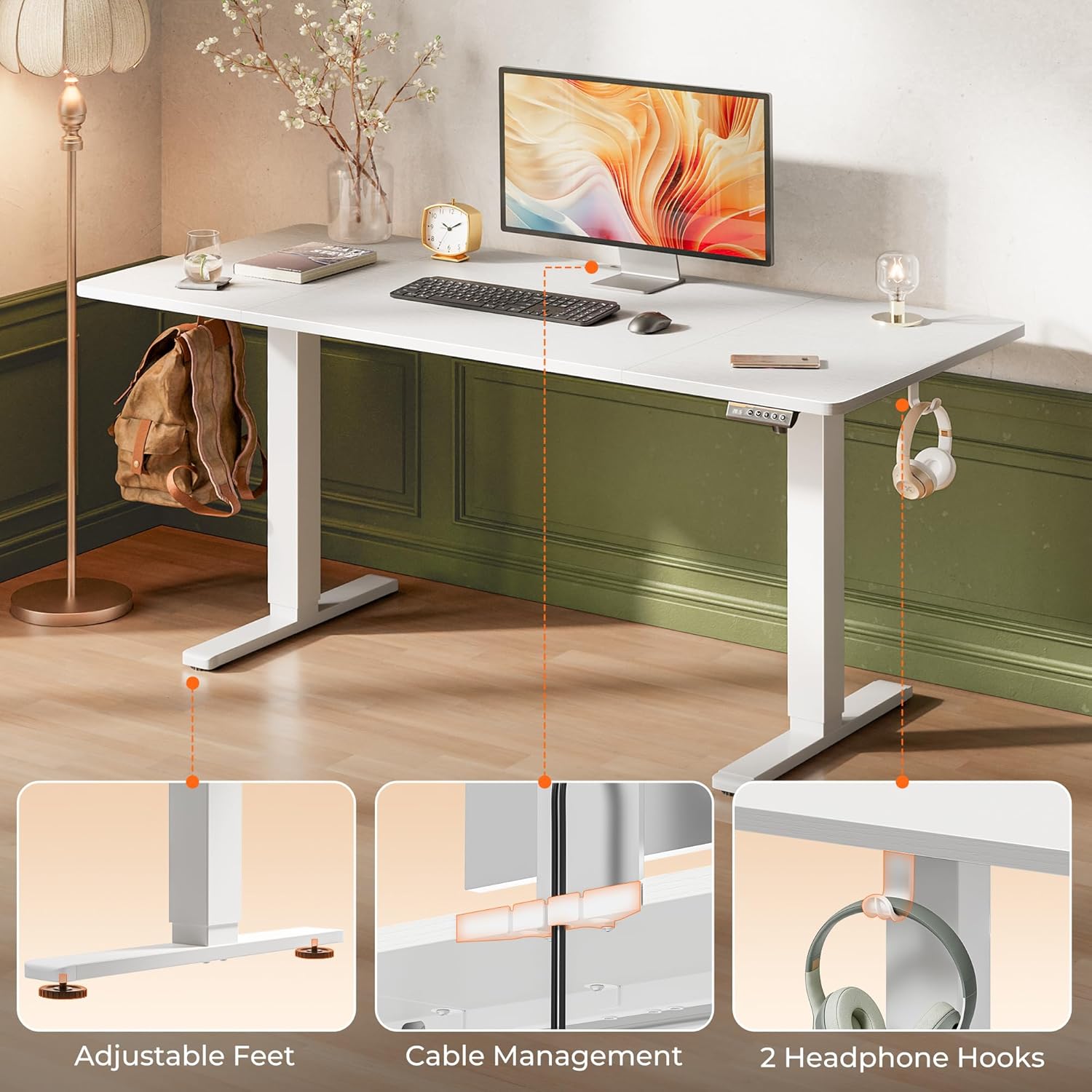
Figure 4.3: Key features include adjustable feet for stability on uneven floors, integrated cable management, and two convenient headphone hooks.
5. Operating Instructions
Your Huuger Electric Standing Desk is equipped with an intelligent keypad for easy height adjustment and memory preset functions.
Control Panel Functions

Figure 5.1: The intelligent keypad features a digital LED screen, up/down arrows, and three programmable preset buttons.
- Digital Screen: Displays the current desk height in inches.
- Up/Down Arrows (▲ / ▼): Press and hold to manually adjust the desk height upwards or downwards. Release to stop.
- Preset Buttons (1, 2, 3): Store and recall your preferred sitting and standing heights.
Adjusting Height
- Press and hold the Up arrow (▲) to raise the desk.
- Press and hold the Down arrow (▼) to lower the desk.
- Release the button when the desired height is reached. The digital screen will show the current height.
Setting Memory Presets
You can save up to three preferred heights for quick adjustments.
- Adjust the desk to your desired height using the Up/Down arrows.
- Press the 'M' button (Memory button, usually indicated by 'M' or a similar icon next to the numbers). The screen may flash 'S-' or 'M-'.
- Immediately press one of the Preset Buttons (1, 2, or 3). The height is now saved to that button.
- To recall a saved height, simply press the corresponding Preset Button (1, 2, or 3). The desk will automatically move to the stored position.
Anti-Collision Feature
The desk is equipped with an anti-collision system. If the desktop encounters an obstacle during height adjustment, it will automatically stop and reverse direction slightly to prevent damage or injury. Ensure the area around the desk is clear before operation.

Figure 5.2: The desk offers a flexible height range from 28.3 inches to 46.5 inches, promoting healthier work habits.

Figure 5.3: The desk operates smoothly and silently, with a motor noise level below 45 dB, ensuring a focused work environment.
6. Maintenance
Proper maintenance ensures the longevity and optimal performance of your Huuger Electric Standing Desk.
- Cleaning: Wipe the desktop and frame with a soft, damp cloth. Avoid using harsh chemicals or abrasive cleaners, as these can damage the finish.
- Cable Management: Periodically check and organize cables to prevent tangles and ensure they do not interfere with the desk's movement.
- Fastener Check: Occasionally check all screws and fasteners to ensure they are tight. Retighten if necessary.
- Weight Distribution: Distribute weight evenly across the desktop to maintain stability and prevent strain on the motor.
7. Troubleshooting
If you encounter any issues with your desk, refer to the following common problems and solutions.
| Problem | Possible Cause | Solution |
|---|---|---|
| Desk does not move | Power cable disconnected; Motor overload; Control box error. | Check power connections. Unplug and replug the power cable. Reduce weight on the desk. Reset the system (refer to specific reset instructions in the full manual, if available). |
| Desk moves unevenly | Uneven weight distribution; Loose fasteners; Obstruction. | Redistribute weight. Check and tighten all assembly screws. Ensure no objects are impeding leg movement. |
| Anti-collision activates frequently | Obstruction in path; Sensitivity setting (if adjustable). | Clear the area around the desk. If the issue persists without visible obstacles, contact support. |
| Error code displayed | Specific system malfunction. | Note the error code and refer to the comprehensive troubleshooting guide in the full product manual or contact customer support. |
8. Warranty and Support
Your Huuger 63x28 Electric Standing Desk comes with a Limited Warranty. Please refer to the warranty card included with your purchase for specific terms and conditions, including coverage duration and what is covered.
For technical assistance, warranty claims, or any questions not addressed in this manual, please contact Huuger customer support. Contact information can typically be found on the Huuger official website or on your product packaging.
Online Resources: For additional support, assembly videos, and FAQs, please visit the official Huuger website.