
1. Introduction
The Kerpu 004T is a portable, high-efficiency spot welder designed for assembling battery packs and other small-scale welding tasks. Featuring a 12000mAh battery and a 2-inch LCD screen, this device offers 199 adjustable gear settings for precise control. Its compact design makes it suitable for various applications, from DIY projects to professional repairs.

Figure 1: Kerpu 004T Portable Spot Welder. This image displays the main unit with its LCD screen and connected welding pens, illustrating its compact form factor and readiness for use.
2. Safety Information
Please read and understand all safety instructions before operating the Kerpu 004T Spot Welder. Failure to follow these instructions may result in electric shock, fire, or serious injury.
- Always wear appropriate personal protective equipment (PPE), including safety glasses and gloves, when operating the spot welder.
- Ensure the work area is well-ventilated and free from flammable materials.
- Do not operate the device in wet conditions or expose it to rain.
- Keep children and unauthorized personnel away from the operating area.
- Avoid touching the welding pens or welded material immediately after operation, as they may be hot.
- Do not attempt to weld materials thicker than specified (0.1-0.2mm for nickel-plated sheets) to prevent damage to the device.
- The device features built-in over-current, over-voltage, and over-temperature protection. If the device shuts off automatically, allow it to cool down before resuming operation.
- Use only the provided charging cable and accessories.
3. Package Contents
Verify that all items are present in the package:
- 1 x Kerpu 004T Spot Welder Unit
- 1 x Pair of WP110 Welding Pens
- 1 x Type-C Charging Cable
- 1 x Roll of Nickel-Plated Sheets (approx. 2 meters)
- 1 x Sandpaper (for cleaning pen tips)
- 1 x 4x4 Holder (for battery organization)
- 1 x User Manual (this document)
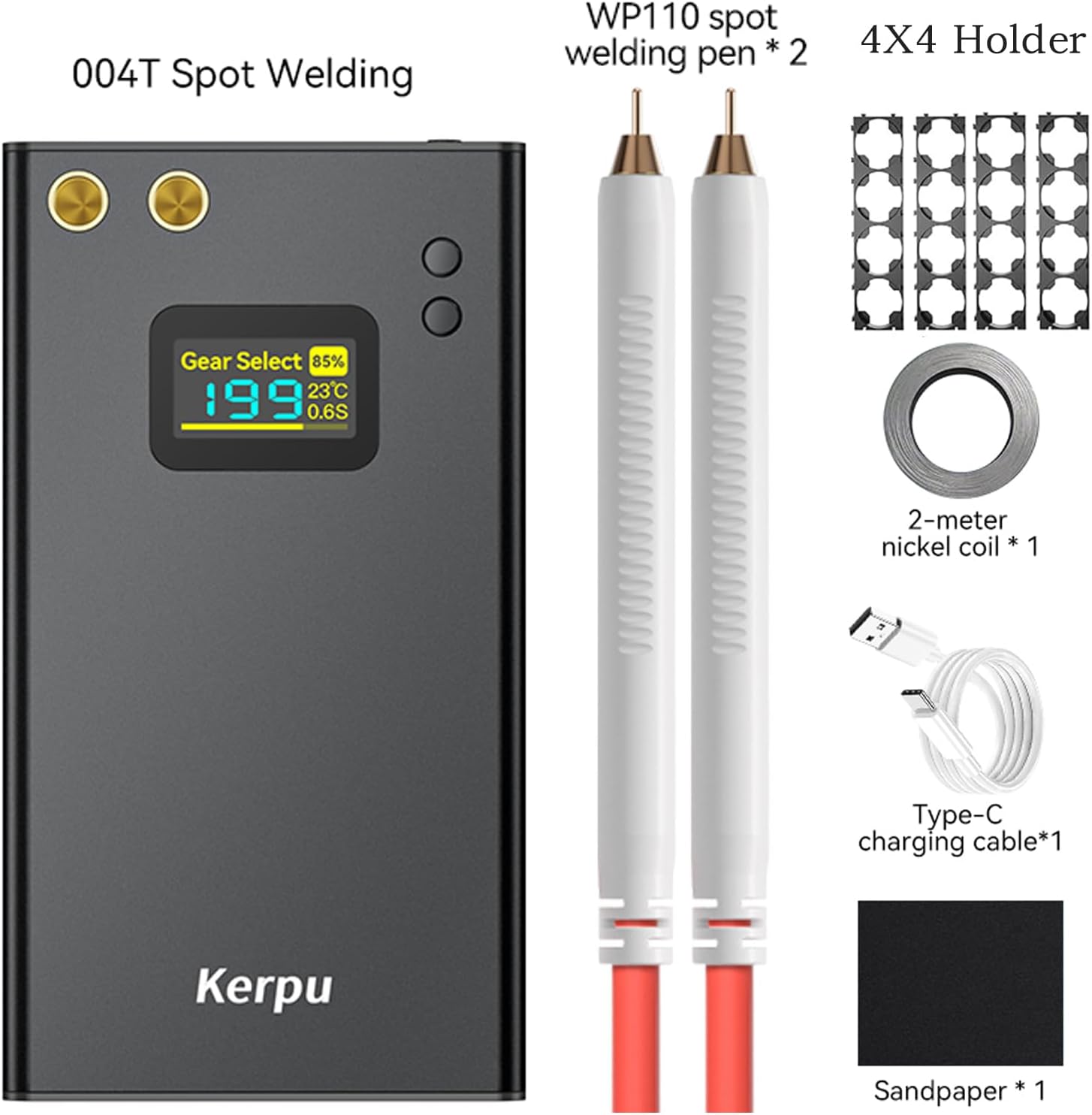
Figure 2: Included Components. This image shows the Kerpu 004T spot welder unit alongside its accessories, including welding pens, nickel strip, charging cable, sandpaper, and a 4x4 battery holder.
4. Product Overview and Features
4.1 Device Components
- Main Unit: Houses the 12000mAh battery, control circuitry, and LCD screen.
- LCD Screen: A 2-inch TFT high-definition color screen displays critical information such as gear select (power level), output triggers countdown, power display, internal temperature, and trigger time.
- Welding Pens (WP110): Made with purple copper, featuring replaceable aluminum oxide copper welding needles and EC8 gold-plated pen tips for efficient conductivity. The pens have insulated and heat-insulating soft rubber holders.
- USB Output Port: Allows the device to function as a power bank for charging other USB devices.

Figure 3: LCD Screen Interface. This image highlights the various indicators on the LCD screen: (1) Set out power level, (2) Output triggers countdown, (3) Power display, (4) Internal temperature, and (5) Trigger time.

Figure 4: WP110 Spot Welding Pen. This image details the construction of the welding pen, showing the replaceable aluminum oxide copper welding needle, the insulated and heat-insulating soft rubber pen holder, and the EC8 gold-plated pen tip.
4.2 Key Features
- High-Efficiency Welding: 12000mAh capacity for faster battery pack assembly.
- User-Friendly Operation: LCD display and single-button automatic mode for quick setup and use.
- Precise Control: 199 adjustable gear settings for power levels and trigger timing.
- Safety Protections: Built-in over-current, over-voltage, and over-temperature protection.
- Versatile Applications: Compatible with nickel-plated sheets, stainless steel, aluminum alloy, galvanized sheets, and various battery types (18650, 21700, 32650).
- Power Bank Functionality: USB output for charging external devices.
5. Setup
5.1 Charging the Device
- Connect the provided Type-C charging cable to the charging port on the spot welder.
- Connect the other end of the cable to a suitable USB power adapter (not included).
- The LCD screen will indicate the charging status. Ensure the device is fully charged before first use for optimal performance.
5.2 Connecting Welding Pens
- Insert the connectors of the WP110 welding pens into the designated ports on the top of the spot welder unit. Ensure a secure connection.
- Verify that the welding needles are clean and properly seated in the pen tips. Use the provided sandpaper to clean the pen tips if necessary.
6. Operating Instructions
6.1 Powering On/Off
Press and hold the main button (usually the only button) to power the device on or off.
6.2 Adjusting Welding Gears (Power Level)
- Once powered on, the LCD screen will display the current gear setting.
- Short press the main button to cycle through the 199 available gear settings.
- Select a gear setting appropriate for the material thickness and type. Start with lower settings and gradually increase if needed. For 0.1-0.2mm nickel-plated sheets, a moderate setting is usually sufficient.
6.3 Performing a Spot Weld
- Prepare the materials: Ensure the nickel strip and battery terminals are clean and free of oxidation.
- Place the nickel strip firmly against the battery terminal or other material to be welded.
- Position both welding pen tips onto the nickel strip, ensuring they are parallel and make good contact with the material. The tips should be close together but not touching each other.
- The device will automatically detect contact and initiate the welding process after a short delay (trigger time displayed on LCD).
- A successful weld will create a strong bond. If the weld is weak, increase the gear setting and try again.
6.4 Power Bank Function
To use the device as a power bank, connect a USB charging cable from the device's USB output port to your mobile phone or other USB-powered device. The device will automatically begin charging.

Figure 5: Power Bank Functionality. This image demonstrates the Kerpu 004T spot welder charging a smartphone via its USB output port, highlighting its dual functionality.
7. Applications
The Kerpu 004T Spot Welder is suitable for a variety of applications:
- Building and repairing battery packs (e.g., 18650, 21700, 32650 cells).
- Welding nickel-plated sheets, stainless steel, aluminum alloy, and galvanized sheets.
- Repairing and reviving electronic devices by replacing old batteries.
- DIY projects requiring precise metal joining of thin materials (0.1-0.2mm thickness).

Figure 6: Diverse Welding Applications. This image illustrates various uses for the spot welder, including welding pure nickel to cylindrical batteries, converting polymer mobile phone battery ears to nickel, welding iron/stainless steel sheets, and nickel plating/button battery welding.
8. Maintenance
- Cleaning: Regularly clean the welding pen tips with the provided sandpaper to remove oxidation and ensure good conductivity. Wipe the main unit with a dry, soft cloth.
- Storage: Store the device in a cool, dry place away from direct sunlight and moisture.
- Battery Care: For long-term storage, charge the battery to approximately 50-70% capacity. Recharge every 3-6 months to prevent deep discharge.
- Welding Needle Replacement: The welding needles are replaceable. If they become worn or damaged, replace them with genuine Kerpu replacement needles.
9. Troubleshooting
- Device does not power on: Ensure the battery is charged. Connect the charging cable and allow it to charge for some time.
- Weak welds: Increase the gear setting (power level). Ensure welding pen tips are clean and making firm contact with the nickel strip and material. Check that the nickel strip and battery terminals are clean.
- No weld: Verify that both welding pen tips are making simultaneous and firm contact. Check for any loose connections of the welding pens to the main unit.
- Device shuts off automatically: This indicates activation of the over-current, over-voltage, or over-temperature protection. Allow the device to cool down before attempting to use it again. Reduce the welding intensity or duration if this occurs frequently.
- LCD screen not displaying correctly: Power off the device and restart it. If the issue persists, contact customer support.
10. Specifications
| Feature | Specification |
|---|---|
| Model Number | 004T |
| Battery Capacity | 12000mAh |
| Battery Type | Lithium Polymer (2 included) |
| Adjustable Gears | 199 |
| Display | 2-inch LCD Screen |
| Weldable Material Thickness | 0.1-0.2mm (e.g., nickel-plated sheets) |
| Power Source | Battery Powered |
| Charging Port | Type-C |
| USB Output | Yes (Power Bank Function) |
| Item Weight | 789 g |
| Parcel Dimensions | 23.09 x 16.21 x 4.6 cm |

Figure 7: Product Dimensions. This image provides a visual representation of the Kerpu 004T spot welder's size, with measurements in both inches and centimeters.
11. Warranty and Support
Kerpu is committed to providing quality products and support. If you encounter any issues or have questions regarding your Kerpu 004T Spot Welder, please refer to the following:
- Welding Parameter Guidance: Free guidance is available to help you achieve optimal welding performance.
- Replacement Parts: If you are missing parts or require replacements in the future, please contact Kerpu customer service.
- Customer Service: For further assistance, please contact Kerpu customer support through the retailer's platform or the official Kerpu website.

