
SPEEDBOX SpeedBox 3.3 B.Tuning for Yamaha (SB33BT_Y)
SpeedBox 3.3 B.Tuning for Yamaha User Manual
Model: SB33BT_Y
Brand: SPEEDBOX
1. Product Overview
The SpeedBox 3.3 B.Tuning is an advanced tuning chip designed for e-bikes equipped with Yamaha Motors PW-X3, PW-S2, and also compatible with Yamaha YDX-Moro 05 and Yamaha Moro 07 models. This device allows users to set their own speed limit for electric assistance, enhancing the riding experience.
It features Bluetooth connectivity, enabling control and data analysis via the SpeedBox App.

Image: The SpeedBox 3.3 B.Tuning module, its wiring harness, and a portion of the installation instructions.
2. Compatibility
The SpeedBox 3.3 B.Tuning is specifically designed for e-bikes with the following Yamaha motors:
- Yamaha Motors PW-X3
- Yamaha Motors PW-S2
- Yamaha YDX-Moro 05
- Yamaha Moro 07
Important Note:
This device is NOT compatible with e-bikes and motors such as Yamaha UrbanRush, CrossCore, CrossConnect, Wabash, or YDX-Torc.

Image: Visual representation of the SpeedBox 3.3 B.Tuning connected to a Yamaha e-bike motor, alongside illustrations of compatible Yamaha PW-X3, PW-S2, YDX-Moro, and YDX-Moro Pro motors.
3. Installation
Proper installation is crucial for the correct functioning of your SpeedBox. Detailed installation instructions are provided in the product package and on the official SpeedBox YouTube channel.
Before installing the SpeedBox into a brand new e-bike, it is recommended to ride at least 10 km on the e-bike without the tuning chip installed.
- Step 1: Prepare the E-bike. Remove the battery and disassemble necessary parts of the e-bike to gain access to the motor connectors.
- Step 2: Disconnect Motor Connectors. Carefully disconnect the motor connectors as illustrated in the provided instructions within the package.
- Step 3: Connect SpeedBox. Plug the SpeedBox module into the disconnected connectors. Ensure all connections are secure. Refer to the manual for specific wiring diagrams. Reassemble the e-bike to its original condition and reinstall the battery.
- Step 4: Activate Device. Activate the SpeedBox device on your e-bike's display. If using the B.Tuning version, activate it also within the SpeedBox App.
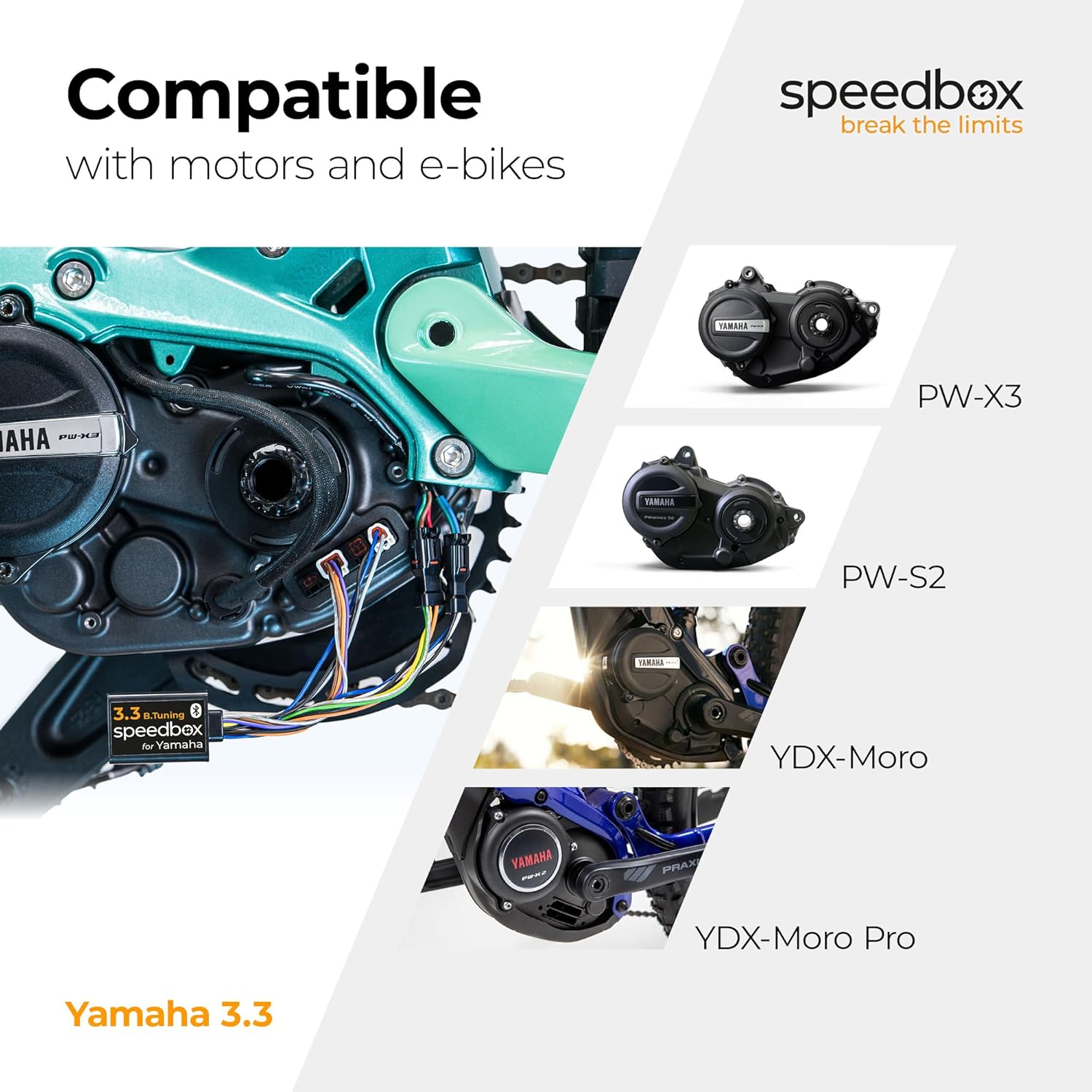
Image: Step-by-step visual guide for installing the SpeedBox 3.3 B.Tuning, showing battery removal, connector disconnection, SpeedBox connection, and activation.
For a visual guide, please refer to the official SpeedBox YouTube channel: @SpeedBoxTuning
4. Operating Instructions
4.1. Activation and Deactivation
The SpeedBox can be activated or deactivated using the mobile SpeedBox App or directly via the e-bike's display.
- Activation: To activate the tuning, press the Light button on your e-bike display. The display will show a value of 99 km/h (62 mph), indicating that the speed limit is removed, allowing for unlimited speed. Alternatively, you can activate by switching modes three levels down and then three levels up.
- Deactivation: To deactivate the tuning, use the same method (Light button or mode switching). Your display will then show 25 km/h (16 mph), restoring the default speed limit. You can also use the combination of - + - + buttons to activate/deactivate the SpeedBox.

Image: E-bike display examples showing the activated state (99 km/h) and deactivated state (25 km/h) of the SpeedBox.
4.2. Setting Maximum Speed Limit
You can adjust the maximum speed limit for electric assistance through the SpeedBox App or by manipulating the e-bike's display modes.
- Via App: Use the SpeedBox App to set your desired maximum speed limit.
- Via Display: Change modes by switching three levels down and then three levels up. The actual speed limit will then be displayed.
- The maximum speed of electric assistance can be switched by pressing the LIGHT button briefly or by turning the rear wheel 360°.
- The last displayed limit will be saved after 5 seconds of inactivity.
5. SpeedBox App
The SpeedBox App provides comprehensive control and data analysis for your e-bike when paired with the SpeedBox 3.3 B.Tuning module.
- Tuning Control: Easily activate or deactivate the tuning function.
- Motor Lock: Secure your e-bike by locking the motor via the app.
- Invisible Tuning Mode: Conceal the tuning status from the e-bike's display.
- Bike and Trip Data Analysis: View detailed statistics about your rides, including speed, distance, and other metrics.
- Saving Trips: Record and save your trip data for future review.

Image: Screenshots of the SpeedBox App displaying various features such as tuning control, trip data, and diagnostics.
The SpeedBox App is available for download on both Google Play Store and Apple App Store.
6. Maintenance and Care
The SpeedBox module is designed for durability and requires minimal maintenance. Keep the module and its connections clean and dry. Avoid exposing it to extreme temperatures or harsh chemicals.
Regularly check the physical connections to ensure they remain secure, especially after riding in challenging conditions.
7. Troubleshooting and Important Warnings
7.1. Firmware Updates
Warning:
Do not update the firmware of your e-bike while the SpeedBox is installed or if you plan to use the SpeedBox. Updating the e-bike's firmware may lead to detection of the tuning device and potential malfunction. The warranty of SpeedBox products does not cover malfunctions caused by updating the motor's firmware.
7.2. Legal Disclaimer
Important Legal Notice:
E-bikes equipped with SpeedBox products are not allowed to be used on public roads, cycling paths, and public places. Such use may be in conflict with applicable laws and regulations. The manufacturer and seller are not responsible for any damages or legal consequences resulting from the improper use of the SpeedBox product.
8. Specifications
| Feature | Detail |
|---|---|
| Brand | SPEEDBOX |
| Model Name | Speedbox Tuning |
| Part Number | SB33BT_Y |
| Product Dimensions (LxWxH) | 1.38" x 0.98" x 0.31" (3.5cm x 2.5cm x 0.8cm) |
| Item Weight | 0.09 Kilograms |
| Color | Black |
| Material | Polypropylene |
| Connectivity Technology | Bluetooth |
| Human Interface Input | Buttons (via e-bike display) |
| Included Components | Ebike tuning chip |
9. Warranty and Support
9.1. Warranty Information
The SpeedBox 3.3 B.Tuning comes with a 9-Year Manufacturer Warranty. Please retain your proof of purchase for warranty claims.
Note: The warranty does not cover malfunctions caused by updating the e-bike's motor firmware.
9.2. Customer Support
For further assistance, technical support, or warranty inquiries, please visit the official SpeedBox website:
You can also find detailed installation videos and tips on their YouTube channel: @SpeedBoxTuning
Related documentsSpeedBox 3.3 B.Tuning for Yamaha (SB33BT_Y)


Ask a question about this manual
Ask about setup, troubleshooting, compatibility, parts, safety, or missing instructions. Manuals+ will review the question and use this page’s manual context to help answer it.