
1. Introduction
Thank you for choosing the Spigen 57" Automatic Universal Tripod Auto-Open Phone Stand. This versatile device combines the functionality of a selfie stick and a stable tripod, designed to enhance your mobile photography and videography experience. With its automatic tripod deployment, universal compatibility, and detachable Bluetooth remote, capturing perfect moments has never been easier. Please read this manual carefully to ensure proper use and maintenance of your device.
2. Product Features
- Instant Tripod Deployment: Effortlessly transform your selfie stick into a stable tripod with a simple press of the bottom button.
- Durability: Constructed with premium materials for long-lasting use and reliability.
- Compact and Portable Design: Easily fits in your pocket or bag, making it ideal for travel.
- Universal Compatibility: Securely holds most smartphones with a width of 4.5cm - 9.2cm (1.77" - 3.62") wide.
- Bluetooth Remote Control: Detachable remote for convenient shooting from a distance (up to 10m).
- Extendable Design: Extends up to 146cm (57.48") for wider shots and higher angles.
- 360° Rotatable: Allows for both vertical and horizontal phone orientation.
- Premium Non-slip Silicone Grip: Silicone pads keep your device secure and scratch-free.
3. Package Contents
- Spigen Automatic Universal Tripod Selfie Stick
- Detachable Bluetooth Remote Control (with 1 Lithium Metal battery included)
- User Manual
4. Setup Guide
4.1. Attaching Your Smartphone
Gently pull open the phone holder clamps. Insert your smartphone into the holder, ensuring it is securely gripped by the non-slip silicone pads. The holder is designed to accommodate most smartphones with a width between 4.5cm and 9.2cm (1.77" - 3.62").

Image: The phone holder is compatible with a wide range of smartphones, securely holding devices between 4.5cm and 9.2cm wide.
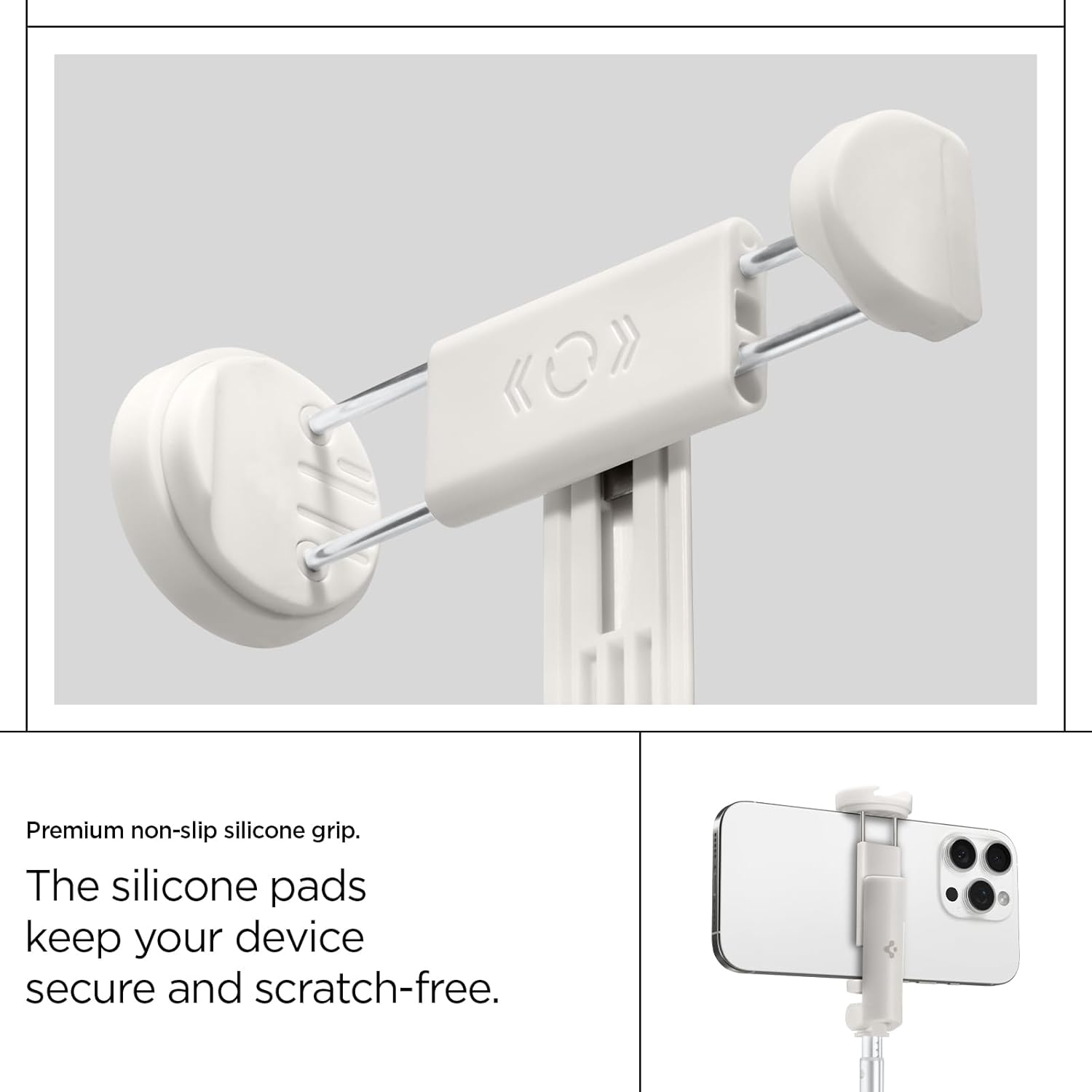
Image: A close-up view of the premium non-slip silicone grip, designed to hold your device securely and prevent scratches.
4.2. Deploying the Tripod
- Ensure the selfie stick is in its folded, compact state.
- Locate the orange button at the bottom end of the stick.
- Press the orange button firmly. The tripod legs will automatically spring open and lock into a stable triangular position.

Image: Step-by-step guide showing the automatic deployment of the tripod legs by pressing the bottom button.
4.3. Pairing the Bluetooth Remote
- Locate the detachable Bluetooth remote control on the handle of the selfie stick. Gently press and slide it upwards to remove it.
- Turn on the remote by pressing and holding the button until the indicator light flashes.
- On your smartphone, go to Bluetooth settings and search for available devices.
- Select "Spigen Selfie Stick" or a similar name from the list to pair. The indicator light on the remote will stop flashing once successfully paired.

Image: The detachable Bluetooth remote control, which can be easily removed from the handle for remote shooting.
5. Operating Instructions
5.1. Using as a Selfie Stick
With your phone securely attached, extend the telescopic pole to your desired length. The stick can extend up to 146cm (57.48"). Use the detachable Bluetooth remote to capture photos or start video recording from a distance, or use your phone's camera button directly.

Image: The selfie stick fully extended, demonstrating its reach for capturing wider angles or group photos.
5.2. Using as a Tripod
After deploying the tripod legs as described in Section 4.2, place the tripod on a flat, stable surface. Adjust the height of the telescopic pole as needed. The stable triangular structure ensures wobble-free shots. Use the Bluetooth remote for hands-free operation, ideal for group photos, time-lapses, or video calls.

Image: The tripod in a stable position, showcasing its triangular structure and non-slip pad for steady recording.
5.3. Adjusting Phone Orientation
The phone holder allows for 360° rotation. Simply rotate your smartphone within the holder to switch between vertical (portrait) and horizontal (landscape) orientations without needing to remove the phone.
6. Maintenance
- Cleaning: Wipe the device with a soft, dry cloth. Do not use abrasive cleaners or solvents.
- Storage: Store the selfie stick in a cool, dry place away from direct sunlight and extreme temperatures.
- Battery Care (Remote): The remote control uses a Lithium Metal battery. If the remote is not responding, the battery may need replacement. Refer to the remote's compartment for battery type and replacement instructions.
- Avoid Overloading: Do not attach devices heavier than recommended to prevent damage to the holder or tripod.
7. Troubleshooting
- Remote Not Connecting:
- Ensure the remote is charged or has a fresh battery.
- Make sure Bluetooth is enabled on your smartphone.
- Unpair and re-pair the remote in your phone's Bluetooth settings.
- Ensure the remote is within 10 meters (33 feet) of your phone.
- Tripod Not Stable:
- Ensure the tripod legs are fully extended and locked into position.
- Place the tripod on a flat, even surface.
- Do not overload the tripod with excessively heavy devices.
- Phone Not Fitting in Holder:
- Check your phone's width against the specified compatibility range (4.5cm - 9.2cm).
- Ensure no bulky phone cases are preventing proper fit.
8. Specifications
| Attribute | Value |
|---|---|
| Product Dimensions | 12.4 x 1.57 x 1.41 inches (31.5 x 4 x 3.6 cm) |
| Item Weight | 9.8 ounces (278.7 Grams) |
| Model Number | AMP09337 |
| Batteries | 1 Lithium Metal battery (included for remote) |
| Compatible Devices | Smartphone |
| Max Extension Length | 146 cm (57.48 inches) |
| Folded Length | 31.5 cm (12.4 inches) |
| Bluetooth Range | Up to 10 meters (33 feet) |
9. Warranty and Support
This Spigen product is covered by a standard manufacturer's warranty. For detailed warranty information, product registration, or technical support, please visit the official Spigen website or contact their customer service directly. Keep your purchase receipt as proof of purchase for warranty claims.
Spigen Official Website: www.spigen.com