
1. Introduction
The Canaan Avalon Nano 3S is an ASIC (Application-Specific Integrated Circuit) miner designed for residential use, specifically for mining Bitcoin using the SHA-256 algorithm. This device offers a compact design, quiet operation, and an integrated information display screen, making it suitable for users new to cryptocurrency mining.
This manual provides essential information for the safe and efficient operation of your Avalon Nano 3S miner. Please read it thoroughly before setup and use.
2. Safety Information
To ensure safe operation and prevent damage to the device or personal injury, please observe the following safety guidelines:
- Power Supply: Use only the provided power supply unit and cable. Ensure the power outlet matches the voltage requirements (110-230V AC).
- Ventilation: Position the miner in a well-ventilated area. Do not block the air intake or exhaust vents. Adequate airflow is crucial to prevent overheating.
- Environment: Avoid operating the device in excessively dusty, humid, or high-temperature environments. Keep away from water and flammable materials.
- Handling: Handle the device with care. Do not drop or subject it to strong impacts.
- Disassembly: Do not attempt to disassemble or repair the device yourself. Unauthorized modifications will void the warranty and may cause damage or injury.
- Children and Pets: Keep the device out of reach of children and pets.
3. Package Contents
Verify that all items are present in the package:
- Avalon Nano 3S Miner Unit
- Power Supply Unit (PSU)
- AC Power Cable
- USB Wi-Fi Dongle (may vary by region/package)
- User Manual (this document)
4. Product Overview
The Avalon Nano 3S is a compact and efficient Bitcoin miner. Key features include:
- SHA-256 Algorithm: Designed for direct Bitcoin mining.
- Information Display Screen: Provides real-time operational data.
- Quiet Operation: Optimized for residential environments.
- USB Port: Supports Wi-Fi module or LAN access for network connectivity.
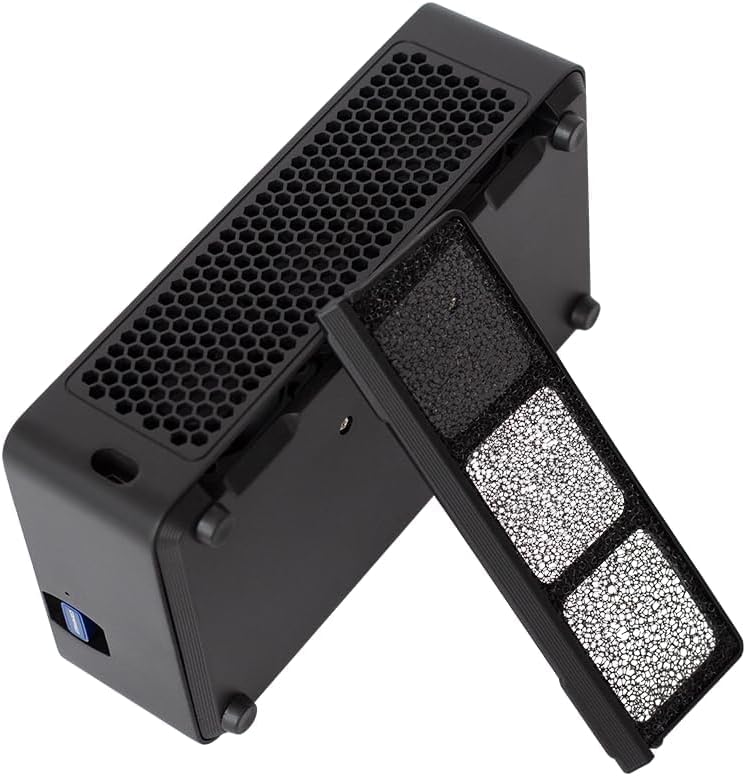
- Dustproof Design: Features a removable dust filter for easier maintenance.




5. Setup
Follow these steps to set up your Avalon Nano 3S miner:
- Unpack: Carefully remove all components from the packaging. Retain the packaging for future transport or storage.
- Placement: Choose a stable, flat surface in a well-ventilated area. Ensure there is at least 10 cm (4 inches) of clear space around all sides of the miner for optimal airflow.
- Connect Power: Connect the AC power cable to the power supply unit, then plug the power supply unit into the miner. Finally, plug the AC power cable into a suitable electrical outlet.
- Network Connection:
- Wi-Fi: If using Wi-Fi, insert the USB Wi-Fi dongle (if included) into the designated USB port on the miner.
- LAN: Alternatively, connect an Ethernet cable from your router to the miner's USB port using a compatible USB-to-Ethernet adapter (not always included).
- Power On: Once connected, the miner should power on automatically or via a power button (if present). The display screen will illuminate.
- Initial Configuration: Download the official Canaan Avalon miner application on your smartphone. Follow the in-app instructions to connect to your miner and configure your mining pool settings. This typically involves searching for the miner on your local network and entering your mining pool details.
Official product video demonstrating the Canaan Avalon Nano 3S miner's features and compact design. This video highlights its quiet operation and suitability for home use.
6. Operating Instructions
After successful setup and configuration, your Avalon Nano 3S will begin mining. Here’s how to monitor and manage its operation:
- Monitoring: The integrated display screen provides real-time information such as hash rate, temperature, and network status. For more detailed statistics and control, use the official mobile application.
- Work Modes: The miner may offer different work modes (e.g., quiet, standard, performance) that adjust power consumption and hash rate. These can typically be selected via the mobile application. Refer to the app's interface for specific options.
- Power Off: To safely power off the device, disconnect the AC power cable from the wall outlet.
7. Maintenance
Regular maintenance helps ensure the longevity and optimal performance of your miner:
- Dust Filter Cleaning: The Avalon Nano 3S features a removable dust filter. Periodically remove and clean the filter to prevent dust buildup, which can impede airflow and cause overheating. Use a soft brush or compressed air.
- Ventilation Check: Regularly inspect the air intake and exhaust vents to ensure they are clear of obstructions.
- Surface Cleaning: Wipe the exterior of the miner with a soft, dry cloth. Do not use liquid cleaners or solvents.
8. Troubleshooting
If you encounter issues with your Avalon Nano 3S, try the following steps:
- Device Not Powering On:
- Ensure the power cable is securely connected to the miner, PSU, and wall outlet.
- Verify the power outlet is functional by plugging in another device.
- No Network Connection:
- For Wi-Fi, ensure the USB Wi-Fi dongle is properly inserted and your Wi-Fi network is active and within range.
- If using LAN, check the Ethernet cable connection and ensure your USB-to-Ethernet adapter is working.
- Restart your router and the miner.
- If changing Wi-Fi networks, a full reset and reconfiguration via the mobile app may be required.
- Low Hash Rate or Overheating:
- Check for proper ventilation and clear any obstructions from the vents.
- Clean the dust filter.
- Ensure the ambient temperature is within the recommended operating range.
- Device Stops Working:
- Perform a power cycle (unplug, wait 30 seconds, then plug back in).
- If the issue persists, contact customer support.
9. Specifications
| Feature | Specification |
|---|---|
| Model | Avalon Nano 3S |
| Algorithm | SHA-256 |
| Hash Rate | 6 TH/s |
| Power Consumption | 140 W |
| Input Voltage | 110-230 Volts (AC) |
| Cooling Method | Air Cooling |
| Product Dimensions (L x W x H) | 9.45 x 5.91 x 4.72 inches |
| Item Weight | 4.24 pounds |
| Manufacturer | Canaan |
| Connectivity | USB (for Wi-Fi/LAN adapter) |
10. Warranty and Support
The Avalon Nano 3S comes with a manufacturer's warranty. Please refer to the warranty card included in your package or visit the official Canaan website for detailed warranty terms and conditions.
For technical support, troubleshooting assistance, or warranty claims, please contact Canaan customer service through their official website or the contact information provided in your product documentation.


