
Kienzle 14980
Kienzle Bathroom Clock User Manual
Model: 14980
Introduction
Thank you for choosing the Kienzle Bathroom Clock. This precision quartz clock is designed to provide reliable timekeeping and essential environmental information in humid environments. Its elegant, splash-proof design ensures durability and seamless integration into any bathroom decor.
This manual provides detailed instructions for setup, operation, and maintenance to ensure optimal performance and longevity of your Kienzle Bathroom Clock.
Product Features
- Accurate quartz movement for reliable time display.
- Integrated hygrometer with a 3-level comfort indicator to assess relative humidity.
- Splash-proof casing, ideal for use in humid environments like bathrooms.
- Flexible placement options: includes a stand for flat surfaces and three suction cups for traceless wall mounting on smooth surfaces.
- Battery-operated for easy installation and versatile use (1x AA battery, not included).
Package Contents
Please check the package for the following items:
- Kienzle Bathroom Clock
- 3 Suction Cups (pre-attached or separate)
- Detachable Stand
- User Manual (this document)
Safety Information
Please read and understand all safety instructions before using the clock. Keep this manual for future reference.
- Battery Safety:
- Use only 1x AA alkaline battery.
- Do not mix old and new batteries, or different types of batteries.
- Insert batteries with correct polarity (+ and -).
- Remove exhausted batteries promptly.
- Dispose of batteries according to local regulations.
- Keep batteries out of reach of children.
- Water Resistance: The clock is splash-proof, meaning it can withstand splashes of water. Do not submerge the clock in water or expose it to direct, strong jets of water.
- Placement: Ensure the clock is placed on a stable surface or securely mounted to prevent falling.
- Cleaning: Do not use abrasive cleaners or solvents. Refer to the Maintenance section for cleaning instructions.
Setup
1. Battery Installation
The clock requires one (1) AA battery (not included).
- Locate the battery compartment on the back of the clock. It may be covered by the suction cups or the stand.
- Carefully open the battery compartment cover.
- Insert one AA battery, ensuring the correct polarity (+ and -) as indicated inside the compartment.
- Close the battery compartment cover securely.

Figure 1: Rear view of the clock with the battery compartment and stand/suction cups.

Figure 2: Detail of the back of the clock, highlighting the suction cups and battery access.
2. Setting the Time
Once the battery is installed, the clock hands will begin to move. To set the correct time:
- Locate the time setting knob on the back of the clock, usually near the battery compartment.
- Rotate the knob in either direction until the clock hands display the accurate time.
- Ensure the knob is pushed back in (if applicable) to prevent accidental time changes.
3. Placement Options
Your Kienzle Bathroom Clock offers two flexible placement options:
a. Using the Detachable Stand
For placement on a flat surface such as a shelf, counter, or vanity:
- Ensure the detachable stand is securely attached to the back of the clock.
- Place the clock on your desired flat surface. Ensure the surface is stable and level.

Figure 3: Clock placed on a counter using the stand.
b. Wall Mounting with Suction Cups
For traceless mounting on smooth, non-porous surfaces like tiles or glass:
- Ensure the three suction cups are firmly attached to the back of the clock.
- Clean the desired wall surface thoroughly to remove any dust, grease, or moisture. The surface must be completely smooth and dry for optimal suction.
- Press the clock firmly against the clean surface, ensuring all three suction cups adhere securely.
- Gently tug on the clock to confirm it is securely mounted before releasing it.

Figure 4: Clock mounted on a shower wall.
Operating the Clock
Time Display
The clock features a clear analog display with hour and minute hands, providing easy readability of the current time.
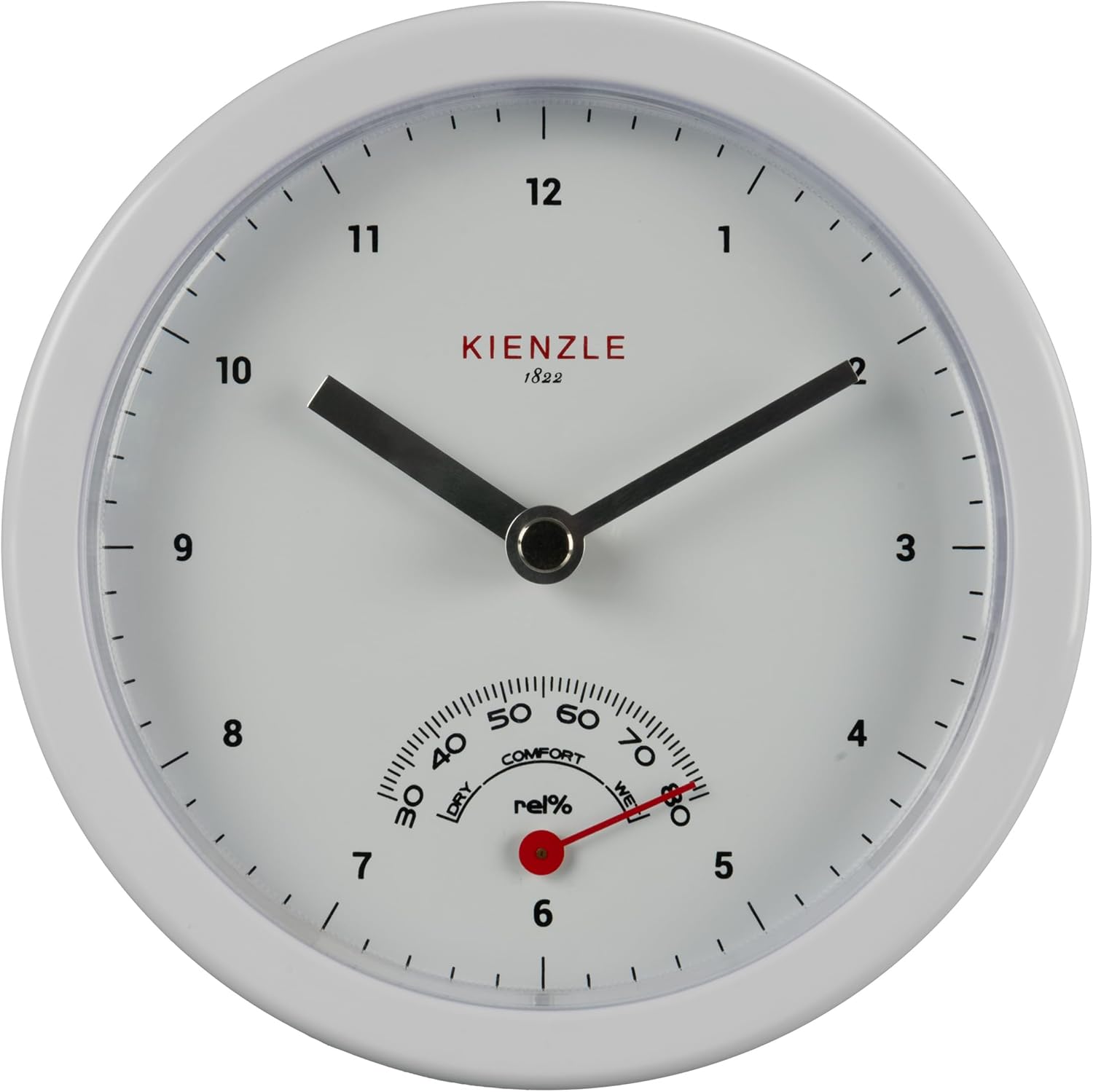
Figure 5: Front view of the Kienzle Bathroom Clock.
Hygrometer and Comfort Indicator
The lower part of the clock face features an integrated hygrometer, which measures the relative humidity (rel%) in the room. Below the humidity scale, a 3-step comfort indicator helps you interpret the humidity level:
- DRY: Indicates low humidity.
- COMFORT: Indicates optimal humidity levels for comfort.
- WET: Indicates high humidity.
This feature allows you to monitor and manage the climate in your bathroom effectively.

Figure 6: Close-up of the hygrometer and comfort indicator.
Maintenance
Cleaning
To clean your Kienzle Bathroom Clock:
- Wipe the clock's surface with a soft, damp cloth.
- Do not use harsh chemicals, abrasive cleaners, or solvents, as these may damage the finish or internal components.
- Ensure the clock is dry after cleaning, especially around the battery compartment.
Battery Replacement
When the clock hands stop moving or the time becomes inaccurate, it's time to replace the battery. Follow the "Battery Installation" steps in the Setup section to replace the AA battery.
Troubleshooting
| Problem | Possible Cause | Solution |
|---|---|---|
| Clock not working / Hands not moving | Battery is dead or incorrectly installed. | Replace the AA battery with a new one, ensuring correct polarity. |
| Time is inaccurate | Battery is low; Time was not set correctly. | Replace the battery. Re-set the time using the setting knob. |
| Suction cups not holding | Surface is not clean, smooth, or dry; Suction cups are dirty or damaged. | Clean the wall surface and suction cups thoroughly. Ensure the surface is smooth and dry. If suction cups are damaged, they may need replacement (contact support). |
| Hygrometer reading seems off | Hygrometer is an indicator, not a precision instrument; Extreme environmental conditions. | The hygrometer provides an approximate reading for general comfort indication. Ensure the clock is not exposed to direct heat sources or extreme drafts. |
Specifications
| Feature | Detail |
|---|---|
| Model Number | 14980 |
| Brand | Kienzle |
| Product Dimensions | 14 x 3.81 x 4 cm (Diameter x Depth x Height with stand) |
| Weight | 152 g |
| Power Source | Battery (1x AA, not included) |
| Display Type | Analog |
| Special Features | Hygrometer, Comfort Indicator, Splash-proof |
| Material | Plastic |
| Color | White |
| Indoor/Outdoor Use | Indoor |
Warranty and Support
Specific warranty details are not provided in this manual. For warranty information, technical support, or replacement parts, please contact the retailer or the manufacturer directly using the contact information provided at the point of purchase.
Please retain your proof of purchase for any warranty claims.
Related documents14980


Ask a question about this manual
Ask about setup, troubleshooting, compatibility, parts, safety, or missing instructions. Manuals+ will review the question and use this page’s manual context to help answer it.