Introduction
This manual provides comprehensive instructions for the assembly, operation, and maintenance of your T4TREAM Fluted Makeup Vanity Desk. Designed for modern elegance and functional utility, this vanity desk features a 3-way mirror with adjustable lighting, a built-in charging station, and ample storage solutions. Please read this manual thoroughly before assembly and use to ensure proper setup and longevity of your product.
Safety Information
Please adhere to the following safety guidelines to prevent injury or damage to the product:
- Ensure all components are securely fastened during assembly. Loose parts can cause instability.
- Do not overload drawers or shelves beyond their stated weight capacity. The tempered glass tabletop can bear up to 30 lbs.
- Keep electrical components (charging station) away from water or damp environments.
- Use only the provided power cord and avoid using damaged cords or adapters.
- Keep small parts away from children during assembly to prevent choking hazards.
- Always lift the vanity with assistance when moving to prevent injury and damage.
- Regularly inspect the vanity for any signs of wear or damage, especially to the electrical components and mirror.
Your package is protected with Styrofoam sheets and protective boards. Even if the shipping box shows signs of damage, the internal packaging is designed to safeguard your vanity.
Package Contents
Verify that all components are present before beginning assembly. Each component is meticulously labeled with serial numbers for easy identification.
- Vanity Desk Frame (various panels and legs)
- 3-Way Mirror with Integrated LED Lights
- Tempered Glass Tabletop
- Drawers (2 top drawers, 1 wide middle drawer)
- Storage Cabinets (2 side cabinets with adjustable shelves)
- Charging Station Module (2 AC outlets, 1 USB port, 1 Type-C charger)
- Assembly Hardware (screws, connectors, tools if provided)
- Instruction Manual
Setup and Assembly
Assembly is required for this vanity desk. While the process is streamlined with user-friendly instructions, it can be time-consuming. It is recommended to allocate sufficient time for assembly, potentially a full day, and to have assistance if possible.
- Unpack and Organize: Carefully unpack all components and lay them out on a clean, soft surface to prevent scratches. Identify each part using the provided labels.
- Assemble Base Frame: Follow the step-by-step diagrams in the instruction booklet to assemble the main frame of the vanity desk. Ensure all screws are tightened securely.
- Install Drawers and Cabinets: Attach the drawer slides and assemble the drawers. Insert them into their designated slots. Install the side cabinets, ensuring the adjustable shelves are placed as desired.
- Attach Mirror and Charging Station: Secure the 3-way mirror to the vanity top. Connect the charging station module according to the electrical diagrams.
- Place Glass Tabletop: Carefully position the tempered glass tabletop onto the designated area.
- Final Inspection: Double-check all connections and ensure the vanity is stable and level.

Image: The fully assembled T4TREAM Fluted Makeup Vanity Desk in Solid White, showcasing its corner-friendly design and elegant fluted panels.

Image: A close-up of the vanity's storage, showing the smooth metal rail of the 28-inch wide drawer with fluted panel, and the interior of the left and right cabinets with adjustable shelves.
Operating Instructions
3-Way Mirror and Lighting System
The vanity features a sophisticated 3-way mirror system with integrated LED lighting for optimal illumination during your beauty routine.
- Mirror Configuration: The system includes two 12-inch side mirrors and a 23-inch center mirror, providing comprehensive viewing angles.
- Touch Control: Locate the touch-sensitive power button on the center mirror. Tap to turn the lights on/off.
- Adjusting Brightness: Press and hold the touch control button to seamlessly adjust the brightness from 0% to 100%.
- Switching Lighting Modes: Tap the touch control button to cycle through three distinct lighting modes:
- Cool Daylight
- Neutral Light
- Warm Light
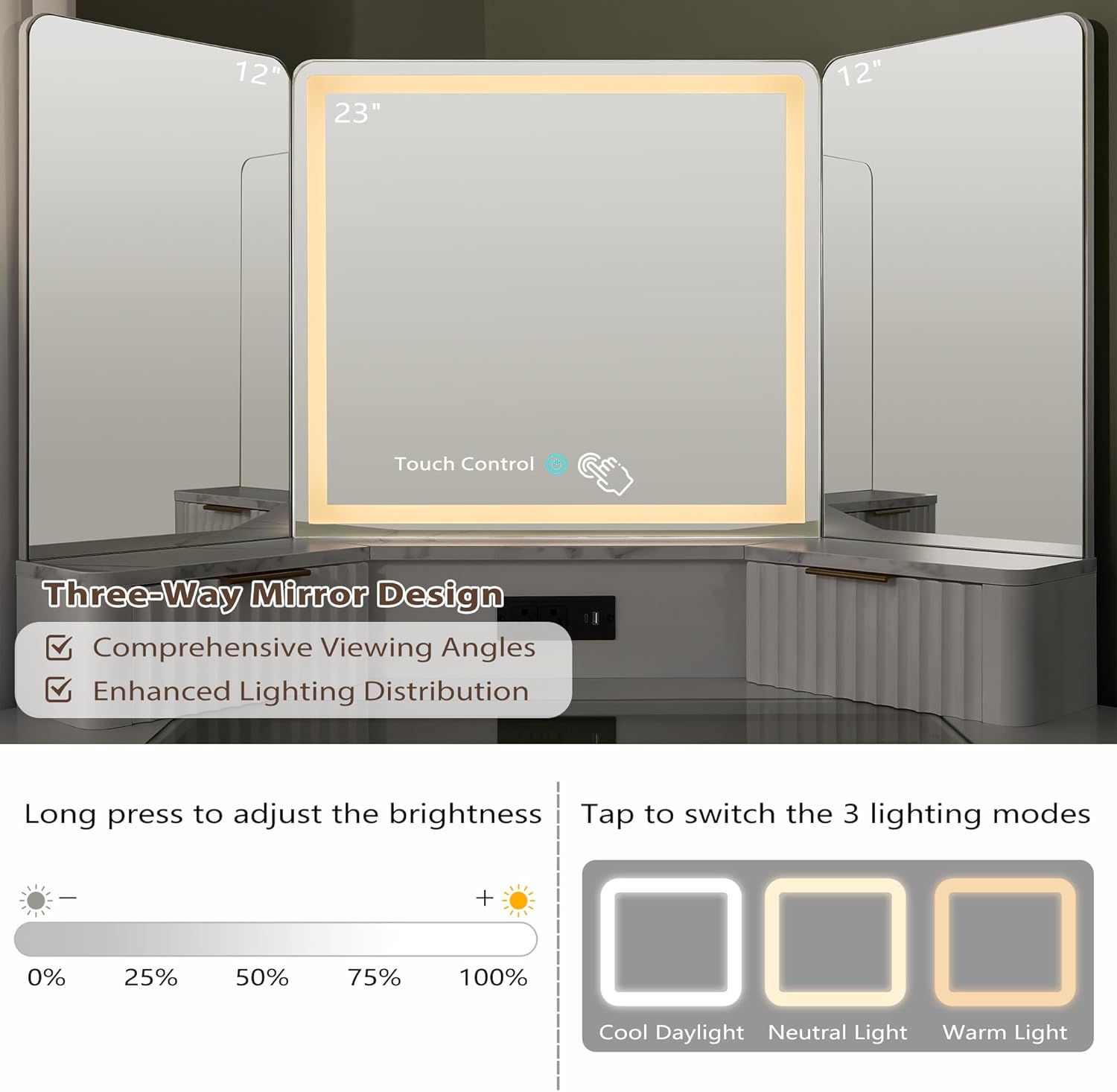
Image: The three-way mirror system, highlighting the touch control for adjusting brightness and switching between Cool Daylight, Neutral Light, and Warm Light modes.
Built-in Charging Station
The integrated charging station provides convenient power access for your electronic devices.
- AC Outlets: Features 2 standard 125V/12A AC outlets for hair dryers, curling irons, or other small appliances.
- USB/Type-C Ports: Includes a 5V/2A USB port and a Type-C charger for charging smartphones, tablets, and other compatible devices.
- Power Cord: The charging station is equipped with a 6.5-foot power cord for flexible placement.

Image: An overhead view of the vanity with its glass top open, revealing the built-in charging station with AC outlets, USB, and Type-C ports, alongside various storage compartments.
Storage Solutions
The vanity desk offers extensive storage options to keep your beauty essentials organized and accessible.
- Glass Top Display: The transparent tempered glass tabletop allows for clear visibility and easy access to frequently used items, making organization effortless.
- Top Small Drawers: Two small drawers are located on the vanity top for refined storage of smaller items.
- Wide Middle Drawer: A 28-inch wide middle drawer with a fluted panel provides ample space for larger items.
- Semi-Open Cubbies: Two semi-open side cubbies offer additional accessible storage.
- Dual Storage Cabinets: Two side cabinets feature adjustable shelves, allowing you to customize the storage space for various product sizes.

Image: A detailed view of the spacious transparent tempered glass tabletop, showcasing its durability and how it provides a clear view of stored cosmetics and accessories.
Maintenance
Proper care will ensure the longevity and appearance of your vanity desk.
- Cleaning: Wipe surfaces with a soft, damp cloth. For the tempered glass tabletop, use a glass cleaner. Avoid abrasive cleaners or harsh chemicals that may damage the finish.
- Dusting: Regularly dust all surfaces with a dry, soft cloth.
- Spills: Promptly clean up any spills to prevent staining, especially on the faux marble top.
- Mirror Care: Clean the mirror with a non-ammonia glass cleaner and a soft, lint-free cloth.
- Hardware: Periodically check and tighten any loose screws or hardware to maintain stability.
Troubleshooting
| Problem | Possible Cause | Solution |
|---|---|---|
| Lights not turning on/off or adjusting. | Power connection issue; faulty touch sensor. | Ensure the vanity is properly plugged into a working outlet. Check the power cord for damage. If the issue persists, contact customer support. |
| Vanity feels wobbly or unstable. | Loose assembly screws; uneven floor. | Re-tighten all assembly screws. Use furniture levelers or shims under the legs if the floor is uneven. |
| Drawers are difficult to open or close. | Misaligned slides; obstruction; loose hardware. | Check if the drawer slides are correctly aligned and free of debris. Ensure all hardware on the drawers and slides is securely fastened. |
| Stickers/labels peeling off. | Adhesive weakening. | Re-press the stickers firmly. For a more permanent solution, consider using a small amount of clear adhesive, ensuring it is safe for the surface. |
Specifications
- Brand: T4TREAM
- Model Number: FPSC48CVD-SWT
- Color: Solid White
- Dimensions (Overall): 48"W x 21.44"D x 56"H (121.92 cm W x 54.46 cm D x 142.24 cm H)
- Item Weight: 136 pounds (61.69 kg)
- Frame Material: Engineered Wood (FSC-Certified wood, optimal MDF, P2 engineered wood)
- Tabletop Material: Tempered Glass (scratch-resistant, heat-proof, bears up to 30 lbs)
- Finish: White (Faux marble top from melamine veneer)
- Assembly Required: Yes
- Charging Station: 2 AC Outlets (125V/12A), 1 USB Port (5V/2A), 1 Type-C Charger (5V/2A), 6.5-foot power cord
- Mirror Features: 3-way design (two 12" side mirrors, one 23" center mirror), Touch-controlled LED lighting (adjustable brightness, 3 color modes: Cool Daylight, Neutral Light, Warm Light)

Image: Technical drawing illustrating the overall dimensions of the vanity desk, including width, depth, height, and individual mirror and drawer measurements.
Warranty and Support
T4TREAM Furniture is committed to customer satisfaction. If you encounter any issues or have questions regarding your vanity desk, please do not hesitate to reach out to our customer support team. We are here to assist you every step of the way.
For support, please refer to the contact information provided with your purchase documentation or visit the official T4TREAM website.


