
1. Introduction
This manual provides essential information for the safe and efficient operation of your Dawnice 10kWh Solar Storage Lithium Battery. This 51.2V 206Ah LiFePO4 battery is designed for home solar power systems, offering reliable energy storage and backup capabilities. Please read this manual thoroughly before installation and use.
The Dawnice lithium battery utilizes advanced manufacturing technology for stable performance and high power output. It features a standard charge-discharge current of 100A and a maximum output power of 10000W. This product requires an inverter for operation and is compatible with mainstream inverters.
2. Safety Instructions
Always observe the following safety precautions to prevent injury or damage to the battery system:
- Installation: Installation must be performed by qualified personnel. Ensure all local and national electrical codes are followed.
- Environment: Install the battery in a well-ventilated area, away from direct sunlight, heat sources, and flammable materials.
- Handling: The battery is heavy (approximately 120 pounds). Use appropriate lifting techniques and equipment during installation.
- Connections: Ensure all electrical connections are secure and correctly polarized. Incorrect wiring can cause damage or fire.
- Water Exposure: Do not expose the battery to water or excessive moisture. The unit has an IP54 rating, providing protection against dust and splashing water, but it is not waterproof.
- Disassembly: Do not attempt to open, disassemble, or modify the battery unit. There are no user-serviceable parts inside.
- Damage: If the battery appears damaged, do not use it. Contact customer support immediately.
- Inverter Compatibility: This battery must be used with a compatible inverter. Ensure the inverter's specifications match the battery's requirements.
3. Product Overview and Features
The Dawnice 10kWh Solar Storage Lithium Battery is designed for high performance and longevity. Key features include:
- High Capacity: 51.2V 206Ah (approximately 10.55 kWh) LiFePO4 battery.
- Long Service Life: Grade A battery cells with 6000+ cycle times, offering a 15+ year lifespan.
- Integrated BMS: Built-in 150A Battery Management System (BMS) protects against overcharging, over-discharging, over-current, overheating, and short circuits.
- Scalability: Can be expanded by paralleling up to 15 units for increased capacity.
- Smart Monitoring: Real-time monitoring via Bluetooth on your phone or laptop.
- LED Touchscreen: Integrated LED touchscreen for direct battery status checks.
- Flexible Installation: Wall-mounted or ground-mounted options.
- Mobility: Equipped with freewheeling casters for easy positioning (for ground-mounted setup).
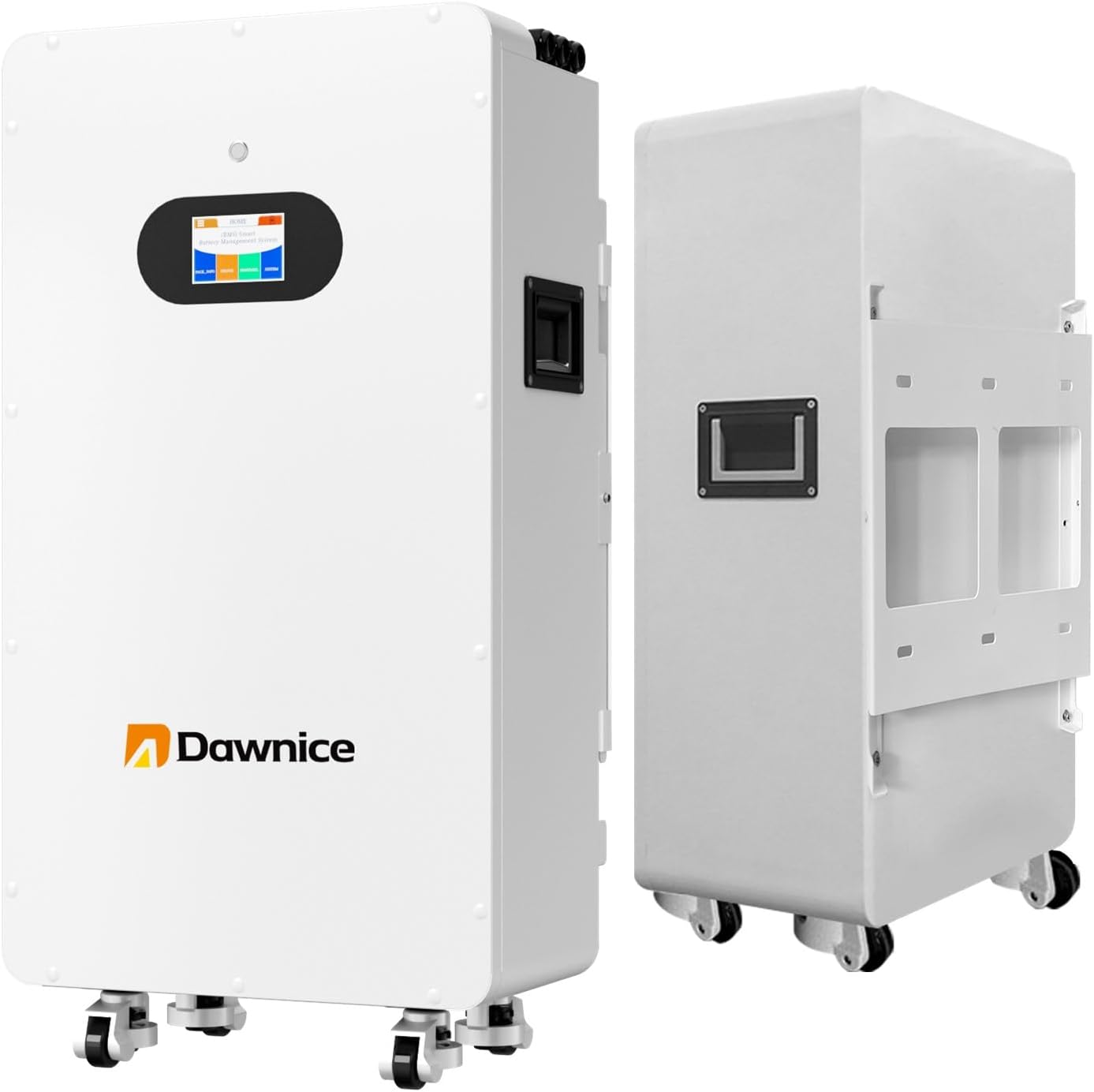
Figure 1: Front and side view of the Dawnice 10kWh Solar Storage Lithium Battery. The unit is white with a black display screen on the front and handles on the side.

Figure 2: Key features of the battery, highlighting the fully removable bracket for wall mounting, the smart LED touchscreen for monitoring, and freewheeling casters for mobility.

Figure 3: Close-up of the LED touchscreen interface, illustrating the BMS Management System display with options for CELLS_INFO, PROTOCOL, STATUS, SYSTEM, Parameter, and History. It also shows the main state with SOC (%), Voltage (V), Current (A), and Capacity (AH).
4. Package Contents
Upon receiving your Dawnice 10kWh Solar Storage Lithium Battery, please verify that all components are present and undamaged:
- Dawnice 10kWh Solar Storage Lithium Battery Unit (Model DWPF-LCT10N-001)
- Wall-mounting bracket (if applicable)
- User Manual (this document)
- Other accessories (cables, connectors, etc. - specific items may vary)
If any items are missing or damaged, please contact Dawnice customer support immediately.
5. Setup and Installation
The Dawnice battery offers both wall-mounted and ground-mounted installation options. Ensure the installation location meets the safety requirements outlined in Section 2.
5.1 Installation Location
- Choose a cool, dry, and well-ventilated area.
- Avoid direct sunlight, rain, and extreme temperatures.
- Ensure the mounting surface (for wall-mount) is strong enough to support the battery's weight (120 lbs).
- Maintain adequate clearance around the unit for ventilation and maintenance.
5.2 Wall-Mounted Installation
- Securely attach the removable bracket to the wall using appropriate fasteners.
- Carefully lift and mount the battery unit onto the bracket. Ensure it is securely seated.
5.3 Ground-Mounted Installation
- Position the battery unit on a flat, stable surface.
- The integrated freewheeling casters allow for easy movement before final positioning.
5.4 Electrical Connections
All electrical connections should be made by a certified electrician.
- Connect the battery to a compatible inverter.
- Ensure correct polarity for all DC connections.
- Connect communication cables (CAN/RS485) for monitoring and parallel operation if applicable.
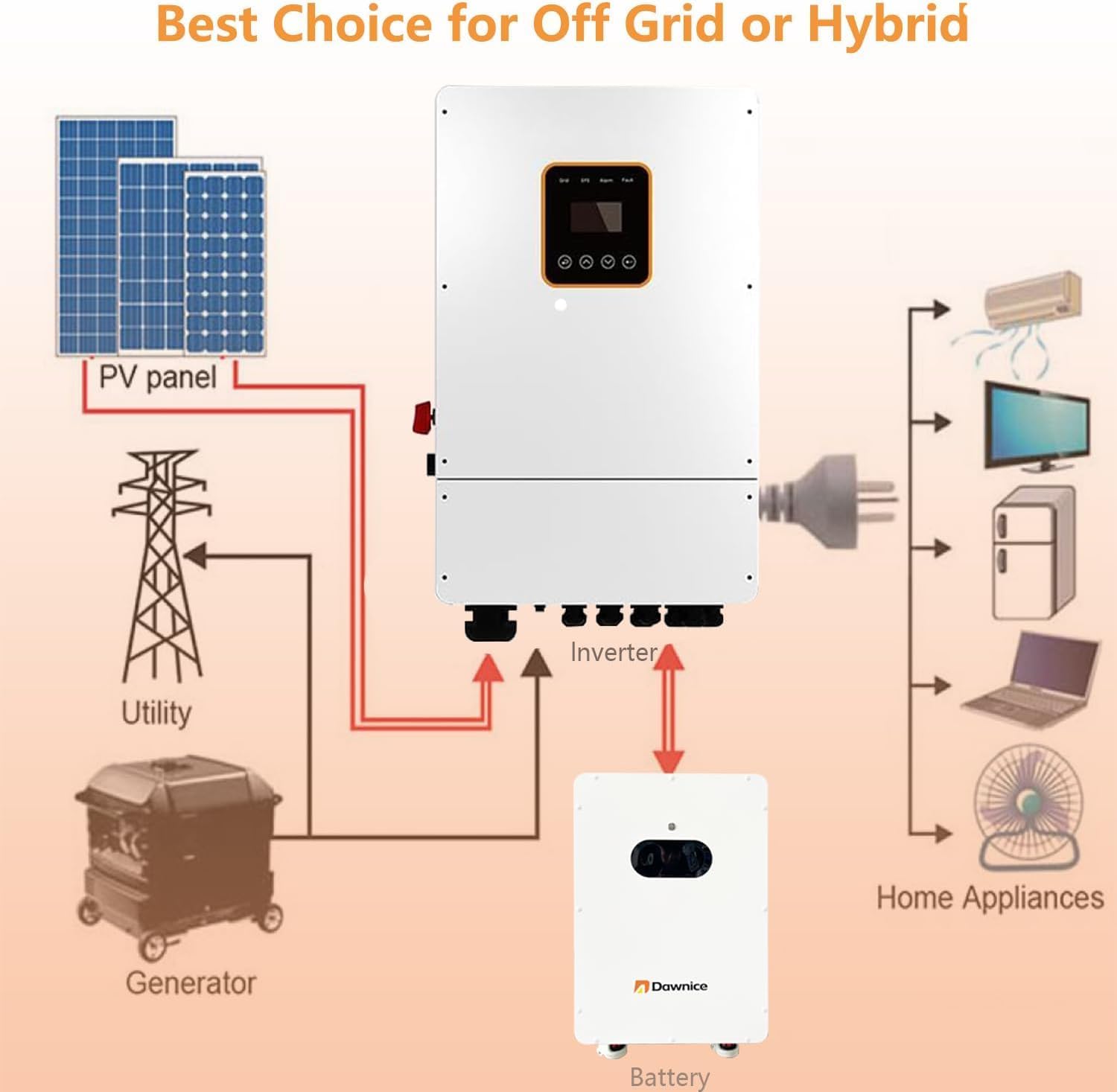
Figure 4: Connection diagram for an off-grid or hybrid solar system. It illustrates the battery's integration with solar panels, an inverter, utility grid, a generator, and various home appliances.

Figure 5: Detailed view of the battery's signal communication panel and battery power interface. It labels ports such as Battery Switch, Touch Screen, Removable Brackets, Handle, Fuma Wheels, Battery Switch Indicator, Reset Button, Dip Switch, Dry Contact, Inverter RS485 Communication Port, Inverter CAN Port, Host Computer Communication Port, Battery Parallel Port 1 & 2, Battery Running Indicator, Battery Warning Indicator, and Battery Power Indicator.
6. Operating Instructions
6.1 Powering On/Off
- To Power On: Ensure all connections are secure. Locate the battery switch (refer to Figure 5) and turn it to the 'ON' position. The LED indicators and touchscreen will illuminate.
- To Power Off: Turn the battery switch to the 'OFF' position.
6.2 Monitoring Battery Status
You can monitor the battery's status through the integrated LED touchscreen or via a mobile application using Bluetooth.
- LED Touchscreen: The touchscreen displays real-time information such as State of Charge (SOC), Voltage (V), Current (A), and Capacity (AH). Navigate through the menus using the touch interface (refer to Figure 3).
- Bluetooth Monitoring: Download the official Dawnice monitoring application to your smartphone or laptop. Enable Bluetooth on your device and pair it with the battery system to view detailed performance data and adjust settings.
6.3 Parallel Connection (Capacity Expansion)
The Dawnice battery supports parallel connection of up to 15 units to expand total energy storage capacity. Consult a qualified electrician for parallel installation to ensure proper wiring and communication setup.
- Ensure all batteries are of the same model and capacity.
- Connect the parallel communication ports (Battery Parallel Port 1 & 2) between units (refer to Figure 5).
- Follow the inverter manufacturer's guidelines for connecting multiple battery banks.
7. Maintenance
The Dawnice LiFePO4 battery is designed for minimal maintenance. However, regular checks can ensure optimal performance and longevity.
- Cleaning: Keep the battery unit clean and free of dust. Use a dry, soft cloth for cleaning. Do not use liquid cleaners.
- Ventilation: Ensure ventilation openings are not obstructed.
- Connections: Periodically check all electrical connections for tightness and signs of corrosion.
- Firmware Updates: Check the Dawnice website or mobile app for any available firmware updates for the battery's BMS.
- Storage: If storing the battery for an extended period, ensure it is charged to approximately 50% State of Charge (SOC) and stored in a cool, dry place.
8. Troubleshooting
This section addresses common issues you might encounter. For problems not listed here, please contact Dawnice customer support.
| Problem | Possible Cause | Solution |
|---|---|---|
| Battery does not power on. | Battery switch is off; no power input; internal fault. | Ensure battery switch is ON. Check all power connections. If problem persists, contact support. |
| Low power output. | Battery is low on charge; inverter issue; BMS protection activated. | Check battery SOC on touchscreen/app. Verify inverter operation. Check for BMS warning indicators (Figure 5). |
| Bluetooth connection issues. | Bluetooth on device is off; battery is out of range; app issue. | Ensure Bluetooth is enabled on your device. Move closer to the battery. Restart the app or your device. |
| Unusual noises or smells. | Internal component issue. | Immediately power off the battery and disconnect it. Contact customer support. Do not attempt to fix it yourself. |
9. Specifications
Detailed technical specifications for the Dawnice 10kWh Solar Storage Lithium Battery (Model DWPF-LCT10N-001):
| Attribute | Value |
|---|---|
| Model Number | DWPF-LCT10N-001 |
| Nominal Voltage | 51.2V |
| Capacity | 206Ah |
| Rated Energy | 10.55 kWh |
| Max. Charge/Discharge Current | 100A |
| Maximum Output Power | 10000W |
| Voltage Range | 44.8V - 57.6V |
| Cycle Life (25°C, 80% DOD) | ≥6000 Cycles |
| Design Life | ≥15 Years (25°C) |
| Scalability | Up to 15 units parallel |
| Communication | CAN/RS485, Bluetooth |
| Product Dimensions (L x W x H) | 23.62 x 11.81 x 27.56 inches |
| Item Weight | 120 pounds |
| Installation Mode | Wall / Ground Mounted |
| IP Grade | IP54 |
| Manufacturer | Dawnice |

Figure 6: Visual representation of the battery unit with key specifications. Note: The dimensions and weight shown in this image (640mm x 288mm x 460mm, 100KG) may differ from the detailed specifications provided in the table above. Please refer to the table for the most accurate product specifications.

Figure 7: Overview of Dawnice energy storage battery series, illustrating different capacities (5kWh, 10kWh, 16kWh, 20kWh) and their respective Amp-hour ratings (100AH, 206AH, 314AH, 410AH).
10. Warranty and Support
Dawnice provides a 10-year quality assurance (QA) for this product, reflecting confidence in its durability and performance. For specific warranty terms and conditions, please refer to the documentation included with your purchase or contact Dawnice customer support.
If you have any questions, require technical assistance, or need to report an issue, please contact Dawnice customer support. Contact information can typically be found on the official Dawnice website or through your purchase platform.
Note: The product is subject to hazardous materials regulation and is non-returnable. Customer support is available for assistance.


