
Introduction
The Portronics Iron Beats III is a powerful 200W party speaker designed to deliver an immersive audio experience. It features a wireless UHF karaoke microphone, Bluetooth V5.3 connectivity, versatile input options, dynamic RGB LED lights, and an extended battery life. This manual provides essential information for setting up, operating, and maintaining your speaker.
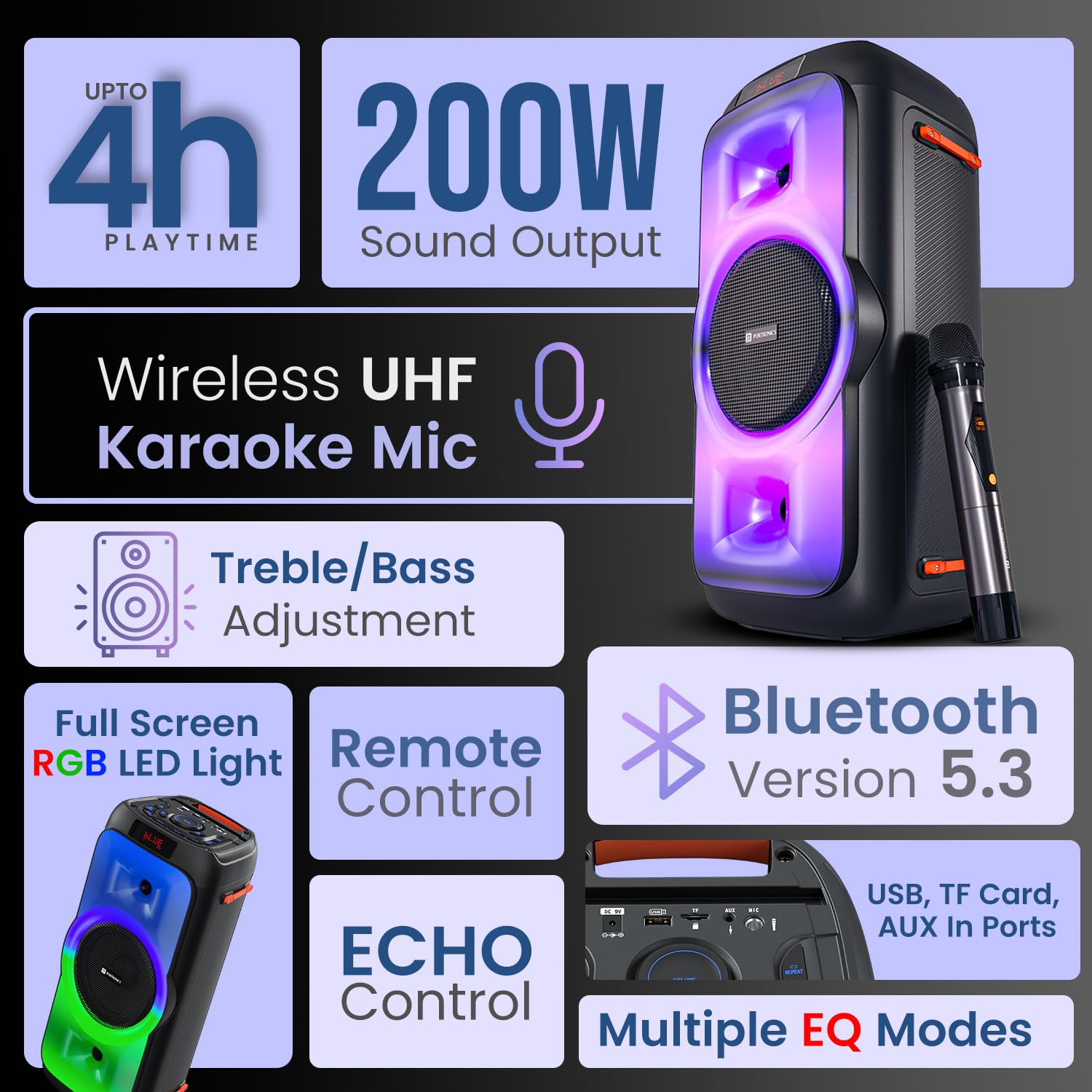
Overview of the Portronics Iron Beats III speaker, showcasing its main features including sound output, connectivity, and lighting.
Setup
Unpacking and Initial Charge
- Carefully remove all components from the packaging: Speaker, Power Adapter, Wireless Karaoke Mic, Remote Control, and Documentation.
- Before first use, fully charge the speaker using the provided power adapter. Connect the adapter to the DC 9V input port on the speaker and plug it into a power outlet. The charging indicator will show the charging status.
Powering On/Off
- To power on, press and hold the POWER button on the control panel.
- To power off, press and hold the POWER button again.
Operating Instructions
Bluetooth Connectivity (V5.3)
- Turn on the speaker. It will automatically enter Bluetooth pairing mode, indicated by a flashing 'BLUE' on the LED display.
- On your mobile device, enable Bluetooth and search for available devices.
- Select "Portronics Iron Beats III" from the list. Once connected, the speaker will emit a confirmation sound, and 'BLUE' will stop flashing.

The speaker features Bluetooth 5.3 for stable wireless connections and includes a convenient mobile holder space.
USB/TF Card Playback
- Insert a USB drive or TF card into the respective port on the speaker.
- The speaker will automatically detect the storage device and begin playing audio files.
- Use the MODE button to switch between input sources if needed.
AUX Input
- Connect an external audio device (e.g., MP3 player, laptop) to the AUX IN port using a 3.5mm audio cable (not included).
- Press the MODE button to select AUX input.
FM Radio
- Press the MODE button to switch to FM radio mode.
- Press the SCAN button (often combined with Play/Pause) to automatically scan and save available FM stations.
- Use the CH- / CH+ buttons to navigate through saved stations.
Wireless Karaoke Microphone
- Ensure the wireless microphone is charged and powered on.
- The microphone will automatically pair with the speaker.
- Adjust the microphone volume using the dedicated MIC VOL control on the speaker.
- Adjust the echo effect using the ECHO control.

The included wireless UHF karaoke microphone allows for clear vocal performance.
Sound Adjustment (Bass/Treble/EQ)
- Use the dedicated BASS and TREBLE controls on the speaker to fine-tune the audio output.
- Press the EQ button to cycle through multiple equalizer modes (e.g., Pop, Rock, Jazz, Classic) to match your music genre.

Adjust bass and treble levels for a customized sound experience.
LED Lights Control
- Press the LED button on the control panel or remote to cycle through different RGB lighting modes or to turn the lights off.

The full-screen RGB LED lights enhance the party atmosphere.
Remote Control Usage
- The included remote control allows for convenient adjustment of volume, track selection, mode switching, EQ settings, and LED light control from a distance.

The control panel and remote offer comprehensive control over the speaker's functions.
Maintenance
Cleaning
- Wipe the speaker's exterior with a soft, dry cloth. Do not use abrasive cleaners or solvents.
- Avoid getting moisture into any openings.
Storage
- Store the speaker in a cool, dry place away from direct sunlight and extreme temperatures.
- If storing for an extended period, charge the battery periodically to maintain its health.
Battery Care
- To prolong battery life, avoid fully discharging the speaker frequently.
- Charge the speaker using only the provided power adapter.
Troubleshooting
| Problem | Possible Solution |
|---|---|
| No power | Ensure the speaker is charged. Connect the power adapter and check if the charging indicator lights up. Press and hold the power button. |
| No sound | Check the volume level on both the speaker and your connected device. Ensure the correct input mode (Bluetooth, AUX, USB, TF, FM) is selected. |
| Bluetooth pairing fails | Ensure the speaker is in pairing mode. Disable and re-enable Bluetooth on your device. Move your device closer to the speaker. Forget the device from your phone's Bluetooth list and try pairing again. |
| Microphone not working | Ensure the microphone is powered on and charged. Check the MIC VOL control on the speaker. |
| Remote control not working | Ensure there are no obstructions between the remote and the speaker. Replace the remote control battery (CR5 type). |
Specifications
- Model Number: POR-2343
- Output Power: 200 Watts
- Connectivity: Bluetooth V5.3
- Audio Inputs: USB, TF Card, AUX, FM Radio
- Microphone: Wireless UHF Karaoke Mic
- Battery Type: Lithium Polymer
- Playtime: Up to 4 Hours (at moderate volume)
- Mounting Type: Floor Standing
- Material: ABS Plastic
- Product Dimensions (LxWxH): 55.1 x 29.7 x 29 cm
- Item Weight: 4.85 kg
- Included Components: Speaker, Power Adapter, Karaoke Mic, Remote Control, Documentation
Warranty and Support
For warranty information, technical support, or service inquiries, please contact Portronics customer support:
- Email: help@portronics.com
- Phone: +91 9555-245-245
Please refer to the documentation included in the box for specific warranty terms and conditions.