
DAREU A950
DAREU A950 Wing 8K Lightweight Wireless Gaming Mouse User Manual
Model: A950
Introduction
Thank you for choosing the DAREU A950 Wing 8K Lightweight Wireless Gaming Mouse. This manual provides detailed instructions for setting up, operating, and maintaining your new gaming mouse. Designed for professional gamers, the A950 Wing features an ultra-lightweight 35g design, dual 8K Hz polling rate, a custom AIM-750U 30K optical sensor, and durable Omron switches, ensuring a responsive and comfortable gaming experience.
What's in the Box
Verify that all components are present in the package:
- DAREU A950 Wing Gaming Mouse
- 8K Nano Receiver
- USB-C Cable
- Anti-slip Sticker Set
- English Manual (this document)

Image: The DAREU A950 Wing mouse in black, shown with its 8K Nano Receiver connected via USB-C cable.
Product Overview
Familiarize yourself with the components of your DAREU A950 Wing mouse:
- Left Click Button: Primary action button.
- Right Click Button: Secondary action button.
- Scroll Wheel: For vertical scrolling and middle-click function.
- Side Buttons (x2): Programmable buttons, typically for forward/backward navigation.
- DPI Button (underneath): Used for cycling through DPI settings.
- USB-C Port: For wired connection and charging.
- Power/Mode Switch: Located on the underside, for switching between wired and wireless modes.
- Optical Sensor: High-precision tracking.
- Mouse Feet: Low-friction pads for smooth gliding.

Image: An exploded diagram illustrating the internal components of the DAREU A950 Wing mouse, highlighting its lightweight construction with individual component weights such as top cover, buttons, scroll wheel, battery, PCB, and foot pads.
Setup
Charging the Mouse
Before first use, it is recommended to fully charge the mouse. Connect the supplied USB-C cable to the mouse's USB-C port and the other end to a powered USB port on your computer or a USB wall adapter. A full charge takes approximately 90 minutes and provides up to 70 hours of battery life.

Image: An illustration showing the DAREU A950 Wing mouse with a battery indicator displaying "70H" for battery life and "approx. 90 min" for full charge time.
Connecting the Mouse
The DAREU A950 Wing supports both wired and wireless connections.
- Wireless Mode (2.4GHz):
- Insert the 8K Nano Receiver into an available USB-A port on your computer.
- Locate the power/mode switch on the underside of the mouse and slide it to the wireless (2.4GHz) position.
- The mouse should automatically connect. If not, ensure the receiver is properly inserted and the mouse is charged.
- Wired Mode (USB-C):
- Connect the supplied USB-C cable directly from the mouse's USB-C port to a USB-A port on your computer.
- Ensure the power/mode switch on the underside of the mouse is in the wired position (or off, depending on model behavior).
- The mouse will function as a wired mouse and charge simultaneously.

Image: The DAREU A950 Wing mouse connected via USB-C cable, illustrating its dual-mode connection capability for both wired and 2.4GHz wireless operation.
Operating Instructions
Basic Operation
The left and right click buttons perform standard mouse functions. The scroll wheel allows for vertical navigation through documents and web pages, and can also be pressed for a middle-click action.
DPI Adjustment
The DAREU A950 Wing features a custom AIM-750U optical sensor with up to 30,000 DPI. To cycle through preset DPI settings, hold both side buttons simultaneously for approximately 3 seconds until the scroll wheel light flashes. Continue to hold and release to select the desired DPI level. The specific DPI levels are configurable via the DAREU software.

Image: A detailed diagram of the customized AIM-750U optical sensor, highlighting its capabilities including 50G max acceleration, 750 IPS max speed, and 30000 DPI resolution.
Polling Rate
The mouse supports a dual 8K Hz polling rate in both wired and wireless modes, providing an ultra-low latency response time of 0.125ms. This ensures rapid and precise communication between the mouse and your computer.

Image: A visual comparison demonstrating the 8K Hz polling rate in both wired and wireless modes, showing the reduced response times compared to lower polling rates.
Programmable Buttons and Software
The DAREU A950 Wing features 5 programmable buttons. To customize button functions, DPI settings, macros, and other advanced features, download and install the official DAREU driver software. The software is typically web-based and can be found on the official DAREU website by searching for "Dareu driver".
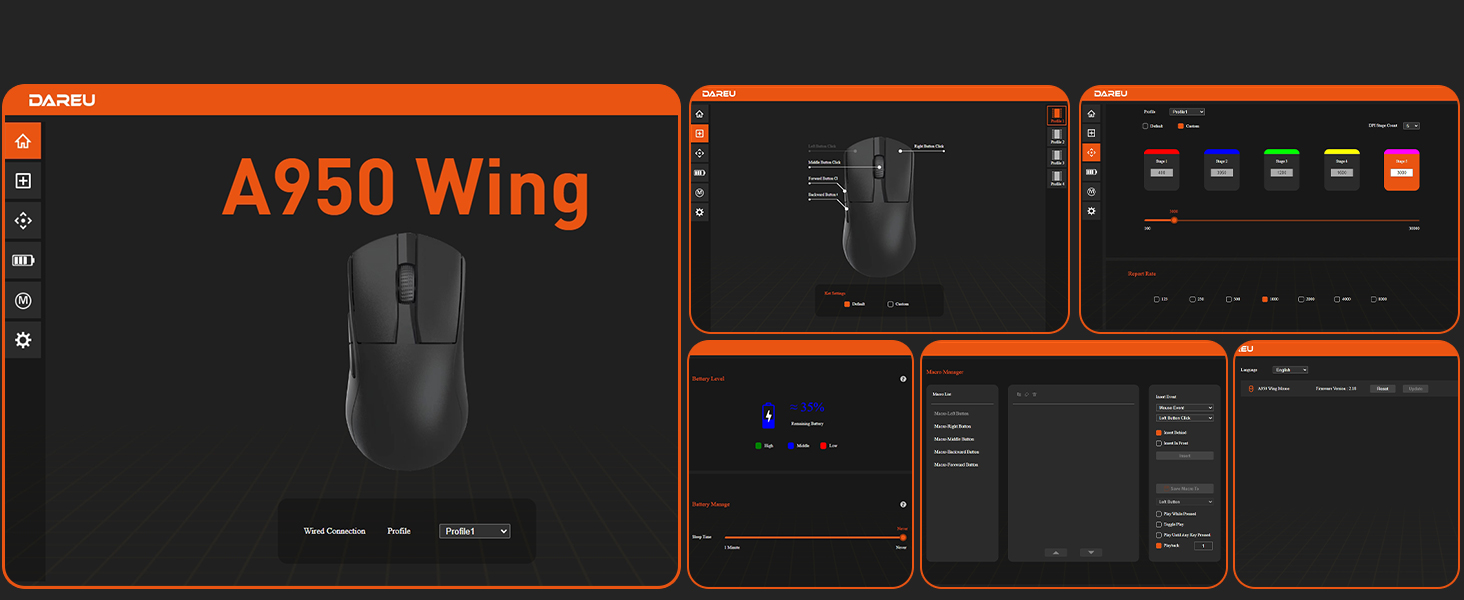
Image: A composite screenshot displaying various panels of the DAREU A950 Wing software interface, including settings for button assignments, DPI, battery status, and macro management.
Maintenance
Cleaning
To maintain optimal performance, regularly clean your mouse. Use a soft, dry cloth to wipe the surface. For stubborn dirt, a slightly damp cloth can be used, but ensure no moisture enters the mouse. Use a cotton swab or compressed air to clean around the scroll wheel and sensor area.
Battery Care
To prolong battery life, avoid fully discharging the mouse frequently. Charge the mouse when the battery indicator is low. Store the mouse in a cool, dry place when not in use for extended periods.
Troubleshooting
- Mouse not responding:
- Ensure the mouse is charged.
- Check the power/mode switch on the underside of the mouse.
- For wireless mode, ensure the 8K Nano Receiver is securely plugged into a USB port. Try a different USB port.
- For wired mode, ensure the USB-C cable is securely connected to both the mouse and the computer. Try a different USB port.
- Restart your computer.
- Cursor movement is erratic or jumpy:
- Clean the optical sensor on the underside of the mouse.
- Ensure you are using the mouse on a suitable surface. The AIM-750U sensor supports gaming on glass surfaces, but optimal performance is achieved on a mouse pad.
- Check for any obstructions around the sensor.
- DPI settings not changing:
- Ensure you are performing the DPI adjustment procedure correctly (holding both side buttons for 3 seconds).
- Verify settings within the DAREU driver software.
- 8K Hz Polling Rate issues:
- Ensure your computer meets the minimum hardware requirements for 8K Hz polling rate.
- Verify the polling rate setting in the DAREU driver software.
Hardware Requirements for 8K Hz Polling Rate
To fully utilize the 8K Hz polling rate, your system should meet or exceed the following specifications:
- CPU: Intel Core i7-9700K or higher / AMD Ryzen 7 3700X or higher
- Display: 240Hz+ refresh rate monitor
- GPU: NVIDIA GTX 1080 or equivalent / AMD RX 5700 or equivalent
- RAM: 16GB or more

Image: A graphic detailing the recommended hardware specifications for achieving optimal 8K Hz polling rate performance with the DAREU A950 Wing mouse.
Specifications
| Feature | Specification |
|---|---|
| Model | A950 |
| Brand | DAREU |
| Connectivity | USB (Wired), 2.4GHz (Wireless) |
| Sensor | Custom AIM-750U Optical Sensor (based on PAW3950) |
| Max DPI | 30,000 DPI |
| Max Polling Rate | 8K Hz (8000 Hz) |
| Max Acceleration | 50G |
| Max Tracking Speed | 750 IPS |
| Switches | Omron 100 Million Click Lifecycle |
| MCU | Nordic 52840 |
| Weight | 35g (1.23 ounces) |
| Dimensions (L x W x H) | 119.5mm x 63mm x 38mm (4.7 x 2.48 x 1.5 inches) |
| Battery Life | Up to 70 hours |
| Charging Time | Approx. 90 minutes for full charge |
| Buttons | 5 Programmable Buttons |
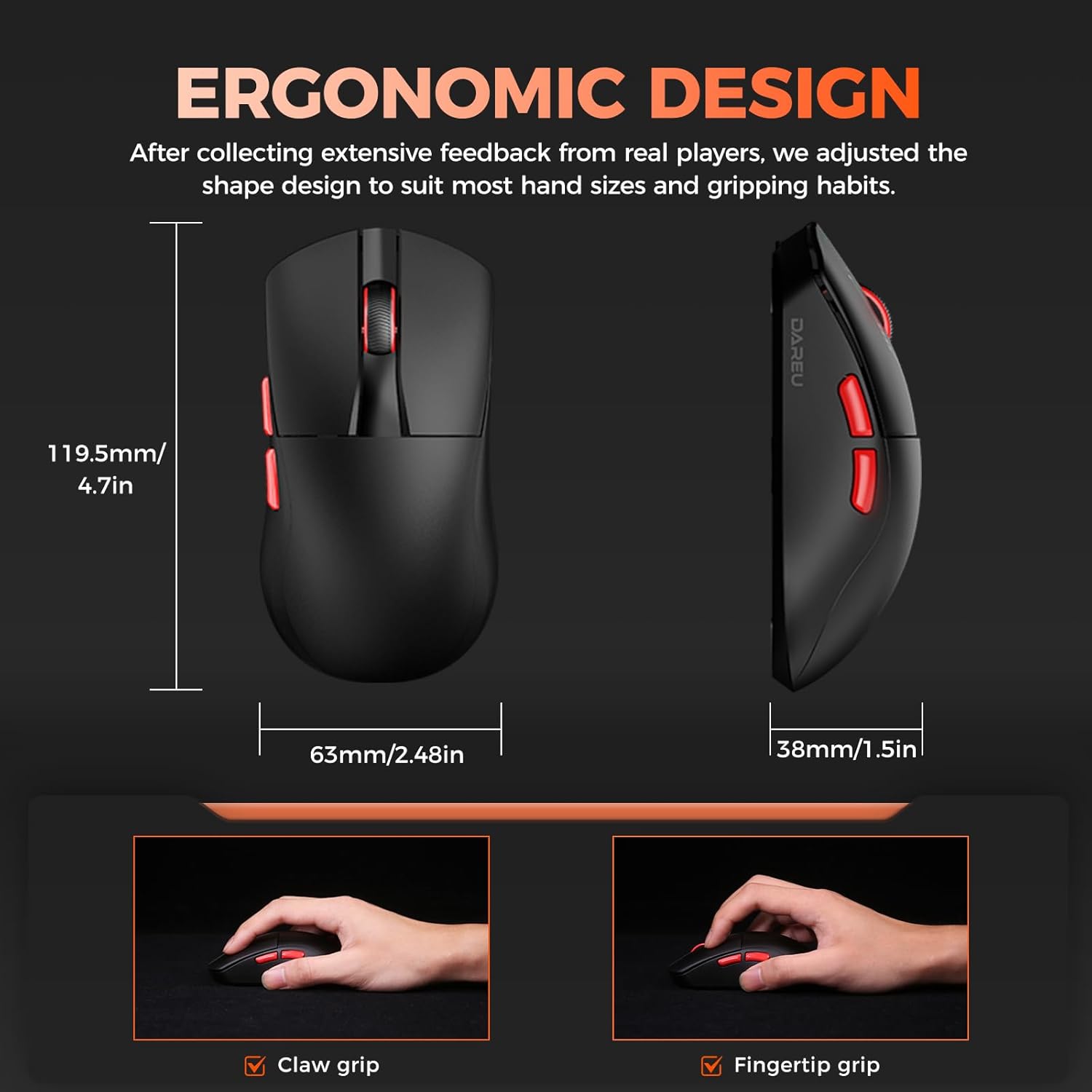
Image: A diagram illustrating the dimensions of the DAREU A950 Wing mouse and examples of claw grip and fingertip grip styles.
Warranty and Support
For warranty information and technical support, please refer to the warranty card included with your product or visit the official DAREU website. You can also contact DAREU customer service for assistance with product inquiries, troubleshooting, and service requests.
For the latest drivers and software, please visit the DAREU official website.
Related documentsA950


Ask a question about this manual
Ask about setup, troubleshooting, compatibility, parts, safety, or missing instructions. Manuals+ will review the question and use this page’s manual context to help answer it.