
Hercules 4780942
Hercules DJControl Mix Ultra
Mobile DJ Controller User Manual
Brand: Hercules | Model: 4780942
1. Introduction
This manual provides essential information for setting up, operating, and maintaining your Hercules DJControl Mix Ultra. Designed for aspiring DJs and casual users, this ultra-mobile controller offers a fun and intuitive way to mix music using your smartphone or tablet. Its compact and lightweight design makes it ideal for use in various settings, from social gatherings to impromptu DJ sets.
The DJControl Mix Ultra is compatible with both iOS and Android devices and integrates seamlessly with popular DJ software, including the djay app. It features a built-in rechargeable battery for extended portability and includes the innovative Neural Mix feature, allowing for real-time isolation of vocals, drums, and harmonic elements from your tracks.
2. Product Overview
Familiarize yourself with the main components of your DJControl Mix Ultra:

Figure 1: Front view of the Hercules DJControl Mix Ultra with a smartphone.
- Jog Wheels: Two touch-sensitive jog wheels for scratching, cueing, and track navigation.
- Tempo Faders: Adjust the playback speed of each track.
- Volume Faders: Control the volume level of each deck.
- Crossfader: Blend between Deck 1 and Deck 2.
- EQ Knobs: High, Mid, and Low controls for adjusting the frequency balance of each track.
- Performance Pads: Multi-functional pads for Hot Cues, Loops, FX, and Sampler modes.
- Neural Mix Button: Activates the Neural Mix feature for isolating track elements.
- Browser Knob: Navigate through your music library within the djay app.
- Battery Indicator: Displays the current battery level.
- Bluetooth Indicator: Shows Bluetooth connection status.

Figure 2: DJControl Mix Ultra with its protective cover, which doubles as a smartphone stand.
The included clear cover not only protects the controller during transport but also ingeniously transforms into a stand for your smartphone or tablet, providing an optimal viewing angle during your DJ sessions.
3. Setup
3.1 Initial Charging
Before first use, fully charge your DJControl Mix Ultra using the provided USB-C cable. Connect the cable to the USB-C port on the side of the controller and plug the other end into a compatible USB power source. The battery indicator light will show charging status.
3.2 Software Installation
Download and install the djay app on your iOS or Android smartphone or tablet. The app is available on the Apple App Store and Google Play Store. Ensure your device meets the minimum system requirements for the app.
3.3 Bluetooth Connection
- Turn on your DJControl Mix Ultra using the power switch located next to the USB-C port. The Bluetooth indicator will begin to flash.
- Enable Bluetooth on your smartphone or tablet.
- Open the djay app. The app should automatically detect the DJControl Mix Ultra.
- Follow the on-screen prompts in the djay app to complete the Bluetooth pairing process. The Bluetooth indicator on the controller will turn solid blue once connected.
3.4 Audio Output
To hear your mix, connect your headphones and speakers using the included Y-cable. This cable allows you to pre-listen to tracks in your headphones while the main mix plays through your speakers.
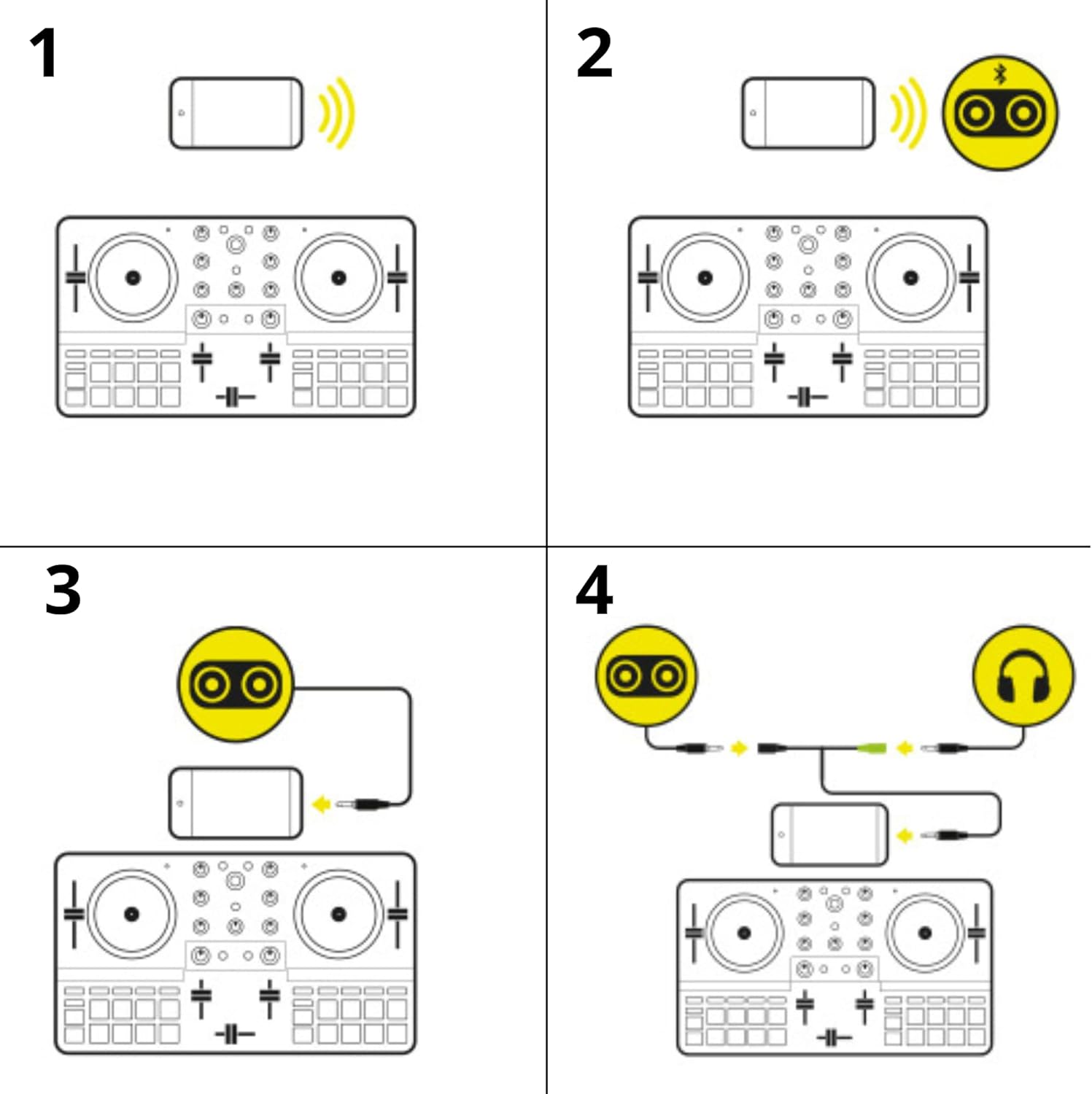
Figure 3: Audio connection diagram using the included Y-cable.
4. Operating Instructions
4.1 Loading Tracks
Use the Browser Knob in the center of the controller to navigate your music library within the djay app. Press the knob to select a track, then assign it to either Deck 1 or Deck 2.
4.2 Basic Mixing
- Volume Faders: Adjust the individual volume of Deck 1 and Deck 2.
- Crossfader: Slide left or right to transition between the two decks.
- Tempo Faders: Synchronize the beats per minute (BPM) of your tracks for smooth transitions.
- EQ Knobs (High, Mid, Low): Fine-tune the sound of each track by adjusting its frequency components.
4.3 Performance Pads
The performance pads offer various creative functions:

Figure 4: Detailed view of the performance pads.
- Hot Cue: Set and trigger cue points in your tracks.
- Loop: Create and activate loops of various lengths.
- FX: Apply real-time effects to your tracks.
- Sampler: Trigger pre-loaded samples or record your own.
4.4 Neural Mix Feature
The Neural Mix feature allows you to isolate and manipulate individual components of a track, such as vocals, drums, or harmonic elements. This is a powerful tool for creating unique mixes and mashups.

Figure 5: Central mixer section highlighting the Neural Mix controls.
To activate Neural Mix, press the dedicated Neural Mix button (often indicated by an 'N' symbol). The EQ knobs will then control the levels of the isolated elements (vocals, drums, harmonics) instead of the traditional frequency bands. Press the button again to return to standard EQ control.
4.5 Official Product Videos
Watch these official videos from Hercules for a visual guide on using your DJControl Mix Ultra:
Video 1: Hercules DJ Lifestyle Overview. This video provides a general overview of the DJControl Mix Ultra in various usage scenarios.
Video 2: Hercules DJControl Mix Ultra Features Demo. This video demonstrates the key features and controls of the DJControl Mix Ultra, including the Neural Mix function and performance pads.
5. Maintenance
- Cleaning: Use a soft, dry cloth to clean the surface of the controller. Avoid abrasive cleaners or solvents.
- Battery Care: To prolong battery life, avoid fully discharging the battery frequently. Store the device in a cool, dry place when not in use.
- Storage: Always use the included protective cover when transporting or storing the controller to prevent damage to the knobs, faders, and jog wheels.
6. Troubleshooting
- Controller not connecting via Bluetooth:
- Ensure the controller is charged and powered on.
- Verify Bluetooth is enabled on your smartphone/tablet.
- Close and reopen the djay app.
- Check if your device's operating system is up to date and compatible with the djay app and controller.
- No sound output:
- Ensure the Y-cable is correctly connected to your device, headphones, and speakers.
- Check all volume levels on the controller, your device, and your speakers.
- Verify that the correct audio output is selected in the djay app settings.
- Short battery life:
- Ensure the controller is fully charged before use.
- Battery performance can vary based on usage and environmental conditions.
7. Specifications
| Item Weight | 3.9 pounds |
| Product Dimensions | 15.4 x 10 x 3.03 inches |
| Item Model Number | 4780942 |
| Power Source | Battery Powered |
8. Warranty & Support
Your Hercules DJControl Mix Ultra is covered by a manufacturer's warranty. Please refer to the warranty card included in your product packaging for specific terms and conditions.
For further support, frequently asked questions, or to access additional resources, please visit the official Hercules website: Hercules Official Store.
Related documents4780942


Ask a question about this manual
Ask about setup, troubleshooting, compatibility, parts, safety, or missing instructions. Manuals+ will review the question and use this page’s manual context to help answer it.