
Important Safety Instructions
Please read all instructions carefully before operating this device and retain them for future reference. Adhere to all warnings on the product and in the operating instructions.
- Do not block any ventilation openings. Install in accordance with the manufacturer's instructions.
- Do not install near any heat sources such as radiators, heat registers, stoves, or other apparatus (including amplifiers) that produce heat.
- Protect the power cord from being walked on or pinched, particularly at plugs, convenience receptacles, and the point where they exit from the apparatus.
- Only use attachments/accessories specified by the manufacturer.
- Unplug this apparatus during lightning storms or when unused for long periods of time.
- Refer all servicing to qualified service personnel. Servicing is required when the apparatus has been damaged in any way.
Product Overview
The ONN Blu-ray Player (Model 100147615) is designed to provide high-definition video output up to 1920x1080 pixels, supporting a wide range of disc and video formats for a versatile home entertainment experience. It features a compact black design and includes an HDMI cable for immediate setup.
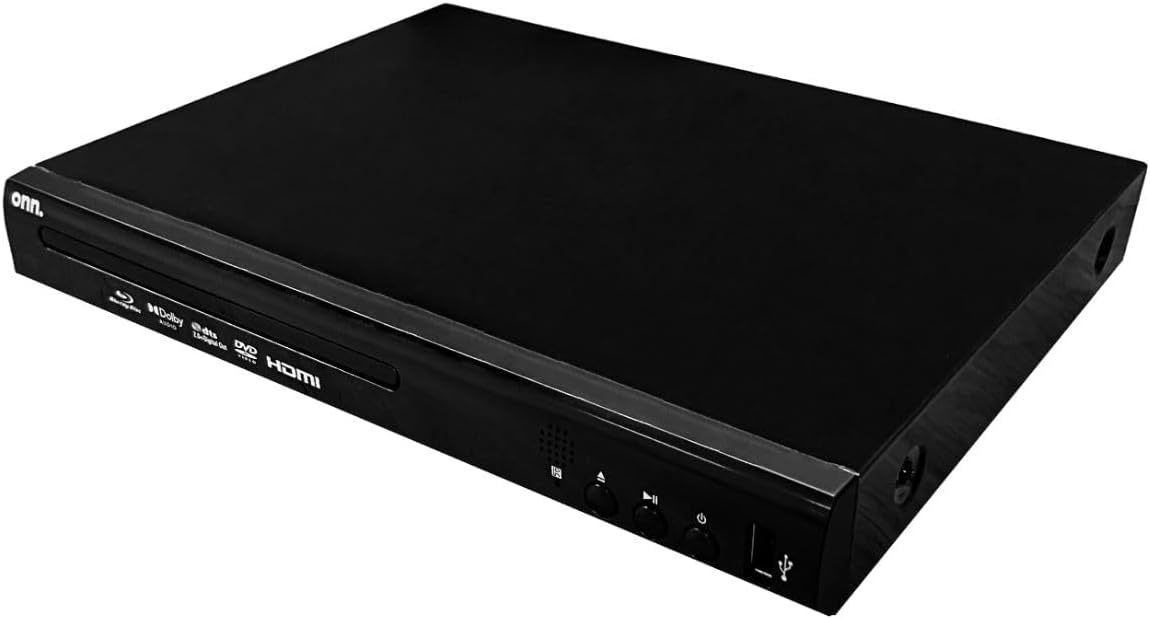
Front view of the ONN Blu-ray Player, showing the disc tray, ONN logo, and control buttons.
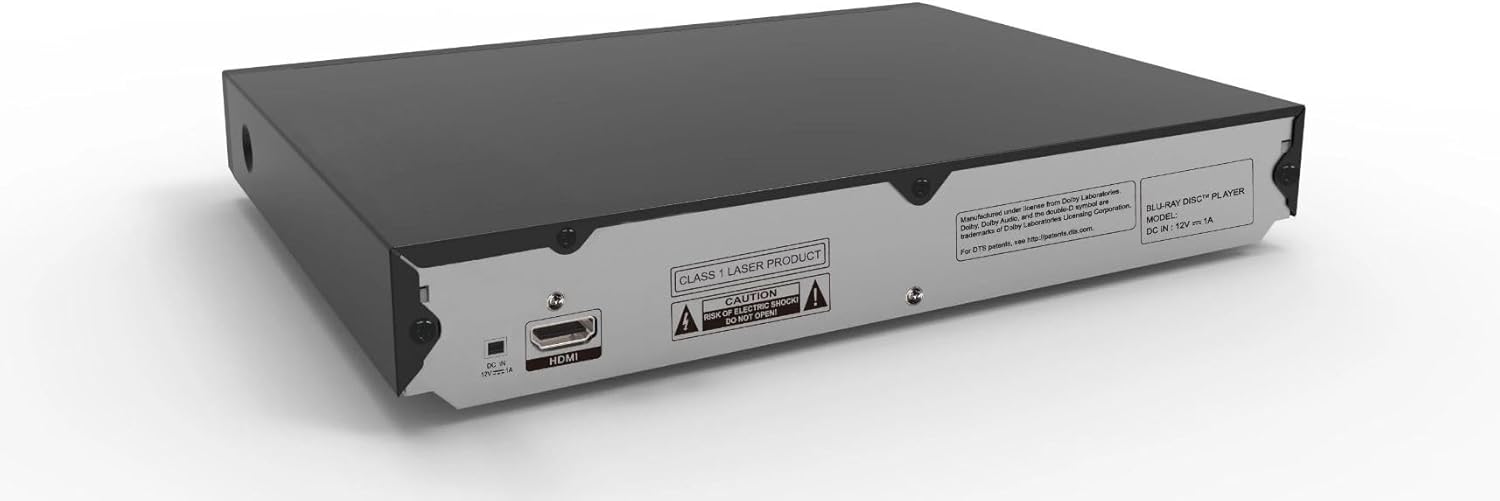
Rear view of the ONN Blu-ray Player, highlighting the HDMI output and power input ports.
What's in the Box
Verify that all items are present in the package:
- ONN Blu-ray Player
- Remote control
- HDMI Cable (6 feet)
- User Guide (this document)
Setup
Connecting the Player
- Connect to TV: Use the included HDMI cable to connect the HDMI OUT port on the Blu-ray player to an HDMI IN port on your television.
- Connect Power: Plug the power adapter into the DC IN port on the player, then plug the other end into a wall outlet.
For optimal performance, ensure your TV is set to the correct HDMI input source.
Initial Power On
- Press the Power button on the front of the player or on the remote control.
- The player will power on, and the ONN logo or a setup screen may appear on your TV.
Operating Instructions
Basic Playback
- Insert Disc: Gently press the OPEN/CLOSE button on the player or remote to open the disc tray. Place a Blu-ray disc, DVD, or CD onto the tray with the label side facing up. Press OPEN/CLOSE again to close the tray.
- Playback: The player will typically begin playback automatically. If not, navigate to the disc icon on the on-screen menu and press ENTER.
- Control Playback: Use the PLAY, PAUSE, STOP, FAST FORWARD, and REWIND buttons on the remote control to manage playback.

The ONN Blu-ray Player with a disc partially inserted into the tray, alongside the included remote control.
Remote Control Functions
The included remote control provides full functionality for navigating menus, controlling playback, and adjusting settings. Familiarize yourself with the button layout for optimal use.
- Power: Turns the player on or off.
- Disc Tray: Opens and closes the disc tray.
- Navigation Buttons (Up/Down/Left/Right, Enter): Used for menu navigation and selection.
- Playback Controls (Play, Pause, Stop, Skip, Fast Forward, Rewind): Standard controls for media playback.
- Volume: Adjusts the volume if connected directly to an audio system that supports HDMI CEC volume control.
- Setup: Accesses the player's system settings menu.
Supported Disc and Video Formats
The player supports a wide array of media formats:
| Category | Supported Formats |
|---|---|
| Disc Formats | BD, BD-R, BD-RE, DVD-R/RW, DVD+R/RW, DVD-Video, VCD, CD, CD-R/RW |
| Video Formats | H.264, VC1, MPEG1, MPEG-2, MPEG4 |
| Audio Formats | Dolby Digital, Dolby Digital Plus, Dolby TrueHD, DTS |
Maintenance
Proper maintenance ensures the longevity and optimal performance of your Blu-ray player.
- Cleaning the Unit: Use a soft, dry cloth to wipe the exterior of the player. Do not use liquid cleaners or aerosol cleaners.
- Disc Care: Handle discs by their edges. Keep discs clean and free of scratches. Store discs in their cases when not in use.
- Ventilation: Ensure the player has adequate ventilation. Do not place it in an enclosed cabinet without proper airflow.
Troubleshooting
If you encounter issues with your player, refer to the following table for common problems and their solutions.
| Problem | Possible Cause | Solution |
|---|---|---|
| No power | Power cord not connected; Power outlet not active. | Ensure power cord is securely plugged in. Test the outlet with another device. |
| No picture on TV | HDMI cable loose or incorrect input selected on TV. | Check HDMI cable connections. Select the correct HDMI input on your TV. |
| No sound | TV/audio system volume too low; Incorrect audio settings. | Increase volume. Check audio settings on player and TV/audio system. |
| Disc not playing | Disc is dirty, scratched, or incompatible format. | Clean the disc. Try a different disc. Ensure the disc format is supported. |
| Remote control not working | Batteries are dead or inserted incorrectly; Obstruction between remote and player. | Replace batteries. Ensure line of sight to the player's IR sensor. |
Specifications
Key technical specifications for the ONN Blu-ray Player Model 100147615:
| Feature | Detail |
|---|---|
| Model Name | 100147615 |
| Brand | ONN |
| Color | Black |
| Product Dimensions | 7.63 x 10.23 x 1.68 inches |
| Item Weight | 3 pounds |
| Resolution | 1920x1080 pixels (HD Video Output) |
| Connectivity Technology | HDMI, USB |
| Special Features | Comes with 6’ HDMI cable, Support for Dolby Digital, Dolby Digital Plus, Dolby TrueHD, and DTS formats |
Warranty and Support
This ONN Blu-ray Player is a renewed product. For specific warranty information and support, please refer to the Amazon Renewed program policies or contact the seller directly through your Amazon order details. Amazon Renewed products typically come with a separate warranty provided by the supplier or Amazon.
For further assistance, please consult the product listing on Amazon.com or contact Amazon customer service.


