
Introduction
This manual provides comprehensive instructions for the safe and efficient use of your EV SPACES EV-102 Rechargeable Wireless Microphone System. Please read this manual thoroughly before operating the device and retain it for future reference.
The EV-102 system features a UHF metal handheld microphone designed for clear audio transmission. It is suitable for various applications including karaoke, speeches, and events.
Package Contents
Verify that all items listed below are included in your package:
- 1 x Microphone (CH-A)
- 1 x Receiver
- 1 x 3.5mm adapter
- 1 x Microphone jacket
- 1 x Microphone non-slip ring
- 1 x USB Charging Cord
- 1 x User Manual (this document)
Product Overview
The EV SPACES EV-102 system consists of a handheld microphone and a compact receiver. Both units are rechargeable and designed for ease of use.
Microphone Features
- Dynamic Microphone Capsule: Designed for high-quality sound pickup.
- Cardioid Pick-up Pattern: Focuses on sound directly in front of the microphone, reducing background noise.
- Anti-drop Net Cover: Provides protection for the microphone capsule.
- Aluminum Alloy Construction: Lightweight and durable.
- Battery Indicator Light: Displays current battery status.
- Volume Control: Allows adjustment of microphone output level.

Figure 1: Microphone Capsule Features. This image illustrates the dynamic microphone capsule, emphasizing its cardioid pickup pattern for high-quality sound, noise reduction capabilities, and the protective anti-drop net cover.
Receiver Features
- Compact Design: Plugs directly into audio equipment.
- UHF Connectivity: Ensures stable and long-range wireless transmission.
- 6.35mm Jack: Standard audio output connector.
- 3.5mm Adapter: Included for compatibility with smaller input jacks.
Setup Instructions
The EV-102 system is designed for plug-and-play operation. Follow these steps to set up your microphone system:
- Charge the Devices: Ensure both the microphone and receiver are fully charged before first use. Refer to the "Charging Instructions" section for details.
- Turn on the Receiver: Locate the power button on the receiver and press it to turn the unit on.
- Turn on the Microphone: Locate the power button on the microphone and press it to turn the unit on. The microphone and receiver should automatically pair.
- Connect the Receiver: Plug the receiver directly into the microphone input port (6.35mm jack) of your audio device (e.g., amplifier, PA system, karaoke machine, speaker). If your device has a 3.5mm input, use the included 3.5mm adapter.

Figure 2: Plug & Play Setup. This image illustrates the three simple steps for setting up the microphone system: turning on the receiver, turning on the microphone, and plugging the receiver into an audio device.
The system is compatible with devices featuring 1/8" (3.5mm) or 1/4" (6.35mm) MIC input ports. It is not compatible with Bluetooth or AUX input ports.
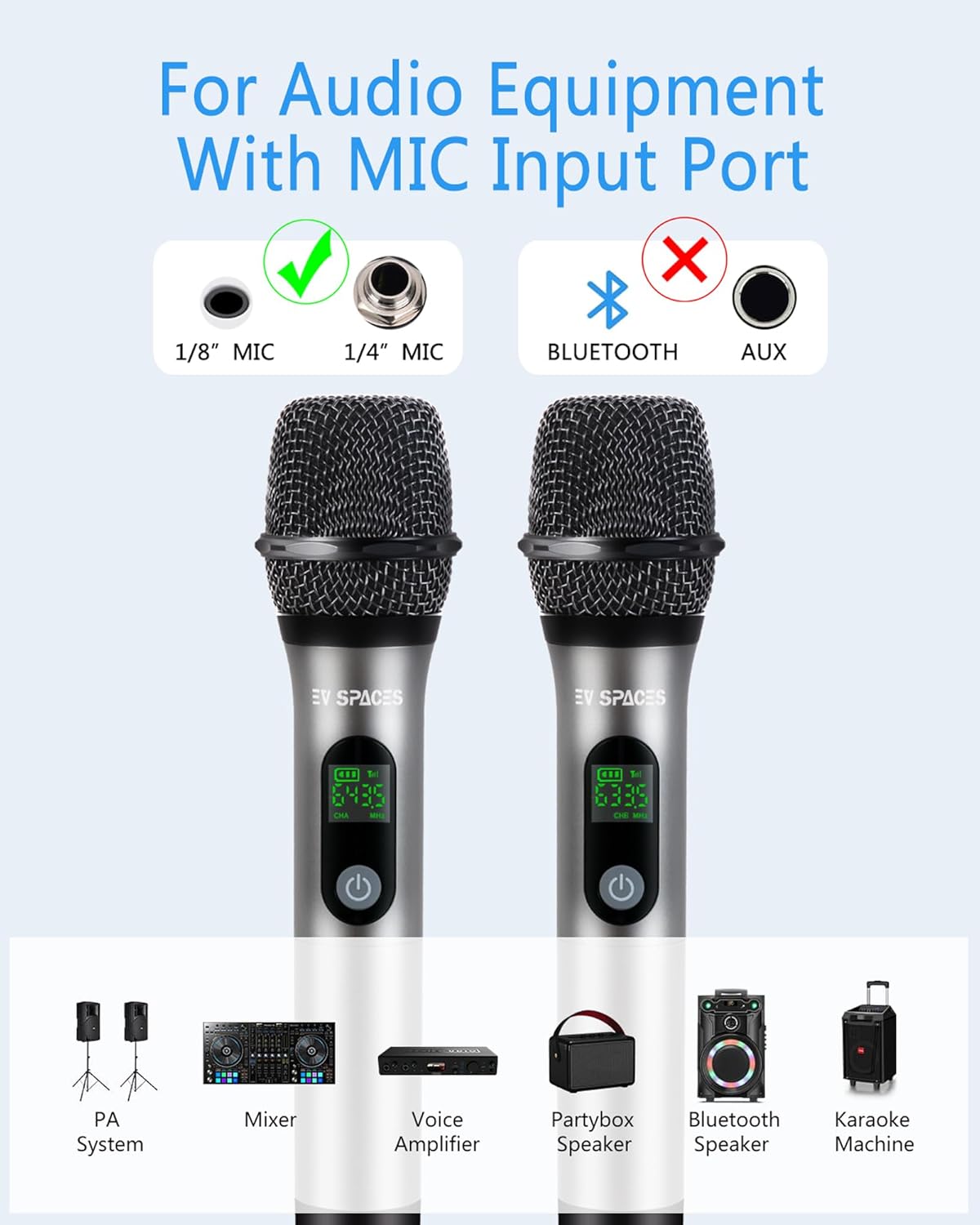
Figure 3: Connectivity Compatibility. This image clarifies that the system works with 1/8" and 1/4" microphone input jacks, but not with Bluetooth or AUX connections.
Operating Instructions
Once set up, the microphone system is ready for use.
- Power On/Off: Press and hold the power button on both the microphone and receiver to turn them on or off.
- Volume Adjustment: Use the volume controls on the microphone to adjust the output level as needed.
- Wireless Range: The system offers a wireless range of up to 200 feet (approximately 60 meters) in open areas. Maintain a clear line of sight between the microphone and receiver for optimal performance.

Figure 4: Wireless Signal Range. This image demonstrates the effective UHF wireless signal range of up to 200 feet (60 meters) between the microphone and receiver in an open environment.
The system is designed for various applications:

Figure 5: Versatile Usage Scenarios. This image shows the microphone being used in various settings, including a sleepover, a formal speech, a wedding ceremony, and by children singing, highlighting its adaptability.
Charging Instructions
Both the microphone and receiver are equipped with rechargeable batteries.
- Charging Time: A full charge typically takes approximately 2 hours.
- Operating Time: A full charge provides approximately 6 hours of continuous use.
- Charging Method: Use the included USB charging cord to connect the microphone and receiver to a standard USB power source (e.g., USB wall adapter, computer USB port).
- Battery Indicator: Monitor the battery indicator light on the microphone to check the charging status and remaining battery life.

Figure 6: Charging Process. This image illustrates how to charge the microphone and receiver using USB cables, highlighting the efficient charging time of 2 hours for 6 hours of use.
Maintenance
Proper maintenance ensures the longevity and optimal performance of your microphone system.
- Cleaning: Use a soft, dry cloth to clean the microphone and receiver. Do not use liquid cleaners or solvents.
- Storage: Store the system in a cool, dry place away from direct sunlight and extreme temperatures when not in use.
- Microphone Covers: The included microphone covers are reusable. Clean them gently with mild soap and water, then allow them to air dry completely before reattaching.
- Battery Care: For long-term storage, charge the batteries to approximately 50% every few months to maintain battery health.
Troubleshooting
If you encounter issues with your EV SPACES EV-102 system, refer to the following common solutions:
| Problem | Possible Cause | Solution |
|---|---|---|
| No sound from microphone |
|
|
| Poor sound quality / Static |
|
|
| Microphone not charging |
|
|
Specifications
| Feature | Detail |
|---|---|
| Model Name | EV-102 |
| Connectivity Technology | UHF |
| Connector Type | 3.5 mm Jack, 6.35 mm Jack |
| Microphone Form Factor | Handheld |
| Polar Pattern | Unidirectional (Cardioid) |
| Power Source | Battery Powered (Rechargeable Lithium Ion) |
| Number of Batteries | 3 Lithium Ion batteries required (included) |
| Operating Range | Up to 200 feet (60 meters) |
| Charging Time | Approx. 2 hours |
| Operating Time | Approx. 6 hours |
| Compatible Devices | Amplifier, Camera, Karaoke Machine, PA System, Speaker |
| Enclosure Material | Aluminum, Metal |
Warranty Information
The EV SPACES EV-102 Rechargeable Wireless Microphone System comes with a 1-year warranty from the date of purchase. This warranty covers manufacturing defects and ensures the product is free from defects in material and workmanship under normal use.
Please retain your proof of purchase for warranty claims. The warranty does not cover damage caused by misuse, accident, unauthorized modification, or normal wear and tear.
Customer Support
For any questions, concerns, or assistance with your EV SPACES EV-102 Rechargeable Wireless Microphone System, please contact our customer service team.
Your satisfaction is our priority. If you are not completely satisfied with your product or service, please do not hesitate to contact us via email. We are dedicated to providing the highest standard of customer service and top-quality goods.
Contact information can typically be found on the product packaging or the official EV SPACES website.