
Product Overview
The Xech Solar Beam is a versatile, high-power rechargeable solar torch light designed for various lighting needs. It features dual charging capabilities (USB-C and solar panel), multiple light modes, and a detachable design for flexible use. This manual provides instructions for safe and efficient operation of your device.
Video Description: This video provides a visual overview of the Xech Solar Beam, demonstrating its features, charging methods, and various light modes in different usage scenarios.
Key Features
- Dual Charging: Supports both USB-C and solar panel charging for convenience and eco-friendly power.
- Four Light Modes: Includes Long Range, Short Range, SOS, and Side Light for diverse illumination requirements.
- Detachable Design: The light module can be separated from the diffuser for use as a handheld torch, desk lamp, or mounted light.
- Compact and Portable: Lightweight and sturdy design, suitable for travel, outdoor activities, and emergency kits.
- Multi-Use Functionality: Functions as a torch, solar lamp, study light, and camping lantern.
Components
The Xech Solar Beam consists of two primary components:
- Light Module: Contains the LED light source, solar panel, USB-C charging port, power button, and battery indicator.
- Diffuser: A cylindrical housing that provides 360-degree soft light when the light module is inserted.
Setup and Assembly
To assemble the Xech Solar Beam for diffused lighting:
- Take the light module and the diffuser.
- Align the light module with the top opening of the diffuser.
- Gently push the light module downwards into the diffuser until it is securely seated.
To use as a handheld torch or mounted light, simply pull the light module upwards to detach it from the diffuser.

Image Description: The left panel illustrates the light module being inserted into the diffuser. The right panel shows the assembled unit emitting 360-degree soft light.
Charging Instructions
The Xech Solar Beam offers two charging methods:
1. USB-C Charging
- Locate the USB-C charging port on the light module.
- Connect the provided USB-C charging cable to the port.
- Plug the other end of the cable into a compatible USB power adapter (not included) or a computer USB port.
- The battery indicator lights will show charging status.
2. Solar Charging
- Ensure the solar panel on top of the light module is clean and unobstructed.
- Place the light module (or the assembled unit) in direct sunlight.
- Solar charging is slower than USB-C charging and is ideal for outdoor use or maintaining charge.
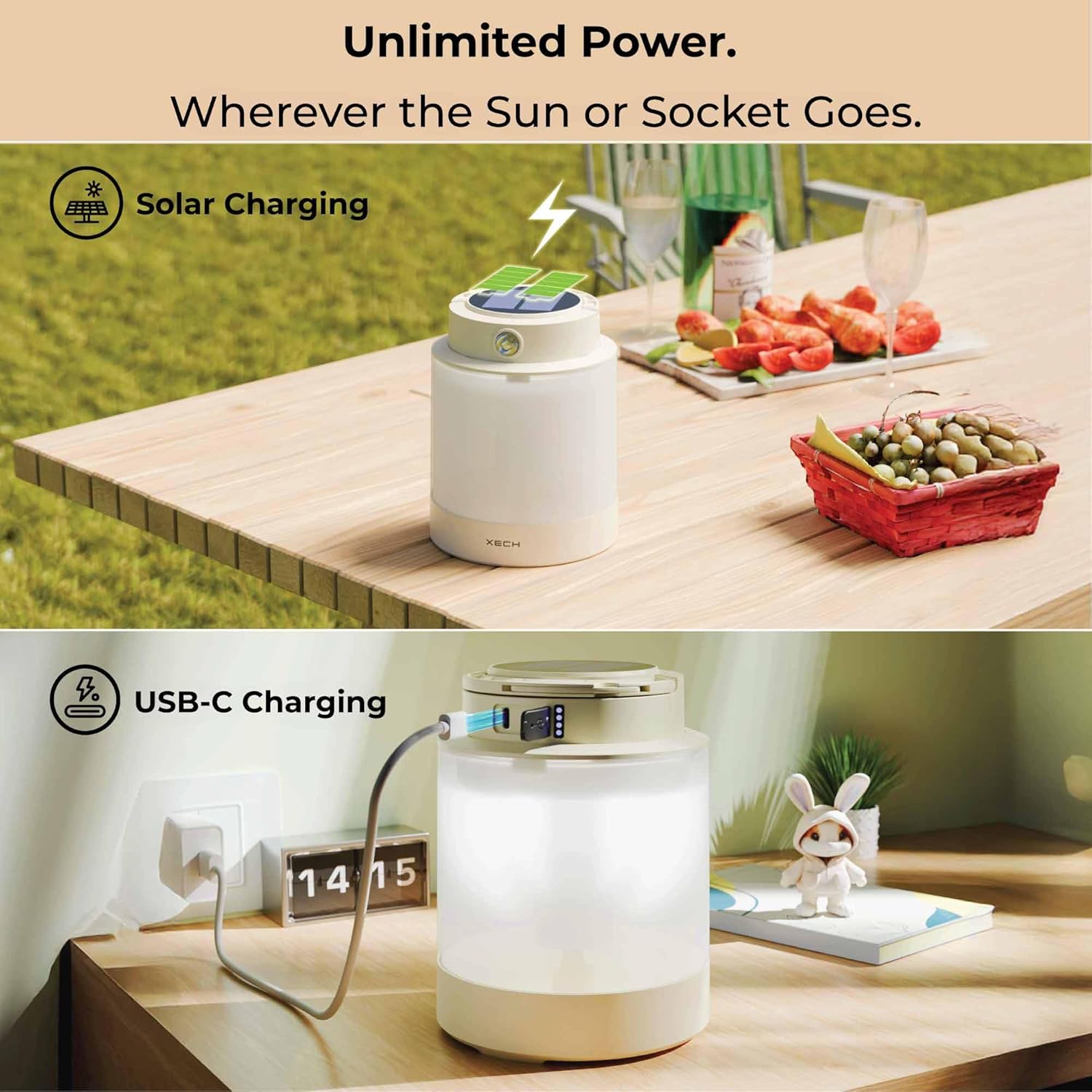
Image Description: The top panel shows the device charging via its solar panel in an outdoor setting. The bottom panel shows the device connected to a wall adapter via a USB-C cable for indoor charging.
Operating Instructions and Light Modes
The Xech Solar Beam features a single intuitive button for operation and mode switching.
Power On/Off
- Press the power button once to turn the light on.
- Press and hold the power button for approximately 2 seconds to turn the light off.
Switching Light Modes
Once the light is on, short press the power button to cycle through the following modes:
- Long Range Beam: Provides a focused, powerful beam for distance visibility. Ideal for outdoor walks or searching.
- Short Range Beam: Offers a softer, wider spread of light, suitable for indoor use or reading.
- SOS Mode: Emits a flashing signal for emergency situations.
- Side Light (Diffused Lamp): Illuminates the surrounding area with a soft, even light. Best used when the light module is inserted into the diffuser.

Image Description: The top panel shows the device emitting a 'Rim Light'. The bottom left panel shows the device used as a 'Focused Torch' to illuminate a car wheel. The bottom right panel shows the device as a 'Soft Diffused Lamp' on a desk.

Image Description: The top panel shows a close-up of the light module's top, highlighting the power button and battery indicator. The bottom panel shows the light module hanging by its integrated hook, demonstrating its versatility.
Versatile Applications
The Xech Solar Beam is designed for a wide range of uses:
- Camping: Hang it inside your tent for ambient lighting.
- Kitchen: Provides supplementary light during cooking or power outages.
- Night Walks: Use the focused torch mode for clear path illumination.
- Study Desks: Offers soft, diffused light for reading or working.
- Emergency Backup: A reliable light source during power cuts.

Image Description: A four-panel image showing the Xech Solar Beam in use: hanging in a tent for camping, providing light in a kitchen, illuminating a path during a night walk, and serving as a desk lamp for studying.
Care and Maintenance
- Cleaning: Wipe the device with a soft, dry cloth. Do not use abrasive cleaners or immerse in water.
- Storage: Store in a cool, dry place away from direct sunlight when not in use for extended periods.
- Battery Care: For optimal battery life, charge the device regularly, even if not in frequent use. Avoid fully discharging the battery for prolonged periods.
- Water Resistance: This product is not water resistant. Avoid exposure to rain or moisture.
Troubleshooting
- Light not turning on: Ensure the battery is charged. Connect to a USB-C power source or place in direct sunlight.
- Solar charging not working: Verify the solar panel is clean and exposed to direct sunlight. Shaded areas will significantly reduce charging efficiency.
- USB-C charging not working: Check the USB-C cable and power adapter for damage. Ensure the cable is fully inserted into the port.
- Light modes not switching: Ensure you are short-pressing the power button to cycle through modes. If unresponsive, try turning the device off and on again.
Specifications
| Feature | Detail |
|---|---|
| Model Number | X-009 |
| Product Dimensions | 30L x 30W x 130H Millimeters |
| Item Weight | 60 Grams |
| Battery Type | Lithium-Ion (1 x 9V battery included) |
| Brightness | 150 Lumen |
| Wattage | 1 Watt Hours |
| Voltage | 5 Volts |
| Colour Temperature | 5000 Kelvin |
| Material | Acrylonitrile Butadiene Styrene (ABS) |
| Water Resistance Level | Not Water Resistant |
| Included Components | Charging Cable |
Warranty and Support
For warranty information and customer support, please refer to the documentation provided with your purchase or contact Xech customer service directly. Keep your proof of purchase for any warranty claims.