
Dsoon SWG06
Dsoon 2-Zone Smart Sprinkler Timer User Manual
Model: SWG06
Brand: Dsoon
1. Introduction
Thank you for choosing the Dsoon 2-Zone Smart Sprinkler Timer. This device is designed to automate your garden watering, providing efficient and flexible irrigation for two independent zones. With its advanced features like rain delay, manual modes, and a durable waterproof design, it simplifies garden maintenance and helps conserve water. Please read this manual thoroughly before installation and operation to ensure proper use and longevity of your device.

Figure 1: Dsoon 2-Zone Smart Sprinkler Timer
2. Safety Information
Please observe the following safety precautions to prevent injury or damage to the device:
- Do not immerse the entire unit in water. While waterproof, it is designed for outdoor use and resistance to rain and splashes, not submersion.
- Use only the specified battery type (e.g., AA batteries, not included). Ensure correct polarity when inserting batteries.
- Remove batteries if the unit will not be used for an extended period to prevent leakage.
- Do not expose the unit to extreme temperatures outside its operating range (e.g., freezing conditions). Disconnect and store indoors during winter.
- Keep out of reach of children.
- Ensure all connections are tight to prevent leaks and water damage.
3. Product Features
The Dsoon Smart Sprinkler Timer offers a range of features designed for efficient and convenient watering:
- 2025 Upgraded Waterproof System: Features a dual-layer silicone gasket and nano waterproof coating, achieving an IP68 waterproof rating. Built with a metal filter and second-gen self-cleaning valve diaphragm technology for durability.
- Dual-Zone Smart Control: Two high-flow outlets (5-35 L/min) allow independent control of two irrigation zones. Customize watering schedules for each zone with flexible durations (1 minute to 6 hours) and intervals (1 minute to 7 days).
- 3 Manual Watering Modes: Effortlessly switch between ZONE1, ZONE2, or BOTH ZONES. Adjust watering durations (1 minute to 5 hours 59 minutes) for immediate needs.
- Smart Rain Delay Function: Avoid overwatering with 24h/48h/72h rain delay, which skips watering during rainy periods without disrupting programmed schedules.
- Low-Battery Alert & Auto Shut-Off: The 2.5-inch smart LED display shows real-time watering times, upcoming schedules, and battery status. Alerts for low battery and automatically shuts off the valve to prevent interruptions. Power-off memory function retains settings.

Figure 2: Key Features of the Dsoon Sprinkler Timer
4. Package Contents
Please check the box for the following items:
- Dsoon 2-Zone Smart Sprinkler Timer (Model SWG06)
- User Manual
- Additional washers/adapters (if included)
5. Setup
5.1 Battery Installation
- Locate the battery compartment on the back of the timer.
- Slide the battery cover open.
- Insert two (2) AA alkaline batteries (not included), ensuring correct polarity (+/-).
- Close the battery cover securely until it clicks into place.

Figure 3: Battery Installation and Filter Location
5.2 Attaching the Timer to the Faucet
- Ensure the faucet is turned off.
- Screw the timer onto your outdoor garden faucet. Hand-tighten only. Do not overtighten.
- Connect your garden hoses or irrigation lines to the two outlets at the bottom of the timer. Ensure these connections are also hand-tightened securely.
- Slowly turn on the faucet. Check for any leaks. If leaks occur, tighten connections slightly or check the rubber washers.
Video 1: Demonstrates the water flow and basic setup of the dual-zone timer, showing water dispensing from both outlets.
6. Operating Instructions
The Dsoon timer features a large LCD display and a rotary dial for easy programming. The dial has positions for OFF, AUTO, Set Clock, Start Time, How Long, and How Often.
6.1 Setting the Current Time (Set Clock)
- Turn the dial to Set Clock.
- Use the + and - buttons to adjust the current hour. Press OK/Manual to confirm and move to minutes.
- Adjust minutes using + and -. Press OK/Manual to confirm.
6.2 Programming Automatic Watering (AUTO Mode)
The timer allows independent programming for Zone 1 and Zone 2.
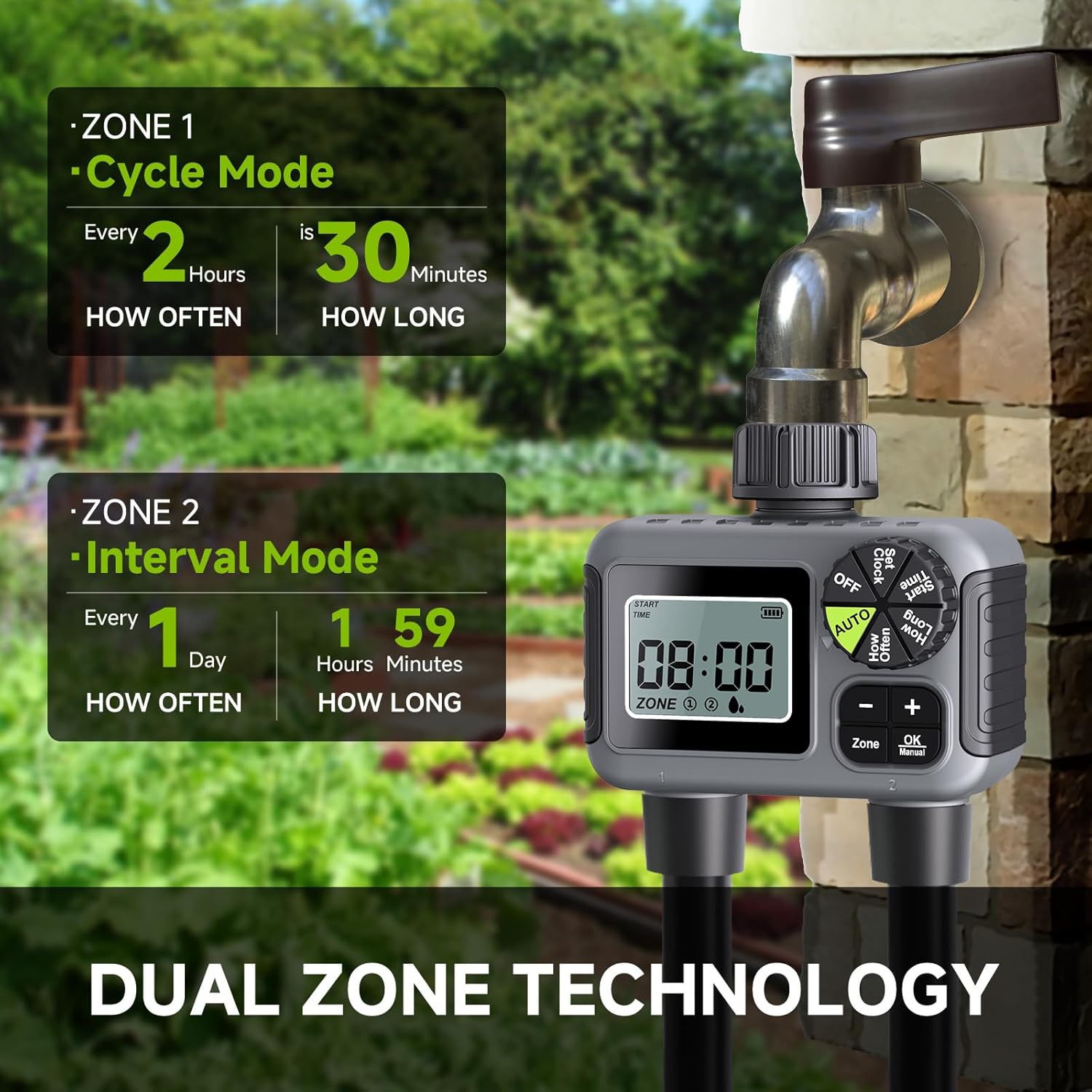
Figure 4: Dual Zone Programming Overview
6.2.1 Select Zone
- Press the Zone button to toggle between Zone 1, Zone 2, or both zones (indicated on the display). Program each zone separately.
6.2.2 Set Start Time
- Turn the dial to Start Time.
- Use + and - to set the desired start time for watering. Press OK/Manual to confirm.
6.2.3 Set How Long (Watering Duration)
- Turn the dial to How Long.
- Use + and - to set the watering duration (from 1 minute to 5 hours 59 minutes). Press OK/Manual to confirm.
6.2.4 Set How Often (Watering Frequency)
- Turn the dial to How Often.
- Use + and - to set the watering frequency (from every 1 hour to every 7 days). Press OK/Manual to confirm.

Figure 5: Programming Options
6.2.5 Activate Automatic Mode
- After setting all parameters, turn the dial to AUTO. The timer is now programmed and will water according to your settings.
Video 2: Demonstrates the process of setting the clock and programming watering schedules on the Dsoon timer.
6.3 Manual Watering
To water immediately without affecting your programmed schedule:
- Turn the dial to any position other than OFF or AUTO.
- Press and hold the OK/Manual button for 3 seconds. The display will show "Manual" and the current watering duration.
- Use the + and - buttons to adjust the manual watering duration (e.g., 1 minute to 5 hours 59 minutes).
- Press OK/Manual again to start manual watering.
- To stop manual watering, press OK/Manual again or turn the dial to OFF.

Figure 6: Manual Watering Mode
Video 3: Detailed demonstration of manual watering and other operational aspects of the timer.
6.4 Rain Delay Function
To temporarily pause your watering schedule due to rain:
- Turn the dial to AUTO.
- Press and hold the + button for 3 seconds. The display will show "Delay" and the default delay duration (e.g., 24h).
- Use the + and - buttons to select the desired delay duration (24h, 48h, or 72h).
- Press OK/Manual to confirm the rain delay. The timer will resume its programmed schedule after the delay period.
- To cancel rain delay, press and hold the + button again for 3 seconds.

Figure 7: Rain Delay Function
7. Maintenance
7.1 Battery Replacement
When the low-battery indicator appears on the display, replace the batteries promptly to ensure continuous operation. Follow the battery installation steps in Section 5.1.
7.2 Cleaning the Filter
The timer includes a metal filter at the inlet to prevent debris from entering the unit. Periodically check and clean this filter:
- Turn off the faucet and disconnect the timer.
- Remove the filter screen from the inlet.
- Rinse the filter under running water to remove any accumulated debris.
- Reinsert the clean filter and reattach the timer to the faucet.
7.3 Winterization
Before the first frost, disconnect the timer from the faucet and hoses. Remove the batteries. Store the timer indoors in a dry, protected area to prevent damage from freezing temperatures.
8. Troubleshooting
| Problem | Possible Cause | Solution |
|---|---|---|
| Timer does not turn on/display is blank. | Dead or incorrectly installed batteries. | Replace batteries with new AA alkaline batteries, ensuring correct polarity. |
| No water flow. | Faucet is off; filter is clogged; low water pressure; valve stuck. | Ensure faucet is fully open. Clean the inlet filter. Check water pressure. If valve is stuck, try manual mode or reset. |
| Water leaks from connections. | Loose connection; missing or damaged washer. | Tighten connections. Check and replace rubber washers if necessary. |
| Timer waters at incorrect times or continuously. | Incorrect programming; internal malfunction. | Review and re-program all settings (Set Clock, Start Time, How Long, How Often). Ensure dial is set to AUTO. If issue persists, try removing batteries for 5 minutes to reset, then re-program. If still problematic, contact customer support. |
| Rain delay not working. | Not activated correctly; already expired. | Ensure rain delay is properly set and confirmed. Check if the delay period has passed. |
9. Specifications
| Attribute | Value |
|---|---|
| Model Number | SWG06 |
| Brand | Dsoon |
| Color | Black/Green |
| Material | Plastic |
| Product Dimensions | 2.6"D x 4.52"W x 4.72"H |
| Screen Size | 2.5 Inches |
| Item Weight | 15.8 ounces |
| Waterproof Rating | IP68 (as per feature bullets) |
| Flow Rate | 5-35 L/min (as per feature bullets) |
10. Warranty and Support
Dsoon products are manufactured to high-quality standards. For warranty information, technical support, or any questions regarding your Dsoon 2-Zone Smart Sprinkler Timer, please refer to the contact information provided on the product packaging or visit the official Dsoon website. Please retain your proof of purchase for warranty claims.
You can also visit the Dsoon Store on Amazon for more information: Dsoon Amazon Store
Ask a question about this manual
Ask about setup, troubleshooting, compatibility, parts, safety, or missing instructions. Manuals+ will review the question and use this page’s manual context to help answer it.