
1. Introduction
Thank you for choosing the Philips SFL2202 Rechargeable LED Flashlight. This manual provides essential information for the safe and efficient use of your device. Please read it thoroughly before operation and retain it for future reference.

The Philips SFL2202 flashlight highlighting its IPX7 waterproof rating, 1500 lumens brightness, 9-hour illumination, lightweight and portable design, and tactical switch.
2. Safety Information
- Do not look directly into the LED light. The intense light can cause temporary vision impairment or eye damage.
- Keep the flashlight away from children.
- Do not disassemble, modify, or attempt to repair the flashlight yourself. Contact qualified service personnel for repairs.
- Use only the provided USB cable or a certified equivalent for charging.
- Avoid exposing the flashlight to extreme temperatures or direct sunlight for prolonged periods.
- Dispose of the battery according to local regulations. Do not incinerate.
3. Package Contents
Ensure all items are present in the package:
- Philips SFL2202 LED Flashlight
- USB Charging Cable
- User Manual (this document)
4. Product Overview
The Philips SFL2202 is a compact and powerful rechargeable LED flashlight designed for various applications, including outdoor activities and emergencies. It features a durable aluminum alloy body and multiple lighting modes.

This image illustrates the compact and lightweight design of the Philips SFL2202 flashlight, measuring 124mm in length and weighing 155g, making it easy to carry in a pocket.

The Philips SFL2202 flashlight being used in rainy conditions, showcasing its IPX7 waterproof capability, which allows it to withstand harsh weather.

A detailed view of the Philips SFL2202's 20W LED light source, highlighting its high-density, high-quality lamp beads for efficient and long-lasting illumination.
5. Setup
5.1 Charging the Flashlight
- Locate the USB Type-C charging port on the flashlight.
- Connect the provided USB charging cable to the flashlight's Type-C port.
- Connect the other end of the USB cable to a compatible USB power source (e.g., wall adapter, computer USB port, power bank).
- The battery indicator light will show the charging status: green (over 50%), orange (10%-50%), red (under 10%).
- Charging typically takes approximately 5.5 hours (with a 5V=1A input).
- Once fully charged, disconnect the charging cable.

The Philips SFL2202 flashlight connected to a power source via its Type-C charging port, indicating direct charging and compatibility with various charging devices.

An illustration of the Philips SFL2202's 3000 mAh battery, emphasizing its capacity for up to 9 hours of illumination.
6. Operating Instructions
6.1 Power On/Off and Mode Selection
The Philips SFL2202 features a tactical tail switch for operation.
- To Turn On/Off: Press the tail switch firmly until it clicks.
- To Cycle Modes: With the flashlight on, lightly press the tail switch (without clicking) to cycle through the four lighting modes: High Brightness, Low Brightness, Strobe, and SOS.
6.2 Continuous Dimming
The flashlight supports continuous dimming for precise brightness control.
- To Adjust Brightness: After turning on the flashlight, press and hold the power button. The light will gradually increase or decrease in brightness. Release the button when the desired brightness level is reached.

This image shows the continuous dimming function of the Philips SFL2202 flashlight, allowing for easy adjustment of light intensity. It explains to press and hold the power button to adjust brightness.
7. Maintenance
- Cleaning: Wipe the flashlight with a soft, damp cloth. Do not use abrasive cleaners or solvents.
- Storage: Store the flashlight in a cool, dry place when not in use. If storing for extended periods, charge the battery every 3-6 months to maintain its lifespan.
- Water Resistance: While the flashlight is IPX7 waterproof, ensure the charging port cover is securely closed before exposing it to water.
8. Troubleshooting
| Problem | Possible Cause | Solution |
|---|---|---|
| Flashlight does not turn on. | Low battery or no charge. | Charge the flashlight using the USB Type-C cable. |
| Light output is dim. | Low battery. | Recharge the flashlight. |
| Flashlight does not charge. | Faulty cable or power source. | Try a different USB cable or power adapter. Ensure connections are secure. |
| Cannot change lighting modes. | Incorrect operation. | Ensure the flashlight is on, then lightly press the tail switch to cycle modes. |
9. Specifications
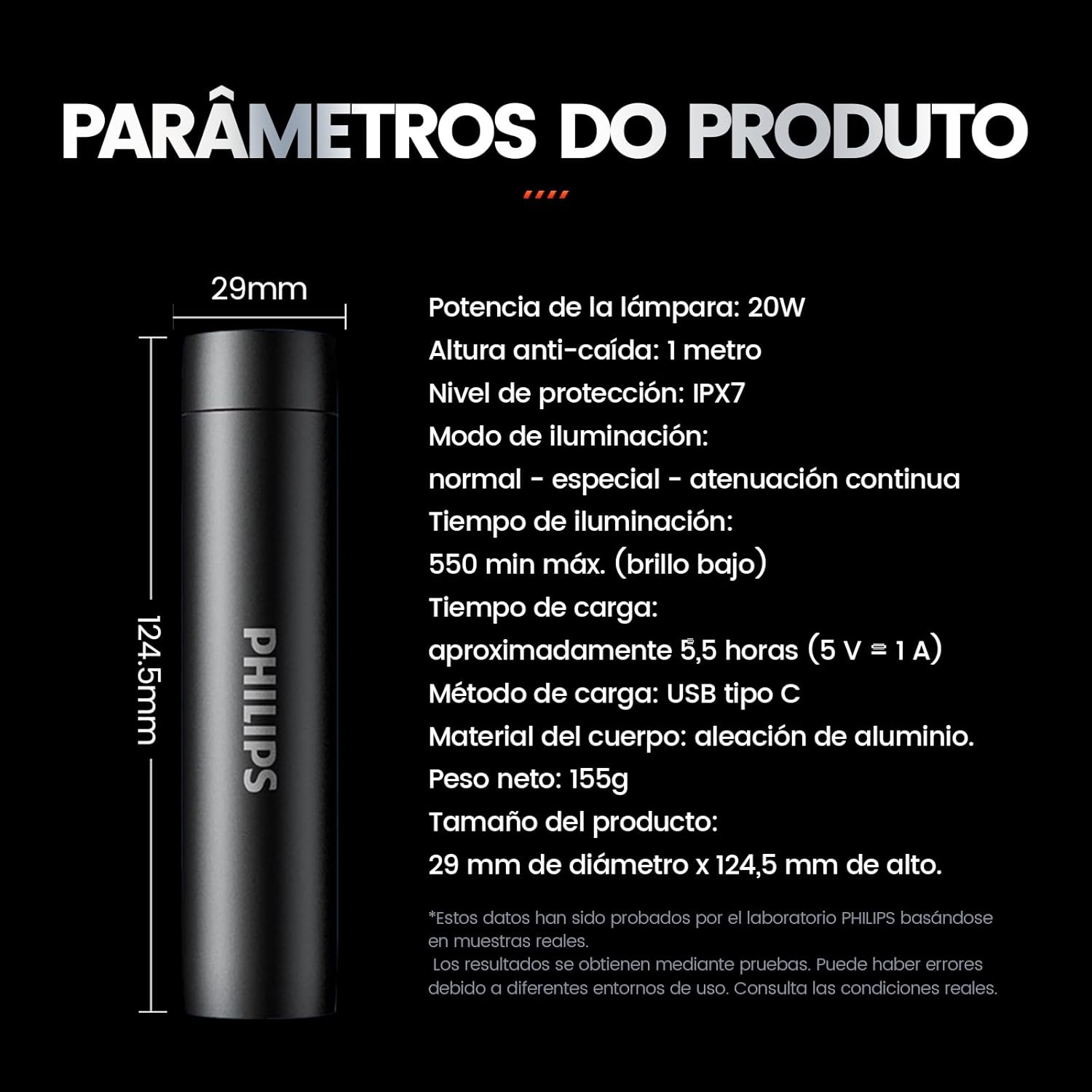
A diagram detailing the product parameters of the Philips SFL2202 flashlight, including its dimensions (29mm diameter x 124.5mm height) and other technical specifications.
| Feature | Specification |
|---|---|
| Brand | Philips |
| Model | SFL2202 |
| Light Source | LED |
| Luminous Flux | 1500 lumens |
| Power | 20W |
| Battery Capacity | 3000 mAh |
| Run Time | Up to 9 hours |
| Charging Time | Approx. 5.5 hours (5V=1A) |
| Charging Port | USB Type-C |
| Material | High-density Aluminum Alloy |
| Waterproof Rating | IPX7 |
| Drop Resistance | 1 meter |
| Dimensions | 29 mm (diameter) x 124.5 mm (height) |
| Weight | 155 g |
| Included Components | USB Cable |
10. Warranty and Support
For warranty information and customer support, please refer to the warranty card included with your product or visit the official Philips website. Keep your purchase receipt as proof of purchase for any warranty claims.
If you encounter any issues not covered in this manual, please contact Philips customer service for assistance.


