
1. Safety Information
Please read all safety instructions carefully before operating the device. Failure to follow these instructions may result in electric shock, fire, or serious injury.
- Keep the device out of reach of children and pets.
- Use the device only for its intended purpose as described in this manual.
- Do not immerse the device or its power adapter in water or any other liquid.
- Ensure the power supply matches the requirements specified on the device.
- Unplug the device from the power outlet when not in use, before cleaning, or during maintenance.
- Do not insert fingers or foreign objects into the grinding chamber or injection tube while the device is operating.
- Operate the device on a stable, flat, and dry surface.
- Avoid using the device in excessively dusty or humid environments.
- If the device shows any signs of damage, discontinue use immediately and contact customer support.
Legal Disclaimer: Statements regarding dietary supplements have not been evaluated by the FDA and are not intended to diagnose, treat, cure, or prevent any disease or health condition.
2. Product Overview
The COOL KNIGHT Electric Cigarette Rolling Machine is designed for efficient grinding and injection of herbs or tobacco into cigarette tubes or rolling papers. It features a durable design and user-friendly operation.
Key Features:
- High Quality Construction: Made with environmentally friendly materials and high-quality stainless steel for safety and durability.
- Efficient Grinding & Injecting: Designed for high-efficiency grinding and injecting, saving time and effort.
- Adjustable Density: Rotary button allows adjustment of injection density.
- Easy Filtering: Includes a scraper and filter screen for filtering fine powders.
- Versatile Tube Sizes: Equipped with two different sizes of injection tubes.
- Stable Operation: Features 6 non-slip pads for comfort and stability during use.
Package Contents:
- 1x Electric Cigarette Rolling Machine
- 1x Power Adapter
- 1x Filter Screen
- 1x Cleaning Brush
- 1x Tube Probe
- 1x Scraper
- 1x Cone Loader
- 1x Screwdriver

Figure 2.1: The COOL KNIGHT Electric Cigarette Rolling Machine with its various components and accessories.
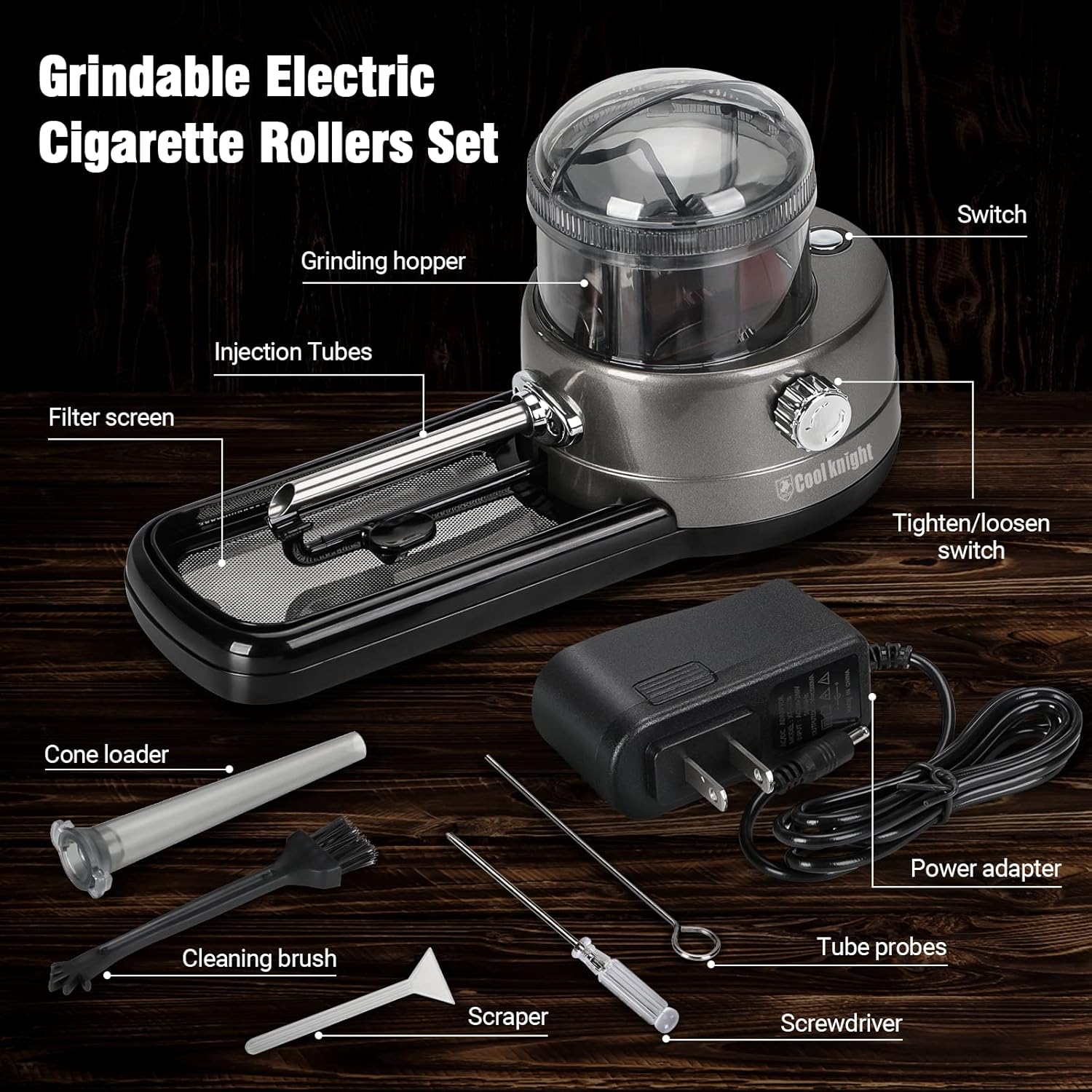
Figure 2.2: Detailed view of the Electric Cigarette Rollers Set, highlighting the grinding hopper, injection tubes, filter screen, power adapter, cleaning brush, tube probes, scraper, cone loader, and screwdriver.
3. Setup
3.1 Unpacking and Inspection
- Carefully remove all components from the packaging.
- Inspect the machine and accessories for any signs of damage. If any damage is found, do not use the device and contact customer support.
- Ensure all listed package contents are present.
3.2 Initial Preparation
- Place the machine on a stable, flat, and dry surface.
- Ensure the area around the machine is clear of obstructions and flammable materials.
- Connect the power adapter to the machine's power input port and then plug it into a suitable electrical outlet. The switch lights up with a blue light when connected.

Figure 3.1: Product dimensions for proper placement. The machine is approximately 8.5 inches long, 3.9 inches wide, and 4.8 inches high.
4. Operating Instructions
4.1 Basic Operation
- Prepare Material: Place the tobacco or herb to be injected into the grinding hopper. Do not overfill; the tobacco should be loose and fluffy. Avoid putting hard objects into the hopper, as this may damage the blade.
- Insert Tube: Insert an empty cigarette paper tube into the nozzle. The machine supports 0.8mm or 0.65mm injection tubes.
- Start Production: Press the start switch to begin the grinding and injecting process.
- Completion: The filled cigarette will fall off automatically after injection is completed. The process can be paused by pressing the switch again.

Figure 4.1: Visual guide for operating the machine, showing material loading, tube insertion, starting the machine, and finished product.
4.2 Adjusting Injection Density
The rotary button on the side of the machine allows you to adjust the injection density. Turn the button towards "Tight" for a denser fill or towards "Loose" for a looser fill, according to your preference.

Figure 4.2: The cone loader accessory can be used for injecting material into pre-rolled papers.
5. Maintenance and Cleaning
Regular cleaning ensures optimal performance and extends the lifespan of your machine. Always unplug the device before cleaning.
5.1 Cleaning the Grinding Chamber
- After each use, remove any remaining material from the grinding hopper.
- Use the provided cleaning brush to sweep out loose particles from the chamber.
- For stubborn residue, use the cleaning probe carefully to dislodge material.
5.2 Cleaning the Filter Screen and Tray
- The machine includes a filter screen and a removable tray to collect fine powders.
- Carefully remove the tray and screen. Use the scraper to clear any accumulated material.
- The filter screen helps to filter out fine powders, ensuring a cleaner product.
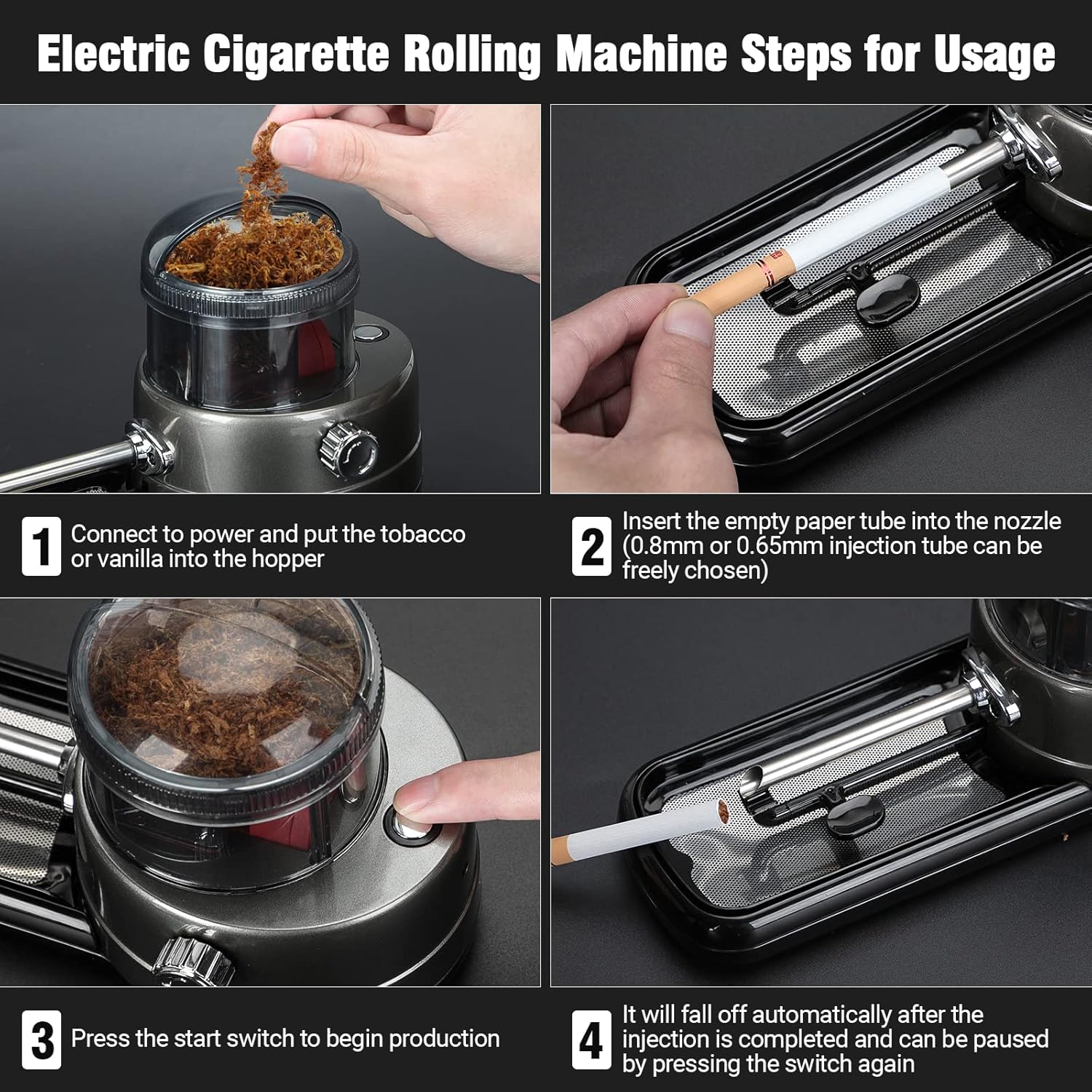
Figure 5.1: The removable tray with filter screen and scraper for easy cleaning and filtering of fine powders.
6. Troubleshooting
If you encounter issues with your COOL KNIGHT Electric Cigarette Rolling Machine, refer to the table below for common problems and their solutions.
| Problem | Possible Cause | Solution |
|---|---|---|
| Machine does not turn on. | Not plugged in; power outlet issue; damaged power adapter. | Ensure power adapter is securely plugged into both the machine and a working outlet. Try a different outlet. If problem persists, contact support. |
| Material not grinding or injecting properly. | Hopper overfilled; material too wet/dry; foreign object in chamber; blade obstruction. | Do not overfill the hopper. Ensure material is dry and loose. Unplug and carefully check for obstructions in the grinding chamber and injection tube using the probe. |
| Cigarette tube not filling completely or too loosely/tightly. | Incorrect density setting; material consistency. | Adjust the rotary density button. Ensure material is consistent and not too coarse or fine. |
| Machine stops during operation (red light). | Material jam; overheating. | If a red light appears, it indicates a potential jam. Wait a few seconds for the machine to reset. If it persists, unplug, clear any jams, and allow to cool before restarting. |
7. Specifications
| Feature | Detail |
|---|---|
| Product Dimensions | 10.16 x 8.9 x 4.17 inches |
| Item Weight | 1.41 Pounds |
| Manufacturer | COOL KNIGHT |
| ASIN | B0DSVVXFJS |
| Compatible Tube Sizes | 0.8mm, 0.65mm (injection tubes) |
8. Warranty and Support
COOL KNIGHT is committed to providing high-quality products and excellent customer service.
If you are dissatisfied with your product for any reason or encounter any trouble during use, please contact us in time. We are dedicated to providing you with the best solution.
For support, please refer to the contact information provided with your purchase or visit the official COOL KNIGHT store on Amazon: COOL KNIGHT Store.