
Miady M2259Q
Miady 5000mAh Magnetic Power Bank User Manual
Model: M2259Q
Product Overview
The Miady 5000mAh Magnetic Power Bank is a versatile portable charger designed for convenience and functionality. It features MagSafe compatibility for wireless charging, a built-in Bluetooth tracker that works with Apple Find My, a secure card holder, and both wireless and wired charging capabilities.

An overview of the Miady 5000mAh Magnetic Power Bank, showcasing its key features including the built-in Bluetooth tracker, strong magnetic attachment, wireless charging, and foldable stand.
What's in the Box
- Magnetic Portable Charger 5000mAh x 1
- Charging cable x 1
Key Features
- Built-in Air Tracker Tag: Features a Bluetooth tracker that works with Apple Find My. Pair it like an AirTag to locate your power bank and other essentials via the Find My app.
- Integrated Card Holder: The back includes a secure card holder designed to fit up to two bank cards, allowing easy access when attached to your iPhone.
- Wireless Charging (Up to 15W): Supports 5W, 7.5W, 10W, and 15W wireless charging. Compatible with iPhone 16, 15, 14, 13, and 12 series, with a strong magnetic connection.
- Wired Charging (20W): Equipped with a 5,000 mAh capacity, it also supports wired charging up to 20W via USB-C.
- Battery Indicator Lights: Five white indicator lights, each representing 25% of the battery life. A green light indicates wireless charging is active.
- Foldable Stand: Integrated stand for convenient viewing while charging wirelessly.
Setup and Initial Use
Charging the Power Bank
Before first use, fully charge your Miady Power Bank using the provided USB-C cable and a compatible power adapter (not included). The indicator lights will show charging progress.

The power bank supports pass-through charging, allowing it to charge itself and a device simultaneously.
Pairing with Apple Find My
To utilize the built-in Air Tracker Tag feature, follow these steps to pair your power bank with the Apple Find My app:
- Power On: Press and hold the "On/Off" button of your power bank for about 2 seconds until you hear a "beep." This indicates the device is now on.
- Connect to the "Find My" App:
- Ensure Bluetooth is enabled on your iPhone and you have an internet connection.
- Open the "Find My" app on your iPhone.
- Tap the "Devices" tab.
- Tap the "+" icon.
- Select "Add Other Item."
- When "Huthtur tag" appears, tap "Connect."
- Add a name for your power bank, then tap "Continue."
- Choose an emoji for your power bank, then tap "Continue."
- Tap "Agree" to complete the connection.

Visual guide for pairing the power bank with the Apple Find My application.
Operating Instructions
Wireless Charging
Align your MagSafe-compatible iPhone (iPhone 12 series and newer) with the magnetic charging pad on the power bank. The strong magnets will securely attach the phone, and wireless charging will begin automatically. The green indicator light will illuminate.
Tip: For optimal wireless charging, ensure your phone has a MagSafe or magnetic case. Non-original magnetic cases may cause increased heat during charging. It is normal for the charger to generate some heat during magnetic charging.

Demonstration of the strong magnetic connection for wireless charging, emphasizing the need for MagSafe or magnetic cases.

Illustration of both wireless and wired charging methods supported by the power bank.
Wired Charging
Connect your device to the power bank's USB-C port using a compatible charging cable. The power bank supports up to 20W wired charging for fast power delivery.
Using the Card Holder
The integrated card holder on the back of the power bank can securely hold up to two standard bank cards. Use the thumb slot for easy insertion and removal of cards.
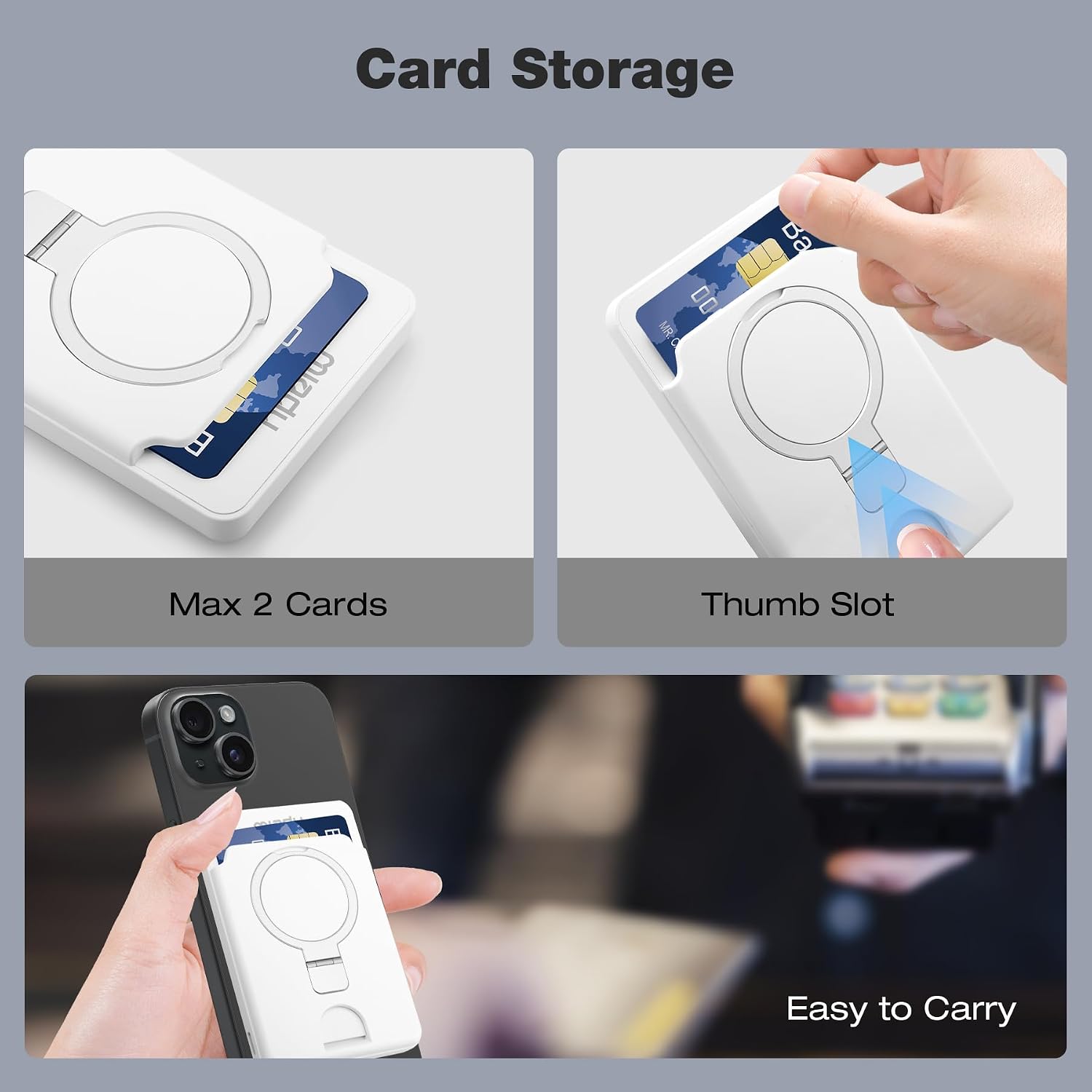
Details on the card storage capacity and ease of use with the thumb slot.
Using the Foldable Stand
The power bank features a foldable ring stand. Pull out the ring to prop up your iPhone horizontally or vertically for hands-free viewing while charging.

The power bank attached to an iPhone, demonstrating the use of the foldable ring stand and the Find My app interface.
Battery Indicator Lights
The power bank is equipped with five white LED indicator lights to show the remaining battery level. Each light represents approximately 25% of the battery capacity.
- 5 Lights: 75%-100% charged
- 4 Lights: 50%-75% charged
- 3 Lights: 25%-50% charged
- 2 Lights: 0%-25% charged
- Green Light: Indicates active wireless charging.

Explanation of the power bank's battery level indicators.
Compatibility
- Wireless Charging: iPhone 16, 15, 14, 13, and 12 series.
- Wired Charging: iPhone 16/15/14/13/12 Series, iPad Air/Pro Series, Galaxy S24 Ultra/S24/S24+, AirPods, and other USB-C compatible devices.
Visual representation of the wide range of devices compatible with the power bank's wireless and wired charging.
Specifications
| Model Number | M2259Q |
| Battery Capacity | 5000mAh |
| Wireless Charging Output | 5W / 7.5W / 10W / 15W |
| Wired Charging Output | 20W (USB-C) |
| Dimensions (L x W x H) | 4.01 x 2.69 x 0.62 inches |
| Item Weight | 5 ounces |
| Special Features | Over Charging Protection, Wireless Charging Compatible, Built-in Bluetooth Tracker, Card Holder, Foldable Stand |
Troubleshooting
- Power Bank Not Charging:
Ensure the charging cable is securely connected to both the power bank and the power adapter. Try a different cable or adapter. Check if the power outlet is functional.
- Phone Not Wirelessly Charging:
Verify your phone is MagSafe compatible (iPhone 12 series or newer). Ensure the phone is properly aligned with the magnetic charging pad. Remove any thick or non-magnetic cases. It's normal for some heat to be generated during wireless charging.
- Find My Feature Not Working:
Ensure the power bank is powered on (press and hold the button for 2 seconds until it beeps). Check that Bluetooth is enabled on your iPhone and you have an internet connection. Try unpairing and re-pairing the device in the Find My app. If the device does not "beep" when attempting to connect, it may indicate an issue with the tracker.
- Cards Difficult to Remove from Holder:
The card holder is designed for a snug fit to secure cards. Use the designated thumb slot to push cards out. Avoid overfilling the holder (maximum 2 cards).
Maintenance and Safety Information
- Keep the power bank away from water, moisture, and extreme temperatures.
- Do not disassemble, puncture, or modify the device.
- Avoid dropping or subjecting the power bank to strong impacts.
- Clean the device with a soft, dry cloth. Do not use harsh chemicals or abrasive materials.
- Store in a cool, dry place when not in use.
- Dispose of the power bank responsibly according to local regulations for electronic waste.
Warranty and Support
For warranty information or technical support, please refer to the official Miady website or contact Miady customer service directly. Contact details can typically be found on the product packaging or the manufacturer's website.
Manufacturer: Miady
Country of Origin: China
Related documentsM2259Q

Ask a question about this manual
Ask about setup, troubleshooting, compatibility, parts, safety, or missing instructions. Manuals+ will review the question and use this page’s manual context to help answer it.