1. Introduction
The LUVUOKYE Wireless Indoor Outdoor Weather Station provides comprehensive environmental monitoring with a vivid full-color display. This manual guides you through the setup, operation, and maintenance of your device to ensure accurate and reliable weather information.
Key features include indoor and outdoor temperature and humidity tracking, a 12-24 hour weather forecast, atomic clock with DST function, moon phase display, and customizable alarms.
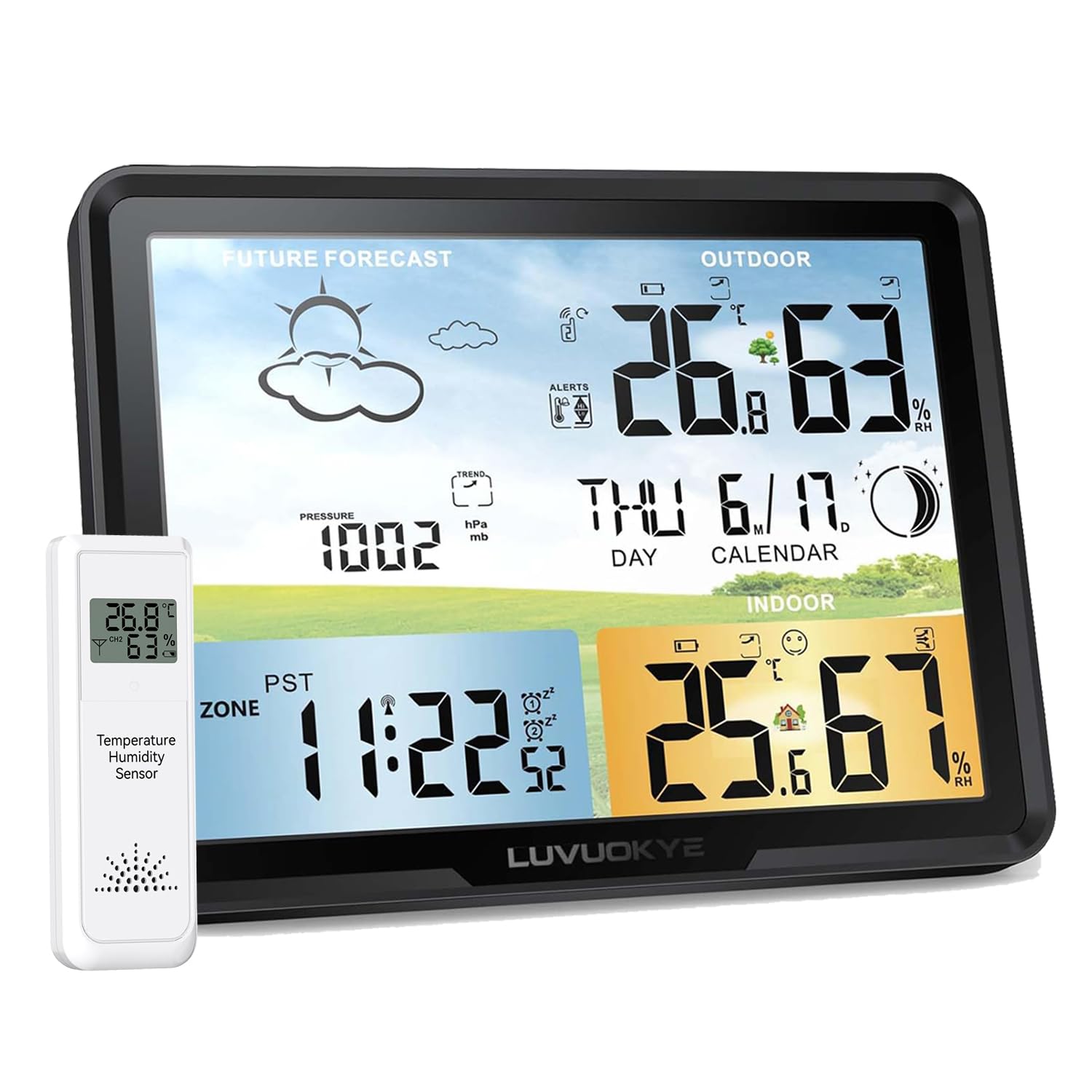
Figure 1: LUVUOKYE Weather Station main unit and remote sensor.
2. What's in the Box
- Weather Station Main Unit
- Remote Sensor (1 included, supports up to 3)
- Power Adapter
- User Manual
- Quick Guide

Figure 2: All components included in the package.
3. Product Overview
The weather station features a large, full-color LCD display designed for clear readability. The display is organized into several sections, providing quick access to all essential information.

Figure 3: Labeled sections of the main display for easy reference.
Display Sections:
- Future Forecast: Displays weather icons (sunny, partly cloudy, cloudy, rainy, thundershower, snowy, heavy snow) for the next 12-24 hours based on barometric pressure trends.
- Outdoor Temperature & Humidity: Shows current readings from the remote sensor.
- Barometric Pressure: Indicates local air pressure and its trend.
- Time & Date: Displays current time (with selectable 12/24-hour format) and date, synchronized by the atomic clock.
- Indoor Temperature & Humidity: Shows current readings from the main unit. Includes a comfort indicator (smiley face icon).
- Moon Phase: Illustrates the current lunar phase.
Back Panel Controls:
The back of the main unit features several buttons for configuration and a foldable kickstand for desktop placement, along with a hanging hole for wall mounting.
Video 1: Overview of the weather station's back panel and controls.
- SET Button: Used to enter and confirm settings.
- UP/RF & DOWN/MEM Buttons: Used to adjust values and navigate menus. The RF button also initiates remote sensor signal reception.
- HI/DP Button: Displays maximum/minimum temperature/humidity and dew point.
- ALARM Button: Activates/deactivates and sets alarms.
- ALERT Button: Sets temperature alerts.
- SNOOZE/LIGHT Button (Top): Activates snooze for alarms and adjusts backlight brightness.
4. Setup
4.1 Powering the Unit:
The weather station offers dual power options: AC adapter or 3 x AAA batteries (not included). For continuous display and to prevent data loss during power outages, it is recommended to use both power sources.
- AC Adapter: Plug the provided power adapter into the DC 5V port on the back of the main unit and into a wall outlet. The display will remain on with adjustable brightness.
- Batteries: Insert 3 x AAA batteries into the battery compartment on the back of the main unit. On battery power, the backlight activates with one touch and turns off after 10 seconds to conserve energy.

Figure 4: Powering the main unit with AC adapter or batteries.
4.2 Remote Sensor Setup:
The remote sensor requires 2 x AAA batteries (not included). Once batteries are inserted, the sensor will automatically transmit temperature and humidity data to the main unit.
Video 2: Detailed setup and feature explanation.
4.3 Initial Time and Date Setting:
Upon first power-on, the unit will attempt to receive WWVB atomic clock signals for automatic time synchronization. If successful, the time and date will set automatically. If not, or if you prefer manual setting:
- Press and hold the SET button for 2 seconds to enter time setting mode.
- Use the UP/RF and DOWN/MEM buttons to adjust the flashing value (e.g., year, month, day, hour, minute).
- Press SET to confirm each setting and move to the next.
- Select your time zone (PST, MST, CST, EST) and enable/disable Daylight Saving Time (DST) if applicable.

Figure 5: Atomic clock with WWVB functionality for automatic time synchronization.
4.4 Weather Forecast Calibration:
The weather station requires 7-10 days to calibrate its barometric pressure sensor for accurate local weather forecasts. Ensure the correct local pressure is set during initial setup.
5. Operating Instructions
5.1 Displaying Outdoor Readings:
The main unit automatically receives data from the remote sensor. If you have multiple sensors, press the UP/RF button to cycle through channels (CH1, CH2, CH3).

Figure 6: Monitoring temperature and humidity from multiple remote sensors.
5.2 Setting Alarms:
The device supports customizable alarms.
- Press and hold the ALARM button to enter alarm setting mode.
- Use UP/RF and DOWN/MEM to set the desired alarm time.
- Press ALARM to confirm.
- To activate/deactivate an alarm, short press the ALARM button.
5.3 Backlight Adjustment:
When powered by the AC adapter, short press the SNOOZE/LIGHT button on top to cycle through different brightness levels. On battery power, a short press will activate the backlight for 10 seconds.
5.4 Comfort Indicator & Heat Index:
The indoor section displays a comfort indicator (smiley face) based on temperature and humidity levels. The manual also provides a heat index chart to understand potential risks at higher temperatures.
6. Remote Sensor Placement
For accurate outdoor readings, place the remote sensor in a shaded, dry location, protected from direct sunlight and rain. Avoid placing it near heat sources or large metal objects that could interfere with the signal.
The sensor has a hanging hole for easy mounting. The wireless range is up to 60 meters (200 feet) in open air.
7. Maintenance
- Cleaning: Wipe the unit and sensor with a soft, damp cloth. Do not use abrasive cleaners or solvents.
- Battery Replacement: Replace batteries in both the main unit and remote sensor when the low battery indicator appears on the display.
- Storage: If storing the unit for an extended period, remove all batteries.
8. Troubleshooting
- No Outdoor Reading: Ensure the remote sensor batteries are correctly installed and the sensor is within range of the main unit. Press the UP/RF button on the main unit to force a signal search.
- Inaccurate Forecast: Allow 7-10 days for the barometric pressure to calibrate. Ensure the correct local pressure is set.
- Time Not Synchronizing: Check your time zone and DST settings. Ensure the unit is in an area with good WWVB signal reception.
- Display Too Dim: Ensure the AC adapter is plugged in for continuous bright display. Adjust brightness with the SNOOZE/LIGHT button.
9. Specifications
| Feature | Detail |
|---|---|
| Package Dimensions | 8.03 x 5.98 x 3.11 inches; 1.17 Pounds |
| Date First Available | November 4, 2025 |
| Manufacturer | LUVUOKYE |
| ASIN | B0FZKF95LX |
| Brand | LUVUOKYE |
| Recommended Uses For Product | Home |
| Specific Uses For Product | Humidity, Temperature |
| Power Source | AC, DC (Adapter or Batteries) |
| Special Feature | Temperature and humidity monitor |
| Material | Plastic |
| Connectivity Technology | Wireless |
| Style | Contemporary |
| Color | Jet Black |
| Included Components | Weather station, remote sensor, power adapter, user manual, quick guide |
10. Warranty and Support
For warranty information or technical support, please refer to the contact details provided on the product packaging or visit the official LUVUOKYE website. Keep your purchase receipt for warranty claims.