Important Safety Instructions
Please read all instructions carefully before using the AJKJ Handheld Vacuum Sealer. Retain this manual for future reference.
- Do not immerse the device in water or other liquids.
- Keep the device away from heat sources and direct sunlight.
- This appliance is not intended for use by persons (including children) with reduced physical, sensory or mental capabilities, or lack of experience and knowledge, unless they have been given supervision or instruction concerning use of the appliance by a person responsible for their safety.
- Ensure the charging cable is not damaged before use. Use only the provided USB-C charging cable.
- Do not attempt to open or repair the device yourself. Contact qualified service personnel for any repairs.
- The vacuum bags are reusable but must be cleaned thoroughly between uses to prevent bacterial growth.
- Do not vacuum seal liquids without proper precautions to prevent suction of liquid into the device.
Package Contents
Verify that all items are present in your package:
- 1 x Handheld Vacuum Sealer
- 15 x Seal Bags (5 Small, 5 Medium, 5 Large)
- 4 x Sealing Clips
- 1 x USB-C Charging Cable
- 2 x Inflatable Tools
- 1 x Storage Bag
- 1 x Instruction Manual (this document)

Image: Overview of the AJKJ Handheld Vacuum Sealer package contents, showing the main unit, different sizes of vacuum bags, sealing clips, USB-C charging cable, two inflatable tools, and a grey storage bag.
Product Overview
The AJKJ Handheld Vacuum Sealer is a compact, battery-powered device designed to extend the freshness of food and save storage space. Its multi-functional design also includes inflation capabilities and a built-in flashlight.
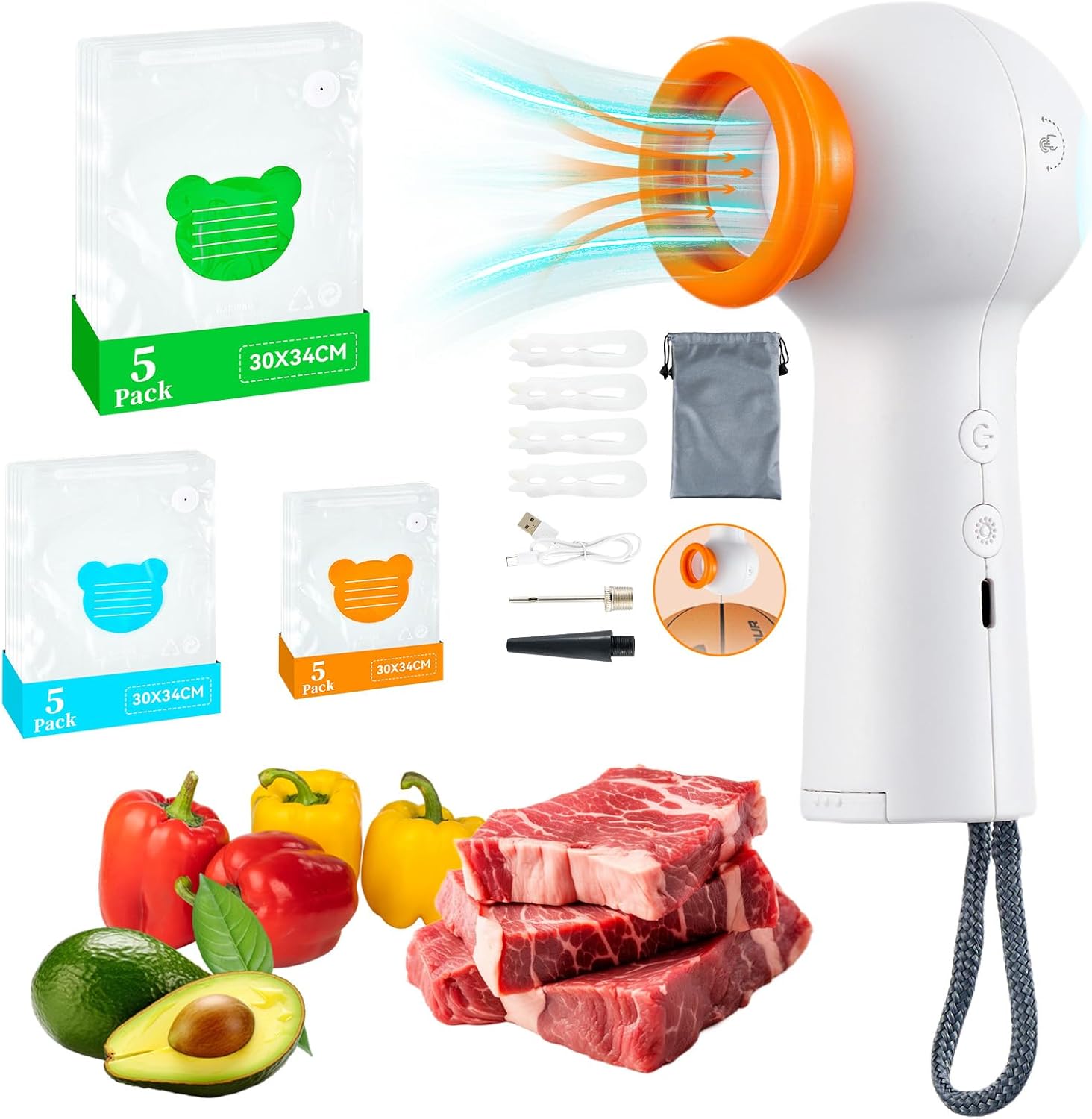
Image: The AJKJ Handheld Vacuum Sealer shown with its accompanying vacuum bags and examples of food items (meat, vegetables) that can be sealed, highlighting its application in food preservation.
Key Features
- Powerful Suction: Achieves -60kPa suction for efficient air removal.
- Long-lasting Battery: Equipped with a 1200mAh rechargeable lithium battery.
- Lightweight and Portable: Weighs approximately 360g, making it easy to handle and store.
- Multi-functional: Functions as a vacuum sealer, an inflator for various items, and a flashlight.
- Reusable Bags: BPA-free bags with double zipper and upgraded air valve for secure sealing.
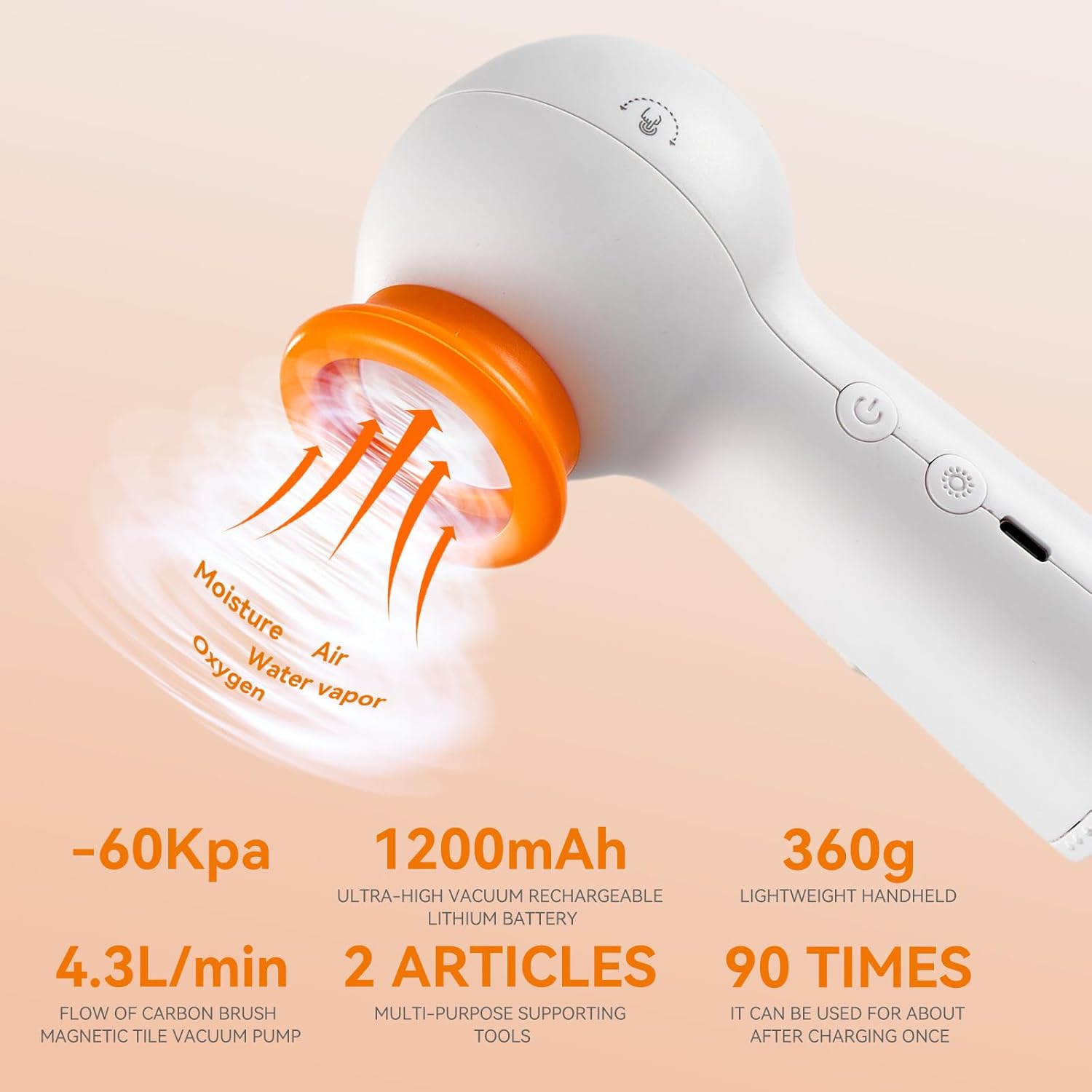
Image: A visual representation of the vacuum sealer's performance metrics, such as suction power, battery capacity, and weight, emphasizing its efficiency in removing air and moisture.

Image: This image highlights the versatile 4-in-1 functionality of the device, demonstrating its use for vacuum sealing bags, as a flashlight, and for inflating both basketballs and balloons.

Image: A comparison showing the visual difference between vacuum-sealed and non-vacuum-sealed food, using a salmon fillet as an example to demonstrate how vacuum sealing helps maintain freshness.
Setup
Charging the Device
Before first use, fully charge the vacuum sealer. Connect the provided USB-C charging cable to the charging port on the device and plug the other end into a compatible USB power source (e.g., wall adapter, computer USB port).
- The indicator light will be red while charging.
- The indicator light will turn green when fully charged.
- If the light is blinking green when you power it on, it indicates a low battery and needs to be charged.
Preparing the Vacuum Bags
The included vacuum bags are reusable and designed for optimal performance with the AJKJ Handheld Vacuum Sealer. Ensure bags are clean and dry before use.

Image: Detailed view of the vacuum bag's features, including the double zipper for secure closure, the air valve for vacuuming, and the BPA-free material, along with a note about brightly colored patterns for categorization.
Operating Instructions
Vacuum Sealing Food
Follow these steps to vacuum seal your food items:
- Prepare the Bag: Place the food item into a suitable size vacuum bag. Ensure the contents do not obstruct the air valve or the zipper area.
- Seal the Zipper: Use the provided sealing clip to firmly close the double zipper of the bag. Run the clip across the zipper multiple times to ensure a complete and airtight seal.
- Position the Sealer: Lay the bag flat on a stable, flat surface. Place the suction nozzle of the handheld vacuum sealer directly over the air valve on the bag. Ensure a tight fit.
- Start Vacuuming: Press the power button on the sealer to begin the vacuuming process. The device will start to remove air from the bag.
- Monitor and Stop: Observe the bag as it deflates. Once the desired vacuum level is achieved (the bag is tightly sealed around the food), press the power button again to stop the device.

Image: A step-by-step visual guide on operating the vacuum sealer, from placing food in the bag and sealing it with the clip, to initiating and stopping the vacuuming process with the device.
Using the Inflation Function
The vacuum sealer can also be used to inflate items such as basketballs or balloons:
- Attach Tool: Locate the compartment at the bottom of the vacuum sealer. Select the appropriate inflatable tool (needle for balls, nozzle for balloons) and screw it firmly into the top opening of the sealer.
- Connect to Item: Insert the inflatable tool into the valve of the item you wish to inflate.
- Start Inflation: Press the power button to activate the inflation function.
- Monitor and Stop: Inflate the item to the desired firmness, then press the power button again to stop.
Using the Flashlight Function
The device includes a built-in flashlight with multiple settings:
- Press the dedicated light button once for a bright solid light.
- Press the light button a second time for a dim solid light.
- Press the light button a third time for a flashing light (emergency signal).
- Press the light button a fourth time to turn the flashlight off.
Maintenance and Care
Cleaning the Vacuum Sealer
- Ensure the device is turned off and unplugged before cleaning.
- Wipe the exterior of the sealer with a soft, damp cloth. Do not use abrasive cleaners or immerse the device in water.
- Clean the suction nozzle regularly to prevent food residue buildup.
Cleaning and Reusing Vacuum Bags
- The vacuum bags are washable and reusable.
- Wash bags with warm soapy water and rinse thoroughly.
- Ensure bags are completely dry before storing or reusing to prevent mold or bacterial growth.
- Do not use sharp objects inside the bags that could puncture them.
Storage
Store the vacuum sealer and its accessories in the provided storage bag in a cool, dry place, away from direct sunlight and extreme temperatures.
Troubleshooting
| Problem | Possible Cause | Solution |
|---|---|---|
| Device not turning on. | Battery is low or depleted. | Charge the device fully using the USB-C cable. |
| Bag is not vacuuming properly. | Bag zipper is not fully sealed. | Ensure the double zipper is completely closed using the sealing clip. |
| Air valve is obstructed or not flat. | Ensure no food items are blocking the air valve. Lay the bag flat on a hard surface. | |
| Suction nozzle not properly aligned with valve. | Press the suction nozzle firmly and directly onto the air valve. | |
| Bag loses vacuum after sealing. | Small puncture or tear in the bag. | Inspect the bag for damage. Use a new bag if necessary. |
| Food residue on the zipper or valve. | Clean the zipper and valve area thoroughly before sealing. |
Specifications
| Feature | Detail |
|---|---|
| Brand | AJKJ |
| Model Number | DL-03 |
| Product Dimensions | 2.36"L x 3.15"W x 5.71"H |
| Item Weight | 1.39 pounds |
| Power Source | Battery Powered (1 Lithium Ion battery included) |
| Operation Mode | Automatic |
| Suction Power | -60 kPa |
| Bag Temperature Range | -24°C to 100°C |
Warranty and Support
For information regarding warranty coverage, product support, or to purchase replacement parts and accessories, please contact AJKJ customer service. Refer to the product packaging or the official AJKJ website for contact details.
Always ensure you are using official AJKJ replacement bags and accessories to maintain optimal performance and device longevity.


