
Overview
The Voistek Computer Headphones VS-HSM-VS881FUSB-3.5 are designed to provide clear audio and communication for various applications. Featuring 40mm drivers for enhanced sound quality and a noise-canceling microphone, this wired headset ensures clear voice transmission by filtering out background noise. Its lightweight design with soft memory foam ear pads and an adjustable headband offers all-day comfort. The headset provides versatile connectivity options including 3.5mm, USB, and USB-C, along with convenient in-line controls for volume and muting.
Package Contents
- Voistek Computer Headphones VS-HSM-VS881FUSB-3.5
- 1* 3.5mm to USB Adapter
- 1* USB to USB-C Adapter
- User Manual
Product Features
Enhanced Sound Quality

Image: Voistek headset with internal components visible, highlighting 40mm speakers for enhanced audio.
Experience crisp, clear audio with 40mm drivers, ideal for virtual meetings, webinars, music streaming, and online learning. The headset features high signal-to-noise ratio speakers and an independent cavity design, along with acoustic shock protection.
Noise-Canceling Microphone

Image: Woman wearing Voistek headset with AI noise-canceling microphone, showing sound wave filtering.
The flexible microphone arm can be adjusted to the optimal position, offering 99.7% background noise cancellation for clear voice quality in noisy environments. Enhanced digital signal processing technology reduces background noise and picks up clear voice.
All-Day Comfort

Image: Woman wearing Voistek headset, illustrating lightweight design, memory foam ear pads, and adjustable headband for 24-hour comfort.
Soft memory foam ear pads and an adjustable headband ensure comfort during extended use for calls, gaming, or work. The ultra-light and ergonomic design, along with premium soft leather and breathable ear pads, minimize discomfort.
Easy Controls

Image: Close-up of the in-line control unit with buttons for mic mute, volume up/down, and horn mute, alongside headset adjustment features.
Convenient in-line controls allow for mic mute, speaker mute, and volume adjustments. The 5+4 feet cable provides flexibility, letting you manage calls without needing to access device settings.
Wide Compatibility
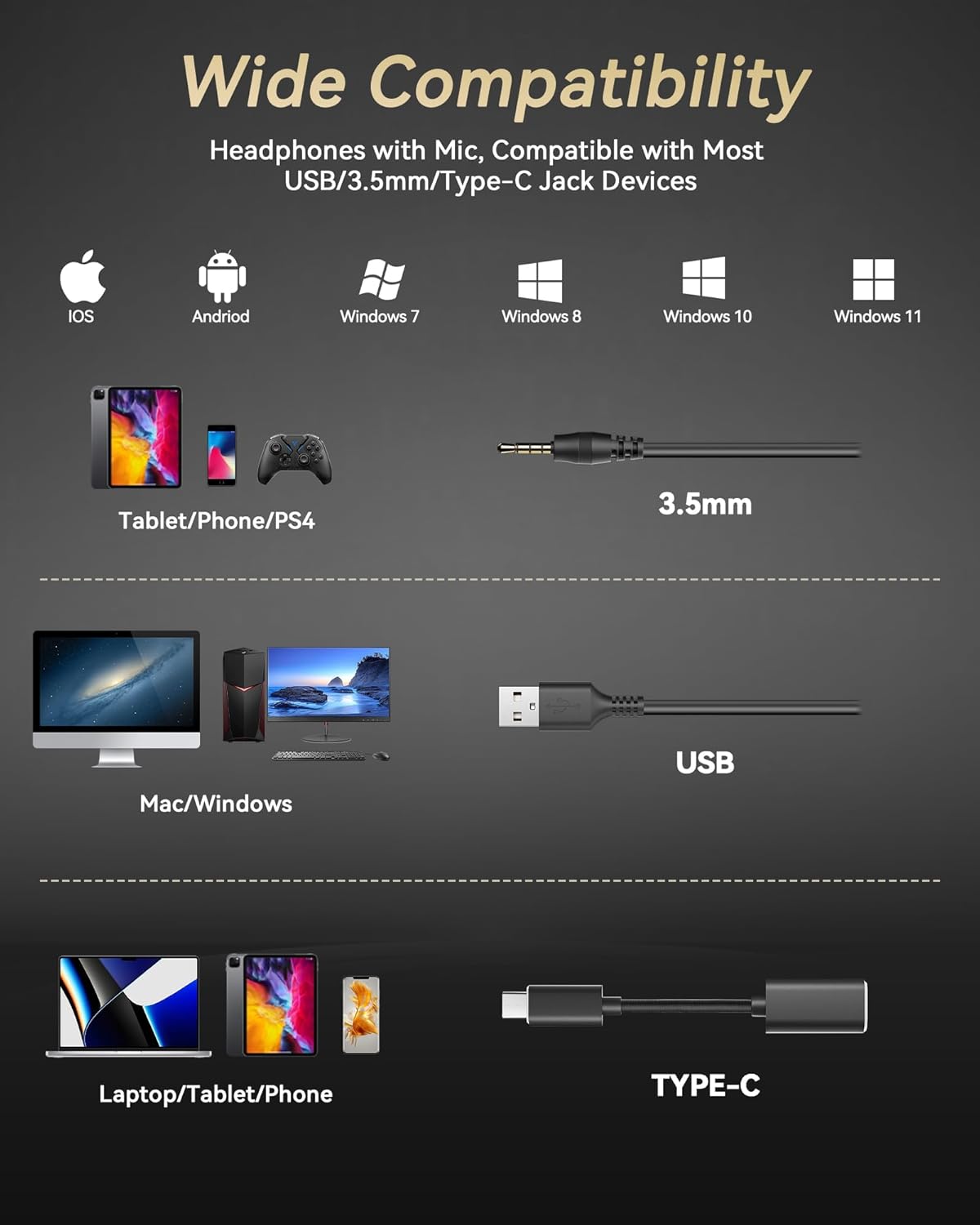
Image: Diagram showing headset compatibility with various devices and connection types: iOS, Android, Windows, Mac, via 3.5mm, USB, and Type-C.
Compatible with 3.5mm jack or USB devices, including PC, tablet, Mac, iOS, laptop, and Android phones. The included adapters ensure broad connectivity for various operating systems and devices.
Product Demonstration (Similar Model)
Video: A seller demonstrates the features and comfort of a similar USB headset with a microphone, highlighting its lightweight design, adjustable headband, and noise-canceling capabilities.
Setup
Connecting the Headset

Image: Diagram illustrating various connection methods for the Voistek headset: 3.5mm jack, USB-A adapter, and USB-C adapter.
- 3.5mm Jack Connection: Plug the 3.5mm jack directly into your device's audio port.
- USB Connection: Attach the 3.5mm jack to the provided 3.5mm to USB Adapter, then plug the USB-A connector into your computer's USB port.
- USB-C Connection: If your device only has USB-C ports, connect the 3.5mm jack to the 3.5mm to USB Adapter, then connect the USB-A end of the adapter to the USB to USB-C Adapter, and finally plug the USB-C Adapter into your device.
Operating Instructions
Adjusting the Microphone

Image: Voistek headset with flexible microphone arm rotating 320 degrees.
The microphone arm is flexible and can be rotated 320 degrees. Adjust it to position the microphone optimally for your voice, or swivel it upwards and out of the way when not needed. This allows for use on either the left or right side.
Using In-Line Controls

Image: Man using Voistek headset with close-up of in-line controls for mic mute, volume, and horn mute.
- Volume Control: Use the '+' and '-' buttons on the in-line control unit to increase or decrease the audio volume.
- Microphone Mute: Press the microphone icon button to mute your microphone. An indicator light will show its status.
- Speaker Mute (Horn Mute): Press the speaker icon button to mute the headset's audio output. An indicator light will show its status.
Maintenance
To ensure the longevity of your Voistek headphones, store them in a clean, dry place when not in use. Avoid exposing the headset to extreme temperatures or direct sunlight. Clean the ear pads and microphone with a soft, damp cloth. Do not use harsh chemicals or abrasive cleaners. Handle the cables gently to prevent tangling and damage.
Troubleshooting
No Sound/Microphone Not Working
- Ensure the headset is securely plugged into the correct port (3.5mm, USB-A, or USB-C adapter).
- Check your device's audio settings to ensure the Voistek headset is selected as the input and output device.
- Verify that the volume is not muted on the in-line controls or your device.
- If using a USB adapter, try plugging it into a different USB port.
Poor Sound Quality
- Ensure the connections are secure.
- Adjust the volume levels on both the headset and your device.
- Test the headset with a different device to rule out device-specific issues.
Discomfort During Use
- Adjust the headband to fit your head comfortably.
- Reposition the ear pads to ensure they sit correctly on your ears.
- Take short breaks during extended use to alleviate pressure.
Specifications
| Noise Control | Hybrid Noise Cancellation |
| Headphones Jack | USB, 3.5 mm, USB-C Jack |
| Model Name | 882FUSB3.5 |
| Connectivity Technology | Wired |
| Material | Acrylonitrile Butadiene Styrene (ABS), Leather, Metal, Plastic |
| Item Weight | 0.44 Pounds |
| Cable Feature | Tangle Free |
| Control Type | Volume Control, Mic Mute, Horn Mute |
| Compatible Devices | Cellphones, Computers, Desktops, Laptops, PC, Tablets, iPhone |
| Manufacturer | Voistek |
| Item Model Number | 881FUSB-3.5 |
| Colour | Black |
| Ear Placement | Over Ear |
| Form Factor | Over Ear |
| Impedance | 32 Ohms |
Warranty & Support
Voistek provides a hassle-free refund or replacement for any defects. For further assistance or warranty claims, please contact Voistek customer support through their official channels. Refer to the included User Manual for detailed contact information.