1. Introduction
This manual provides instructions for the installation, operation, and maintenance of your AWESAFE Android 13 Car Radio Stereo. This unit is designed for specific vehicle models and offers advanced features including Android 13 operating system, wireless CarPlay, Android Auto, GPS navigation, and a backup camera.
1.1 Applicable Car Models
- GMC Yukon: 2007-2013
- Chevrolet Tahoe / Suburban: 2007-2013
Ensure your vehicle's model and year match the compatibility list for proper fit and function.

Image 1.1: AWESAFE Car Radio Stereo installed in a compatible vehicle dashboard, showing the screen displaying a car image. This illustrates the integrated appearance of the unit.
2. Setup and Installation
2.1 Package Contents
Before beginning installation, verify that all components are present in the package:
- AWESAFE Car Radio Stereo Unit
- Power Cable
- RCA Cable
- Microphone
- Rear Camera
- Can Bus Decoder
- Speaker
- USB Cables (x3)
- GPS Module
- Reversing Line
- Antenna Cable
- Crowbar (for trim removal)
- Screwdriver

Image 2.1: Components included in the AWESAFE Car Radio Stereo package, laid out on a surface. These include the main unit, various cables, microphone, rear camera, GPS module, and tools necessary for installation.
2.2 General Installation Guidelines
Installation of the car radio stereo involves removing the factory unit, connecting wiring harnesses, and mounting the new unit. Due to the complexity of automotive electrical systems, professional installation is recommended. Ensure the vehicle's battery is disconnected before starting any electrical work.
- Wiring Connections: Connect the provided power cable, RCA cable, USB cables, and antenna cable to their respective ports on the stereo unit and the vehicle's wiring harness.
- GPS Module: Install the GPS module in a location with a clear view of the sky, typically on the dashboard or under the windshield, to ensure optimal signal reception.
- Microphone: Mount the external microphone in a suitable location for clear voice pickup during calls.
- Rear Camera: Install the backup camera at the rear of the vehicle, ensuring it is securely mounted and wired correctly to the reversing line input on the stereo.
- Can Bus Decoder: Connect the Can Bus decoder as per the wiring diagram to ensure proper communication with the vehicle's systems, including steering wheel controls.
3. Operating Instructions
3.1 Android 13 System
The unit operates on Android 13 with 2GB RAM and 32GB ROM, providing a responsive user experience. Connect to Wi-Fi to access the application store and download various apps.
3.2 Wireless CarPlay & Android Auto
Connect your iPhone or Android phone wirelessly via Bluetooth or using a USB cable to access CarPlay or Android Auto. This allows for integrated use of phone features such as navigation, calls, messages, and music through the stereo's display or voice assistant.

Image 3.1: AWESAFE Car Radio Stereo screen displaying the CarPlay interface with various app icons, and two hands holding smartphones showing CarPlay and Android Auto interfaces. This demonstrates the seamless integration of smartphone features.
3.3 GPS Navigation & Wi-Fi Connectivity
The unit includes a built-in offline map for North America. For online navigation and other internet-dependent features, connect the stereo to a Wi-Fi hotspot. This enables real-time traffic updates and access to online mapping services.

Image 3.2: AWESAFE Car Radio Stereo screen showing GPS navigation with a map and route, and another screen showing YouTube video playback, illustrating Wi-Fi capabilities for online content and navigation.
3.4 Bluetooth Function
Utilize the built-in Bluetooth for hands-free calling and wireless audio streaming. The integrated microphone ensures clear communication during calls, and your car speakers provide audio output.
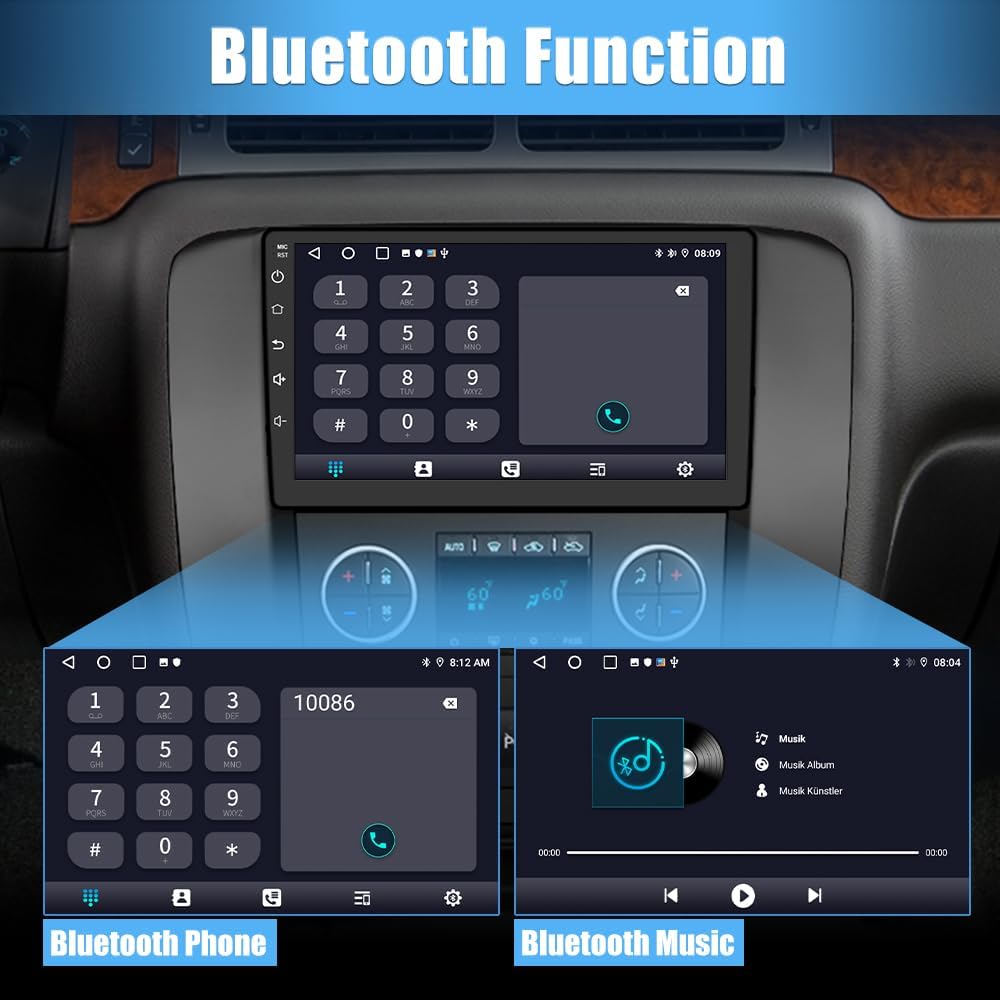
Image 3.3: AWESAFE Car Radio Stereo screen displaying a phone dial pad for Bluetooth calls and a music player interface for Bluetooth audio streaming. This highlights the hands-free communication and entertainment features.
3.5 FM Radio
Access the FM radio function to listen to local radio stations, weather forecasts, and news. The interface allows for easy station tuning and preset management.

Image 3.4: AWESAFE Car Radio Stereo screen showing the FM radio interface with frequency display and station presets. This illustrates the radio tuning and selection options.
3.6 Steering Wheel Control (SWC)
The unit supports your vehicle's original steering wheel controls, allowing for convenient operation of functions such as volume adjustment, track skipping, and mode switching without taking your hands off the wheel.

Image 3.5: AWESAFE Car Radio Stereo screen displaying a menu for configuring steering wheel controls, with an overlay showing a hand interacting with a steering wheel button. This highlights the integration with vehicle controls for safe operation.
3.7 DSP (Digital Signal Processor)
The built-in Digital Signal Processor allows you to customize audio settings and sound effects to your preference, enhancing your listening experience with various music styles.
3.8 Split Screen Function
Utilize the split-screen feature to run two applications simultaneously, such as navigation and music playback, or maps and video, for enhanced multitasking.
3.9 Backup Camera
When the vehicle is shifted into reverse, the unit automatically displays the AHD image from the included backup camera, providing a clear view of the area behind your vehicle for safer parking and maneuvering.
4. Maintenance
To ensure the longevity and optimal performance of your AWESAFE Car Radio Stereo, follow these maintenance guidelines:
- Cleaning: Use a soft, dry cloth to clean the screen and exterior surfaces. Avoid abrasive cleaners or solvents that may damage the finish.
- Software Updates: Periodically check for available software updates through the system settings. Keeping the software updated can improve performance and add new features.
- Environmental Conditions: Avoid exposing the unit to extreme temperatures, direct sunlight for prolonged periods, or excessive moisture.
5. Troubleshooting
If you encounter issues with your car stereo, refer to the following common troubleshooting tips:
- No Power: Check all power connections and fuses. Ensure the vehicle's battery is charged.
- No Sound: Verify speaker connections. Check volume levels and audio settings (e.g., DSP settings). Ensure the mute function is not active.
- GPS Signal Issues: Ensure the GPS module is installed in a location with a clear view of the sky. Check the GPS antenna connection.
- Bluetooth Connectivity Problems: Ensure Bluetooth is enabled on both the stereo and your mobile device. Try unpairing and re-pairing the devices.
- Backup Camera Not Working: Verify the camera's power and video connections. Ensure the reversing line is correctly connected. If the issue persists, contact customer support.
- Steering Wheel Controls Not Responding: Check the Can Bus decoder connection and ensure the steering wheel control settings are correctly configured in the stereo's menu.
For persistent issues or problems not covered here, please contact AWESAFE customer support.
6. Specifications
| Feature | Specification |
|---|---|
| Model Number | AWESAFE-Android13 |
| Operating System | Android 13 |
| RAM | 2GB |
| ROM | 32GB |
| Product Dimensions | 7.5 x 5.6 x 6.8 inches (7.5"D x 5.6"W x 6.8"H) |
| Item Weight | 4.44 pounds |
| Connectivity Technology | Bluetooth, Wi-Fi |
| Controller Type | Android |
| Special Feature | Built-In Bluetooth, GPS Navigation, CarPlay, Android Auto, Backup Camera Support, Steering Wheel Control |
| Compatible Devices | Headphone (for audio output) |
| Connector Type | RCA |
| Audio Output Mode | Stereo |
| Surround Sound Channel Configuration | 2.0 |
| Video Encoding | RM |
7. Warranty and Support
7.1 Warranty Information
Your AWESAFE Car Radio Stereo comes with a 12-month warranty from the date of purchase, covering manufacturing defects. Additionally, a 30-day hassle-free return and exchange policy is offered.
7.2 Customer Support
AWESAFE provides after-sales technical support to assist with installation and operational issues. For assistance, please refer to the contact information provided with your purchase or visit the official AWESAFE website.


