
1. Introduction
This manual provides essential information for the safe operation, assembly, maintenance, and troubleshooting of your Eldryvon EV02A Mobility Scooter. Please read this manual thoroughly before using the scooter to ensure proper function and safety.
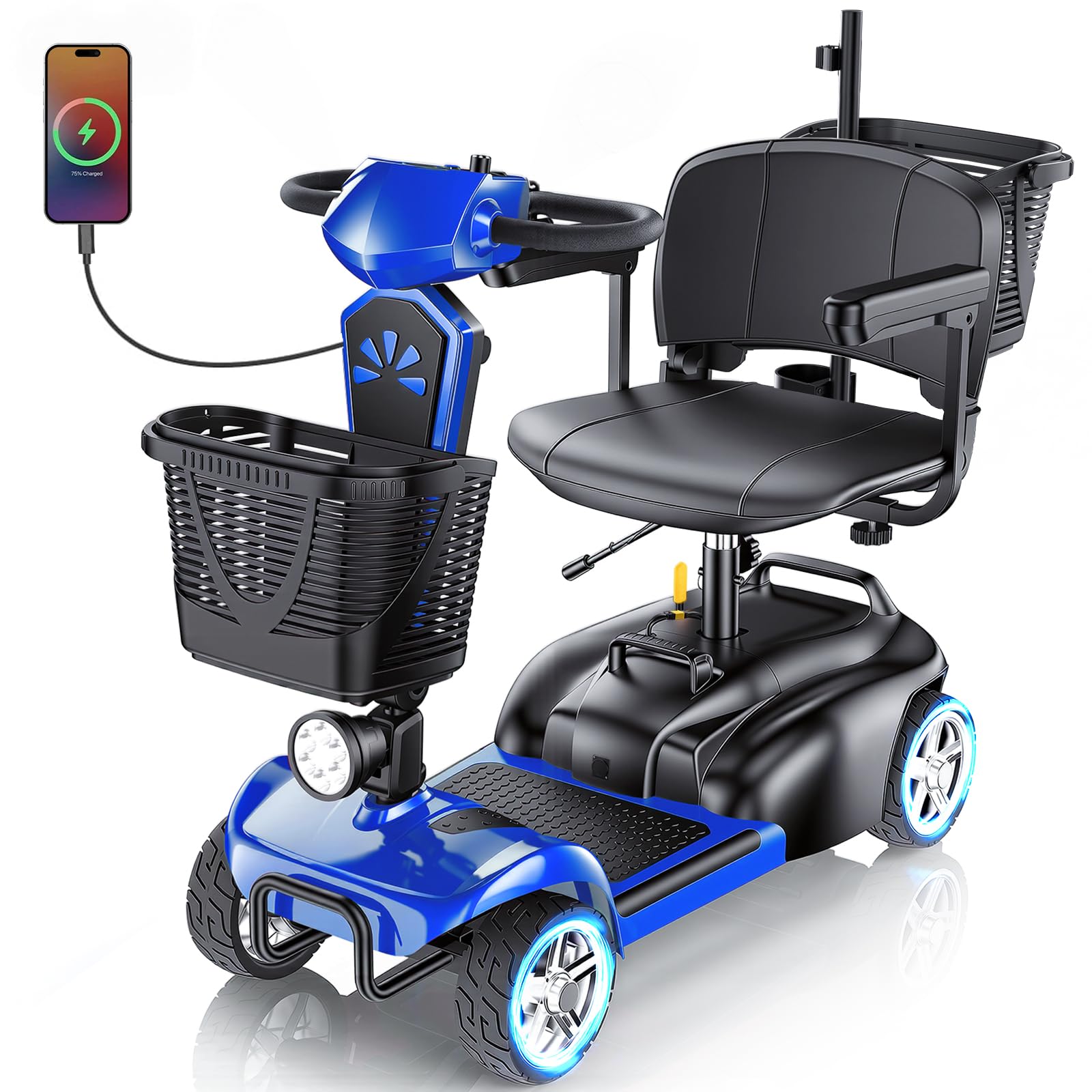
Image: The Eldryvon EV02A Mobility Scooter, showcasing its design and features.
2. Safety Information
Your safety is paramount. Always adhere to the following guidelines:
- Read and understand all instructions before operation.
- Ensure the battery is fully charged before each use.
- Do not exceed the maximum weight capacity of 300 lbs.
- Operate the scooter on stable, level surfaces. Avoid steep inclines beyond 15°.
- Use caution when driving on uneven terrain, gravel, or lawns.
- Always use the front light in low-light conditions.
- Familiarize yourself with the controls, including the horn and braking system.
- Avoid sudden stops or turns at high speeds.
- Keep hands and feet clear of moving parts.
- Consult a healthcare professional if you have any medical conditions that might affect your ability to operate the scooter safely.
3. Package Contents
Upon unpacking, verify that all the following items are included:
- 1x Main Body of the scooter
- 1x Seat
- 1x 15Ah Detachable Battery
- 1x Front Basket
- 1x Rear Basket
- 1x Power Adapter
- 1x User Manual and Toolkit
- 1x Headlight
- 2x Armrests
- (Note: The standard version does not include a rearview mirror)
4. Product Overview and Features
The Eldryvon EV02A is a versatile mobility scooter designed for comfort, performance, and ease of use. Key features include:
- Detachable Battery: The 15Ah battery offers hassle-free charging and power-off protection.
- Powerful Motor: Equipped with a 350W motor, capable of tackling slopes up to 15°.
- Adjustable Speed: Top speed of 7 MPH with a customizable speed control knob.
- Foldable Design: Easily disassembles into four parts for compact storage and transport.
- Comfortable Seating: Features a height-adjustable, rotating seat and pivoting armrests for easy entry/exit.
- Safety Features: Includes a front anti-collision bar, rear anti-tip wheels, front light, and a backup horn.
- Dual Baskets: Front and rear baskets provide convenient storage.
- USB Charging Port: Conveniently charge your mobile devices on the go.

Image: Product dimensions and key performance metrics.

Image: Scooter in use, emphasizing battery, range, and speed.

Image: Demonstrating the scooter's capability on various terrains.

Image: The powerful 350W motor.
5. Setup and Assembly
Follow these steps to assemble your Eldryvon EV02A Mobility Scooter. For a visual guide, please refer to the installation video below.
5.1. Video Guide: Installation & Operating Instructions
Video: Detailed installation and operating instructions for the Eldryvon EV02/03 Mobility Scooter.
5.2. Step-by-Step Assembly
- Unpack Components: Carefully remove all parts from the packaging and ensure all items listed in Section 3 are present.
- Install the Seat:
Attach the seat base to the seat post, ensuring it is securely fastened with the provided screws. Then, insert the seat post into the main body of the scooter. Adjust the seat height to your preference and secure it.

Image: Seat assembly and adjustment points.
- Install the Armrests:
Slide the armrests into their designated slots on the seat frame. Adjust the width for comfort and secure them using the adjustment knobs.
- Install the Rear Basket:
Attach the rear basket to the back of the seat frame. Ensure it is firmly secured. The basket can be folded for storage by pressing the buckle.

Image: Rear basket installation and folding mechanism.
- Install the Front Basket:
Hook the front basket onto the tiller column at the front of the scooter.
- Install Rearview Mirrors (if applicable):
If your model includes rearview mirrors, screw them into the designated ports on the tiller.
- Connect Battery:
Ensure the battery is properly connected. The 15Ah battery is detachable for convenient charging.
- Adjust Tiller:
Adjust the tiller angle for comfortable steering by loosening the adjustment knob, setting the desired angle, and tightening the knob securely.

Image: The scooter's foldable design for convenient storage.
6. Operating Instructions
Familiarize yourself with the control panel and driving mechanisms before operating the scooter.
6.1. Control Panel Overview

Image: Detailed view of the control panel.
- Key Switch: Insert the key and turn to power on/off the scooter.
- Power Indicator: Displays the current battery level.
- Speed Adjustment Knob: Rotate to increase or decrease the maximum speed.
- Front Light Button: Press to turn the headlight on or off.
- Horn Button: Press to activate the horn.
- Left Control Lever: Press to drive the scooter backward.
- Right Control Lever: Press to drive the scooter forward.
- USB Charging Port: Located on the tiller for charging devices.
6.2. Driving the Scooter
- Start: Turn the key to the ON position.
- Select Speed: Adjust the speed control knob to your desired speed setting. Start with a lower speed until you are comfortable.
- Forward Movement: Gently press the right control lever to move forward.
- Backward Movement: Gently press the left control lever to move backward.
- Braking: Release both control levers to engage the electric braking system. The scooter will come to a smooth stop.
- Turning: Use the tiller to steer the scooter in the desired direction.
7. Charging Instructions
Proper charging ensures optimal battery life and scooter performance.
- Battery Charging:
The 15Ah battery is detachable. You can charge it while it's installed on the scooter or remove it for off-board charging. Connect the power adapter to the charging port on the battery and then to a standard wall outlet. The indicator light on the charger will show charging status (e.g., red for charging, green for fully charged).
- USB Device Charging:
To charge your mobile devices, locate the USB port on the tiller. Connect your device's USB cable to this port. Ensure the scooter is powered on for the USB port to function.

Image: USB charging port in use.
8. Maintenance
Regular maintenance will prolong the life and performance of your scooter.
- Cleaning: Wipe down the scooter with a damp cloth. Avoid using harsh chemicals or excessive water.
- Battery Care: Charge the battery regularly, even if the scooter is not in frequent use, to maintain battery health. Store the battery in a cool, dry place.
- Tire Inspection: Periodically check the solid tires for wear and tear.
- Fasteners: Ensure all bolts and screws are tight. Do not overtighten.
- Storage: When storing for extended periods, ensure the battery is fully charged and disconnect it if possible. Store the scooter in a dry, protected area.
9. Troubleshooting
If you encounter issues with your scooter, refer to the following common problems and solutions:
| Problem | Possible Cause | Solution |
|---|---|---|
| Scooter does not power on. | Battery not connected, battery discharged, key not fully inserted/turned. | Check battery connection, charge battery, ensure key is fully inserted and turned to ON. |
| Scooter moves slowly or inconsistently. | Low battery charge, speed setting too low, motor issue. | Charge battery, adjust speed knob, contact customer support if issue persists. |
| Brakes not engaging properly. | Lever not fully released, brake system malfunction. | Ensure levers are fully released. If issue continues, cease use and contact support. |
| Unusual noises during operation. | Loose components, motor issue, obstruction. | Inspect for loose parts or obstructions. If noise persists, contact customer support. |
If you cannot resolve an issue using this guide, please contact Eldryvon customer support.
10. Specifications
| Feature | Detail |
|---|---|
| Model Number | EV02A |
| Product Dimensions (D x W x H) | 43" x 18.5" x 38.6" |
| Item Weight | 88 Pounds |
| Maximum Weight Recommendation | 300 Pounds |
| Maximum Speed | 7 Miles per Hour |
| Wheel Size | 7.8 Inches |
| Handle Height | 36 Inches |
| Turn Radius | 43 Inches |
| Power Source | Battery Powered (15Ah) |
| Brake Style | Electric Braking System |
| Wheel Type | Solid |
| Frame Material | Aluminum |
| Color | Blue (for this variant) |
| Manufacturer | Shenzhen Fumanqian Intelligent Technology Co., Ltd |
11. Warranty and Support
Your Eldryvon EV02A Mobility Scooter comes with a 30-day easy return policy. For any product-related inquiries, technical assistance, or warranty claims, please contact Eldryvon customer support.
- Dedicated Service Phone: +1(720)306-9827 (7AM-11PM PST)
- SMS Message: +1(551)3241-613 (Reply within 12 hours)
- Email: ELDRYVONVIP@OUTLOOK.COM (24/7 online service)

Image: Eldryvon Customer Support Contact Information.
