
1. Important Safety Information
Read all instructions carefully before beginning installation. Failure to follow these instructions could result in electric shock, fire, or personal injury.
- Ensure the power is turned off at the circuit breaker before installation or maintenance.
- All wiring must be in accordance with national and local electrical codes.
- The fan must be mounted to a structurally sound ceiling joist or outlet box capable of supporting the fan's weight (approximately 14.02 pounds).
- Do not bend the blade holders during installation or cleaning.
- Keep children away from the fan during operation.
- This fan is suitable for indoor and outdoor (covered) use. Do not expose directly to rain.
2. Package Contents
Verify that all components are present before proceeding with installation.
- Ceiling Fan Motor Assembly
- 5 Reversible Blades (Black/Wood Grain)
- LED Light Kit
- Remote Control
- Downrods (4.92 inches and 9.84 inches)
- Mounting Bracket and Hardware
- Instruction Manual

Image: Overview of the Conciseer 52-inch ceiling fan, showing the main unit, reversible blades, and remote control.
3. Product Specifications
| Feature | Detail |
|---|---|
| Brand | Conciseer |
| Model Number | 5b8381c5-f7bc-4811-b338-53521ba51bba |
| Size | 52 inches |
| Color | Black/Wood Grain (reversible blades) |
| Material | Metal, Plastic |
| Motor Type | DC Motor |
| Speeds | 6 Wind Speeds |
| Light Source | Integrated LED, 24W |
| Color Temperature | 3000K (Warm White), 4500K (Natural White), 6500K (Cool White) |
| Dimmable | Yes, Stepless (10%-100%) |
| Control Method | Remote Control |
| Timer Function | 2H, 4H, 8H |
| Reversible Blades | Yes (Summer/Winter Mode) |
| Noise Level | Low-noise operation |
| Indoor/Outdoor Use | Indoor, Outdoor (covered) |
| Product Dimensions | 8 x 52 x 8 inches |
| Item Weight | 14.02 pounds |
4. Setup and Installation
This section provides a general overview. Refer to the detailed installation guide included in your package for step-by-step instructions and diagrams.
- Preparation: Turn off power at the circuit breaker. Ensure the mounting location can support the fan's weight.
- Mounting Bracket Installation: Secure the mounting bracket to the ceiling outlet box or a structural joist.
- Downrod Assembly: Attach the chosen downrod (4.92in or 9.84in) to the fan motor assembly.
- Wiring: Connect the fan's electrical wires to the household wiring according to the provided wiring diagram. Ensure all connections are secure.
- Canopy Installation: Secure the canopy to the mounting bracket, covering the wiring connections.
- Blade Attachment: Attach the five reversible blades to the motor housing. Choose either the black or wood grain side facing down.
- Light Kit Installation: Connect and secure the LED light kit to the bottom of the fan motor assembly.
- Power Restoration: Once installation is complete, restore power at the circuit breaker.

Image: Illustration of the two included downrod sizes (4.92 inches and 9.84 inches) for flexible installation in various room settings.
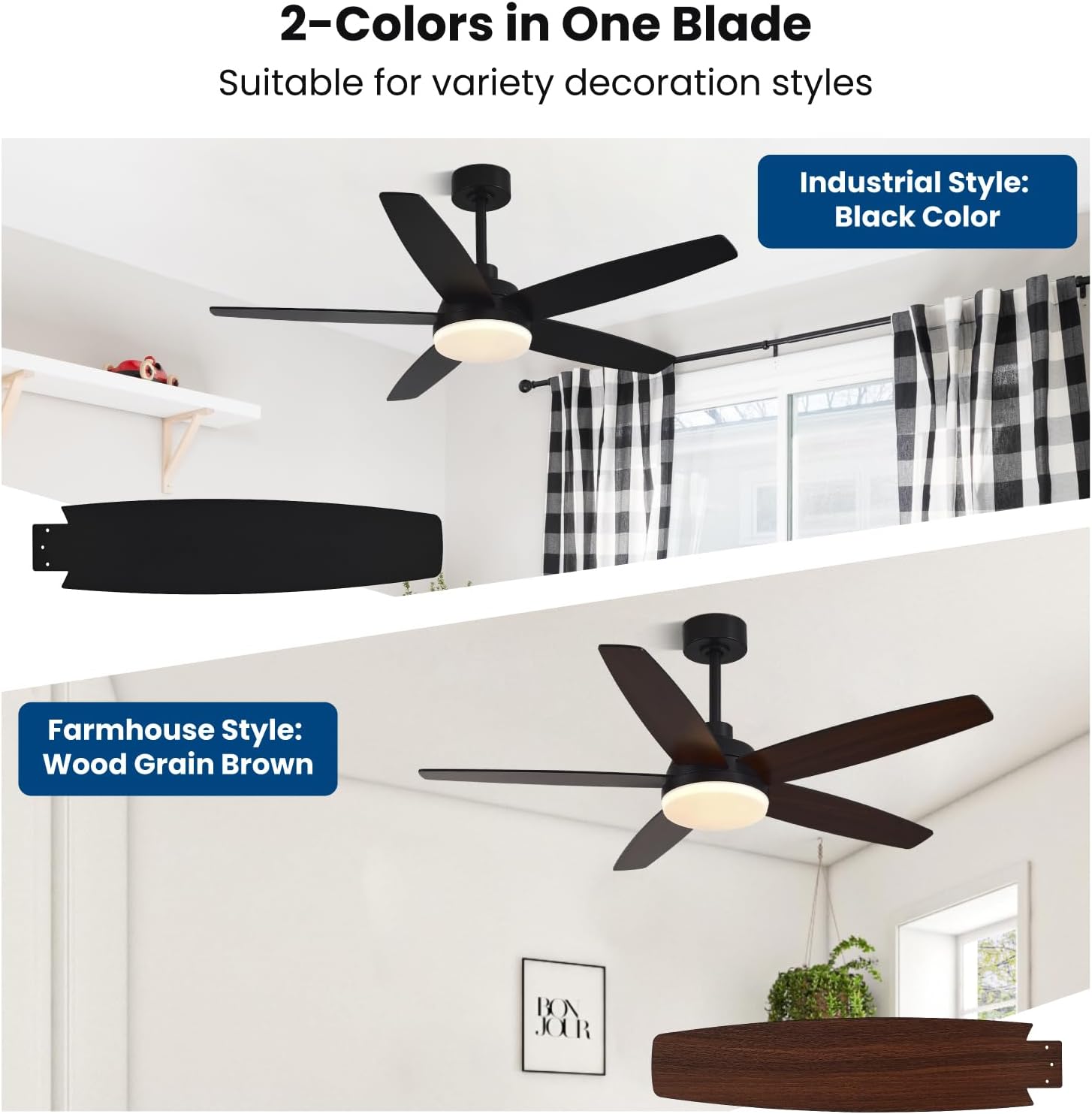
Image: Detail of the reversible blades, showcasing the black and wood grain finishes available on each blade.
5. Operating Instructions
The Conciseer ceiling fan is operated using the included remote control. Ensure the remote has fresh batteries installed.
5.1 Fan Control
- Power On/Off: Press the fan power button to turn the fan on or off.
- Speed Adjustment: Use the speed buttons (1-6) to select desired fan speed.

Image: Visual representation of the fan's 6 speed settings, categorized as soft, medium, and strong wind.
- Reverse Function: Press the reverse button to change the direction of blade rotation.
- Summer Mode (Downward Airflow): Blades rotate counter-clockwise, pushing cool air down.
- Winter Mode (Upward Airflow): Blades rotate clockwise, drawing cool air up and distributing warm air.

Image: Diagram showing the airflow patterns for summer mode (fan forward) and winter mode (fan reverse).
- Natural Wind Mode: Activates a varying fan speed to simulate natural breezes.
- Mute Function: Press the mute button to silence remote control beeps.
5.2 Light Control
- Light On/Off: Press the light power button to turn the light on or off.
- Color Temperature Adjustment (3CCT): Cycle through 3000K (Warm White), 4500K (Natural White), and 6500K (Cool White) by pressing the color temperature button.

Image: Examples of the fan light at 3000K, 4500K, and 6500K color temperatures in different room settings.
- Brightness Adjustment (Dimmable): Use the brightness up/down buttons to adjust the light intensity from 10% to 100%.

Image: Visual guide to the stepless dimming function, showing light levels from 10% to 100% intensity.
5.3 Timer Function
- Press the 2H, 4H, or 8H button to set the fan to automatically turn off after 2, 4, or 8 hours, respectively.

Image: A person relaxing in a living room, with an overlay indicating the 2H, 4H, and 8H timer options.

Image: Comparison showing the fan operating with only wind (light off) and with only the light on (fan off), demonstrating independent control.
6. Maintenance
Regular maintenance ensures optimal performance and extends the life of your ceiling fan.
- Cleaning: Periodically wipe the fan blades and motor housing with a soft, damp cloth. Do not use abrasive cleaners or solvents.
- Blade Inspection: Check blade screws for tightness annually. Loose screws can cause wobbling and noise.
- Light Kit: The integrated LED light source is designed for long life and is not user-replaceable.
- Remote Control: Replace batteries when the remote's range decreases or it stops responding.
- Always ensure power is off at the circuit breaker before performing any cleaning or maintenance.
7. Troubleshooting
If you experience issues with your fan, consult the following common solutions before contacting support.
| Problem | Possible Cause | Solution |
|---|---|---|
| Fan does not start | No power to the fan; Loose wiring connections; Remote control battery low or not paired. | Check circuit breaker; Verify all wiring connections are secure; Replace remote battery or re-pair remote (refer to remote pairing instructions in full manual). |
| Fan wobbles | Loose blade screws; Unbalanced blades; Improper mounting. | Tighten all blade screws; Ensure blades are installed correctly; Check mounting bracket for secure installation. |
| Noisy operation | Loose screws; Blades rubbing; Motor issue. | Check and tighten all screws; Ensure no wires or components are touching the fan blades or housing; If noise persists, contact customer support. Image: Diagram showing the low noise output of the fan's DC motor, indicating it is quieter than a library or a whisper. |
| Light does not work | No power to the light; Loose wiring; LED light kit malfunction. | Check power supply; Verify light kit wiring connections; If integrated LED, contact customer support if it fails. |
| Remote control not working | Dead batteries; Remote not paired; Obstruction. | Replace batteries; Re-pair remote control (refer to full manual); Ensure no obstructions between remote and fan receiver. |
8. Warranty and Support
Conciseer products are designed for quality and reliability. For specific warranty details, please refer to the warranty card included with your product or visit the official Conciseer website.
If you encounter any issues during installation or operation that are not covered in this manual, please contact Conciseer customer support for assistance. Our professional after-sales support team is ready to help.
Contact Information: Refer to your product packaging or the Conciseer brand store on Amazon for the most current support contact details.