
1. Introduction
The MARVO Scorpion M292-WH is a wired gaming mouse designed for precision and comfort. It features a high-sensitivity optical sensor, adjustable DPI settings, programmable buttons, and customizable 7-color lighting. This manual provides essential information for setting up, operating, maintaining, and troubleshooting your M292-WH gaming mouse.

Figure 1: MARVO Scorpion M292-WH Gaming Mouse with green lighting.
2. Setup
Follow these steps to set up your MARVO Scorpion M292-WH gaming mouse:
- Unpack the Mouse: Carefully remove the mouse and its cable from the packaging.
- Connect to Computer: Plug the USB connector of the mouse into an available USB port on your computer.
- Driver Installation: The mouse is typically plug-and-play for basic functionality. Your operating system should automatically detect and install the necessary drivers.
- Software Installation (Optional): For advanced customization, including programmable buttons and lighting effects, download and install the official MARVO software from the manufacturer's website. Refer to the software's instructions for detailed configuration.

Figure 2: MARVO Scorpion M292-WH Gaming Mouse and packaging.
3. Operating Instructions
The M292-WH mouse offers several features to enhance your gaming experience:
3.1 DPI Adjustment
The mouse features adjustable DPI (Dots Per Inch) levels, allowing you to change cursor sensitivity on the fly. The M292-WH supports DPI settings from 1200 to 8000 DPI. Use the dedicated DPI buttons (usually located below the scroll wheel) to cycle through the preset DPI levels.
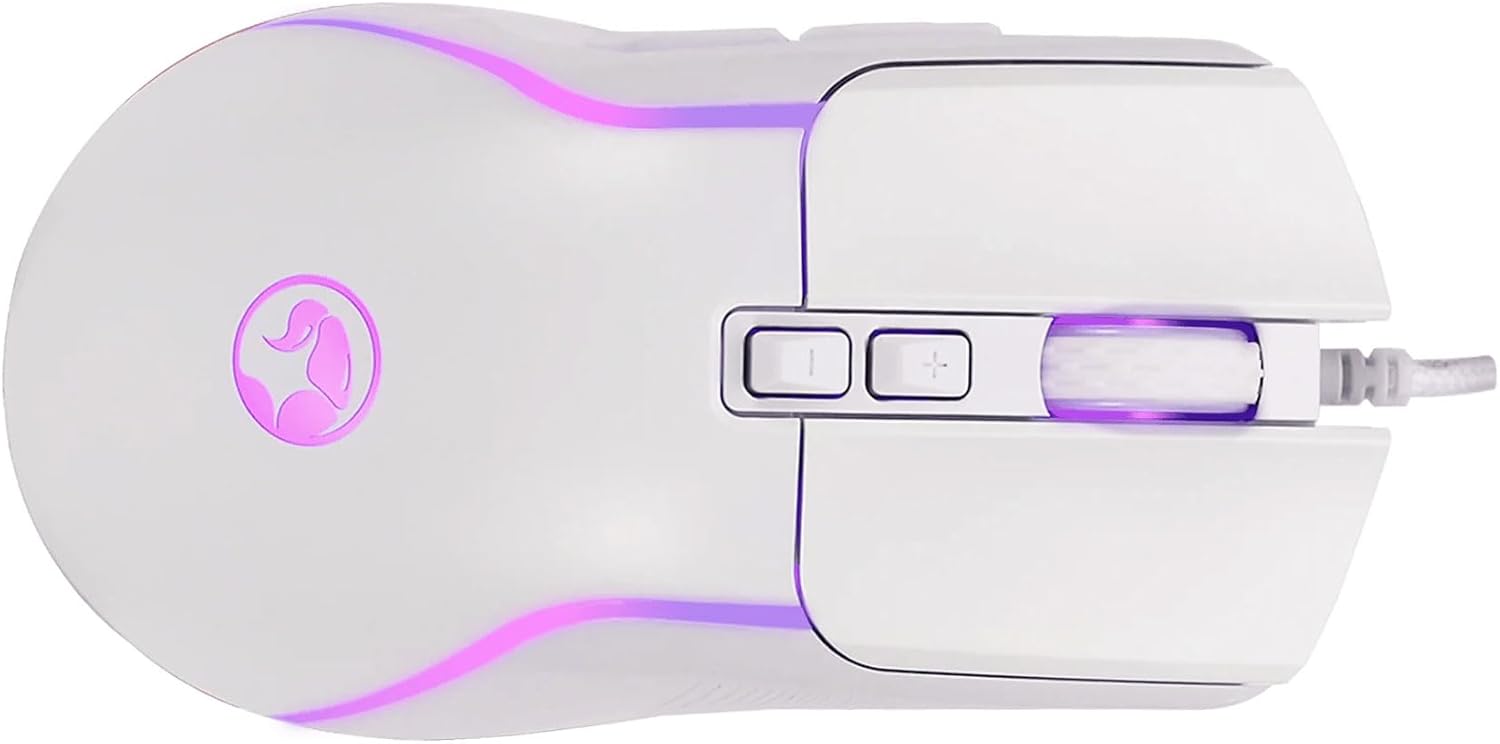
Figure 3: Top view of the mouse, highlighting DPI adjustment buttons.
3.2 Programmable Buttons
The M292-WH is equipped with 7 buttons, including 6 programmable buttons. These buttons can be customized using the MARVO software to assign macros, keyboard functions, or other commands. Refer to the software's user interface for detailed instructions on button programming.

Figure 4: Side view of the mouse, showing programmable side buttons.
3.3 7-Color Lighting
The mouse features dynamic 7-color lighting. The lighting effects and colors can be configured through the MARVO software to match your preferences or gaming setup.
4. Maintenance
Proper maintenance ensures the longevity and optimal performance of your gaming mouse:
- Cleaning: Use a soft, dry, lint-free cloth to clean the surface of the mouse. Avoid using harsh chemicals, abrasive cleaners, or excessive moisture, as these can damage the mouse's finish or internal components.
- Sensor Care: Keep the optical sensor on the underside of the mouse clean and free from dust or debris.
- Cable Management: Avoid sharply bending or twisting the mouse cable. Store the cable neatly when not in use to prevent damage.
5. Troubleshooting
If you encounter issues with your MARVO Scorpion M292-WH mouse, refer to the following troubleshooting tips:
- Mouse Not Responding:
- Ensure the USB cable is securely plugged into a working USB port on your computer.
- Try plugging the mouse into a different USB port.
- Restart your computer.
- DPI Not Changing:
- Confirm you are pressing the correct DPI adjustment buttons.
- If using custom DPI settings, ensure the MARVO software is running and configured correctly.
- Lighting Not Working:
- Check the MARVO software settings to ensure lighting is enabled and configured as desired.
- Ensure the mouse is properly connected to the computer.
- Buttons Not Functioning:
- Verify that the MARVO software is correctly installed and that button assignments are not conflicting.
- Test the mouse on another computer to rule out system-specific issues.
6. Specifications
| Feature | Specification |
|---|---|
| Brand | MARVO |
| Model | M292-WH |
| Connection | Wired USB |
| Type | Gaming Mouse |
| Sensor | Optical |
| Sensitivity (DPI) | 1200-1800-2400-3200-4800-8000 (Adjustable) |
| Number of Buttons | 7 (6 Programmable) |
| Polling Speed | 125 Hz |
| Cable Length | 150 cm |
| Lighting | 7 Colors |
| Ergonomics | Left and right handed |
| Item Weight | 6.7 ounces (approx. 190g) |
| Package Dimensions | 8.11 x 4.88 x 2.4 inches |
7. Warranty and Support
MARVO products are manufactured to high-quality standards. This product is covered by a limited warranty against defects in materials and workmanship. The specific terms and duration of the warranty may vary by region and retailer.
For warranty claims, technical support, or further assistance, please visit the official MARVO website or contact your local retailer. You may need to provide proof of purchase.
MARVO Official Website: www.marvo-tech.com (Please note: This is a placeholder URL as no specific support link was provided in the product data. Refer to your product packaging or official MARVO documentation for the correct support website.)


