
1. Introduction
This manual provides instructions for the installation, operation, and maintenance of your fishkeeper Submersible Fish Tank Light with Air Bubble Hole. This 3-in-1 device is designed to aerate, illuminate, and decorate your aquarium, offering customizable lighting options and a built-in timer function.
The 30-inch model is ideal for fish tanks 34 inches or larger.
2. Safety Information
- The light bar is IP68 waterproof and designed for submersible use.
- The controller is NOT waterproof. Do not immerse the controller in water.
- An air pump is required for bubble functionality and is not included with this product. Ensure your air pump is 6W or higher for optimal performance.
- If the air pump is placed below the water level of the tank, a check valve must be used to prevent water backflow into the pump. (Check valve not included).
- Always disconnect power before performing any maintenance or handling the light.
3. Package Contents
Verify that all components are present in the package:
- 1x fishkeeper Submersible Fish Tank Light (30-inch)
- 1x User Manual
- 1x DC Power Adapter
- 2x 2m Air Tube
- 2x L-shaped Tube Connector
- 1x Y-shaped Tube Connector
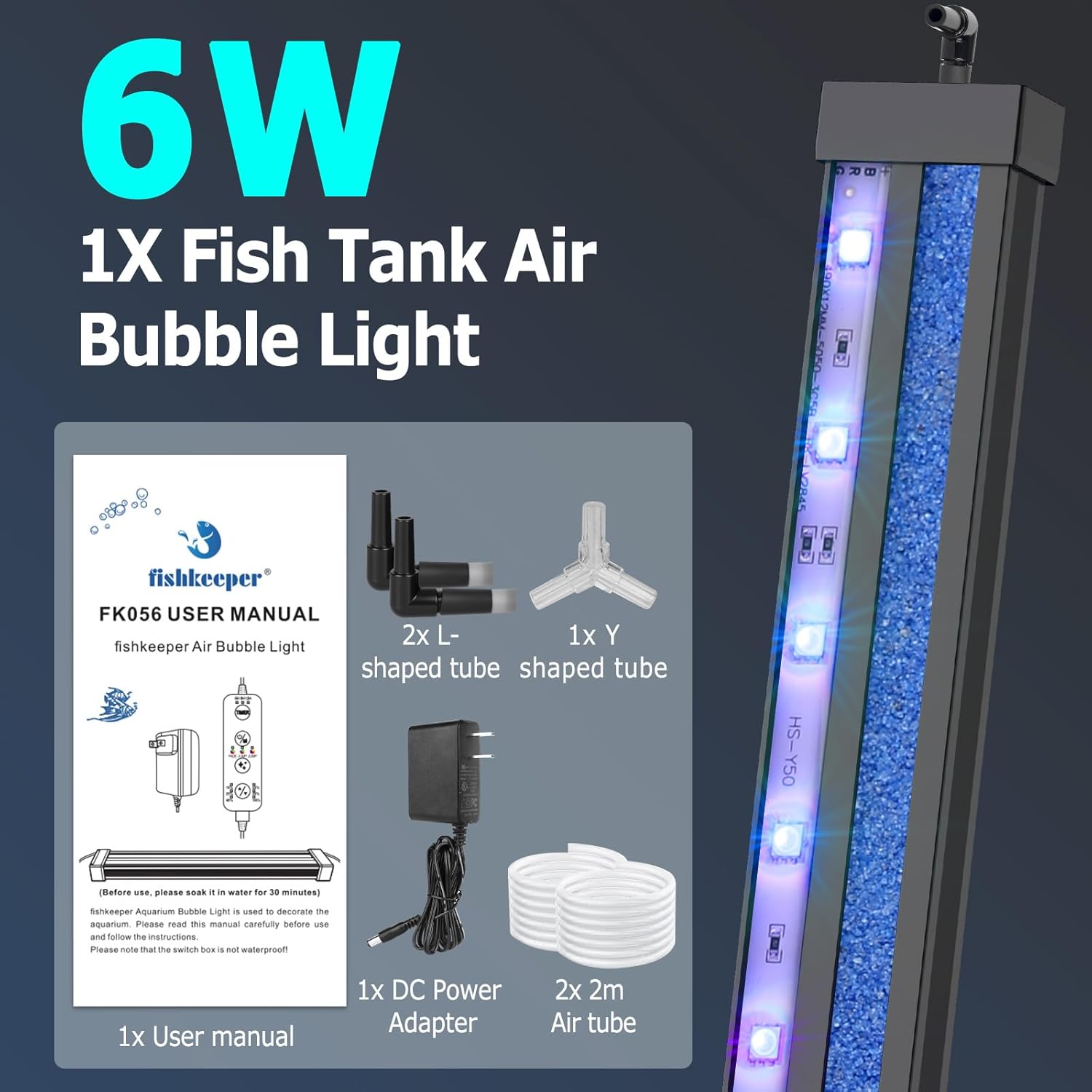
Image: Contents of the fishkeeper Submersible Fish Tank Light package.
4. Setup Instructions
Follow these steps for proper installation:
- Initial Soak: Before first use, soak the fish tank light air bubbler in water for 2 hours. This helps to saturate the fine-pore stone for optimal bubble performance.
- Connect Air Pump: Connect one end of the air tubing (provided) to the 4mm diameter air intake hole on the fish tank light. Connect the other end of the air tubing to your external air pump (not included). Ensure a secure connection.
- Positioning: Place the fish tank light flat on the bottom of your aquarium. Its self-sinking design eliminates the need for suction cups.
- Power Connection: Connect the DC power adapter to the light and then plug it into a power outlet. Ensure the controller remains outside the water.

Image: Visual guide for the initial setup process.

Image: Connection diagram for the aquarium bubble light.

Image: Important warning regarding the non-waterproof controller.
5. Operating Instructions
The fishkeeper Submersible Fish Tank Light is controlled via a wired multi-function controller. Familiarize yourself with the buttons and their functions:
5.1 Controller Overview

Image: Detailed view of the multi-function wired controller.
- TIMER Button: Press to cycle through timer settings: 6 hours, 9 hours, 12 hours. The light will automatically turn on and off at the same time daily.
- Power / M (Mode) Button:
- Short Press: Turns the light ON or changes the single color mode.
- Long Press: Turns the light OFF.
- FADE / JUMP Button: Press to cycle through the three color cycling modes. Note: Brightness cannot be adjusted in cycling modes.
- Brightness Buttons (10%, 25%, 40%, 65%, 85%, 100%): Press to adjust the brightness level when in a single-color mode.
5.2 Single Color & Brightness Adjustment
The light offers 9 single-color modes: Red, Blue, Green, Orange, Purple, Full Spectrum, Warm White, Cool White, and Green-White. To select a single color:
- Ensure the light is ON. If OFF, short press the Power/M button.
- Repeatedly short press the Power/M button to cycle through the available single colors until your desired color is displayed.
- Use the brightness buttons (10% to 100%) to set the desired intensity for the selected color.
5.3 Color Cycling Modes
The light features three dynamic color cycling modes:
- Cycle 1 (Fade): Smooth, gradual transitions across 11 colors for a soft effect.
- Cycle 2 (Jump): Dynamic jumps between 9 distinct colors for a lively show.
- Cycle 3 (Jump): Classic red, green, and blue jumps for a bold look.
To activate a cycling mode, press the FADE/JUMP button. Repeated presses will cycle through the three modes. Brightness cannot be adjusted in cycling modes.

Image: Visual representation of available lighting modes and brightness.
5.4 Timer Settings
The light includes 3 preset timer options:
- 6 Hours
- 9 Hours
- 12 Hours
To set a timer, press the TIMER button until the desired duration (6H, 9H, or 12H) is selected. The light will automatically turn on and off at the same time each day. There is a 5-minute buffer period at the start and end of the timer cycle.

Image: Timer and brightness control options.

Image: Explanation of the timer's 5-minute buffer.
5.5 Product Demonstration Video
Video: Demonstration of the aquarium bubble light's features, including color cycling.
6. Maintenance
- Cleaning: Periodically clean the light bar to prevent algae buildup. Disconnect power before cleaning. Use a soft cloth or brush and aquarium-safe cleaning solutions if necessary.
- Bubble Performance: If bubble output decreases, ensure the air pump is functioning correctly and the air tubing is not kinked or blocked. Re-soaking the light bar for a few hours can help restore optimal bubble diffusion.
- Controller Care: Keep the controller dry and away from water splashes.
7. Troubleshooting
| Problem | Possible Cause | Solution |
|---|---|---|
| Light does not turn on. | No power, loose connection, faulty adapter/controller. | Check power outlet. Ensure all connections are secure. Test with another power source if possible. Contact support if issue persists. |
| No bubbles or sparse bubbles. | Air pump not connected/working, air tubing kinked/blocked, air stone not saturated. | Ensure air pump is connected and operating. Check air tubing for kinks or blockages. Re-soak the light bar in water for 2 hours. Ensure air pump wattage is sufficient (6W or higher). |
| Light control (colors/brightness) not responding. | Controller malfunction, in cycling mode. | Ensure the light is not in a cycling mode (brightness cannot be adjusted in these modes). If in single-color mode and still unresponsive, the controller may be faulty. |
| Timer not working correctly. | Incorrect timer setting, power interruption. | Re-set the timer. Ensure continuous power supply. |
8. Specifications
| Brand Name | fishkeeper |
| Model Number | SUS-FK056-6W-NEW |
| Item Type Name | Aquarium light |
| Color | Black |
| Shape | Rectangular |
| Material | Polyvinyl Chloride (PVC) |
| Light Source Type | Light Emitting Diode (LED) |
| Power Source | Corded Electric |
| Light Source Wattage | 6 watts |
| Light Source Special Features | Color-changing, Color-customizable, Cycling modes |
| Color Temperature | 0.01 Kelvin (Indicates a wide color range) |
| Item Dimensions (L x W x H) | 31.88"L x 3.14"W x 2.67"H |
| Unit Count | 1 Count |
| Applicable Wattage Air Pump | 7-10W (for 6W light) |

Image: Detailed product specifications across various models.
9. Warranty and Support
This fishkeeper product comes with a 2-year manufacturer's warranty from the date of purchase. This warranty covers defects in materials and workmanship under normal use.
For warranty claims, technical support, or any questions regarding your product, please contact fishkeeper customer service through the retailer's platform or visit the official fishkeeper store online.
Please retain your proof of purchase for warranty validation.