
1. Introduction
This manual provides essential instructions for the setup, operation, and maintenance of your SPYPOINT Flex-S-Dark Solar Cellular Trail Camera. Please read this guide thoroughly to ensure proper use and optimal performance of your device. The Flex-S-Dark is designed for outdoor wildlife monitoring and security, featuring a built-in solar panel for extended battery life, high-resolution imaging, and cellular connectivity for remote data transmission.

Image 1.1: The SPYPOINT Flex-S-Dark Solar Cellular Trail Camera and its retail packaging.
2. Product Overview and Key Features
The SPYPOINT Flex-S-Dark is a robust cellular trail camera equipped with advanced features for reliable outdoor surveillance.
- Built-in Solar Panel: Features an integrated solar panel and internal battery, reducing the need for frequent battery changes. This system can extend power supply for up to 11 months, depending on usage and sunlight exposure.
- No-Glow Night Vision: Utilizes no-glow LEDs for discreet operation in total darkness, preventing disturbance to wildlife. Remote switching between no-glow and low-glow settings is available via the SPYPOINT app.
- High-Resolution Imaging: Captures 40MP photos and 1080p videos with sound. Images and videos are transmitted to your mobile device via the free SPYPOINT app.
- On-Demand Requests: Allows users to request photos and videos instantly using the Instant Mode feature in the app.
- Advanced Settings: Customizable options include Multi-shot, Time-Lapse+, and scheduling.
- Cross-Carrier Coverage: Automatically connects to the strongest available cellular signal for consistent data transmission.
- Durable Design: Constructed with a reinforced ghost grey casing and a semi-flexible antenna for outdoor resilience.

Image 2.1: Key features of the Flex-S-Dark camera, including image resolution and power capabilities.

Image 2.2: The camera's no-glow LED feature for discreet operation.

Image 2.3: Illustration of the camera's built-in solar panel and battery system.

Image 2.4: The camera's cross-carrier coverage capability for optimal signal.
3. What's in the Box
Your SPYPOINT Flex-S-Dark package includes the following items:
- FLEX-DARK Camera
4. Setup Guide
Follow these steps to set up your SPYPOINT Flex-S-Dark camera.
4.1. Download the SPYPOINT App
Before activating your camera, download the free SPYPOINT app from your mobile device's app store. The app is essential for camera activation, settings management, and receiving photos/videos.
4.2. Activate Your Camera
- Open the SPYPOINT app and navigate to the 'Cameras' section.
- Tap the '+' icon to add a new camera.
- Follow the on-screen prompts to scan the QR code located inside your camera's battery compartment or manually enter the device's SIM number.

Image 4.1: Activating the camera by scanning the QR code via the SPYPOINT app.
4.3. Physical Setup
- Screw in the Antenna: Attach the antenna securely to the designated port on the camera.
- Insert the MicroSD Card: Open the camera's compartment and insert a compatible microSD card (not included, up to 32GB recommended). Ensure it is inserted correctly.
- Turn On Your Camera: Locate the ON/OFF switch and slide it to the 'ON' position.

Image 4.2: Steps for physical setup: antenna, microSD card, and power switch.

Image 4.3: Example of a compatible microSD card.
4.4. Format MicroSD Card and Test
- Format your MicroSD Card: With the camera on, press the 'FORMAT' button to prepare the microSD card for use. This erases all data on the card.
- Push the Test Button: Press the 'TEST' button to confirm the camera is functioning and to send a test photo.
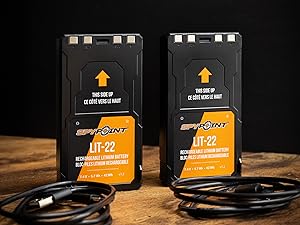
Image 4.4: Locating the FORMAT and TEST buttons on the camera.

Image 4.5: A user interacting with the camera's controls while mounted.
4.5. Verify App Connection
After setup, check the SPYPOINT app to confirm your camera has reported its status. It may take a few minutes for the camera to connect and transmit its initial status.

Image 4.6: SPYPOINT app interface showing camera status and photo transmission plan.
5. Operating Instructions
The SPYPOINT Flex-S-Dark is primarily operated and configured through the SPYPOINT mobile application.
5.1. Using the SPYPOINT App
The app provides comprehensive control over your camera's settings and allows you to view captured media.
- View Photos and Videos: Access your captured 40MP photos and 1080p videos directly from the app.

Image 5.1: Example of a 40MP photo displayed in the SPYPOINT app.

Image 5.2: Example of a 1080p video displayed in the SPYPOINT app.
- On-Demand Requests: Use the 'Instant Mode' feature to request immediate photos or videos from your camera.
- Adjust Settings: Configure camera settings such as photo resolution, video length, multi-shot mode, time-lapse intervals, and operational schedules.
- Interactive Maps and Alerts: The app provides interactive maps to track camera locations and real-time alerts for activity.

Image 5.3: Overview of SPYPOINT app features including mapping and alerts.
5.2. Photo Plans
The camera includes a free photo plan for 100 photos per month. Additional plans are available for purchase through the SPYPOINT app if more transmissions are required.
6. Maintenance
Regular maintenance ensures the longevity and optimal performance of your Flex-S-Dark camera.
- Solar Panel: Periodically clean the solar panel surface to ensure maximum sunlight absorption. Dust, dirt, or debris can reduce charging efficiency.
- Battery Management: The built-in internal battery is charged by the solar panel. For extended use, especially in low-light conditions, consider using the optional SPYPOINT LIT-22 rechargeable lithium battery pack.

Image 6.1: Optional SPYPOINT LIT-22 rechargeable lithium battery packs.
- Lens Cleaning: Gently clean the camera lens with a soft, lint-free cloth to avoid smudges that could affect image quality.
- Antenna Check: Ensure the semi-flexible antenna is securely attached and positioned for optimal signal reception.
- Firmware Updates: Check the SPYPOINT app regularly for available firmware updates to ensure your camera has the latest features and performance improvements.
7. Troubleshooting
This section addresses common issues you might encounter with your Flex-S-Dark camera.
7.1. Camera Not Reporting / No Photos Received
- Check Signal Strength: Ensure the camera is placed in an area with adequate cellular signal. The camera automatically connects to the strongest carrier, but very remote areas may have limited coverage.
- Battery Level: Verify the battery level via the SPYPOINT app. Insufficient power can prevent transmissions.
- Data Plan: Confirm your photo transmission plan is active and has available credits.
- MicroSD Card: Ensure the microSD card is properly inserted and formatted. A full or corrupted card can prevent photo storage and transmission.
7.2. Poor Image/Video Quality
- Clean Lens: Clean the camera lens as described in the Maintenance section.
- Obstructions: Ensure there are no obstructions (branches, leaves) in front of the camera's view or the infrared LEDs, especially at night.
- Placement: Adjust camera placement to optimize lighting conditions and minimize motion blur.
7.3. Excessive or Useless Photos
- Sensitivity Settings: Adjust the camera's motion detection sensitivity via the app. High sensitivity can trigger photos from minor movements like swaying branches.
- Placement: Avoid pointing the camera directly at areas with constant movement (e.g., busy roads, heavily swaying vegetation).
7.4. Transmission Lag
- Cellular Network Congestion: Transmission speeds can vary based on network traffic and signal strength.
- App Sync Interval: Check your camera's sync interval settings in the app. More frequent syncs may consume more battery.
8. Specifications
| Indoor/Outdoor Usage | Outdoor |
| Compatible Devices | Smartphone |
| Power Source | Battery Powered (Built-in Solar Panel, Internal Battery, Optional LIT-22) |
| Connectivity Protocol | Cellular |
| Controller Type | Push Button, SPYPOINT App |
| Mounting Type | Tree Mount |
| Video Capture Resolution | 1080p |
| Number of Items | 1 (FLEX-DARK Camera) |
| Item Dimensions (L x W x H) | 3.25 x 4.75 x 11.22 inches |
| Item Weight | 1 pound (16 ounces) |
| Video Capture Format | MPEG-4 |
| UPC | 887157000011 |
| Model Name | FLEX-S-DARK US |
| Special Features | Constant Capture Technology, GPS-Enabled, Request Photos & Videos On-Demand, Responsive Trigger, 100' Detection Range |
9. Warranty and Support
The SPYPOINT Flex-S-Dark Solar Cellular Trail Camera comes with a 2-year warranty. For warranty claims, technical support, or additional product information, please visit the official SPYPOINT website or contact their customer service directly. Ensure you have your product model number and proof of purchase available when seeking support.


