
1. Introduction
Thank you for choosing the LAMAX W10.2 Outdoor Action Camera. This manual provides detailed instructions on how to set up, operate, and maintain your camera to ensure optimal performance and longevity. The LAMAX W10.2 is designed for capturing high-quality video and photos in various environments, featuring true 4K/60FPS recording, advanced MAXsmooth 2.0 stabilization, and robust waterproofing.
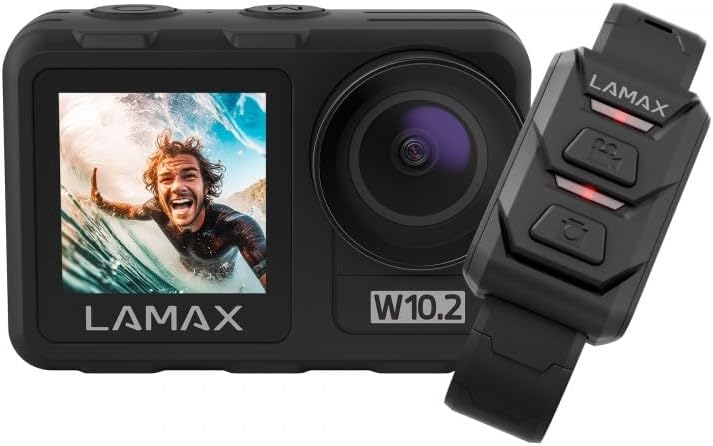
Image 1.1: The LAMAX W10.2 Action Camera shown with its accompanying remote control. The camera features a front display and a main lens, while the remote control has three buttons for easy operation.
2. What's in the Box
Upon unboxing your LAMAX W10.2, please verify that all the following components are included:
- LAMAX W10.2 Action Camera
- Waterproof Housing (for depths up to 40 meters)
- Remote Control
- Mini Tripod
- Clear Filter (for lens protection)
- USB Charging Cable
- Mounting Accessories (various mounts and adhesive pads)
- Cleaning Cloth
- Battery (C batteries required, included)

Image 2.1: A comprehensive view of all items included in the LAMAX W10.2 package, including the camera, waterproof case, remote, various mounts, cables, and cleaning cloth.
3. Product Overview
Familiarize yourself with the key components and features of your LAMAX W10.2 camera:
- Dual Displays: Features both a main rear touchscreen and a front display for easy framing and monitoring.
- Touch Control and Buttons: The touchscreen provides intuitive control, while physical buttons offer practical operation, especially underwater.
- Lens: High-quality lens for capturing sharp images and videos.
- Microphone: Built-in microphone for audio recording.
- Speaker: For audio playback.
- USB Port: For charging and data transfer.
- HDMI Port: For connecting to external displays.
- Battery Compartment: Located at the bottom for battery insertion.
- MicroSD Card Slot: For memory card insertion (card not included).

Image 3.1: Detailed view of the LAMAX W10.2 camera highlighting its 2-inch touchscreen, mode setting/display switch, record ON/OFF button, camera and WLAN power button, and tripod thread for direct attachment.
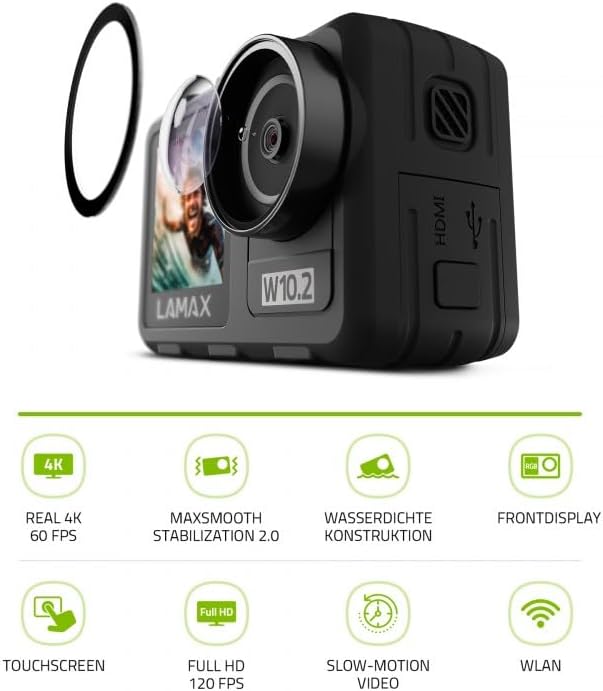
Image 3.2: The LAMAX W10.2 camera accompanied by icons representing its key features: Real 4K 60 FPS, MAXsmooth Stabilization 2.0, Waterproof Construction, Front Display, Touchscreen, Full HD 120 FPS, Slow-Motion Video, and WLAN (Wi-Fi).
4. Setup
4.1. Charging the Battery
- Open the battery compartment cover.
- Insert the included battery, ensuring correct polarity.
- Connect the camera to a USB power source using the provided USB cable. The charging indicator light will illuminate.
- Once fully charged, the indicator light will change or turn off.
4.2. Inserting a MicroSD Card
A MicroSD card (not included) is required to store videos and photos. Use a Class 10 or higher MicroSD card with a maximum capacity of 128GB.
- Locate the MicroSD card slot on the side of the camera.
- Insert the MicroSD card with the gold contacts facing the back of the camera until it clicks into place.
- To remove, gently push the card in until it springs out.
4.3. Powering On/Off
- To Power On: Press and hold the Power button (usually located on the top or side) for a few seconds until the screen illuminates.
- To Power Off: Press and hold the Power button again until the camera shuts down.
5. Operating Instructions
5.1. Basic Operation
- Mode Switching: Use the Mode button or touchscreen gestures to switch between video, photo, and playback modes.
- Recording/Shutter: Press the Shutter/Record button (usually on top) to start/stop video recording or take a photo.
- Navigation: Use the touchscreen or physical navigation buttons to browse menus and settings.
5.2. Video Recording
The LAMAX W10.2 supports true 4K video recording at 60 frames per second (FPS) for incredibly detailed footage.
- Resolution Settings: Access video settings to select resolutions such as 4K/60FPS, 2.7K, 1080p, and 720p.
- Slow Motion: Capture dynamic slow-motion footage at up to 4x in Full HD (1080p).
- MAXsmooth 2.0 Stabilization: This advanced electronic stabilization ensures smooth, shake-free video, even during intense action. It is automatically enabled for optimal performance.
5.3. Photo Capture
Capture high-resolution still images with various settings:
- Photo Modes: Standard photo, burst mode, time-lapse photo.
- Settings: Adjust exposure, white balance, and ISO for different lighting conditions.
5.4. Waterproofing
The LAMAX W10.2 is designed for aquatic adventures:
- Without Housing: The camera is waterproof up to 12 meters (approximately 40 feet) without the need for additional housing.
- With Included Housing: When placed in the provided waterproof housing, the camera can be submerged up to 40 meters (approximately 130 feet).
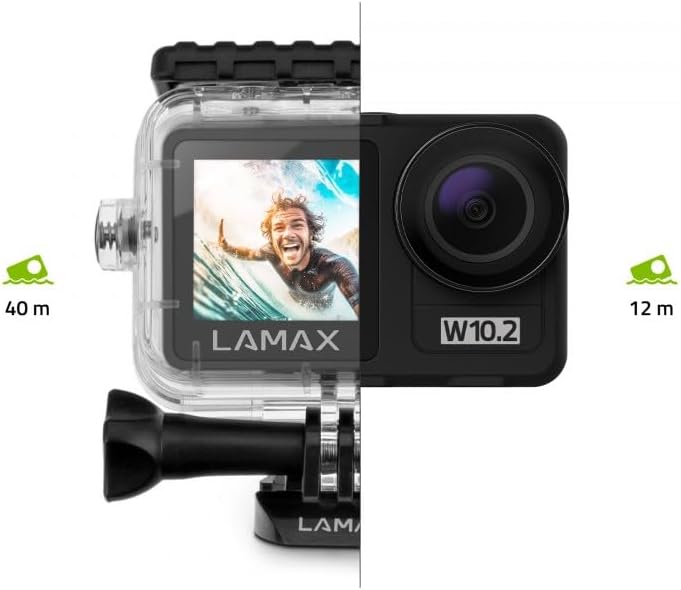
Image 5.1: Visual representation of the LAMAX W10.2's waterproofing capabilities, showing it can go to 12 meters without a case and 40 meters with the included waterproof housing.
5.5. Wi-Fi and Mobile App
Connect your camera to your smartphone via Wi-Fi for remote control, live preview, and easy file transfer.
- Download the official LAMAX mobile app from your device's app store.
- Enable Wi-Fi on your camera through the settings menu.
- On your smartphone, connect to the camera's Wi-Fi network (SSID and password will be displayed on the camera screen).
- Open the LAMAX app to control the camera, view footage, and download files wirelessly.
5.6. Remote Control
The included remote control allows for convenient operation from a distance.
- Pairing: Follow the instructions in the camera's settings menu to pair the remote control.
- Functions: Typically, the remote allows you to start/stop recording and take photos without touching the camera.
6. Maintenance
Proper maintenance ensures the longevity and performance of your LAMAX W10.2 camera.
- Cleaning: Use the provided cleaning cloth to gently wipe the lens and screen. For stubborn smudges, use a lens cleaning solution designed for optics. Do not use abrasive materials.
- Waterproof Housing Care: After use in water, rinse the waterproof housing with fresh water and allow it to air dry. Inspect the O-ring seal for any debris or damage before each use.
- Storage: Store the camera in a cool, dry place away from direct sunlight and extreme temperatures. Remove the battery if storing for extended periods.
- Battery Care: Avoid fully discharging the battery frequently. Charge the battery regularly, even if not in use, to maintain its health.
7. Troubleshooting
If you encounter issues with your LAMAX W10.2, refer to the following common problems and solutions:
| Problem | Possible Cause | Solution |
|---|---|---|
| Camera does not power on. | Low battery; battery incorrectly inserted; camera frozen. | Charge the battery; reinsert battery correctly; perform a hard reset (refer to manual for specific button combination). |
| Video footage is shaky. | MAXsmooth 2.0 stabilization is off; extreme vibrations. | Ensure MAXsmooth 2.0 is enabled in settings; use appropriate mounts to minimize vibration. |
| Cannot connect to Wi-Fi. | Wi-Fi not enabled on camera; incorrect password; app issue. | Enable Wi-Fi on camera; double-check password; restart camera and app. |
| Camera is not waterproof. | Waterproof housing not properly sealed; O-ring damaged or dirty. | Ensure housing is securely latched; clean and inspect O-ring for damage before each use. |
| MicroSD card error. | Incompatible card; card full; card corrupted. | Use a recommended Class 10 or higher card; format the card (this will erase data); try a different card. |
8. Specifications
Detailed technical specifications for the LAMAX W10.2 Action Camera:
| Feature | Detail |
|---|---|
| Brand | LAMAX |
| Model Number | 10.2 |
| Product Dimensions | 3.2 x 6.4 x 4.2 cm; 127 g |
| Photosensor Technology | CMOS |
| Video Capture Resolution | 4K |
| Max Focal Length | 5.03 Millimeter |
| Video Capture Format | MP4 |
| Screen Size | 2 Inch |
| Connectivity Technology | HDMI, Wi-Fi |
| Color | Dark Grey |
| Special Features | Remote Control, Shockproof, Slow Motion, Timer, Touchscreen |
| Camcorder Type | Action Camera |
| Batteries | C batteries required (included) |
| First Available Date | January 10, 2025 |
9. Warranty & Support
LAMAX products are designed for reliability and performance. For information regarding warranty coverage, technical support, or service, please refer to the official LAMAX website or contact their customer service directly.
- Online Support: Visit the LAMAX official website for FAQs, software updates, and digital manuals.
- Customer Service: Contact details for customer support can typically be found on the LAMAX website's 'Support' or 'Contact Us' section.


