1. Introduction
Thank you for choosing the INIU Smallest 22.5W 10000mAh Power Bank and 2-Port 45W USB-C Charger Block. This comprehensive charging solution is designed to provide portable power and fast wall charging for your electronic devices. This manual will guide you through the setup, operation, maintenance, and troubleshooting of your new product.
Package Contents:
- INIU 10000mAh Power Bank
- INIU 45W USB-C Charger Block
- User Manual
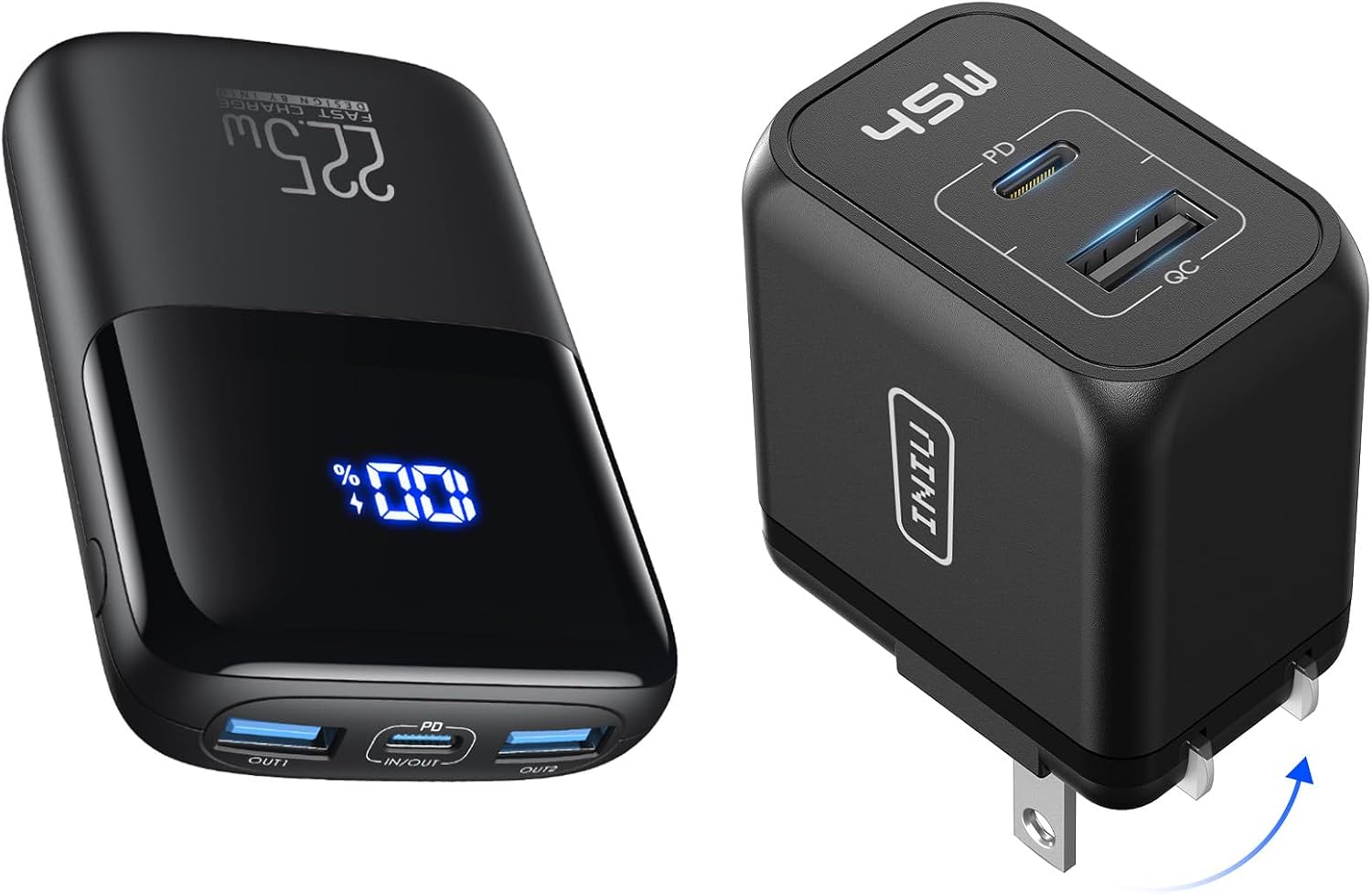
Image 1.1: The INIU 10000mAh Power Bank and 45W USB-C Charger Block, as included in the package.
2. Important Safety Instructions
Please read all safety warnings and instructions before using this product to avoid injury or damage.
- Do not expose the power bank or charger block to water, moisture, or extreme temperatures.
- Do not disassemble, open, or attempt to repair the device.
- Keep out of reach of children.
- Avoid dropping or subjecting the device to strong impacts.
- Do not use if the device is visibly damaged or swollen.
- Dispose of the product responsibly according to local regulations.
3. Product Components
3.1 INIU 10000mAh Power Bank
The power bank features a compact design with a 10000mAh capacity, capable of delivering up to 22.5W fast charging. It includes a digital display to show the remaining battery percentage and multiple output ports for versatile device charging.
- Capacity: 10000mAh
- Output: Up to 22.5W (USB-A), 20W (USB-C In/Out)
- Ports: 2 x USB-A (OUT1, OUT2), 1 x USB-C (IN/OUT)
- Display: Digital LED percentage display

Image 3.1: The INIU 10000mAh Power Bank, demonstrating its compact size when held in a hand.

Image 3.2: The INIU 10000mAh Power Bank shown next to a smartphone, highlighting its ultra-compact dimensions and light weight.

Image 3.3: The INIU 10000mAh Power Bank's compatibility with various devices and fast charge modes, including SCP 22.5W, QC 18W, PD 20W, PD 18W, and Trickle Charge for smaller devices.
3.2 INIU 45W USB-C Charger Block
The charger block is a powerful wall adapter with a 45W output, featuring both USB-C and USB-A ports to charge two devices simultaneously at high speed.
- Output: Up to 45W (USB-C PD/PPS), 12W (USB-A QC3.0/AFC)
- Ports: 1 x USB-C, 1 x USB-A
- Features: Supports Samsung Super Fast Charging 2.0

Image 3.4: A close-up view of the INIU 45W USB-C Charger Block, showing its USB-C (PD) and USB-A (QC) ports.

Image 3.5: The INIU 45W USB-C Charger Block demonstrating its fast charging capability for smartphones, supporting up to 45W output.

Image 3.6: The INIU 45W USB-C Charger Block plugged into a wall outlet, simultaneously charging a tablet via USB-C and a smartphone via USB-A.

Image 3.7: The INIU 45W USB-C Charger Block's universal compatibility, showing support for various laptops, tablets, smartphones, smartwatches, and earbuds via its USB-C and USB-A ports.
4. Setup
4.1 Initial Charging of the Power Bank
- Before first use, fully charge the INIU 10000mAh Power Bank.
- Connect a USB-C cable (not included) to the power bank's USB-C IN/OUT port.
- Connect the other end of the cable to the INIU 45W USB-C Charger Block, or any compatible USB wall adapter.
- Plug the charger block into a wall outlet. The digital display on the power bank will show the charging progress.
- Charge until the display shows "100%".
4.2 Preparing the Charger Block
The INIU 45W USB-C Charger Block is ready for use directly out of the box. Simply unfold the prongs and plug it into a standard wall outlet.
5. Operating Instructions
5.1 Charging Devices with the Power Bank
- Select the appropriate charging cable for your device (not included).
- Connect one end of the cable to your device.
- Connect the other end of the cable to one of the power bank's output ports (USB-A OUT1, USB-A OUT2, or USB-C IN/OUT).
- The power bank will automatically begin charging your device. The digital display will illuminate to show the remaining battery percentage.
- To stop charging, simply disconnect the cable from your device or the power bank.

Image 5.1: The INIU 10000mAh Power Bank connected via a USB-C cable to an iPhone, demonstrating its fast charging capability.
5.2 Charging Devices with the Charger Block
- Unfold the prongs of the INIU 45W USB-C Charger Block and plug it into a standard wall outlet.
- Select the appropriate charging cable for your device (not included).
- For fast charging, use a USB-C to USB-C cable with the USB-C PD port. For other devices, use a USB-A cable with the USB-A QC port.
- Connect one end of the cable to your device and the other end to the corresponding port on the charger block.
- The charger block can charge two devices simultaneously.
6. Maintenance
6.1 Cleaning
To clean the power bank and charger block, gently wipe the surfaces with a soft, dry, lint-free cloth. Do not use liquid cleaners, aerosols, or abrasive materials.
6.2 Storage
Store the device in a cool, dry place away from direct sunlight and extreme temperatures. If storing for an extended period, it is recommended to charge the power bank to approximately 50-70% every three months to maintain battery health.
6.3 Battery Care (Power Bank)
To prolong the lifespan of the power bank's battery:
- Avoid fully discharging the battery frequently.
- Avoid leaving the power bank in a fully charged state for very long periods.
- Do not expose the power bank to temperatures above 45°C (113°F) or below 0°C (32°F).
7. Troubleshooting
7.1 Power Bank Not Charging / Not Charging Device
- Check Cables: Ensure all charging cables are securely connected and are not damaged. Try a different cable.
- Check Power Source: If charging the power bank, ensure the wall adapter and outlet are functioning correctly.
- Restart Device: Disconnect and reconnect the device you are trying to charge.
- Power Bank Reset: Some power banks can be reset by simultaneously pressing and holding the power button (if present) and plugging in a charging cable. Refer to the specific product details if this applies.
7.2 Slow Charging
- Cable Quality: Use high-quality, certified charging cables that support fast charging.
- Port Selection: Ensure you are using the correct port for fast charging (e.g., USB-C PD port on the charger block).
- Device Compatibility: Confirm your device supports the fast charging protocols (PD, QC, SCP) offered by the INIU products.
7.3 Digital Display Not Working
- Recharge Power Bank: The display might not activate if the battery is completely depleted. Charge the power bank for a few minutes.
- Contact Support: If the display remains unresponsive after charging, contact INIU customer support.
8. Specifications
8.1 INIU 10000mAh Power Bank
| Model Name | INIU 10000mAh Power Bank |
| Battery Capacity | 10000mAh / 37Wh |
| USB-C Input/Output | 5V/3A, 9V/2.22A, 12V/1.67A (20W Max) |
| USB-A Output (OUT1/OUT2) | 4.5V/5A, 5V/4.5A, 9V/2A, 12V/1.5A (22.5W Max) |
| Dimensions | 4.1 x 2.6 x 0.9 inches (10.4 x 6.6 x 2.3 cm) |
| Weight | 6.9 oz (195 g) |
8.2 INIU 45W USB-C Charger Block
| Model Name | INIU 45W USB-C Charger Block |
| USB-C Output (PD/PPS) | 5V/3A, 9V/3A, 12V/3A, 15V/3A, 20V/2.25A (45W Max) |
| USB-A Output (QC3.0/AFC) | 5V/2.4A, 9V/2A, 12V/1.5A (18W Max) |
| Total Output | 45W Max (Shared) |
8.3 General Product Information
| Brand | INIU |
| ASIN | B0DSPWF9C5 |
| Date First Available | January 10, 2025 |
9. Warranty Information
INIU products typically come with an 18-month warranty from the date of purchase, covering manufacturing defects. Please retain your proof of purchase for warranty claims. The warranty does not cover damage caused by misuse, accidents, unauthorized modifications, or normal wear and tear.
10. Customer Support
For any questions, technical assistance, or warranty claims, please contact INIU customer support through the following channels:
- INIU Official Website: Visit the official INIU website for support resources and contact forms.
- Amazon Seller Support: If purchased on Amazon, you can contact the seller directly through your Amazon order history.
- Email: Refer to the contact information provided on the product packaging or INIU's official website.


