
OLEVS YPF-G3610G-Bv
OLEVS Men's Analog Quartz Watch with Rotating Bezel
Model: YPF-G3610G-Bv Instruction Manual
1. Introduction
Thank you for choosing the OLEVS Men's Analog Quartz Watch, Model YPF-G3610G-Bv. This timepiece combines classic design with reliable quartz movement, featuring a date display and a functional rotating bezel. This manual provides essential information for proper setup, operation, and maintenance to ensure optimal performance and longevity of your watch.

Image 1.1: Front view of the OLEVS Men's Analog Quartz Watch.
2. Initial Setup
2.1 Unpacking and Inspection
Upon receiving your watch, carefully remove it from its packaging. Inspect the watch for any visible damage. The package should include the watch and a tool for adjusting the watch band.
2.2 Setting the Time and Date
Your OLEVS watch is equipped with a single crown for adjusting the time and date. Follow these steps:
- To set the date: Gently pull the crown out to the first click position. Rotate the crown either clockwise or counter-clockwise until the correct date is displayed in the date window.
- To set the time: Pull the crown out further to the second click position. Rotate the crown to move the hour and minute hands. Continue rotating until the correct time is displayed. Ensure you pass 12 o'clock to determine if it's AM or PM, as the date changes around midnight.
- Once the time and date are set, push the crown back in completely to its original position to start the watch movement.

Image 2.1: Generic diagram illustrating crown positions for time and date adjustment.
2.3 Adjusting the Watch Band
The stainless steel band can be adjusted to fit your wrist. If the band is too loose, you may need to remove one or more links. It is recommended to have this procedure performed by a professional jeweler. However, a link removal tool is often included for self-adjustment. Refer to the specific instructions provided with your link removal tool for safe operation.
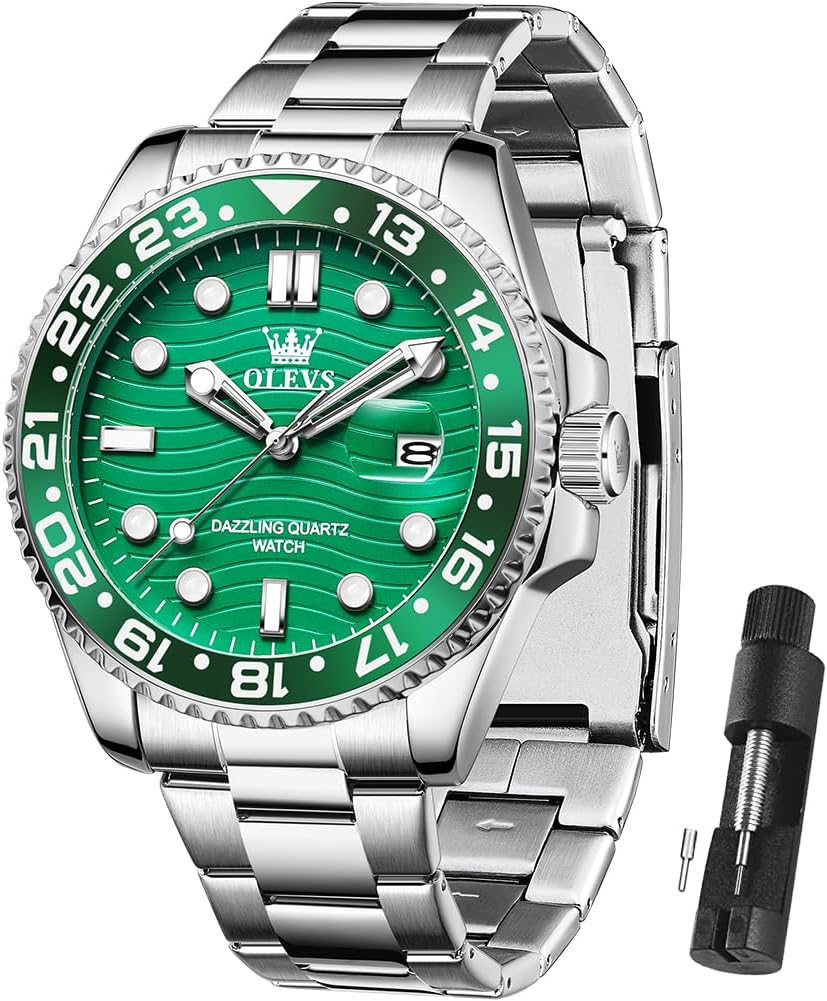
Image 2.2: OLEVS watch shown with a band link removal tool.
3. Operating Your Watch
3.1 Reading the Time and Date
The watch features a classic analog display with hour, minute, and second hands. The current date is shown in the date window, typically located at the 3 o'clock position.
3.2 Using the Rotating Bezel
Your OLEVS watch is equipped with a unidirectional rotating bezel. This bezel can be used for various timing purposes, such as:
- Tracking Elapsed Time: Align the zero marker on the bezel with the minute hand. As time passes, the minute hand will point to the elapsed time on the bezel's scale.
- Tracking a Second Time Zone: If the bezel has a 24-hour scale, you can rotate it to align with a different time zone, allowing you to quickly reference the time in another location.

Image 3.1: Illustration of the watch's rotating bezel and its potential uses.
4. Care and Maintenance
4.1 Water Resistance
This watch is water resistant to 30 meters (3ATM). This means it can withstand splashes, rain, or brief immersion in water. It is not suitable for swimming, diving, or bathing. Avoid operating the crown or pushers when the watch is wet to prevent water ingress.

Image 4.1: Visual representation of the watch's 30m water resistance.
4.2 Luminous Function
The watch hands and markers feature a luminous coating for visibility in low-light conditions. For optimal glow, expose the watch to a strong light source for approximately 30 seconds to activate the luminous material. The intensity and duration of the glow will depend on the exposure time and intensity of the light source.

Image 4.2: The watch dial displaying its luminous properties in darkness.
4.3 Cleaning and Storage
- Clean the watch case and band regularly with a soft, dry cloth. For stainless steel bands, a slightly damp cloth can be used, followed by drying.
- Avoid exposing the watch to extreme temperatures, direct sunlight for prolonged periods, or strong magnetic fields.
- When not in use, store the watch in a cool, dry place, preferably in its original box or a watch case to protect it from dust and scratches.
5. Troubleshooting
| Problem | Possible Cause | Solution |
|---|---|---|
| Watch not running | Crown is pulled out; battery depleted. | Push crown back in completely. If still not running, the battery may need replacement by a professional. |
| Date not changing at midnight | Time is set to PM instead of AM. | Adjust the time by advancing the hour hand past 12 o'clock to ensure the AM/PM cycle is correct. |
| Luminous function is weak | Insufficient light exposure. | Expose the watch dial to a strong light source for at least 30 seconds to recharge the luminous material. |
6. Specifications
Key technical specifications for the OLEVS Men's Analog Quartz Watch, Model YPF-G3610G-Bv:
| Feature | Detail |
|---|---|
| Brand | OLEVS |
| Model Number | YPF-G3610G-Bv (Series 3610) |
| Movement | Original Quartz Movement |
| Case Material | Stainless Steel |
| Band Material | Steel Bracelet |
| Case Diameter | 41 mm |
| Case Thickness | 11 mm |
| Strap Width | 20 mm |
| Perimeter (Max) | 21 cm |
| Mirror Material | High Hardness Coated Mirror |
| Water Resistance | 30 meters (3ATM) |
| Watch Weight | 113 grams |

Image 6.1: Detailed product parameters and dimensions of the OLEVS watch.
7. Warranty Information
OLEVS products are designed for quality and durability. Specific warranty terms and duration may vary. Please retain your proof of purchase. For detailed warranty information, refer to the documentation included with your watch or contact OLEVS customer service directly.
8. Customer Support
If you have any questions, concerns, or require assistance with your OLEVS watch, please contact our customer service team. You can typically find contact information on the OLEVS official website or through the retailer where you purchased the product. Please provide your model number (YPF-G3610G-Bv) and purchase details when contacting support for faster service.
Ask a question about this manual
Ask about setup, troubleshooting, compatibility, parts, safety, or missing instructions. Manuals+ will review the question and use this page’s manual context to help answer it.