
Introduction
This manual provides comprehensive instructions for the Machenike G5PRO Max SE Wireless Gaming Controller. It covers setup, operation, maintenance, and troubleshooting to ensure optimal performance and longevity of your device.
The Machenike G5PRO Max SE is a versatile gaming controller featuring Hall Effect sensing sticks and triggers, 6-axis gyroscope, and tri-mode connectivity (wired, 2.4GHz, Bluetooth). It is designed for use with NS, PC, iOS, and Android devices, offering precise control and an immersive gaming experience.
Setup
Package Contents
Ensure all items are present in the package:
- Machenike G5PRO Max SE Wireless Gaming Controller
- Charging Dock
- USB-C to USB-A Charging Cable
- 2.4GHz USB Adapter
- User Manual
Initial Charging
Before first use, fully charge your controller. The G5Pro Max SE Set Edition bundle includes a charging dock that charges your controller as soon as it's placed down. Simply press the Home button to automatically reconnect when picking it up.
- Connect the USB-C end of the charging cable to the charging dock.
- Connect the USB-A end of the charging cable to a power source (e.g., PC USB port, USB wall adapter).
- Place the controller onto the charging dock. The indicator lights on the controller will illuminate, indicating charging status.
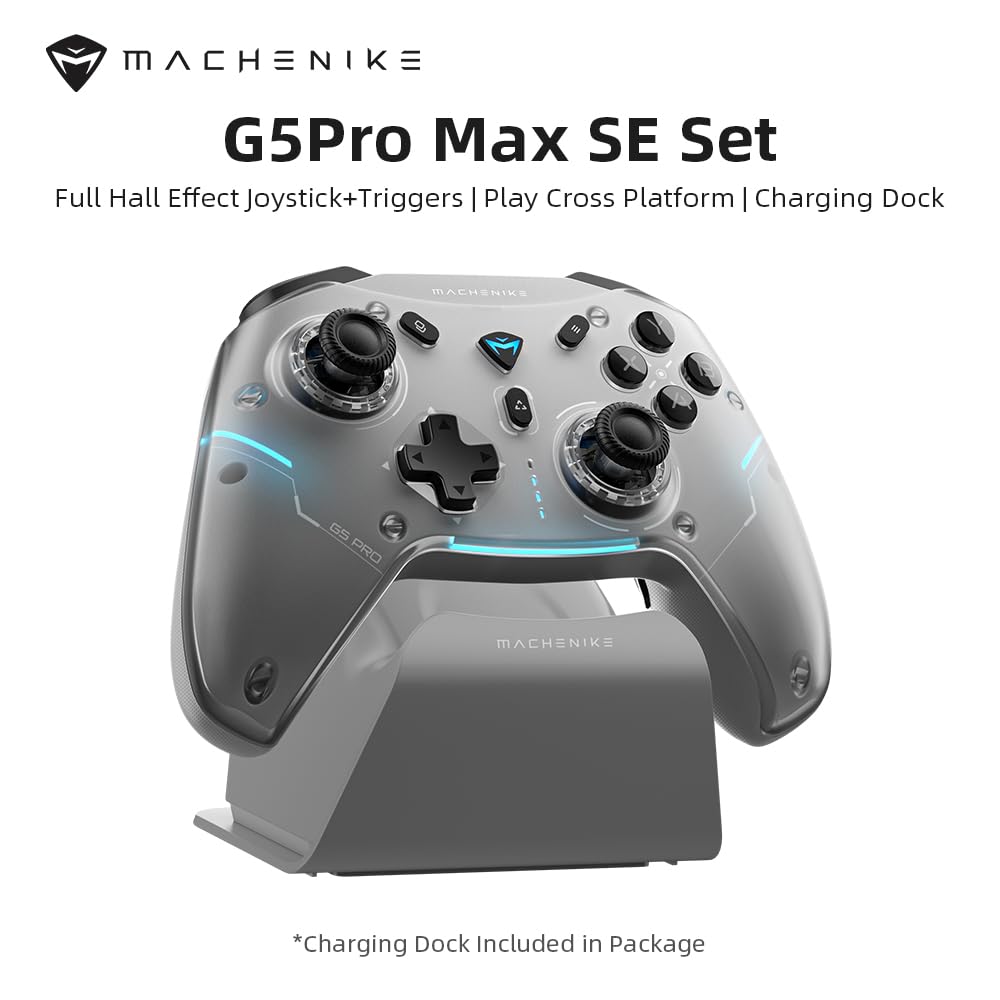
Image: Machenike G5PRO Max SE Controller with its dedicated charging dock.
Connectivity Modes
The controller supports three connectivity modes:
- Wired Connection: Connect the controller directly to your device using the USB-C cable.
- 2.4GHz Wireless: Use the included 2.4GHz USB adapter for a stable wireless connection. This is ideal for PC and Nintendo Switch.
- Bluetooth: Pair the controller with your iOS, Android, or other Bluetooth-enabled devices.
To switch between modes, use the toggle switch located on the back of the controller. Ensure the switch is set to the correct mode (O, NS, PC, 2.4G) for your intended device.

Image: Diagram illustrating the controller's multi-platform compatibility.
Operating Instructions
Hall Effect Sensing Sticks & Triggers
The controller features Hall Effect sensing sticks and triggers, providing accurate anti-drift control and seamless linear input. This technology ensures high precision and extended lifespan compared to traditional potentiometers.

Image: Close-up of the Hall Effect sensing sticks, highlighting their internal mechanism.

Image: Detailed view of the Hall Effect analog triggers, showing their linear control range.
6-Axis Gyro Motion Control
Enhance your gaming experiences with the advanced 6-axis gyro. This technology provides unmatched control as you tilt and rotate the controller, making it an immersive gamepad for PC and other compatible systems.

Image: Controller with visual representation of 6-axis gyro motion sensing.
Smart Charging Dock & Reconnection
The included charging dock not only charges your controller but also offers a smart reconnection feature. Simply place the controller on the dock to charge, and when you pick it up, it will automatically reconnect to the last paired device.

Image: Controller resting on the smart charging dock.
Advanced App Configuration (Keylinker App)
Customize your controller to match your playstyle using the Keylinker App. Download the app to remap buttons, adjust lighting effects, and fine-tune sensitivity settings for joysticks and triggers.

Image: Screenshots of the Keylinker App interface for controller customization.
Magnetic Detachable Faceplate
The controller features a full magnetic detachable faceplate, allowing for easy customization and maintenance. This design also helps resolve potential Hall-effect interference.

Image: Illustration of the magnetic detachable faceplate and its removal.
Machenike Co-Play (Single Dongle Dual Controller Support)
The G5Pro Max SE comes with a dual-core wireless dongle, allowing simultaneous connection of two controllers, including direct compatibility with both original and third-party Switch controllers.

Image: Diagram showing two controllers connected via a single dongle.
Official Product Video
Video: Official overview of the Machenike G5Pro Max Gaming Controller, demonstrating its features and design.
Maintenance
General Care
- Keep the controller clean by wiping it with a soft, dry cloth. Avoid abrasive cleaners or solvents.
- Store the controller in a cool, dry place away from direct sunlight and extreme temperatures.
- Avoid dropping the controller or subjecting it to strong impacts.
Battery Care
- To prolong battery life, avoid fully discharging the controller frequently.
- Charge the controller regularly, even if not in use for extended periods, to maintain battery health.
Troubleshooting
Connectivity Issues
- Controller not connecting: Ensure the mode switch on the back of the controller is set correctly for your device (PC, NS, 2.4G, Bluetooth).
- For 2.4GHz, ensure the USB adapter is securely plugged into your device.
- For Bluetooth, ensure your device's Bluetooth is enabled and the controller is in pairing mode.
- Try restarting both the controller and your device.
Input/Responsiveness Problems
- Stick Drift or Inaccurate Input: Although equipped with Hall Effect sensors to minimize drift, if you experience issues, use the Keylinker App to calibrate the joysticks and triggers.
- Buttons Unresponsive: Ensure the controller is charged. Check for any physical obstructions.
- Firmware Update: Regularly check for firmware updates via the Keylinker App to ensure optimal performance and bug fixes.
Specifications
| Feature | Detail |
|---|---|
| Model | G5 PRO V2 |
| Connectivity | 2.4GHz, Bluetooth, Wired (USB-C) |
| Supported Platforms | NS (Nintendo Switch), PC, iOS, Android |
| Joysticks | Hall Effect Sensing Sticks |
| Triggers | Hall Effect Analog Triggers |
| Motion Control | Built-In 6-Axis Gyro |
| Battery | 600mAh Li-Ion (Up to 8 hours playtime) |
| Charging | Smart Charging Dock (included) |
| Dimensions | 8.66 x 3.15 x 6.69 inches |
| Weight | 1.1 pounds |
| Manufacturer | Machenike |
Warranty and Support
For warranty information and technical support, please refer to the official Machenike website or contact their customer service directly. Keep your proof of purchase for any warranty claims.
Additional protection plans may be available through your retailer. Please check with your point of purchase for details.
Manufacturer: Machenike