
Introduction
The ULANZI LM-P40 RGB LED Video Light is a versatile and portable lighting solution designed for various content creation needs, including YouTube, vlogging, live streaming, and photography. This manual provides detailed instructions for its setup, operation, and maintenance, ensuring you get the most out of your device.
What's in the Box
Carefully unpack your ULANZI LM-P40 RGB LED Video Light and ensure all items are present:
- ULANZI LM-P40 RGB LED Video Light x 1
- Magnetic Diffuser x 1
- User Manual x 1

Image: The ULANZI LM-P40 RGB LED Video Light, its magnetic diffuser, and the user manual laid out next to the product box.
Product Features
Full-Color RGB and Bi-Color Control
The LM-P40 offers comprehensive lighting control with 0-360° full-color RGB adjustment and saturation control. It also provides a bi-color mode with a color temperature range of 2700K (warm) to 6500K (cool). Brightness is fully dimmable from 0% to 100%. Adjustments are made quickly and precisely via dedicated control knobs.

Image: Visual representation of the light's ability to adjust color temperature (2700K-6500K), full 0-359° RGB color, and brightness levels (0-100%).
High Power Output and Color Accuracy
With a 40W output, the LM-P40 delivers a maximum illumination of 14000lux at 0.3 meters (6500K). Its high Color Rendering Index (CRI) of 95+ ensures accurate and vibrant color reproduction, crucial for professional-looking content.

Image: The light panel illuminated, highlighting its 40W power and 14000 lux output. An example demonstrates the high color accuracy (CRI 96+).
Smart Display and Intuitive Controls
An integrated LCD screen provides real-time information on the current lighting mode, remaining battery life, color temperature, and brightness level. Two stepless adjustment knobs allow for precise and quick setting changes.

Image: The light's control interface, showing the CCT and DIM knobs, the LCD screen, and the magnetic soft cover being attached. Illustrations of horizontal and vertical mounting are also present.
Efficient Cooling System
The light features a hollowed-out design and a built-in high-speed cooling fan. This system works continuously to dissipate heat, preventing overheating and ensuring stable power output during prolonged use.
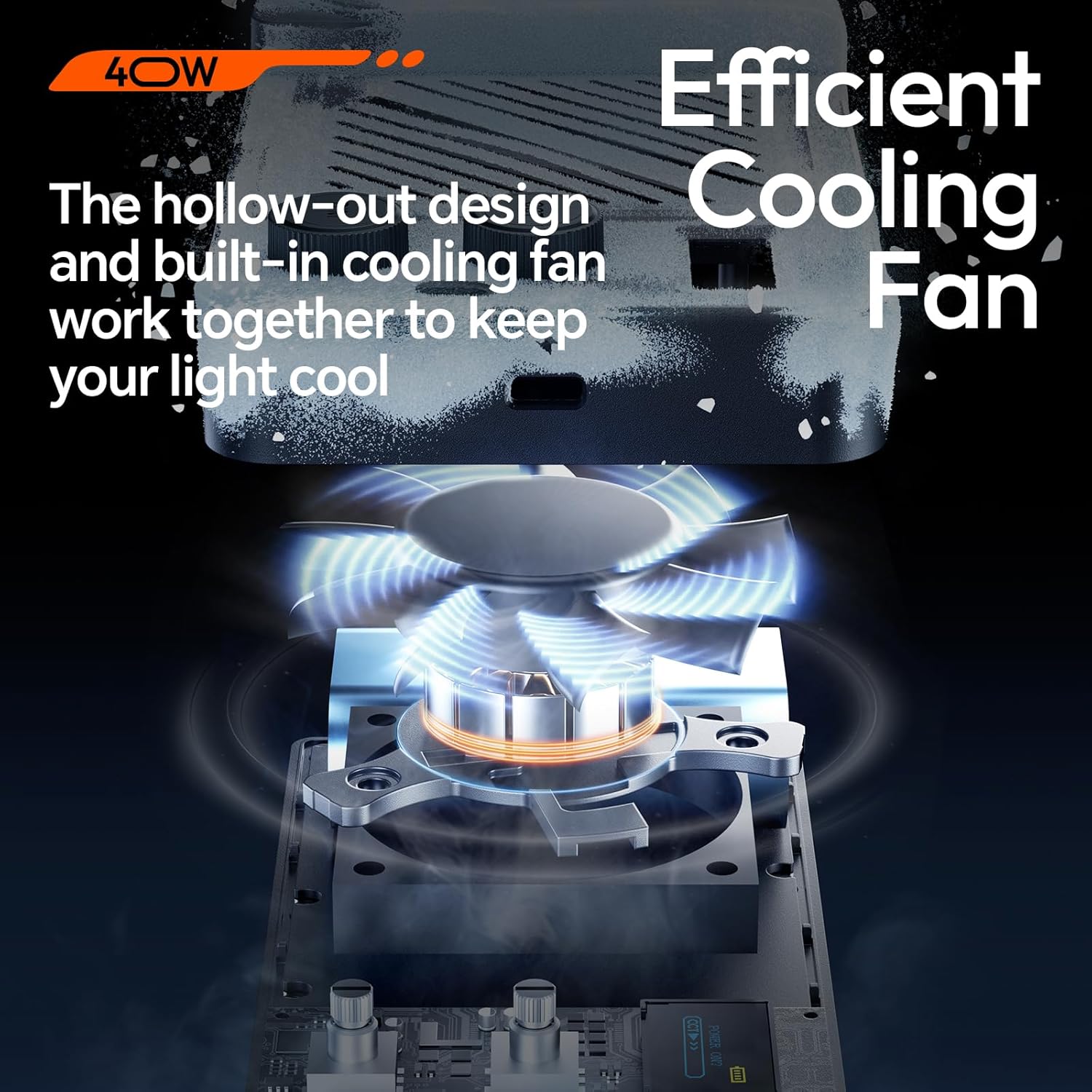
Image: An exploded view showing the internal cooling fan and the hollowed-out structure designed for effective heat management.
High-Capacity Rechargeable Battery
Equipped with a 5000mAh (37Wh) built-in rechargeable lithium battery. It offers approximately 30 minutes of operation at 100% brightness and up to 1 hour 20 minutes at minimum brightness. The Type-C interface supports PD fast charging, allowing for use while charging.

Image: The light being charged via a Type-C cable, with text indicating battery duration at different brightness levels and recommended charger specifications.
Compact and Portable Design
Measuring approximately 9.6 x 4.76 x 3.43 inches and weighing 1.1 lbs (408g), the light is designed for easy portability. It features dual 1/4" screw interfaces for tripods and a cold shoe mount for cameras, supporting both horizontal and vertical setups.

Image: The light in use during an outdoor shoot, demonstrating its compact size and portability. Icons indicate its compact, portable, outdoor-friendly, and lightweight nature.
Setup
- Unboxing: Carefully remove the ULANZI LM-P40 RGB LED Video Light, diffuser, and user manual from the packaging.
- Attaching the Diffuser: The magnetic softbox diffuser can be quickly attached to the front of the light for softer illumination. Ensure it is securely in place.
- Mounting the Light:
- For tripod mounting: Use the standard 1/4" screw holes located on the device. The light can be mounted horizontally or vertically.
- For camera mounting: Utilize the cold shoe mount to attach the light to a camera or DSLR.
Operating Instructions
- Power On/Off: Press and hold the power button (usually located near the control knobs) to turn the light on or off.
- Mode Selection: Use the mode button (often labeled 'CCT' or 'HSI' or a dedicated mode button) to cycle through HSI, CCT, and Scene modes. The current mode will be displayed on the LCD screen.
- Adjusting Color Temperature (CCT Mode): In CCT mode, rotate the 'CCT' knob to adjust the color temperature from 2700K (warm) to 6500K (cool).
- Adjusting Brightness (DIM Knob): Rotate the 'DIM' knob to adjust the brightness level from 0% to 100% in any mode.
- Adjusting RGB (HSI Mode): In HSI mode, rotate the 'CCT' knob to cycle through 0-360° full-color hues. Use the 'DIM' knob to adjust color saturation.
- Scene Effects: In Scene mode, rotate the 'CCT' knob to select from 20 pre-programmed lighting effects.
- LCD Display: The integrated LCD screen provides real-time information on the current mode, color temperature, brightness, and remaining battery life.
Modes and Effects
The ULANZI LM-P40 RGB LED Video Light offers three primary lighting modes to suit various creative needs:
- CCT Mode: Allows precise adjustment of white light color temperature from 2700K to 6500K, along with brightness control.
- HSI Mode: Provides full-color RGB adjustment, enabling you to select any hue from 0-360° and control its saturation.
- Scene Mode: Access 20 unique pre-programmed lighting effects to simulate various environments and scenarios. These include:
- Police Car
- Ambulance
- Fire Truck
- Lightning
- Fireworks
- TV
- Candle
- Party
- Faulty Bulb
- Pulse
- Frequency Line
- Strobe
- RGB Strobe
- Paparazzi
- Emergency
- H/L Beam
- Red Flash
- Green Flash
- Blue Flash
- HSI Slow/Fast

Image: A visual list of the 20 scene effects, including Police Car, Ambulance, Lightning, Fireworks, and various color flashes.

Image: Examples of the light's application in different creative settings, showcasing its RGB capabilities for dynamic lighting.
Battery and Charging
The LM-P40 RGB LED Video Light is equipped with a powerful internal battery:
- Battery Type: Built-in 5000mAh (37Wh) rechargeable lithium battery.
- Battery Life: Approximately 30 minutes at 100% brightness; up to 1 hour 20 minutes at minimum brightness.
- Charging Interface: Type-C port.
- Charging Time: Approximately 3 hours for a full charge.
- Fast Charging: Supports PD (Power Delivery) fast charging.
- Use While Charging: The light can be used while connected to a power source. For optimal performance during simultaneous charging and use, a 65W or higher PD charger is recommended.
Cooling System
To ensure consistent performance and longevity, the ULANZI LM-P40 incorporates an advanced cooling system:
- Design: Features a hollowed-out body design that facilitates airflow.
- Fan: Includes a built-in high-speed cooling fan.
- Function: This system actively dissipates heat generated during operation, preventing the light from overheating and maintaining stable power output even during extended use.
Maintenance
Proper maintenance will extend the life and performance of your video light:
- Cleaning: Use a soft, dry cloth to gently wipe the exterior of the light. Avoid using abrasive materials, solvents, or harsh chemicals, as these can damage the finish or internal components.
- Storage: When not in use, store the light in a cool, dry place, away from direct sunlight, high humidity, and extreme temperatures.
- Battery Care: To maintain battery health, avoid completely draining the battery frequently. Charge the device regularly, even if it's not used for extended periods, to prevent deep discharge.
- Diffuser Care: The magnetic diffuser can be cleaned with a soft, damp cloth. Ensure it is completely dry before reattaching.
Troubleshooting
If you encounter any issues with your ULANZI LM-P40, refer to the following common problems and solutions:
| Problem | Possible Cause | Solution |
|---|---|---|
| Light not turning on | Low or depleted battery; Power button not pressed correctly. | Charge the battery using a Type-C cable and a suitable power adapter. Ensure the power button is pressed and held until the light activates. |
| Brightness or color not adjusting | Incorrect mode selected; Knobs not functioning. | Verify that you are in the correct mode (CCT, HSI, or Scene) for the desired adjustment. Check the LCD display for current settings. If issues persist, try restarting the device. |
| Light feels excessively hot | Cooling fan obstruction; Prolonged use at high power. | Ensure the cooling fan vents are not obstructed. If the light becomes too hot, turn it off and allow it to cool down before resuming use. Consider reducing brightness for extended sessions. |
| Magnetic diffuser detaching easily | Improper alignment; Strong vibrations. | Ensure the diffuser is properly aligned and securely seated on the magnetic points. Handle the light carefully when the diffuser is attached, especially during movement. |
Specifications
| Feature | Detail |
|---|---|
| Brand | ULANZI |
| Model Name | LM-P40 |
| Color Temperature | 2700K-6500K |
| Power | 40W |
| Battery Capacity | 5000mAh (37Wh) |
| Max Illumination | 14000lux (0.3 meters) |
| Color Rendering Index (CRI) | 95+ |
| Charging Interface | Type-C (supports PD fast charging) |
| Charging Time | Approx. 3 hours |
| Battery Life (100% Brightness) | Approx. 30 minutes |
| Battery Life (Min Brightness) | Approx. 1 hour 20 minutes |
| Dimensions | Approx. 9.6 x 4.76 x 3.43 inches (24.4 x 12.1 x 8.7 cm) |
| Weight | Approx. 1.1 lbs (408g) |
| Mounting Options | Dual 1/4" screw holes, Cold shoe mount |
| Compatible Devices | Devices with cold shoe mount and 1/4" standard screw, USB-C input |
Warranty and Support
- Warranty: The ULANZI LM-P40 RGB LED Video Light comes with a 1-year manufacturer's warranty. Please retain your proof of purchase for any warranty claims.
- Support: For technical assistance, troubleshooting, or warranty inquiries, please contact ULANZI customer support through their official website or the retailer from whom you purchased the product.


