
1. Introduction
This manual provides essential information for the safe and efficient installation, operation, and maintenance of the FUZHUI SKI780-2D2G-4 Variable Frequency Drive (VFD) Frequency Converter. Please read this manual thoroughly before using the product to ensure proper functionality and to prevent potential hazards. This device is designed for controlling the speed of 3-phase AC motors in various industrial applications, including constant pressure water supply systems.
2. Product Overview
The FUZHUI SKI780-2D2G-4 is a compact and robust frequency converter designed for precise motor control. It features a built-in braking unit and advanced interference-reduction technology.
Key Features:
- Built-In Braking Unit: Enables fast forward and reverse rotation switching with an external braking resistor, enhancing operational efficiency.
- Exceptional Immunity to Disturbance: Equipped with interference-reduction technology for stable performance in electromagnetically noisy environments.
- User-Friendly Functionality: Designed for ease of operation and wiring, facilitating quick setup and integration.
- Versatile Applications: Suitable for constant pressure water supply and wind pressure constant pressure control, adaptable to various industrial needs.
- Compact and Lightweight Design: Measures approximately 142 x 110 x 85mm and weighs 1.5kg, making it easy to install and transport.

Figure 2.1: Angled view of the FUZHUI SKI780-2D2G-4 VFD Frequency Converter, showing the control panel and terminal blocks.

Figure 2.2: Rear view of the frequency converter, highlighting the ventilation grilles and mounting points.
3. Specifications
| Parameter | Value |
|---|---|
| Model | SKI780-2D2G-4 |
| Application Range | Universal |
| Phase Number | Three Phase |
| Supply Voltage | Three-phase AC380V 50/60Hz |
| Output Voltage | Three-phase AC380V |
| Adapted Motor Capacity | 2.2kW |
| DC Supply Properties | Voltage Type |
| Control Method | Current Direction |
| Output Voltage Regulation Mode | PWM Control |
| Rated Current | 5.1A |
| Product Size (Approx.) | 142 x 110 x 85mm / 5.6 x 4.3 x 3.3in |
| Panel Opening Size (Approx.) | 61 x 81mm / 2.4 x 3.2in |
| Weight (Approx.) | 1.5kg / 3.3 lb |
| Manufacturer | FUZHUI |
| Item Model Number | FUZHUI3ytmw2dggu |
4. Safety Information
WARNING: Electrical shock hazard. Installation and maintenance should only be performed by qualified personnel.
- Always disconnect power before installation, wiring, or maintenance.
- Ensure proper grounding of the unit and connected equipment.
- Do not operate the VFD with damaged cables or if the enclosure is open.
- Protect the unit from moisture, dust, and corrosive environments.
- Observe all local and national electrical codes.
- The VFD may have residual voltage even after power is disconnected. Wait at least 5 minutes after power-off before touching internal components.
5. Setup and Installation
5.1 Mounting
Mount the VFD in a clean, dry, and well-ventilated area. Ensure adequate clearance around the unit for heat dissipation. The compact size (142 x 110 x 85mm) allows for flexible installation.
5.2 Wiring
Refer to the terminal block diagrams for correct wiring connections. Ensure all connections are secure and properly insulated.

Figure 5.1: Front view of the VFD, detailing the control panel and the main power and control terminal blocks.

Figure 5.2: Top-down view of the VFD's terminal blocks, showing input (R, S, T), output (U, V, W), braking (P+, PB), and control terminals (24V, 10V, AI1, GND, DI1-DI5, TA, TB, TC, AO1, FM, A+, B-).
- Power Input (R, S, T): Connect the three-phase AC380V 50/60Hz power supply to these terminals.
- Motor Output (U, V, W): Connect the 3-phase motor to these terminals.
- Braking Resistor (P+, PB): Connect an external braking resistor here if fast deceleration or frequent stopping is required.
- Control Terminals: These include 24V and 10V auxiliary power, analog inputs (AI1, AO1), digital inputs (DI1-DI5), relay outputs (TA, TB, TC), and communication interfaces (FM, A+, B-). Refer to the detailed wiring diagram in the included user manual for specific connections based on your application.
5.3 Panel Compatibility Note
IMPORTANT: This product is an unused inverter and is designed to be used only with an unused panel. If your existing panel is an older model, it may not be compatible with this product. Please refer to the provided images or the full user manual to distinguish between old and new panel models for compatibility.
6. Operating Instructions
The VFD features a user-friendly control panel for setting parameters and operating the motor.
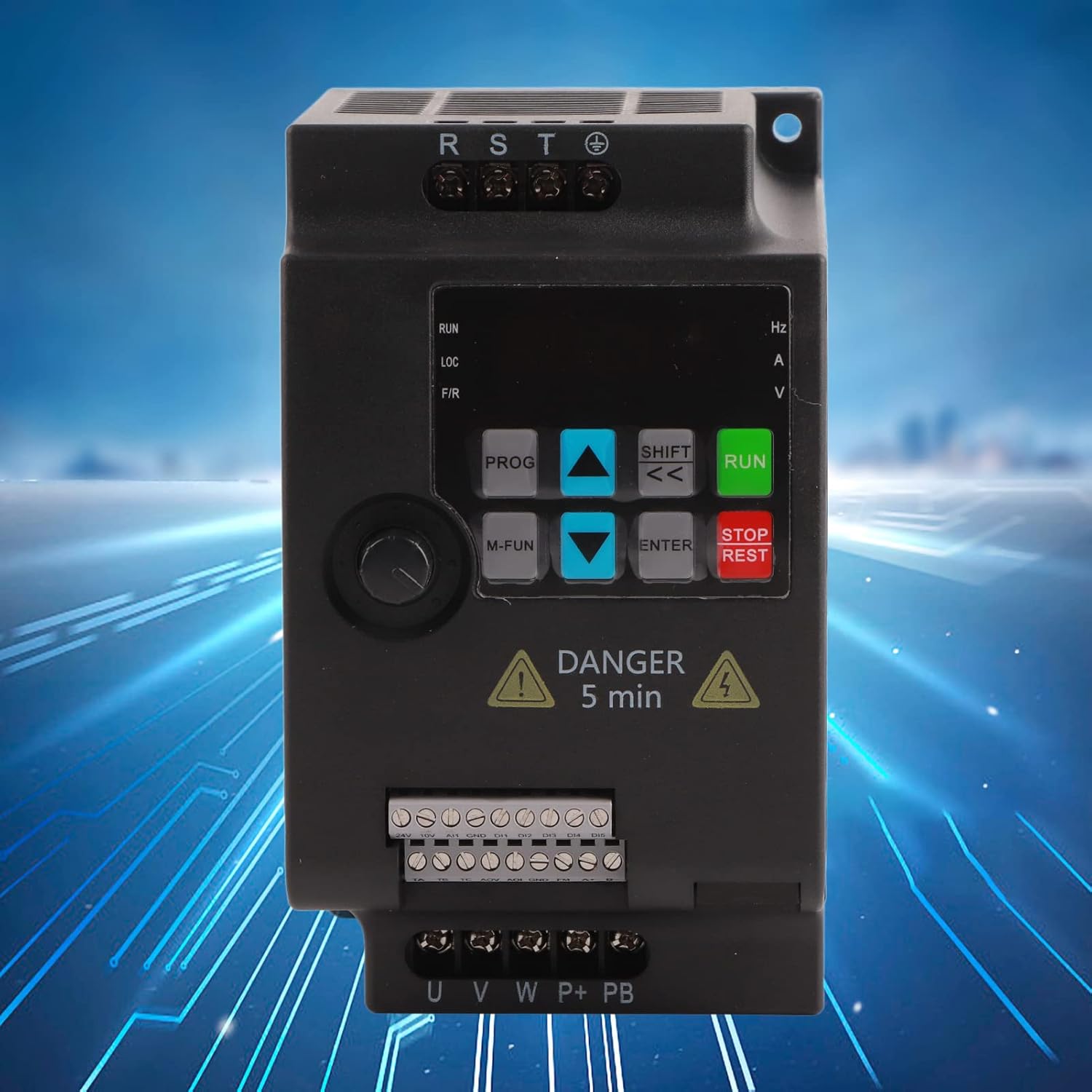
Figure 6.1: Close-up of the VFD control panel, showing buttons for RUN, STOP/REST, PROG, M-FUN, SHIFT, ENTER, and arrow keys.
6.1 Control Panel Functions
- RUN: Starts the motor.
- STOP/REST: Stops the motor or resets errors.
- PROG (Program): Enters or exits parameter setting mode.
- M-FUN (Multi-Function): Accesses multi-function menus.
- SHIFT (<<): Shifts cursor position or changes display.
- ENTER: Confirms parameter settings or enters sub-menus.
- Up/Down Arrows: Navigate through menus or adjust parameter values.
6.2 Basic Operation Sequence
- Power On: Apply three-phase AC380V power to the VFD.
- Parameter Setting: Use the PROG button to enter parameter setting mode. Adjust necessary parameters such as motor frequency, acceleration/deceleration times, and control mode (Current Direction, PWM Control) using the arrow keys and ENTER button.
- Start Motor: Press the RUN button to start the motor. The display will show the output frequency or other selected operating parameters.
- Adjust Speed: Use the up/down arrow keys (if configured for local speed adjustment) or external control signals to change the motor speed.
- Stop Motor: Press the STOP/REST button to stop the motor.
For detailed parameter descriptions and advanced functions, refer to the comprehensive user manual included with your product.
7. Maintenance
Regular maintenance ensures the longevity and reliable operation of your VFD.
- Cleaning: Periodically clean the VFD's exterior and ventilation grilles to prevent dust accumulation, which can impede cooling. Use a soft, dry cloth. Do not use liquid cleaners.
- Inspection: Regularly inspect all wiring connections for tightness and signs of wear or damage. Check for any unusual noises or odors during operation.
- Environmental Conditions: Ensure the operating environment remains within specified temperature and humidity ranges.
- Capacitor Life: Electrolytic capacitors have a finite lifespan. If the VFD is in continuous operation for many years, consider professional inspection or replacement of capacitors.
Always disconnect power and wait for the discharge period before performing any maintenance.
8. Troubleshooting
This section provides general guidance for common issues. For specific error codes and advanced troubleshooting, consult the full user manual.
| Problem | Possible Cause | Solution |
|---|---|---|
| VFD does not power on | No input power; Blown fuse; Internal fault | Check power supply; Inspect fuses; Contact technical support. |
| Motor does not run | Incorrect wiring; Parameter settings incorrect; Overload; Emergency stop active | Verify motor wiring; Check parameter settings (e.g., frequency, control mode); Reduce load; Reset emergency stop. |
| Overcurrent fault | Motor overload; Short circuit in motor or wiring; Rapid acceleration | Reduce load; Check motor and wiring for shorts; Increase acceleration time parameter. |
| Overvoltage fault | Rapid deceleration; High input voltage | Increase deceleration time parameter; Install braking resistor if needed; Verify input voltage. |
| Undervoltage fault | Low input voltage; Power supply interruption | Verify input voltage; Check power supply stability. |
If the problem persists after attempting these solutions, please contact FUZHUI technical support.
9. Warranty and Support
Specific warranty details for the FUZHUI SKI780-2D2G-4 Frequency Converter are not provided in this document. Please refer to the product packaging, purchase documentation, or contact your vendor for warranty information.
For technical support or inquiries, please visit the official FUZHUI store or contact their customer service department.
FUZHUI Store: https://www.amazon.com/stores/FUZHUI/page/E72029D9-145D-4226-96C5-6B17B08C907A