
novorik 0302
novorik Metal Detector Model 0302 User Manual
Comprehensive instructions for assembly, operation, maintenance, and troubleshooting.
1. Introduction
Thank you for choosing the novorik Metal Detector Model 0302. This device is designed for efficient and accurate metal detection across various terrains. Please read this manual thoroughly before operating the detector to ensure proper use and to maximize its performance and longevity.
2. Package Contents
Verify that all items listed below are included in your package:
- novorik Metal Detector (Model 0302)
- Backpack
- Shovel
- Headphones
- Charging Cord
- User Manual (this document)
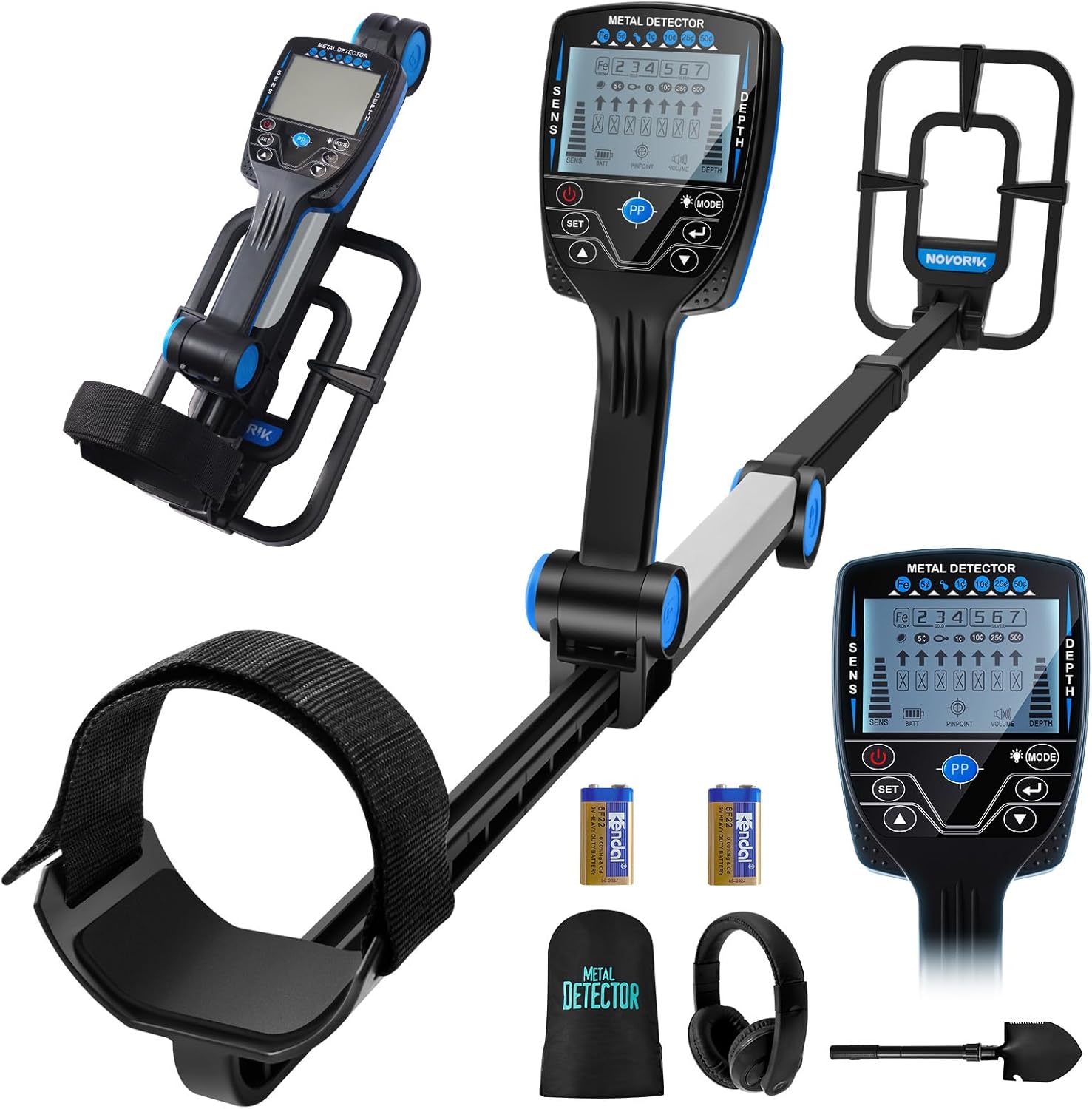
3. Components Overview
Familiarize yourself with the main components and controls of your metal detector:

- LCD Display: Shows detection depth, target identification, sensitivity level, battery status, and volume.
- Search Coil: 10-inch IP68 waterproof coil for detecting metals.
- Control Panel: Buttons for Power, Set, Up, Down, Mode (backlight), Pinpoint (PP), and Enter.
- Adjustable Stem: Retractable design for adjusting length (30" to 48") and portability.
- Armrest: Foam-padded for comfortable operation.
4. Setup and Assembly
The novorik Metal Detector is designed for quick and easy assembly. No complex installation is required.
4.1 Unfolding and Adjusting Length
- Open the latch on the main stem.
- Pull out the lower stem to extend the detector to your desired length (between 30 and 48 inches).
- Fasten the latch securely to lock the stem in place.
- Adjust the search coil angle as needed.
- Ensure the foam-padded armrest is positioned comfortably for your arm.

4.2 Battery Installation
The detector requires batteries for operation. Refer to the battery compartment for specific battery type and installation instructions. Ensure correct polarity.
4.3 Connecting Headphones
Plug the included headphones into the designated port on the control panel for clearer audio signals and to conserve battery life.
5. Operating Modes
The novorik Metal Detector features 5 distinct detection modes to suit various searching conditions and target preferences. Use the "MODE" button to cycle through these options.

- All Metal Mode: Detects all types of metal. This mode provides the highest sensitivity and is ideal for general searching when you want to find any metallic object.
- DISC (Discrimination) Mode: Allows you to eliminate unwanted metal types by setting a numeric range. This is useful for ignoring junk metals like iron and focusing on more valuable targets.
- JEWELRY Mode: Specifically designed to eliminate iron signals, responding only to other metals commonly found in jewelry.
- SNIFF Mode: (Note: The product description mentions "SNIFF" but the image shows "MEMORY". Assuming "MEMORY" is the intended mode based on the image and common detector features.) Detects only memorized metal targets. This mode is useful for repeatedly searching for a specific type of metal.
- Pinpoint (PP) Mode: Used for precise positioning of detected metals. Once a target is located in another mode, switch to PP mode to narrow down its exact location for easier recovery.
6. Operating Instructions
6.1 Powering On and Initial Settings
- Press the Power button (①) to turn on the detector.
- Adjust the sensitivity (SENS) using the Up/Down arrows to prevent false signals. Start with a moderate level and increase if needed.
- Select your desired detection mode (All Metal, DISC, JEWELRY, SNIFF) using the Mode button.
- Adjust the volume to a comfortable level using the Volume controls.
6.2 Sweeping Technique
Hold the detector with the search coil parallel to the ground, about 1-2 inches above the surface. Sweep the coil slowly from side to side in overlapping arcs. Maintain a consistent speed and height for optimal detection.
6.3 Interpreting Signals
When a metal object is detected, the detector will emit an audio tone, and the LCD display will show target identification and estimated depth. Different metals may produce different tones or display segments. Refer to the LCD display for specific target indications (e.g., Iron, 5¢, 1¢, 10¢, 25¢, 50¢, Gold, Silver).
6.4 Using Pinpoint (PP) Mode
Once a target is identified, press the "PP" button. Move the search coil slowly over the area where the signal was strongest. The detector will emit a continuous tone, and the signal strength indicator will increase as you get closer to the exact center of the target. This helps in precise digging.
6.5 Suitable Environments
The 10-inch IP68 waterproof search coil allows for detection in various environments, including:
- Beaches (wet sand and shallow water)
- Fields and parks
- Wooded areas
- Rivers (shallow water)
- Lawns and gardens

7. Maintenance
- Cleaning: After each use, especially in sandy or wet conditions, wipe down the search coil and stem with a damp cloth. Avoid using harsh chemicals.
- Storage: Store the detector in a cool, dry place. If storing for an extended period, remove the batteries to prevent leakage.
- Battery Care: Replace batteries when the low battery indicator appears on the LCD. Use high-quality batteries for optimal performance.
- Coil Protection: While the search coil is waterproof, avoid unnecessary impacts or extreme temperatures.
8. Troubleshooting
| Problem | Possible Cause | Solution |
|---|---|---|
| No power | Dead or incorrectly installed batteries. | Replace batteries or ensure correct polarity. |
| False signals / erratic behavior | High sensitivity setting, electromagnetic interference, mineralized ground. | Reduce sensitivity. Move away from power lines or other electronic devices. Try adjusting ground balance if available (this model has DSP chip for anti-interference). |
| Poor detection depth | Low sensitivity, small target, highly mineralized soil. | Increase sensitivity. Sweep slower. Ensure search coil is parallel to the ground. |
| Cannot pinpoint target accurately | Incorrect use of PP mode, target too deep. | Ensure you are sweeping slowly and precisely in PP mode. Re-scan the area in a different direction. |
9. Specifications
- Brand: novorik
- Model: 0302
- Color: Black
- Material: Aluminum
- Power Source: Battery Powered (Specific battery type not detailed in input, typically 9V)
- Item Weight: 6.1 Pounds
- Product Dimensions (Folded): Approximately 11"L x 4.9"W x 16.9"H
- Adjustable Length: 30" to 48"
- Search Coil Size: 10 Inches
- Search Coil Waterproof Rating: IP68
- Max Detection Depth: Up to 10 inches for coin-sized objects, up to 4 feet for larger objects.
- Detection Modes: All Metal, DISC, JEWELRY, SNIFF (MEMORY), Pinpoint (PP)
- Display: LCD with backlight
- Special Features: DSP chip for anti-interference and high accuracy, foldable design.

10. Warranty and Support
10.1 Warranty Information
Please refer to the product packaging or the official novorik website for detailed warranty information. Keep your purchase receipt as proof of purchase for any warranty claims.
10.2 Customer Support
For technical assistance, troubleshooting, or any questions regarding your novorik Metal Detector Model 0302, please contact novorik customer support through the retailer where the product was purchased or visit the official novorik website for contact details.
Ask a question about this manual
Ask about setup, troubleshooting, compatibility, parts, safety, or missing instructions. Manuals+ will review the question and use this page’s manual context to help answer it.