
Introduction
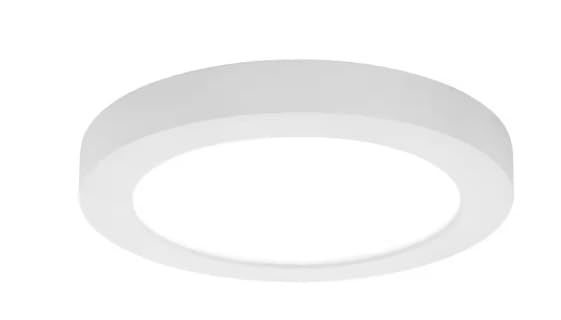
Thank you for choosing the Commercial Electric Flexinstall LED 8-inch White Disklight Recessed Ceiling Light. This manual provides essential information for the safe installation, operation, and maintenance of your new lighting fixture. This fixture features 5CCT (Correlated Color Temperature) selection and DuoBright dimming capabilities, allowing you to customize your lighting experience.
Safety Information
Please read and understand all instructions before beginning installation. Failure to do so may result in electric shock, fire, or other injuries that could be hazardous or fatal. Keep these instructions for future reference.
- WARNING: Risk of electric shock. Disconnect power at the fuse or circuit breaker before installing or servicing.
- WARNING: Risk of fire. Use only with specified voltage and wattage.
- Consult a qualified electrician if you are unsure about the installation process.
- Do not modify the fixture in any way.
- Ensure all connections are secure and correct to prevent electrical hazards.
- This fixture is designed for indoor use only.
Package Contents
Verify that all components are present before installation. If any part is missing or damaged, do not attempt to assemble or install the product.
- LED Disklight Fixture (1)
- Mounting Hardware (screws, wire nuts)
- Instruction Manual (this document)
Setup and Installation
Follow these steps carefully to install your Flexinstall LED Disklight.
- Turn Off Power: Before starting, ensure the power to the junction box is turned off at the circuit breaker or fuse box.
- Prepare Wiring: Connect the fixture's wires to the junction box wires using the provided wire nuts. Connect the black wire from the fixture to the black (live) wire from the junction box, the white wire from the fixture to the white (neutral) wire from the junction box, and the ground wire from the fixture to the bare copper (ground) wire from the junction box. Ensure all connections are secure.
- Mount the Fixture: Align the fixture with the junction box. Use the provided screws to secure the fixture base to the junction box. Ensure the fixture is flush with the ceiling surface.
- Restore Power: Once the fixture is securely mounted and wired, restore power at the circuit breaker.
Operating Instructions
Your Flexinstall LED Disklight offers adjustable color temperature and dimming features.
5CCT Color Temperature Selection
This fixture allows you to select from five different color temperatures: 2700K (Warm White), 3000K (Soft White), 3500K (Neutral White), 4000K (Bright White), and 5000K (Daylight). The selection is typically made via a switch located on the fixture itself before installation, or through a compatible wall switch/remote control if available.
This image illustrates the visual difference between the five available color temperatures (2700K, 3000K, 3500K, 4000K, 5000K) provided by the Flexinstall LED Disklight, ranging from warm to cool white light.
DuoBright Dimming
The DuoBright dimming feature allows for smooth adjustment of light intensity. This fixture is compatible with most standard LED dimmers. Refer to your dimmer's instructions for proper operation. The control method for this fixture includes Push Button and Remote, depending on your setup.
Maintenance
The Flexinstall LED Disklight is designed for long-lasting performance with minimal maintenance.
- Cleaning: Ensure power is off before cleaning. Wipe the fixture with a soft, dry, or slightly damp cloth. Do not use harsh chemicals, abrasive cleaners, or polishes as they may damage the finish.
- LEDs: The integrated LED components are designed to last for the lifetime of the fixture and are not replaceable.
Troubleshooting
If you experience issues with your light fixture, refer to the following common problems and solutions:
| Problem | Possible Cause | Solution |
|---|---|---|
| Light does not turn on. | No power to the fixture; loose wiring; faulty switch. | Check circuit breaker/fuse. Ensure all wire connections are secure. Test the wall switch. |
| Light flickers or dims improperly. | Incompatible dimmer switch; loose wiring. | Ensure dimmer is LED compatible. Check wiring connections. |
| Incorrect color temperature. | CCT switch set incorrectly. | Adjust the CCT switch on the fixture (if accessible) to the desired setting. |
If problems persist, contact customer support.
Specifications
| Feature | Detail |
|---|---|
| Brand | Commercial Electric |
| Model Number | B0DSLY615D |
| Color | White |
| Material | Plastic |
| Light Fixture Form | Ceiling |
| Indoor/Outdoor Usage | Indoor |
| Power Source | Corded Electric |
| Control Method | Push Button, Remote |
| Wattage | 10 watts |
| Brightness | 1500 Lumen |
| Features | 5CCT Selectable, DuoBright Dimming |
Warranty and Support
For warranty information or technical support, please refer to the Commercial Electric official website or contact their customer service department. Keep your purchase receipt as proof of purchase for any warranty claims.
Online Support: Commercial Electric Lighting (Note: This is a general link to Commercial Electric lighting products at Home Depot, as a direct support link is not provided in the input data.)


