1. Introduction
Thank you for choosing the JVC TiVo LT-40VF5355W 40-inch Full HD Smart TV. This television combines advanced display technology with the intuitive TiVo operating system to provide a comprehensive entertainment experience. Featuring Full HD resolution, HDR10 support, and a triple tuner, this TV offers stunning visuals and versatile content access. This manual provides essential information for safe and efficient use of your new television.

This image displays the JVC TiVo 40-inch Smart TV, highlighting its key display technologies. It features Full HD (1920x1080) resolution, HDR10 support for enhanced contrast and color, and Super Resolution technology for improved image clarity. The 'Powered by TiVo' logo indicates its smart TV capabilities.
2. Safety Information
Please read all safety instructions carefully before operating the television. Keep this manual for future reference.
- Power Supply: Ensure the TV is connected to a power outlet with the correct voltage. Do not overload power outlets.
- Ventilation: Do not block ventilation openings. Allow adequate space around the TV for proper airflow.
- Water and Moisture: Do not expose the TV to rain or moisture. Do not place objects filled with liquids on the TV.
- Cleaning: Unplug the TV before cleaning. Use a soft, dry cloth. Do not use liquid or aerosol cleaners.
- Mounting: Follow instructions for stand assembly or wall mounting. Ensure the TV is securely placed to prevent falling.
- Lightning: Unplug the TV during lightning storms or when unused for long periods.
3. Package Contents
Verify that all items are present in the packaging:
- JVC TiVo LT-40VF5355W Television
- User Manual
- Remote Control with 2 AAA Batteries
- TV Stand Feet
4. Setup
4.1. Stand Assembly
- Carefully place the TV face down on a soft, flat surface to prevent screen damage.
- Attach the stand feet to the designated slots on the bottom of the TV using the provided screws.
- Ensure the stand is securely fastened before placing the TV upright.
4.2. Connecting Devices
Your JVC TiVo Smart TV offers various connection options for external devices.

This image displays the various connection ports available on the JVC TiVo Smart TV. It shows 2 HDMI ports, 1 USB port, Digital Audio Output, Antenna (RF/F) input, Headphone jack, Bluetooth connectivity, CI Slot, and a LAN port. These ports allow for connecting external devices such as game consoles, media players, and sound systems.
- HDMI (x2): Connect Blu-ray players, game consoles, or other HDMI-enabled devices. Supports CEC (Consumer Electronics Control) and ARC (Audio Return Channel).
- USB (x1): Connect USB storage devices for media playback.
- Antenna (RF/F): Connect your terrestrial or cable antenna for DVB-T2/C reception.
- Satellite (F-Type): Connect your satellite dish for DVB-S2 reception.
- Digital Audio Output: Connect to an external sound system for digital audio.
- Headphones: Connect headphones for private listening.
- LAN: Connect an Ethernet cable for a wired internet connection.
- Bluetooth: Connect wireless headphones, soundbars, or other Bluetooth devices.
- CI Slot: Insert a Common Interface module for encrypted channels.
4.3. First-Time Setup
- Connect the power cord to the TV and then to a power outlet.
- Press the power button on the remote control or TV.
- Follow the on-screen instructions to select your language, country, and network settings (Wi-Fi or wired).
- The TV will guide you through channel scanning for DVB-T2/C/S2.
- Complete the TiVo setup process to personalize your smart TV experience.
5. Operating the TV
5.1. Remote Control
The included remote control provides full functionality for your JVC TiVo Smart TV.

This image shows the remote control for the JVC TiVo Smart TV. It features standard navigation buttons, number keys, volume and channel controls, and dedicated quick-access buttons for popular streaming services like YouTube, Netflix, Prime Video, and Disney+. The remote enables easy navigation and control of the TV's functions and smart features.
- Power Button: Turns the TV on or off.
- Number Buttons: Select channels directly.
- Volume (+/-): Adjust the sound level.
- Channel (P+/P-): Change channels sequentially.
- Navigation Buttons (Up/Down/Left/Right/OK): Navigate menus and select options.
- Back/Exit: Return to the previous screen or exit a menu.
- Home: Access the TiVo Smart TV home screen.
- Quick Access Buttons: Dedicated buttons for popular streaming apps like Netflix, Prime Video, Disney+, and YouTube.
5.2. Smart TV Features (Powered by TiVo)
The TiVo operating system provides a seamless and personalized smart TV experience.

This image illustrates the JVC TiVo Smart TV's user interface, showcasing various streaming applications. Prominently featured are Netflix, Prime Video, Disney+, YouTube, and other media libraries, demonstrating the wide range of entertainment options available through the TiVo operating system.

This image highlights the benefits of TiVo-powered Smart TVs. Key features include intelligent content navigation, a simple and uncluttered user interface, personalized recommendations based on viewing habits, and continuous software updates that add new functions and streaming options. It emphasizes ease of use and a tailored entertainment experience.
- Intuitive Interface: Easily navigate through content and applications.
- Content Discovery: Search across streaming apps to find desired content.
- Personalized Recommendations: TiVo learns your viewing habits to suggest content you might enjoy.
- Voice Control: Use voice commands to change channels, adjust volume, open apps, and search for content.
- App Ecosystem: Access a wide range of streaming services including Netflix, Prime Video, Disney+, YouTube, DAZN, Twitch, and more.
- Regular Updates: Benefit from continuous software updates that introduce new features and improvements.
5.3. Display Features
Experience superior picture quality with advanced display technologies.

This image demonstrates the High Dynamic Range (HDR10) capability of the JVC Smart TV, showing vibrant colors and enhanced contrast in a dynamic scene. HDR10 provides a more detailed and lifelike picture quality by expanding the range of both color and contrast.

This image illustrates the 'Breathtaking Picture Quality' of the JVC Smart TV, emphasizing Super Resolution and Micro Dimming technologies. Super Resolution enhances image sharpness, while Micro Dimming improves contrast by adjusting backlight levels in different screen areas, resulting in a more detailed and immersive viewing experience.
- Full HD (1920x1080): Delivers sharp and clear images.
- HDR10: Enhances contrast and color accuracy for a more dynamic and realistic picture.
- Super Resolution: Optimizes image details and sharpness.
- Micro Dimming: Improves contrast by analyzing and adjusting backlight levels in different zones of the screen.
5.4. Triple Tuner
The integrated triple tuner allows you to receive television programs without an additional receiver.
- DVB-C: Digital Video Broadcasting - Cable
- DVB-T2: Digital Video Broadcasting - Terrestrial, second generation (for antenna reception)
- DVB-S2: Digital Video Broadcasting - Satellite, second generation (for satellite reception)
5.5. Optimal Viewing Distance
For the best viewing experience, consider the recommended distance between your TV and seating area.
This image presents a table recommending optimal viewing distances for different TV screen sizes and resolutions (4K, Full HD, HD). For a 40-inch Full HD TV like this model, the recommended viewing distance is approximately 162 cm. This helps users position their TV for the best viewing experience.
For your 40-inch Full HD TV, the optimal viewing distance is approximately 162 cm (about 5.3 feet).
6. Maintenance
6.1. Cleaning
- Always unplug the TV before cleaning.
- Use a soft, dry, lint-free cloth to wipe the screen and cabinet.
- For stubborn marks on the screen, lightly dampen the cloth with water or a specialized screen cleaner (do not spray directly onto the screen).
- Avoid using abrasive cleaners, waxes, or solvents.
6.2. Care
- Do not place heavy objects on the TV.
- Avoid exposing the TV to direct sunlight or heat sources.
- Protect the remote control from spills and impacts.
7. Troubleshooting
If you encounter issues with your TV, refer to the following common problems and solutions:
| Problem | Possible Cause | Solution |
|---|---|---|
| No power | Power cord disconnected; no power from outlet | Check power cord connection; test outlet with another device. |
| No picture, but sound is present | Incorrect input source; faulty cable | Press the 'Source' button on the remote to select the correct input; check/replace HDMI/AV cables. |
| No sound, but picture is present | Volume muted or too low; external audio device issue | Unmute or increase volume; check connections to external audio systems. |
| Remote control not working | Dead batteries; obstruction; remote not paired | Replace batteries; remove obstructions; re-pair remote if it's a Bluetooth remote. |
| Smart TV apps not loading/working | No internet connection; app error | Check Wi-Fi/LAN connection; restart TV; update app if available. |
| Picture quality issues (e.g., blur, pixelation) | Low signal quality; source resolution mismatch | Check antenna/cable connection; ensure source device is outputting optimal resolution. |
If the problem persists after trying these solutions, please contact customer support.
8. Specifications
| Feature | Specification |
|---|---|
| Brand | JVC |
| Model Number | LT-40VF5355W |
| Screen Size | 40 Inches (102 cm) |
| Resolution | 1080p (Full HD, 1920x1080) |
| Display Technology | LED-LCD |
| Refresh Rate | 50 Hz |
| Operating System | Powered by TiVo |
| Special Features | Smart TV, HDR10, Super Resolution, Micro Dimming, Triple Tuner (DVB-C/T2/S2) |
| Connectivity Technology | Bluetooth, Wi-Fi, HDMI, USB, LAN |
| HDMI Ports | 2 (CEC + ARC) |
| Total USB Ports | 1 |
| Aspect Ratio | 16:9 |
| Product Dimensions (DxWxH) | 23.5 x 90.9 x 57.9 cm (with stand) |
| Color | White |
| Included Components | User Manual, Remote Control with 2 AAA batteries, TV with stand feet |
| Manufacturer | JVC |
| Country of Origin | Turkey |
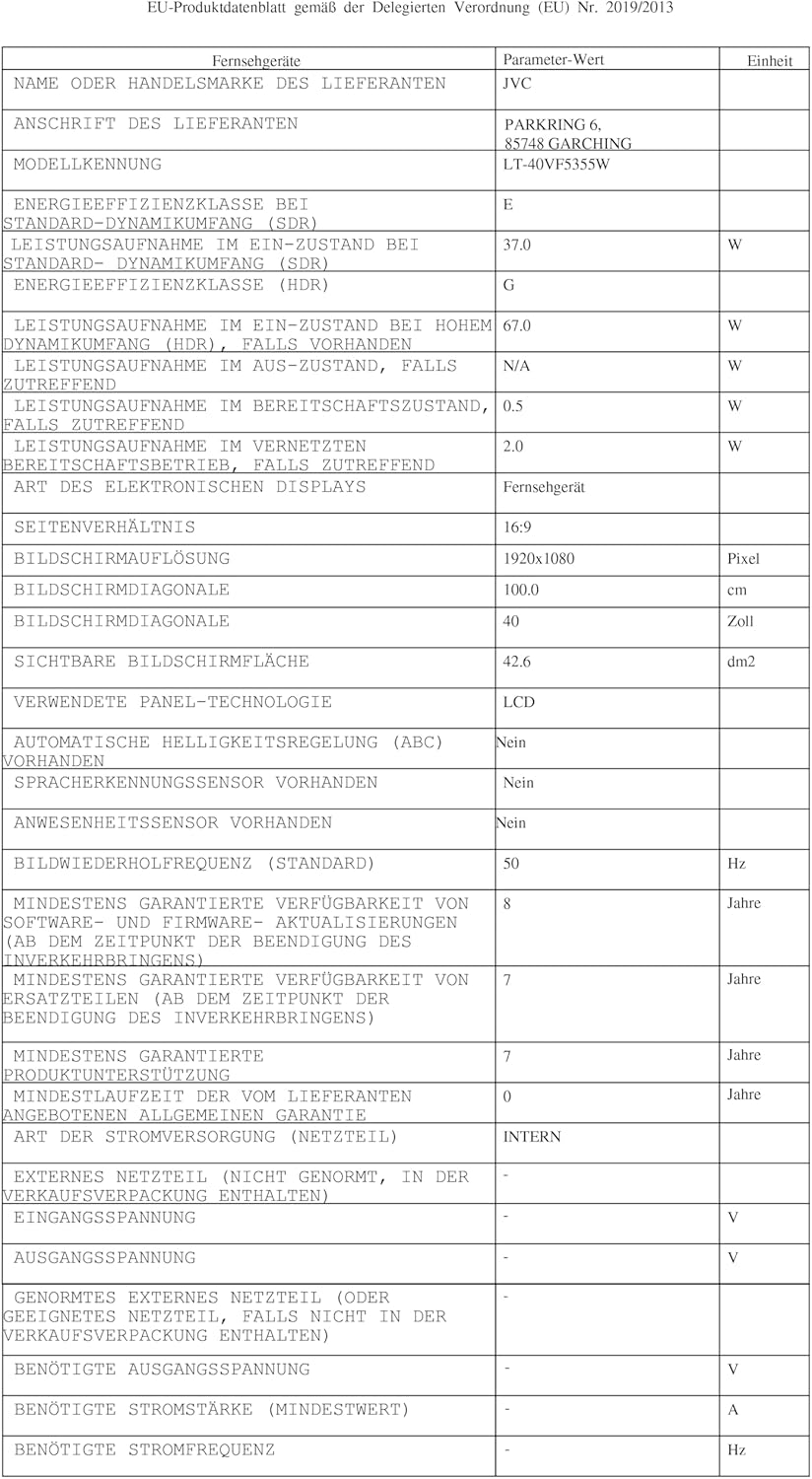
| Spare Parts Availability | 7 Years |
| Guaranteed Software Updates Until | Information not available |
8.1. Energy Efficiency

This image displays the EU energy efficiency label for the JVC LT-40VF5355W television. It shows an energy rating of 'E' for standard dynamic range (SDR) content, with an energy consumption of 37 kWh per 1000 hours. For High Dynamic Range (HDR) content, the rating is 'G' with a consumption of 67 kWh per 1000 hours. The label also indicates the screen size of 40 inches (100 cm) and resolution of 1920x1080 pixels.
- Energy Efficiency Class (SDR): E
- Energy Consumption (SDR): 37 kWh/1000h
- Energy Efficiency Class (HDR): G
- Energy Consumption (HDR): 67 kWh/1000h
- EPREL Database Link: https://eprel.ec.europa.eu/qr/2198539
9. Warranty and Support
JVC provides a commitment to spare parts availability for 7 years from the date of purchase. For warranty claims or technical support, please refer to the warranty card included with your product or visit the official JVC support website.
For further assistance, please contact JVC customer service through their official channels.


