
Introduction
This manual provides comprehensive instructions for the setup, operation, maintenance, and troubleshooting of your JVC LT-40VF4455 Full HD 40-inch LED Television. Please read this manual carefully before using your television to ensure proper and safe operation.

Figure 1: JVC LT-40VF4455 Full HD 40-inch Television
The JVC LT-40VF4455 is a 40-inch Full HD LED television designed for an immersive viewing experience. Its sleek black design integrates well into any living space.
Product Overview
The JVC LT-40VF4455 is a 40-inch Full HD (1920 x 1080 pixels) LED television. It features an integrated triple tuner for versatile reception options and multiple connectivity ports for various multimedia devices.
Key Features:
- Full HD Resolution: Enjoy crisp and clear images with 1920 x 1080 pixel resolution.
- Integrated Triple Tuner: Receive television signals via antenna (DVB-T2), cable (DVB-C), or satellite (DVB-S2) without an external receiver.
- Multiple Connectivity Options: Equipped with 2 HDMI ports (CEC + ARC) and 1 USB port for connecting game consoles, Blu-ray players, external storage, and more.
- USB Media Player: Play personal videos and photos directly from a USB drive.
- Non-Smart TV: This model is designed for purists, offering a straightforward viewing experience without integrated internet functions. External streaming devices can be connected for smart features.

Figure 2: Non-Smart TV Feature
This television is a non-smart TV, focusing on core viewing functionality. For smart features, external streaming devices can be connected via HDMI or USB.
Setup
Unpacking and Assembly:
- Carefully remove the television and all accessories from the packaging.
- Attach the included feet to the television using the provided screws. Ensure they are securely fastened.
- Place the television on a stable, flat surface or mount it on a wall using a compatible VESA M4 100x100 mount (not included).
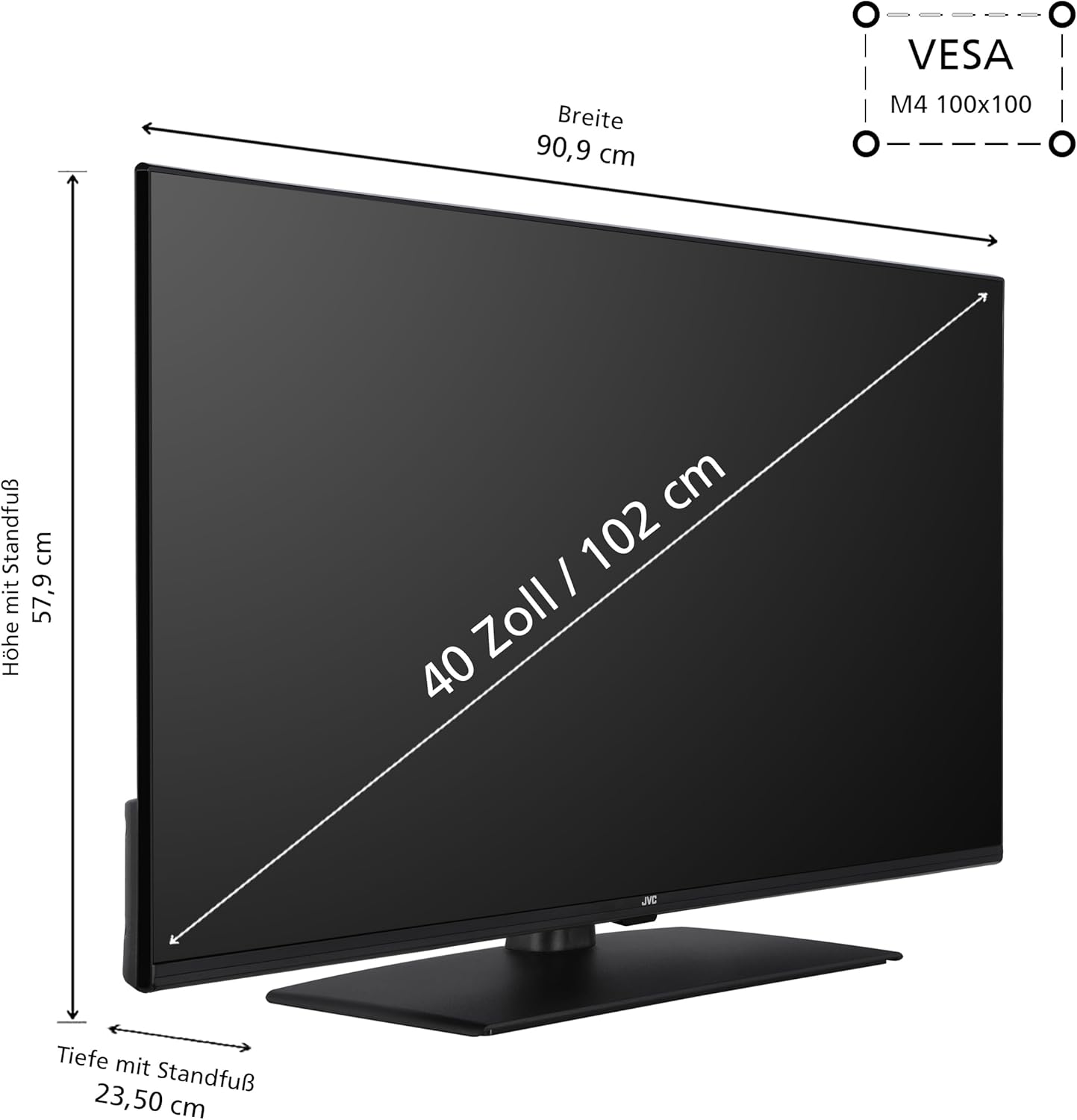
Figure 3: Product Dimensions and VESA Mount
The television measures 90.9 cm in width, 57.9 cm in height (with stand), and 23.5 cm in depth (with stand). It supports VESA M4 100x100 wall mounting.
Connecting Devices:
The JVC LT-40VF4455 offers various connection options:
- HDMI (x2): Connect external devices such as game consoles, Blu-ray players, or streaming sticks. HDMI 1 supports ARC (Audio Return Channel) for simplified audio connections to soundbars or AV receivers.
- USB (x1): Connect USB flash drives or external hard drives for media playback.
- Antenna Input: Connect your terrestrial (DVB-T2), cable (DVB-C), or satellite (DVB-S2) antenna.
- CI Slot: For conditional access modules (CAM) to decrypt encrypted channels.
- Headphone Output: Connect headphones for private listening.
- Digital Audio Output: Connect to an external audio system for high-quality sound.

Figure 4: All Connections at a Glance
This image illustrates the available ports on the JVC LT-40VF4455, including HDMI, USB, CI slot, antenna input, headphone jack, and digital audio output.
First-Time Setup:
- Plug the power cord into a wall outlet.
- Press the power button on the remote control or the TV.
- Follow the on-screen instructions to select your language, country, and perform an automatic channel scan for your chosen reception type (DVB-T2/C/S2).
Operating Instructions
Remote Control Functions:
The included remote control allows you to operate all functions of your television. It comes with 2 AAA batteries already included.
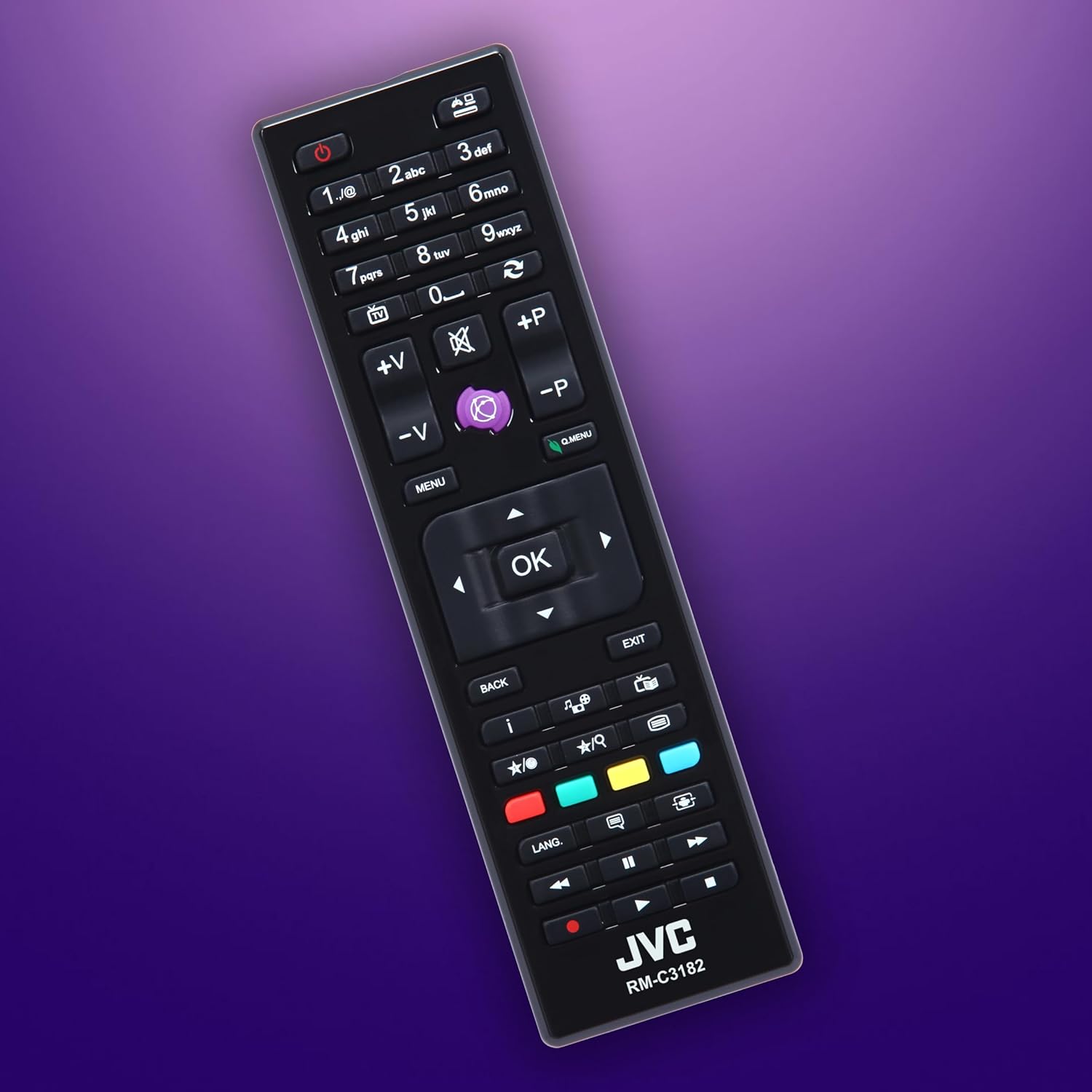
Figure 5: JVC RM-C3182 Remote Control
The remote control provides easy access to power, channel selection, volume control, menu navigation, and media playback functions.
- Power Button: Turns the TV on or off.
- Number Buttons (0-9): Directly select channels.
- Volume (+/-): Adjust the sound level.
- Channel (+/-): Change channels sequentially.
- Menu Button: Access the main menu for settings.
- Navigation Buttons (Up/Down/Left/Right) & OK: Navigate through menus and confirm selections.
- Source Button: Select input source (HDMI 1, HDMI 2, USB, TV).
- Media Playback Buttons: Control playback of media from USB (Play, Pause, Stop, Rewind, Fast Forward).
Media Playback via USB:
To play media files from a USB device:
- Insert your USB flash drive or external hard drive into the USB port on the television.
- The TV should automatically detect the USB device and prompt you to open the media player. If not, press the "Source" button on the remote and select "USB".
- Navigate through your folders and select the video, audio, or image file you wish to play.
- Use the media playback buttons on the remote control to manage playback.
Maintenance
Cleaning the Television:
- Always unplug the television from the power outlet before cleaning.
- Use a soft, dry, lint-free cloth to wipe the screen and cabinet.
- For stubborn marks, lightly dampen the cloth with water or a mild, non-abrasive screen cleaner. Never spray cleaner directly onto the screen.
- Avoid using abrasive cloths, waxes, benzene, alcohol, thinners, or other chemical cleaners, as they may damage the TV's surface.
Optimal Viewing Distance:
For the best viewing experience and to reduce eye strain, consider the recommended viewing distance based on screen size and resolution:

Figure 6: Optimal Viewing Distance
For a 40-inch Full HD television like the LT-40VF4455, an optimal viewing distance is approximately 162 cm (about 5.3 feet).
Troubleshooting
If you encounter any issues with your television, please refer to the following common problems and solutions before contacting support.
| Problem | Possible Cause | Solution |
|---|---|---|
| No power | Power cord not connected; power outlet not working. | Ensure power cord is securely plugged in. Test the outlet with another device. |
| No picture, but sound is present | Incorrect input source selected; external device not powered on or connected properly. | Press the "Source" button on the remote and select the correct input. Check connections and power of external devices. |
| No sound, but picture is present | Volume is muted or too low; audio cables not connected properly. | Increase volume. Check if mute is active. Ensure audio cables are correctly connected. |
| Remote control not working | Batteries are dead or inserted incorrectly; obstruction between remote and TV. | Replace batteries (2x AAA). Ensure correct polarity. Remove any obstructions. |
| Poor picture quality (fuzzy/distorted) | Weak signal; incorrect picture settings. | Check antenna/cable connection. Perform a channel scan. Adjust picture settings (brightness, contrast, sharpness) in the TV menu. |
Specifications
Detailed technical specifications for the JVC LT-40VF4455 television:
| Feature | Detail |
|---|---|
| Brand | JVC |
| Model Number | LT-40VF4455 |
| Screen Size | 40 Inches (102 cm diagonal) |
| Display Technology | LED |
| Resolution | Full HD (1920 x 1080 pixels) |
| Refresh Rate | 50 Hz |
| Color | Black |
| Connectivity | 2x HDMI (CEC + ARC), 1x USB, Antenna (DVB-T2/C/S2), CI Slot, Headphone Out, Digital Audio Out |
| Special Features | Integrated Triple Tuner, USB Media Player |
| Product Dimensions (with stand) | 23.5 cm (D) x 90.9 cm (W) x 57.9 cm (H) |
| VESA Compatibility | M4 100x100 |
| Included Components | Television with feet, Remote control (with 2x AAA batteries), User Manual |
| Energy Efficiency Class (2019/2013) | E |
| Energy Consumption (1000h) | 37 kWh |

Figure 7: Energy Efficiency Label
The JVC LT-40VF4455 has an energy efficiency class of E, with an energy consumption of 37 kWh per 1000 hours.
For more detailed product information, refer to the official EU EPREL database: https://eprel.ec.europa.eu/qr/2198536
Warranty and Support
JVC is committed to providing quality products. For the LT-40VF4455 model, spare parts are guaranteed to be available for 7 years from the end of product placement on the market.
For technical support or service inquiries, please refer to the contact information provided with your purchase documentation or visit the official JVC support website for your region.
Always retain your proof of purchase for warranty claims.


