
Introduction
This user manual provides detailed instructions for the safe and efficient installation, operation, and maintenance of your Goldlife P11 120W Inground Pool Light. This 11-inch, 120W, 12000LM stainless steel underwater LED RGB light is designed for various pool types and operates on a safe 12V DC low voltage system. Please read this manual thoroughly before installation and use.

Image: The Goldlife P11 120W Inground Pool Light, showcasing its RGB color capabilities.
Safety Information
- Always ensure power is disconnected before installation or maintenance.
- Installation should be performed by a qualified electrician or pool professional in accordance with local electrical codes.
- The light operates on 12V DC low voltage. Do not connect directly to 120V AC.
- Ensure all connections are waterproof and sealed to prevent water ingress.
- Do not operate the light out of water for extended periods, as this may cause overheating.
Package Contents
The Goldlife P11 pool light package includes:
- 1x Goldlife P11 Pool Light (11-inch, 120W)
- User Manual
Note: The following components are NOT INCLUDED and must be purchased separately for full functionality:
- 12V DC Transformer and Controller (e.g., C1-1/C1/C3 control system)
- RF Remote Control
- 4-Pin M16 Connector Wire (available in 50FT or 100FT lengths)
- Pool Niche (if using niche installation method)

Image: Visual representation of included items and separately purchased accessories like the control box, remote, and wiring.
Setup and Installation
The Goldlife P11 pool light offers flexible installation options. Ensure you have all necessary components, including a 12V DC transformer, controller, and appropriate wiring, before beginning installation.
Wiring Connection
The light features an adaptable 4-Pin M16 connector for easy wiring. Wires are available in 50FT and 100FT lengths (sold separately). This design allows for quick replacement or repair of the light fixture without needing to rewire the entire system.

Image: Electrical diagram illustrating the connection of the pool light to a transformer and controller (not included).

Image: Overview of Goldlife's diversified swimming pool light connectors, highlighting the adaptable connector used for the P11 model.
Installation Methods
There are two primary installation methods:
- Niche Installation: Suitable for 10-inch or 11-inch large wet niches (niche sold separately). The light fits into the niche and is secured with screws.
- Drilling Installation (Without Niche): Applicable for various pool wall structures. The light is directly mounted to the pool wall using drilling, wiring, and screws.
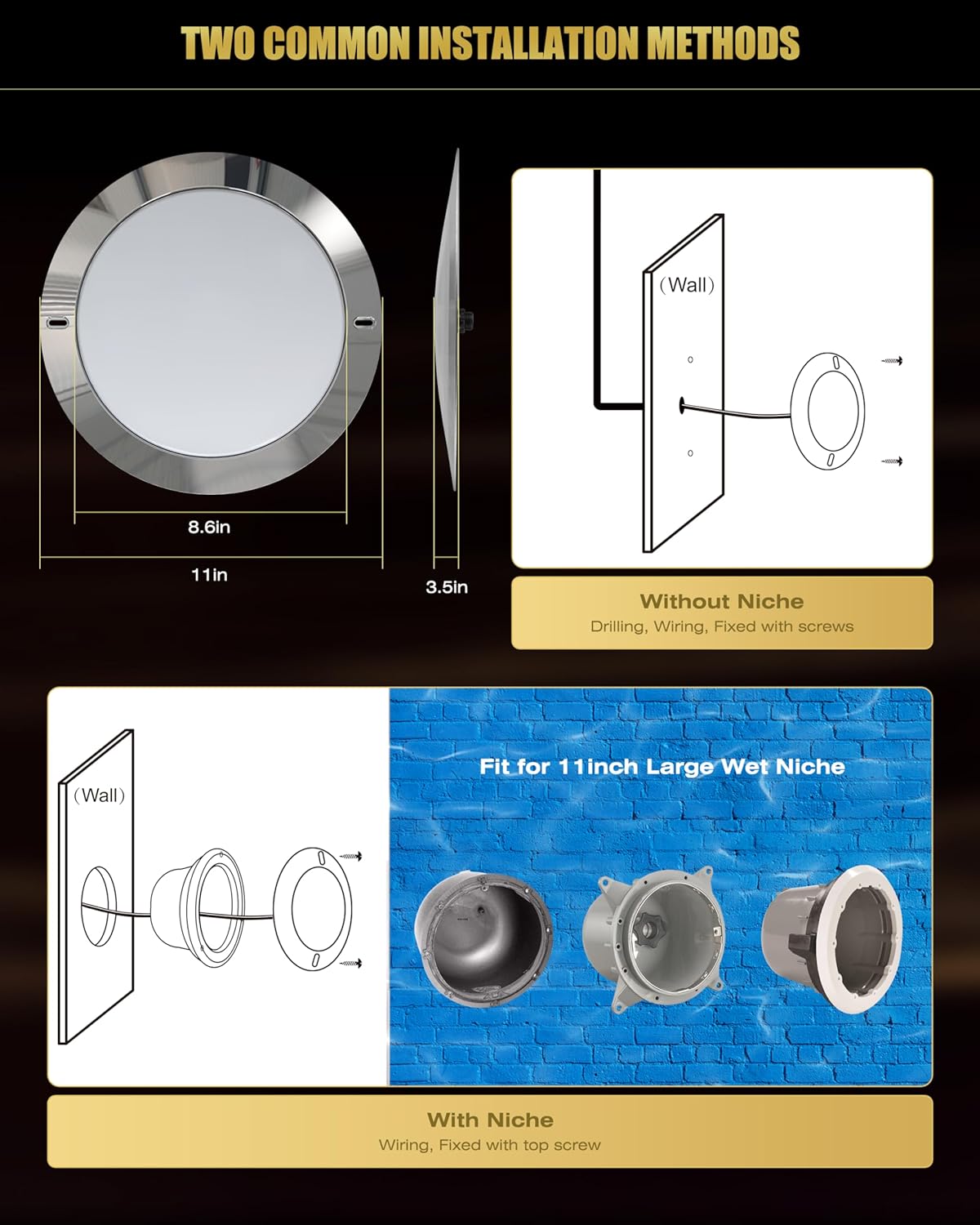
Image: Visual guide to the two common installation methods: niche installation and direct drilling installation.
Always ensure the light is fully submerged when operating to prevent overheating and ensure proper functionality.
Operation
The Goldlife P11 pool light requires an external LED controller and RF remote (or APP control via WiFi/Bluetooth) for full functionality. These control systems are sold separately and are compatible with C1-1, C1, or C3 control systems.
Control Features
With a compatible control system, you can access various features:
- Color Changing (16 million colors)
- Dimming
- Music Synchronization
- DIY Mode for custom lighting effects
- Timing functions
- 8-Zone smart control
- 360° control range (RF remote)

Image: The Goldlife smart control box and RF remote control, illustrating the components for external smart control.

Image: Instructions for pairing the light with an RF remote control and a smartphone application for smart control.
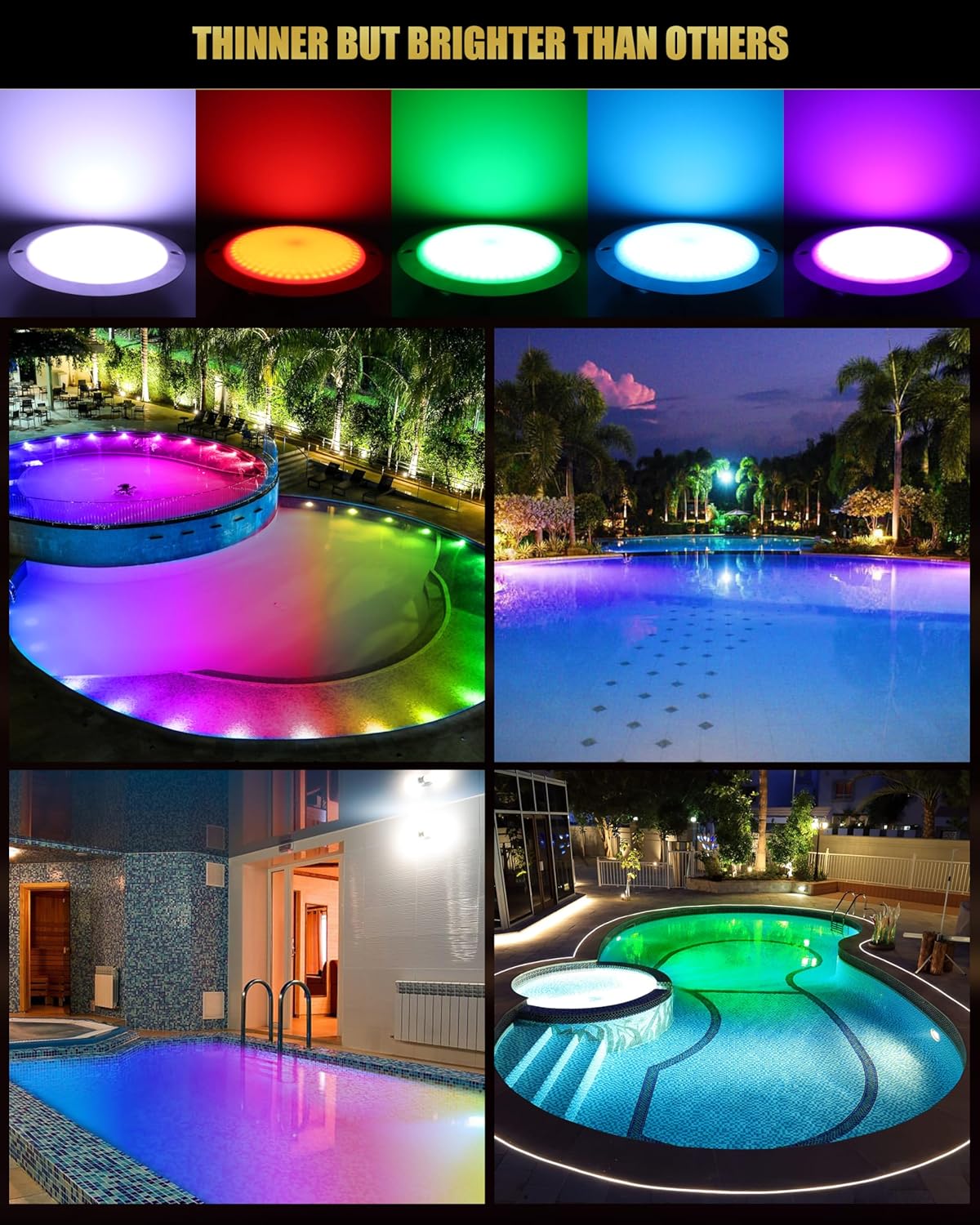
Image: Examples of Goldlife P11 lights illuminating different pool settings, showcasing diverse color and brightness options.
Remote Control Pairing (Example for C2-1 RF Remote)
- Within 3 seconds of powering on the light, quickly press the 'ON' button of any 'Zone' on the remote 3 times.
- The light will flash slowly 3 times, indicating successful pairing.
APP Pairing (Example for 'Smart Life' App)
- Download the 'Smart Life' App, register, and add the device.
- Before powering on the light, press and hold the 'ON' button of the corresponding group of the paired remote control, then power on the light.
- The light will flash white. Only then will it enter WiFi pairing mode, and the APP can find devices.
Maintenance
Regular maintenance ensures the longevity and optimal performance of your Goldlife P11 pool light.
- Cleaning: Periodically clean the light fixture to remove algae or mineral deposits that may obstruct light output. Use a soft brush or cloth and mild pool-safe cleaning solutions.
- Connection Check: Annually inspect the wiring and connections for any signs of wear, corrosion, or damage. Ensure the 4-Pin M16 connector is securely fastened and sealed.
- Adaptable Connector: The adaptable connector design allows for easy removal of the light fixture for maintenance or replacement without needing to drain the pool or rewire the main circuit. Simply pull the wiring out of the water to access the lamp.

Image: Highlighting the robust construction and materials of the Goldlife P11 light, designed for durability and easy maintenance.
Troubleshooting
If you encounter issues with your Goldlife P11 pool light, consider the following common troubleshooting steps:
- Light Not Turning On:
- Check the power supply to the transformer.
- Verify all wiring connections are secure and correctly installed.
- Ensure the 12V DC transformer is functioning correctly.
- Confirm the light is properly connected to the controller.
- Incorrect Colors or No Color Change:
- Ensure the remote control or APP is correctly paired with the controller.
- Check the battery in the remote control.
- Verify the controller settings and mode.
- Water Inside Light Fixture:
- Immediately disconnect power.
- Inspect the light's seals and the M16 connector for damage or improper sealing.
- Contact customer support if water ingress persists after checking connections.
For persistent issues, please refer to the support section or contact Goldlife customer service.
Specifications
| Model | P11 |
| Power | 120W |
| Luminous Flux | 12000LM |
| Voltage | 12V DC |
| Light Type | LED RGB |
| Material | Stainless Steel (316L Anti-Corrosion) |
| Diameter | 11 inches |
| Waterproof Rating | IP68 |
| Connector Type | 4-Pin M16 Adaptable Joint |
| Compatibility | Underground pools, in-ground pools, spas, hot tubs, fountains |
| Package Dimensions | 14.57 x 10.87 x 2.68 inches |
| Item Weight | 14.4 ounces |
| Manufacturer | Goldlife |
Warranty and Support
Goldlife is committed to providing high-quality products and customer satisfaction.
After-Sales Service
For any quality issues, returns, or exchanges, please contact Goldlife customer service. You can typically find contact information by visiting the Goldlife store page where the product was purchased and looking for an "Ask Question" or "Contact Seller" option.
Goldlife offers a fast return and exchange service for any quality issues.


