
1. Introduction
This manual provides essential information for the proper use and maintenance of your MAJESTECH 2025 Phone Game Controller. Please read this manual thoroughly before operating the device to ensure optimal performance and longevity. This controller is designed to enhance your mobile gaming experience on both iOS and Android smartphones.
2. Product Overview
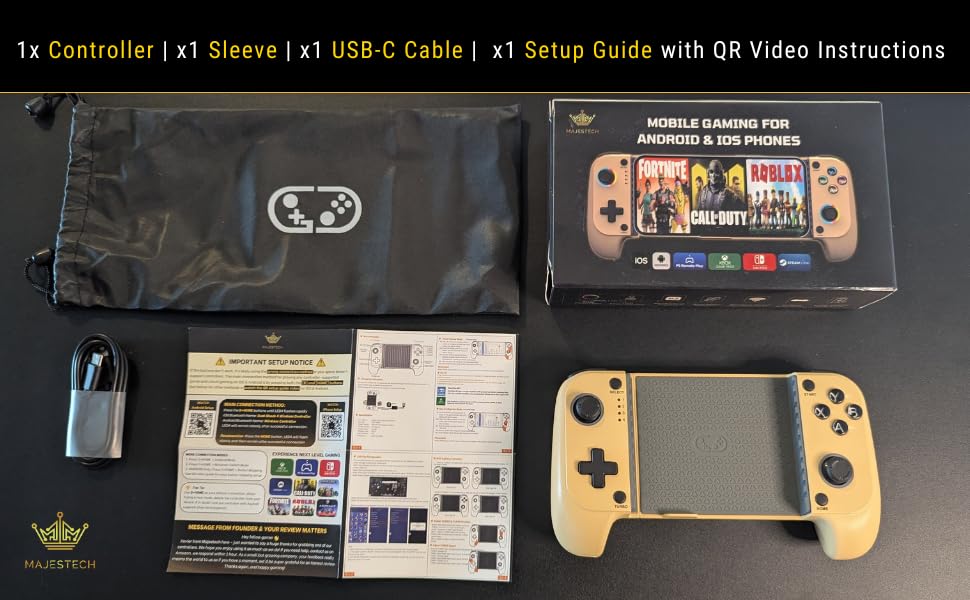
2.1 Package Contents
Upon unpacking, verify that all items listed below are present:
- 1x MAJESTECH 2025 Phone Game Controller
- 1x Protective Sleeve
- 1x USB-C Charging Cable
- 1x Setup Guide (with QR Code for video instructions)
2.2 Key Features
The MAJESTECH 2025 Phone Game Controller incorporates several advanced features for an immersive gaming experience:
- Universal Compatibility: Supports iOS and Android devices, compatible with Xbox Cloud, Steam Link, PS Remote Play, GeForce Now, MFi, Call of Duty, Roblox, Minecraft, and more.
- Hall Effect Joysticks: Provides ultra-precise control, drift-free operation, and low latency.
- Mechanical Triggers: Offers faster response and tactile feedback for improved gameplay.
- Adjustable Turbo Speeds: Three customizable turbo speeds for rapid input.
- Vibrant RGB Lighting: Customizable RGB lighting on joysticks and ABXY buttons.
- Ergonomic Design: Crafted for comfort during extended gaming sessions, minimizing hand fatigue.
- Long-Lasting Battery: Integrated 600mAh battery for extended play.
- Effortless Bluetooth Connection: Simple one-touch wake-up and seamless pairing.


3. Setup
3.1 Charging the Controller
Before first use, fully charge the controller using the provided USB-C cable. Connect the USB-C end to the controller and the USB-A end to a compatible power source (e.g., computer USB port, USB wall adapter). The charging indicator will show the charging status.
3.2 Attaching Your Smartphone
The controller is designed to securely hold smartphones up to 175mm (7 inches) in length, including most phones with cases. Gently extend the controller's sides and carefully place your smartphone into the central slot, ensuring it is centered and stable.

3.3 Bluetooth Pairing
Follow these steps to pair your controller with your smartphone:
- Ensure your smartphone's Bluetooth is enabled.
- Simultaneously press and hold the [B] button and the [HOME] button on the controller until the indicator lights begin to flash, indicating pairing mode.
- On your smartphone, search for Bluetooth devices.
- For iOS devices, select "DUALSHOCK WIRELESS CONTROLLER".
- For Android devices, select "WIRELESS CONTROLLER".
- Once connected, the indicator light on the controller will become solid.

4. Operating Instructions
4.1 Gaming Compatibility
The MAJESTECH controller supports a wide range of gaming platforms and titles:
- Native Mobile Games: Fortnite, Roblox, Minecraft, Call of Duty Mobile, Asphalt, Dead Cells, and many more that support controller input.
- Cloud Gaming Services: Xbox Cloud Gaming, GeForce Now, Luna.
- Remote Play: PlayStation Remote Play, Steam Link, Moonlight.
- Emulators: Compatible with various emulator applications.

4.2 Hall Effect Joysticks and Turbo Speeds
The Hall Effect joysticks provide precise, drift-free input. The controller also features three adjustable turbo speeds for rapid button presses. To activate or adjust turbo speeds, refer to the specific instructions in the included setup guide, as controls may vary by game or mode.
4.3 RGB Lighting Customization
The joysticks and ABXY buttons feature customizable RGB lighting. You can adjust colors and effects to match your preference. Specific button combinations (e.g., TURBO + R3 to adjust RGB/turn off, TURBO + L3 to turn on/off ABXY colors) are used to cycle through modes or select static colors. Consult the setup guide for detailed instructions on RGB customization.
5. Maintenance
To ensure the longevity and optimal performance of your controller, follow these maintenance guidelines:
- Cleaning: Use a soft, dry cloth to clean the surface of the controller. Avoid using harsh chemicals, solvents, or abrasive materials.
- Storage: Store the controller in a cool, dry place away from direct sunlight and extreme temperatures. Use the provided protective sleeve when not in use to prevent dust and scratches.
- Battery Care: Avoid fully discharging the battery frequently. Charge the controller regularly, even if not in constant use, to maintain battery health.
- Handling: Do not drop or subject the controller to strong impacts. Avoid excessive force when inserting or removing your smartphone.
6. Troubleshooting
If you encounter issues with your MAJESTECH controller, refer to the following common problems and solutions:
- Controller does not power on:
- Ensure the controller is fully charged. Connect it to a power source using the USB-C cable and allow it to charge for at least 30 minutes before attempting to power on again. - Unable to pair via Bluetooth:
- Ensure the controller is in pairing mode (indicator lights flashing after pressing [B] + [HOME]).
- Turn off and on your smartphone's Bluetooth.
- Forget the device from your smartphone's Bluetooth settings and attempt to pair again.
- Ensure no other Bluetooth devices are interfering with the connection.
- Restart both your smartphone and the controller. - Buttons or joysticks are unresponsive:
- Ensure the controller is properly connected via Bluetooth.
- Check if the game you are playing supports controller input.
- Restart the controller and your smartphone.
- If the issue persists, try resetting the controller (refer to the setup guide for reset instructions, if available). - RGB lighting is not working or not customizable:
- Ensure the controller is powered on.
- Refer to the setup guide for the correct button combinations to adjust or activate RGB lighting (e.g., TURBO + R3, TURBO + L3). - Short battery life:
- Ensure the controller is fully charged before use.
- Battery performance can degrade over time with extensive use.
If these steps do not resolve your issue, please contact MAJESTECH customer support.
7. Specifications
| Model Number | Saitake STK-7009F |
| Connectivity | Bluetooth Wireless |
| Battery Capacity | 600mAh |
| Charging Port | USB-C |
| Product Dimensions | 6.69 x 3.15 x 1.57 inches |
| Item Weight | 11.7 ounces |
| Max Phone Length | 175mm (7 inches) |
| Manufacturer | Shenzhen Yaika Electronic Co., Ltd |
8. Warranty and Support
MAJESTECH is committed to providing high-quality products and customer satisfaction. Your MAJESTECH 2025 Phone Game Controller is backed by our dedicated customer support team. For any questions, technical assistance, or warranty inquiries, please contact us through the official MAJESTECH channels or refer to the contact information provided in your product packaging or on the MAJESTECH website. We offer 24/7 support to ensure you have a positive and enjoyable gaming experience.