
WINDHORSE C3
WINDHORSE C3 Electric Scooter User Manual
Model: C3 | Brand: WINDHORSE
1. Introduction
Welcome to the user manual for your new WINDHORSE C3 Electric Scooter. This manual provides essential information for the safe and efficient operation, assembly, maintenance, and troubleshooting of your scooter. Please read this manual thoroughly before your first ride and keep it for future reference.

Figure 1.1: The WINDHORSE C3 Electric Scooter, designed for versatile commuting and leisure.
2. Safety Information
WARNING: Always wear a helmet and appropriate safety gear when riding. Familiarize yourself with local laws and regulations regarding electric scooter use.
- Perform a pre-ride inspection before each use, checking brakes, tires, and all fasteners.
- Do not ride in heavy rain or through standing water.
- Avoid riding on slippery surfaces, steep inclines, or uneven terrain.
- Ensure the scooter is fully charged before long rides.
- Do not exceed the maximum load capacity of 330 lbs (149 kg).
- Keep hands and feet clear of moving parts.
3. Package Contents
Your WINDHORSE C3 Electric Scooter package includes the following items:
- Windhorse C3 Electric Scooter *1
- Basket *1
- Charger *1
- Footrest *4
- Tool Kit *1
- User Manual *1 (This document)

Figure 3.1: All components included in the WINDHORSE C3 Electric Scooter package.
4. Assembly & Setup
Your scooter arrives 90% assembled. Follow these steps to complete the setup:
4.1. Handlebar Assembly
- Locate the quick-release lever on the handlebar stem.
- To unfold, move the entire quick-release assembly to the side to release the pin.
- Lift the handlebar assembly into the upright position until it clicks into place.
- Return the quick-release clamp to secure the handlebar.
Video 4.1: Demonstration of folding and unfolding the handlebar stem for storage and use.
4.2. Rear Seat & Backrest Installation
- To remove the rear seat, locate the small Allen bolt underneath the seat. Remove this bolt using the provided tool.
- Slide the rear seat backward to detach it from the frame.
- To install the passenger backrest, align its mounting points with the three corresponding holes on the rear rack.
- Secure the backrest using the provided fasteners. There is some adjustability for forward and backward positioning.
- Once the backrest is secured, the rear seat can be popped back into position and slid forward to lock it in place. Reinstall the Allen bolt from underneath to secure the seat.

Figure 4.2: The adjustable seat and handlebar allow for comfortable riding positions for various heights.
5. Operating Instructions
5.1. Power On/Off
Insert the key into the ignition and turn it to the 'ON' position to power on the scooter. Turn the key to 'OFF' to power down.
5.2. Speed Modes
The WINDHORSE C3 features three distinct speed modes, which can be selected via the multi-functional LCD display:
- Mode 1: Up to 9.3 MPH (15 km/h) - Ideal for beginners or crowded areas.
- Mode 2: Up to 15.5 MPH (25 km/h) - Balanced speed for general commuting.
- Mode 3: Up to 22 MPH (35 km/h) - For maximum speed on open paths.
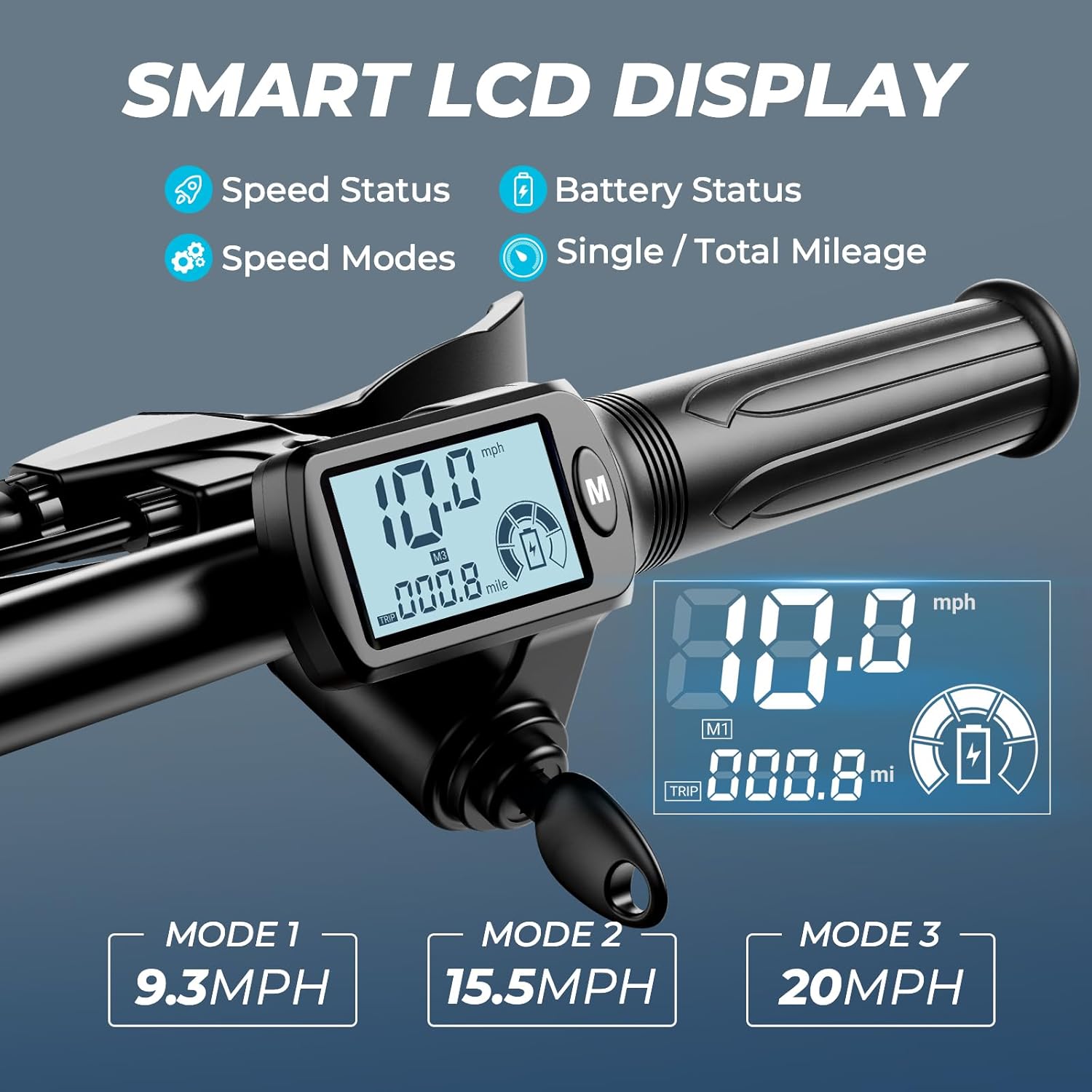
Figure 5.1: The multi-functional LCD display provides real-time information including battery power, speed, and mileage.
5.3. Throttle and Braking
Use the twist throttle on the right handlebar to accelerate. The scooter is equipped with dual disc brakes (front and rear) for effective stopping power. Apply both brakes gently and evenly for controlled deceleration.
6. Key Features
6.1. Powerful Performance
The C3 boasts an 850W peak brushless hub motor, allowing it to climb slopes up to 15° and reach top speeds of 22 MPH. Its 48V 480WH battery provides a range of up to 25 miles on a single charge, with a charging time of 4-5 hours.

Figure 6.1: The powerful 850W peak motor ensures strong acceleration and hill-climbing capability.

Figure 6.2: The 480WH high-capacity battery provides an extended range of up to 25 miles.
6.2. Comfort & Stability
Experience a smooth ride with dual suspension (front and rear motocross-style shocks) and 14-inch pneumatic tires. The wide, cushioned saddle and 8.66-inch wide deck provide ample foot space and comfort for extended rides.

Figure 6.3: Dual shock absorption and large pneumatic tires contribute to a comfortable and stable ride.
6.3. Enhanced Safety
The scooter is equipped with responsive dual disc brakes, a horn, and bright front and rear lights for improved visibility and safety, especially during night rides.

Figure 6.4: Integrated lighting and dual disc brakes enhance rider safety.
6.4. Versatility & Convenience
The C3 features a detachable cargo basket located between the rider's knees, perfect for carrying groceries or personal items. With two seats, it can accommodate an adult and a child, or provide extra space for cargo. The scooter's folding handle and lightweight design make it easy to store and transport.

Figure 6.5: The removable cargo basket offers convenient storage for daily errands or leisure outings.

Figure 6.6: The two-seat design allows for carrying a passenger or additional cargo.
7. Maintenance
7.1. Battery Care
- Charge the battery fully after each use.
- Avoid completely draining the battery.
- Store the scooter in a cool, dry place when not in use, and charge the battery periodically if stored for long periods.
7.2. Tire Pressure
Regularly check and maintain the recommended tire pressure for optimal performance and safety. Refer to the tire sidewall for the correct PSI.
7.3. Cleaning
Clean the scooter with a damp cloth. Do not use high-pressure water jets or immerse electrical components in water.
7.4. General Inspection
Periodically check all bolts, nuts, and fasteners to ensure they are tight. Inspect brake cables and pads for wear and tear.
8. Troubleshooting
If you encounter any issues with your WINDHORSE C3 Electric Scooter, please refer to the following common problems and solutions:
- Scooter not turning on: Check if the battery is charged and properly connected. Ensure the key is fully inserted and turned to the 'ON' position.
- Reduced range/power: This could indicate a low battery charge, aging battery, or riding in challenging conditions (e.g., steep hills, strong headwinds). Ensure proper tire pressure.
- Brakes not effective: Inspect brake pads for wear and adjust brake cable tension if necessary.
- Unusual noises: Check for loose components, debris in wheels, or issues with suspension.
For more complex issues or if troubleshooting steps do not resolve the problem, please contact WINDHORSE customer support.
9. Specifications
| Feature | Specification |
|---|---|
| Brand | WINDHORSE |
| Model Name | C3 |
| Motor | 850W Peak Brushless Hub Motor (500W Continuous) |
| Top Speed | 22 MPH |
| Max Distance Range | 25 Miles |
| Battery | 48V 480WH (10Ah) |
| Charging Time | 4-5 Hours |
| Weight Limit | 330 Pounds |
| Item Weight | 59 Pounds |
| Product Dimensions (LxWxH) | 32.68" x 51.18" x 41.34" |
| Wheel Size | 14 Inches |
| Wheel Type | Pneumatic |
| Brake Style | Front Braking, Rear Braking (Dual Disc Brakes) |
| Suspension Type | Dual Suspension |
| Frame Material | Carbon Alloy |
| Special Features | Adjustable Handlebar Height, Digital Display, Foldable, Seat, Speedometer |
10. Warranty & Support
The WINDHORSE C3 Electric Scooter is certified by UL 2272, ensuring high safety standards. WINDHORSE is dedicated to providing exceptional customer service. Should you face any issues such as motor failure, charging problems, or missing parts, please feel free to reach out to our customer support team for assistance.
For further inquiries or support, please visit the official WINDHORSE store on Amazon or contact our customer service directly.
Related documentsC3

Ask a question about this manual
Ask about setup, troubleshooting, compatibility, parts, safety, or missing instructions. Manuals+ will review the question and use this page’s manual context to help answer it.