
Introduction
This manual provides detailed instructions for the assembly, operation, and maintenance of your FLEXISPOT Foldex Ergonomic Office Chair. Designed for comfort and space-saving, this chair features multi-adjustments, a foldable design, and robust construction to support your daily work, study, or gaming needs.
Important Safety Information
Always ensure the chair is fully assembled and stable before use. Do not exceed the maximum weight capacity of 300 pounds. Be cautious when folding and unfolding the chair to prevent injury.
Setup and Assembly
Package Contents
Your FLEXISPOT Foldex chair comes mostly pre-assembled. Please verify all components are present:
- Pre-assembled Chair Body (seat, backrest, armrests)
- Headrest
- Chair Base (star-shaped)
- 5 Casters (wheels)
- Gas Lift Cylinder
- Screws and Allen Wrench (for headrest attachment)
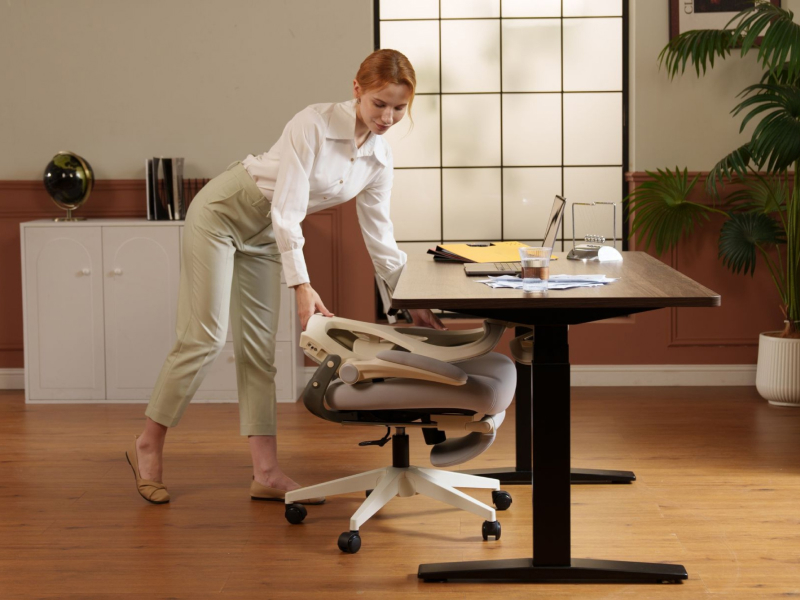
Image: All components of the FLEXISPOT Foldex chair laid out for assembly.
Assembly Instructions
- Attach Casters to Base: Insert each of the 5 casters into the holes at the end of each leg of the chair base until they click securely into place.
- Insert Gas Lift Cylinder: Place the gas lift cylinder into the central hole of the assembled chair base.
- Attach Chair Body to Base: Carefully place the pre-assembled chair body onto the top of the gas lift cylinder, ensuring it is seated firmly.
- Attach Headrest: Position the headrest onto the top of the chair's backrest. Secure it using the provided two screws and Allen wrench.
Your chair is now ready for use. For a visual guide, please refer to the installation video below:
Video: Step-by-step guide on how to install the FlexiSpot Foldex chair.
Operating Instructions
Adjusting the Headrest
The 3D adjustable headrest provides precise neck support. You can adjust its height, angle, and rotation to find your optimal comfort position.

Image: Demonstrating the 3D adjustable headrest.
Adjusting Lumbar Support
The chair features height-adjustable lumbar support to fit the curve of your lower back perfectly. Locate the adjustment mechanism on the backrest and move it up or down to your desired position.

Image: Adjusting the height of the lumbar support.
Adjusting Armrests
The armrests are designed to flip up, allowing you to tuck the chair closer to your desk or create more space when not in use. Simply lift the armrests to raise them or push them down to lower.

Image: Demonstrating the flip-up armrests.
Seat Height and Tilt Function
Utilize the levers located under the seat to adjust the chair's height and engage the tilt function. The tilt tension can also be adjusted to your preference, allowing you to recline and lock the backrest at various angles.

Image: Controls for seat height, back angle, and tilt tension.
Footrest Operation
For enhanced relaxation, the chair includes a retractable footrest. Pull it out from under the seat when desired, and push it back in for storage.

Image: Chair with extended footrest for relaxation.
Folding the Chair for Storage
The chair's backrest can be folded down, allowing it to be tucked under a desk to save space. Press the buttons on the sides of the chair to initiate the folding mechanism.

Image: Folding the chair for compact storage under a desk.
Video: Overview of the FlexiSpot Foldex Ergonomic Chair, including its folding feature.
Maintenance
Cleaning Instructions
To clean your chair, simply wipe it with a damp cloth. Avoid harsh chemicals that may damage the mesh or foam materials.

Image: Water-resistant foam seat for easy cleaning.
General Maintenance
Periodically check all screws and connections to ensure they are tight. Ensure casters roll smoothly and are free of debris. Proper maintenance will extend the life of your chair.
Troubleshooting
If you encounter any issues with your chair, please review the assembly steps to ensure correct installation. For persistent problems or concerns, refer to the Warranty and Support section for assistance.
Specifications
| Feature | Detail |
|---|---|
| Brand | FLEXISPOT |
| Model Name | Flexispot Foldex |
| Item Model Number | OC1-SE |
| Color | Cream |
| Product Dimensions | 27.95"D x 27.95"W x 50.79"H |
| Maximum Weight Recommendation | 300 Pounds |
| Back Style | Mesh |
| Arm Style | Flip-up Armrest |
| Special Features | Foldable, 3D Adjustable Headrest, Flip-up Armrest, Quick Assembly, Adjustable Lumbar Support |
| Is Foldable | Yes |
| Fill Material | Memory Foam |
| Item Weight | 37 pounds |

Image: Detailed dimensions of the FLEXISPOT Foldex chair.
Warranty and Support
Lifetime Warranty
This chair comes with a lifetime warranty. If you encounter any quality problems, please feel free to contact us. We will replace the necessary parts or provide a full replacement for you.
Customer Support
For any questions, assistance, or warranty claims, please contact FLEXISPOT Customer Support. Refer to your purchase documentation for specific contact details or visit the official FLEXISPOT website.


