
Introduction
Thank you for choosing the Bestier Computer Desk with Keyboard Tray, Model H106. This manual provides detailed instructions for assembly, operation, maintenance, and troubleshooting to ensure you get the most out of your new office desk. Designed with a modern aesthetic and practical features, this desk offers a comfortable and organized workspace.
Important Safety Information
- Read all instructions carefully before assembly and use.
- Keep all small parts and packaging materials away from children and pets to prevent choking hazards.
- Assemble the desk on a soft, clean surface to prevent scratches.
- Ensure all screws and fasteners are securely tightened before use. Periodically check and re-tighten as necessary.
- Do not overload drawers or shelves. Distribute weight evenly.
- Use the desk on a level surface to prevent tipping.
- Two people are recommended for assembly to ensure safety and ease of construction.
Package Contents
Before beginning assembly, verify that all parts and hardware are present. Refer to the included parts list in your package. If any items are missing or damaged, please contact customer support.

Figure 1: Exploded view of desk components and hardware. All parts are clearly labeled for easy identification.
Setup and Assembly
Assembly of the Bestier Computer Desk is designed to be straightforward, typically taking 0.5 to 1 hour with two people. All components are clearly labeled, and necessary hardware is included. Follow the step-by-step instructions provided in the manual and refer to the assembly video for visual guidance.
Assembly Video Guide
Video: Detailed installation guide for the Bestier Modern Computer Desk.
Key Assembly Steps
- Unpack and Identify Parts: Lay out all components and hardware. Match each piece to the corresponding number or letter in the parts list.
- Assemble Side Cabinets: Begin by attaching the drawer slides to the side panels of the cabinets. Ensure correct orientation (left/right).
- Construct Drawer Boxes: Assemble the smaller and larger drawer boxes using the provided screws and dowels.
- Install Keyboard Tray Mechanism: Secure the keyboard tray slides to the designated area under the main desk surface.
- Attach Desk Panels: Connect the main desk panels and the side cabinets.
- Insert Drawers: Slide the assembled drawers into their respective tracks.
- Final Touches: Attach any remaining decorative elements or cable management grommets.

Figure 2: The Bestier Computer Desk fully assembled, showcasing its keyboard tray and storage drawers.
Operating Instructions
This desk is designed for optimal functionality and organization in your home office.
Keyboard Tray
The desk features a smooth-gliding keyboard tray located centrally. Simply pull the tray outwards to access your keyboard and mouse, and push it back in when not in use to save space on the main desktop.
Storage Drawers
The desk includes four drawers: two standard storage drawers and two file drawers. The file drawers are equipped with an adjustable metal bar to accommodate Letter, Legal, and A4 size file holders, allowing for customizable organization of your documents.

Figure 3: Detail of the fluted panel drawers and gold handles, highlighting the aesthetic design.
Cable Management
Integrated cable management holes are located in the open storage compartments behind the desk. These allow you to neatly route and organize cables from computers, monitors, and other peripherals, maintaining a clean and tidy workspace.
Video: Overview of the Bestier Modern Home Office Desk, demonstrating drawer functionality and cable management.
Maintenance and Care
To ensure the longevity and appearance of your Bestier Computer Desk, follow these simple care guidelines:
- Cleaning: Wipe the desk surfaces with a soft, damp cloth. Avoid harsh chemicals or abrasive cleaners, as they may damage the laminated finish.
- Spills: Promptly wipe up any spills to prevent moisture absorption and potential damage to the P2 grade particle board.
- Protection: While the desk is designed to be scratch-resistant, using coasters for drinks and protective pads under heavy or sharp objects is recommended.
- Environmental Conditions: Avoid placing the desk in direct sunlight or near heat sources to prevent warping or discoloration. Maintain a stable room temperature and humidity.
- Hardware Check: Periodically inspect all screws and fasteners to ensure they remain tight. Re-tighten if necessary to maintain stability.
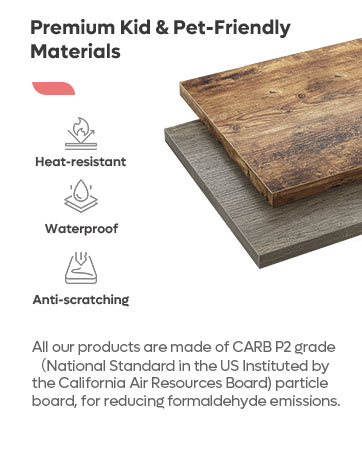
Figure 4: The high-quality P2 grade particle board material, known for its durability and easy maintenance.
Troubleshooting
| Problem | Possible Cause | Solution |
|---|---|---|
| Desk is wobbly. | Loose fasteners or uneven floor. | Check and tighten all screws. Ensure the desk is on a level surface; use shims if necessary. |
| Drawers do not slide smoothly. | Misaligned drawer slides or obstructions. | Verify that drawer slides are correctly installed and aligned. Check for any objects obstructing the tracks. |
| Missing parts or damaged components. | Manufacturing defect or shipping damage. | Do not proceed with assembly. Contact Bestier customer support immediately for replacement parts. |
Specifications
- Brand: Bestier
- Model Number: H106
- Product Dimensions: 21.65"D x 59.06"W x 30.08"H
- Color: Natual Oak
- Material: Engineered Wood (P2 Grade Particle Board)
- Finish Type: Laminated
- Special Features: Keyboard Tray Included, Scratch Resistant, Fluted Panel Drawer Design, Cable Management Holes, Customizable File Drawer (Letter, Legal, A4)
- Number of Drawers: 4 (2 standard, 2 file drawers)
- Assembly Required: Yes (Recommended 2 people)
- Item Weight: 109.77 Pounds
Warranty Information
The Bestier Computer Desk, Model H106, comes with a 12 Months Limited Warranty. This warranty covers manufacturing defects and material flaws under normal use. Please retain your proof of purchase for any warranty claims. For detailed terms and conditions, refer to the warranty card included in your package or contact customer support.
Customer Support
Should you encounter any issues, have questions about assembly, or require assistance with your Bestier Computer Desk, please do not hesitate to contact our dedicated customer support team. We are committed to providing satisfactory solutions.
| Region | Contact Information |
|---|---|
| North American | Phone: 888-666-1086 Email: Service.US@bestier.net |
| Europe | Email: Service.UK@bestier.net, Service.DE@bestier.net, Service.FR@bestier.net, Service.IT@bestier.net, Service.ES@bestier.net |
| Asia | Phone: 04-8888-0283 Email: Service.JP@bestier.net |
| Global | Email: Service@bestier.net |


