
Introduction
Thank you for choosing the JQF Gear WS-607 Full Face Motorcycle Helmet. This manual provides essential information for the proper use, maintenance, and care of your helmet. Please read it thoroughly before using the helmet to ensure maximum safety and product longevity.
The WS-607 helmet is designed for adult riders and features an ABS shell with multi-density EPS material, meeting DOT FMVSS 218 standards for high safety. It includes a quick-release chin strap, multiple ventilation points, and a removable, washable lining for comfort and hygiene.
Safety Information
- DOT Approved: This helmet meets or exceeds DOT FMVSS 218 safety standards, ensuring a high level of protection.
- Proper Fit: Always ensure the helmet fits snugly and securely. A helmet that is too loose may not provide adequate protection in an impact. Refer to the sizing guide for proper measurement.
- Visor Usage: Use appropriate visor colors for different lighting conditions. Black and Chrome Silver visors are recommended for daytime use. Chrome Red visors are suitable for both day and night use.
- Maintenance: Regularly inspect your helmet for any signs of damage. Do not use a damaged helmet.

Image: DOT FMVSS 218 certification sticker on the JQF Gear WS-607 helmet.
Setup & Installation
Visor Installation and Replacement
The WS-607 helmet features an easy-to-replace visor system. Follow these steps to install or replace the visor:
- Locate the trigger mechanism on both sides of the helmet near the visor pivot point.
- Pull the trigger downward to release the visor hook from the gear.
- Carefully remove the old visor.
- Align the new visor's hooks with the gear on both sides.
- Push the visor into place until you hear a click, ensuring both sides are securely fastened.
- Test the visor by raising and lowering it to confirm proper installation.
Video: JQF Gear WS-607 Helmet Visor Installation Guide. This video demonstrates the step-by-step process of removing and installing the visor on the WS-607 helmet.
Quick Release Chin Strap
The helmet is equipped with a quick-release chin strap for easy and secure fastening.
- To fasten: Insert the ribbed end of the strap into the buckle until it clicks securely. Adjust the strap length for a snug fit.
- To release: Pull the red tab on the buckle to disengage the strap.

Image: Detail of the quick-release chin strap mechanism.
Operating Instructions
Ventilation System
The WS-607 helmet features multiple vents to provide optimal airflow and heat dissipation, enhancing rider comfort.
- Top Vent: Located on the crown of the helmet, these can be opened or closed to regulate airflow over the head.
- Chin Vent: Positioned on the chin bar, this vent directs air across the inside of the visor to help prevent fogging and provide fresh air to the face.
- Exhaust Ports: Located at the rear of the helmet, these ports allow warm, moist air to escape, maintaining a comfortable internal temperature.

Image: Illustration of the helmet's ventilation system, showing top, chin, and exhaust vents.
Visor Recommendations
Choose your visor based on riding conditions:
- Black and Chrome Silver Visors: Recommended for daytime use to reduce glare.
- Chrome Red Visor: Suitable for both day and night use, offering versatility.
- If you require other visor colors, please contact JQF Gear for assistance.
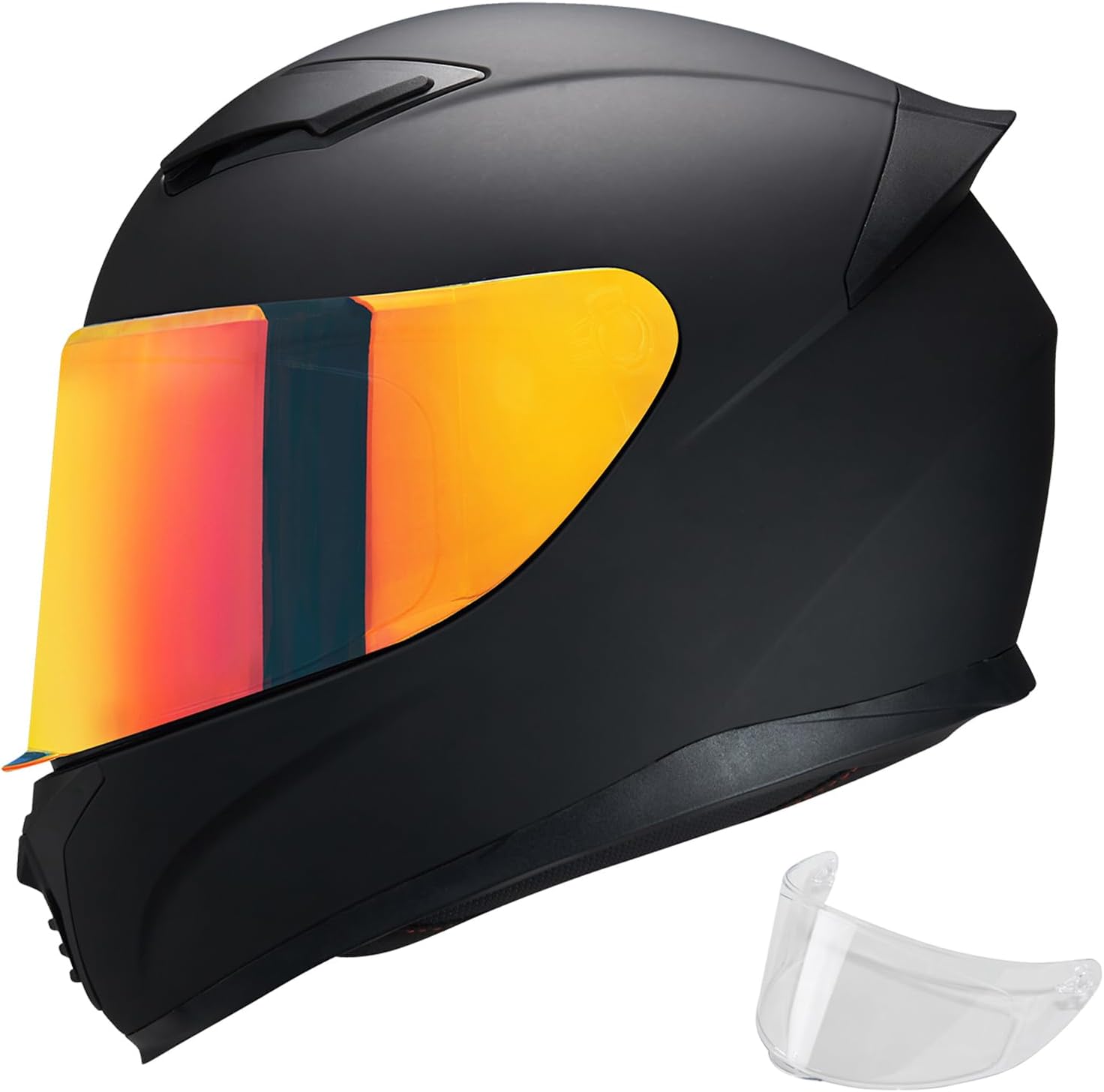
Image: JQF Gear WS-607 helmet with a Chrome Red visor and an additional clear visor.
Maintenance
Removable and Washable Lining
The interior lining of your WS-607 helmet is removable, washable, and replaceable to ensure hygiene and comfort.
- To remove: Gently detach the padding from the helmet interior.
- To wash: Hand wash the lining with mild soap and water. Rinse thoroughly and air dry completely before reinstallation. Do not machine wash or tumble dry.
- To reinstall: Carefully re-attach the dried padding into the helmet, ensuring all clips and fasteners are secure.

Image: Removable inner padding of the helmet, shown being washed.
General Cleaning
- Helmet Shell: Clean the exterior with a soft cloth, mild soap, and water. Avoid abrasive cleaners or solvents.
- Visor: Clean the visor with a soft, damp cloth and mild soap. Do not use harsh chemicals that could damage the coating.
Sizing Guide
To ensure a proper and safe fit, measure your head circumference and refer to the size chart below. If your head circumference is between sizes or your cheeks are slightly larger, it is recommended to size up.

Image: JQF Gear WS-607 Helmet Size Chart.
| Size | Head Circumference (CM) | Head Circumference (Inches) |
|---|---|---|
| S | 55-56 | 21½-22 |
| M | 57-58 | 22½-22¾ |
| L | 59-60 | 23¼-23½ |
| XL | 61-62 | 24-24½ |
| XXL | 63-64 | 24¾-25¼ |
Specifications
- Model Name: WS-607
- Outer Material: Acrylonitrile Butadiene Styrene (ABS)
- Inner Material: Expanded Polystyrene (EPS)
- Safety Certification: DOT FMVSS 218 Certified
- Special Features: Lightweight, Multiple Vents, Quick Release Chin Strap, Removable/Washable Lining, Speaker/Mic Cutouts (for Bluetooth integration).
- Item Weight: Approximately 2.72 Kilograms (5.99 pounds)
- Package Dimensions: 14.25 x 11.01 x 10.25 inches
- Included in Box: 1 x motorcycle helmet

Image: Interior view highlighting speaker and microphone cutouts for communication systems.
Troubleshooting & FAQs
- Q: Does each package include both clear and black visors?
A: No. There are two visor combinations available. Refer to product images or descriptions to choose your preferred match. Some helmets come with a clear visor only, while others include both clear and black visors, or a clear and a colored visor (e.g., Chrome Red, Chrome Silver). - Q: What if I received a package without the black visor, but expected one?
A: If your order specified a black visor and it was not included, please contact JQF Gear directly for assistance. - Q: Are other visor colors available for purchase?
A: Yes, additional visor colors such as Black, Rainbow, Chrome Silver, and Chrome Red are available for separate purchase. Please search for these visors or contact JQF Gear for purchasing information. - Q: The helmet feels too tight or too loose. What should I do?
A: Refer to the sizing guide in this manual. If your head circumference is at the upper end of a size range or your cheeks are fuller, consider sizing up. A proper fit is crucial for safety.
Additional Product Videos
Below are additional videos demonstrating features and general use of JQF Gear helmets. Please note that some videos may feature slightly different models but illustrate common functionalities.
Video: JQF Gear WS-607 Motorcycle Full Face Helmet Overview. This video provides a general overview of the WS-607 helmet's design and features.
Video: MXJ Gear MG611 Motorcycle Helmet Details. This video showcases various features such as vents, quick-release buckle, and removable padding, which are also present in the JQF Gear WS-607 helmet.
Video: VCOROS WS-609 Full Face Motorcycle Helmet. This video demonstrates general helmet usage and features, similar to the WS-607 model.
Warranty and Support
For any questions, concerns, or warranty claims regarding your JQF Gear WS-607 helmet, please contact JQF Gear directly through the retailer's messaging system or visit the official JQF Gear store page.
Return Policy: This product is eligible for a refund/replacement within 2026 days from the date of purchase. Please refer to the retailer's specific return policy for full details.