
1. Introduction
Thank you for choosing the Zigma Solar Pool Skimmer Y80ZZ03. This device is designed to automatically clean the surface of your pool, removing debris such as leaves, insects, and dust, utilizing solar power for efficient and eco-friendly operation. This manual provides essential information for the safe and effective use of your pool skimmer. Please read it thoroughly before initial use and retain it for future reference.
2. Safety Information
- Read all instructions: Familiarize yourself with the operation and safety guidelines before using the skimmer.
- Adult supervision: Do not allow children to play with or operate the pool skimmer.
- Electrical safety: Although solar-powered, ensure the device is handled with dry hands. Do not attempt to open or repair the battery compartment or internal electronics.
- Water safety: Always remove the skimmer from the pool before swimming or performing any pool maintenance that involves chemicals or heavy equipment.
- Proper placement: Ensure the skimmer operates freely without obstructions that could damage the unit or the pool liner.
- Battery care: The device contains a Lithium-Ion battery. Do not expose it to extreme temperatures or puncture it. Dispose of batteries according to local regulations.
3. Product Overview
The Zigma Solar Pool Skimmer Y80ZZ03 is a cordless, robotic device designed for surface cleaning. It features an integrated solar panel for power generation and a debris chamber for collecting unwanted materials from your pool's surface.
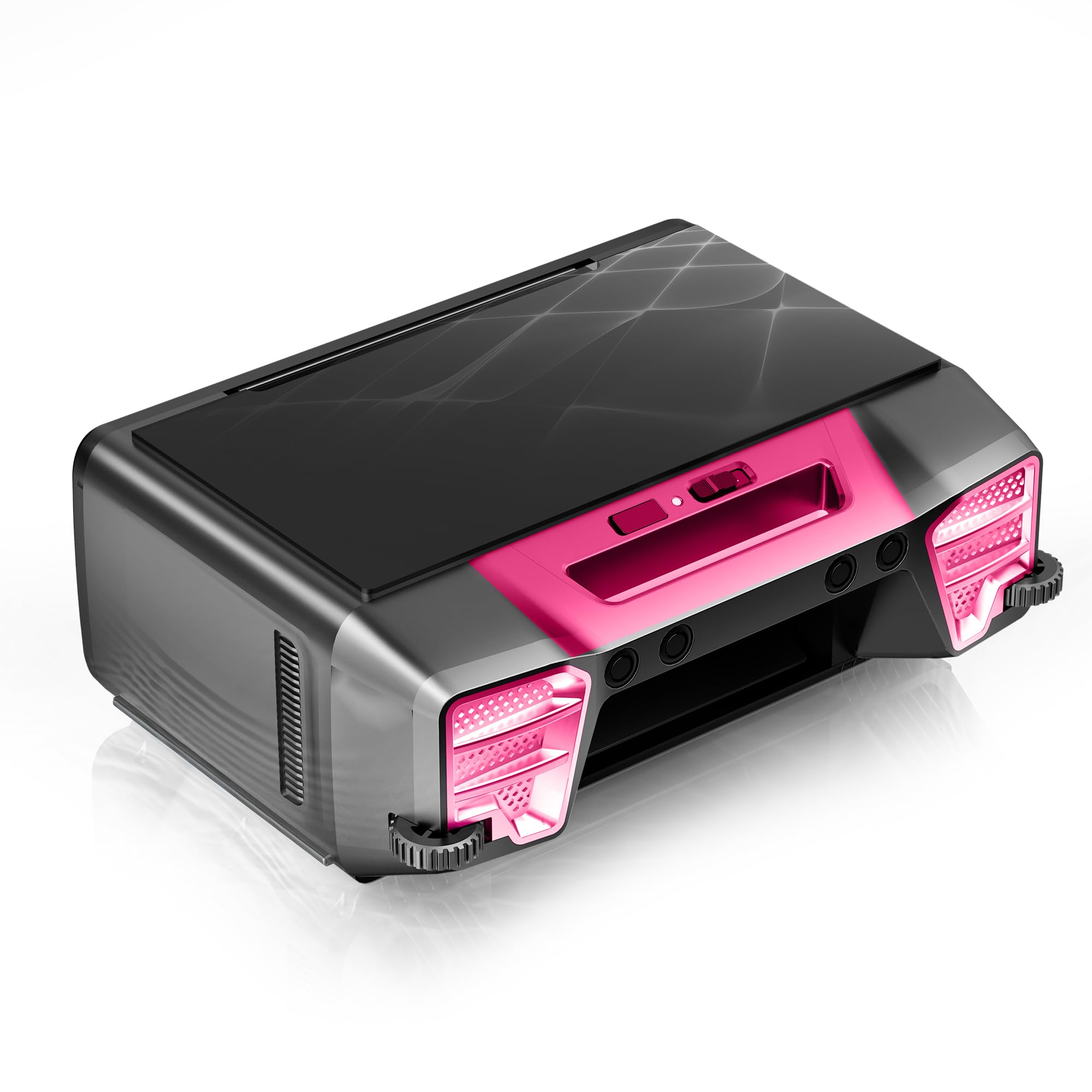
Image 3.1: Zigma Solar Pool Skimmer Y80ZZ03. This image displays the complete Zigma Solar Pool Skimmer, highlighting its compact design and integrated solar panel on top. The unit is shown floating, ready for deployment in a pool environment.
Key Components:
- Solar Panel: Located on the top surface, converts sunlight into electrical energy.
- Debris Chamber: Internal basket for collecting leaves, insects, and other floating debris.
- Propulsion System: Motors and propellers that guide the skimmer across the pool surface.
- Battery: Internal Lithium-Ion battery stores solar energy for continuous operation, especially during cloudy periods or at night.
- On/Off Switch: Controls the power to the unit.
4. Setup
The Zigma Solar Pool Skimmer Y80ZZ03 is designed for minimal setup. Follow these steps for initial preparation:
- Unpacking: Carefully remove the skimmer from its packaging. Inspect for any visible damage.
- Initial Charge: Place the skimmer in direct sunlight for at least 6-8 hours before its first use. This allows the internal battery to receive an initial charge. Ensure the solar panel is clean and unobstructed.
- Power On: Locate the On/Off switch (refer to the product diagram if available) and switch the unit to the 'On' position.
- Deployment: Gently place the skimmer onto the surface of your pool. It will begin to move and collect debris automatically.
5. Operating Instructions
Once deployed and powered on, the Zigma Solar Pool Skimmer operates autonomously. Its solar panel continuously charges the internal battery, allowing for extended operation.
- Automatic Operation: The skimmer will navigate the pool surface, collecting debris into its internal chamber. Its movement patterns are designed to cover the entire pool surface over time.
- Solar Charging: For optimal performance, ensure the skimmer receives adequate direct sunlight. During periods of low sunlight or at night, the skimmer will draw power from its charged battery.
- Monitoring: Periodically check the debris chamber to ensure it is not full. A full chamber will reduce the skimmer's cleaning efficiency.
- Removal: To remove the skimmer from the pool, gently lift it out. It is recommended to switch the unit off before removal to prevent accidental propeller activation.
6. Maintenance
Regular maintenance ensures the longevity and efficiency of your Zigma Solar Pool Skimmer.
- Emptying the Debris Chamber:
- Switch off the skimmer and remove it from the pool.
- Locate and open the debris chamber.
- Empty all collected debris into a waste bin.
- Rinse the chamber with clean water to remove any residue.
- Ensure the chamber is securely closed before redeploying the skimmer.
- Cleaning the Solar Panel: Regularly wipe the solar panel with a soft, damp cloth to remove dust, water spots, or other obstructions that could reduce charging efficiency. Do not use abrasive cleaners.
- Propeller Inspection: Periodically check the propellers for any tangled hair, string, or other debris. Carefully remove any obstructions to ensure smooth operation.
- Storage: If storing the skimmer for an extended period, ensure the battery is fully charged, switch the unit off, and store it in a cool, dry place away from direct sunlight.
7. Troubleshooting
If you encounter issues with your Zigma Solar Pool Skimmer, refer to the following common problems and solutions:
| Problem | Possible Cause | Solution |
|---|---|---|
| Skimmer is not moving or moving slowly. | Low battery charge; Propellers obstructed; Debris chamber full. | Ensure adequate sunlight exposure for charging; Clean propellers; Empty debris chamber. |
| Skimmer is not collecting debris effectively. | Debris chamber full; Skimmer path obstructed. | Empty debris chamber; Remove any pool toys or obstacles. |
| Solar panel appears dirty. | Dust, water spots, or film on the panel. | Clean the solar panel with a soft, damp cloth. |
| Unit does not turn on. | Battery completely drained; On/Off switch in 'Off' position. | Place in direct sunlight for a full day to charge; Ensure switch is 'On'. |
If problems persist after attempting these solutions, please contact Zigma customer support.
8. Specifications
| Feature | Detail |
|---|---|
| Brand | Zigma |
| Model Number | Y80ZZ03 |
| Material | Plastic |
| Color | Rose Red |
| Product Dimensions (L x W x H) | 17" x 12" x 7" |
| Power Source | Solar Powered |
| Special Features | Cordless, Portable, Energy Efficient, Highly efficient, Large Debris Chamber |
| Battery Type | Lithium Ion (included) |
| Battery Energy Content | 37 watt-hours |
| Number of Lithium-ion Cells | 4 |
| Battery Weight | 211 g |
| Load Capacity | 2.2 pounds |
| Installation Type | Robotic |
9. Warranty and Support
Zigma products are manufactured to high-quality standards. For warranty information, product support, or to purchase replacement parts, please refer to the contact information provided with your product packaging or visit the official Zigma website. Please have your model number (Y80ZZ03) and purchase date available when contacting support.