
Introduction
Thank you for choosing the LEPOTEC 4 Pcs RGB LED Wall Lights. These versatile lights are designed to enhance your living space with customizable RGB lighting, app control, music synchronization, and motion sensing capabilities. This manual provides detailed instructions for setup, operation, maintenance, and troubleshooting to ensure optimal performance and longevity of your product.

Image: The LEPOTEC RGB LED Wall Lights demonstrating their color-changing capabilities, including warm white and vibrant RGB, alongside a smartphone displaying the control app interface.
Safety Information
- Do not expose the lights to water or excessive moisture.
- Avoid disassembling or modifying the product, as this may void the warranty and pose safety risks.
- Use only the provided USB cable for charging.
- Keep out of reach of children.
- Ensure proper ventilation around the lights during operation.
Package Contents
Please check the package to ensure all items are present:
- 4 x LEPOTEC RGB LED Wall Lights
- USB Charging Cable(s)
- Adhesive Tapes with Iron Sheets (for non-iron surfaces)
- User Manual (this document)
Setup
1. Charging the Lights
The lights have a built-in 2200mAh rechargeable battery. Before first use, fully charge the lights using the provided USB cable.
- Connect the USB charging cable to the Type-C port on the light.
- Connect the other end of the cable to a USB power adapter (not included) or a computer USB port.
- The charging indicator will show a red light during charging. It will turn green when fully charged.

Image: A detailed diagram illustrating the dimensions of the LEPOTEC light, including the Type-C charging port, switch, and charging indicator light. It highlights the 2000mAh high-capacity battery.
2. Installation
The lights feature a strong built-in magnet for easy attachment.
- On Iron Surfaces: Simply attach the light directly to any iron surface.
- On Non-Iron Surfaces: Use the included adhesive tape with the iron sheet.
- Peel off the protective film from one side of the adhesive tape and stick it onto the iron sheet.
- Peel off the protective film from the other side of the adhesive tape and firmly press the iron sheet onto your desired clean, dry surface.
- Attach the light magnetically to the installed iron sheet.
3. Connecting to the App
For full control and advanced features, connect your lights to the "HappyLighting" app.
- Step 1: Download the 'HappyLighting' app from Google Play Store or Apple App Store.
- Step 2: Enable Bluetooth on your smartphone.
- Step 3: Turn the switch on the light to the 'ON' position.
- Step 4: Open the 'HappyLighting' app. The app should automatically detect and connect to the lights.
- Step 5: Once connected, you can control the lights via the app interface.
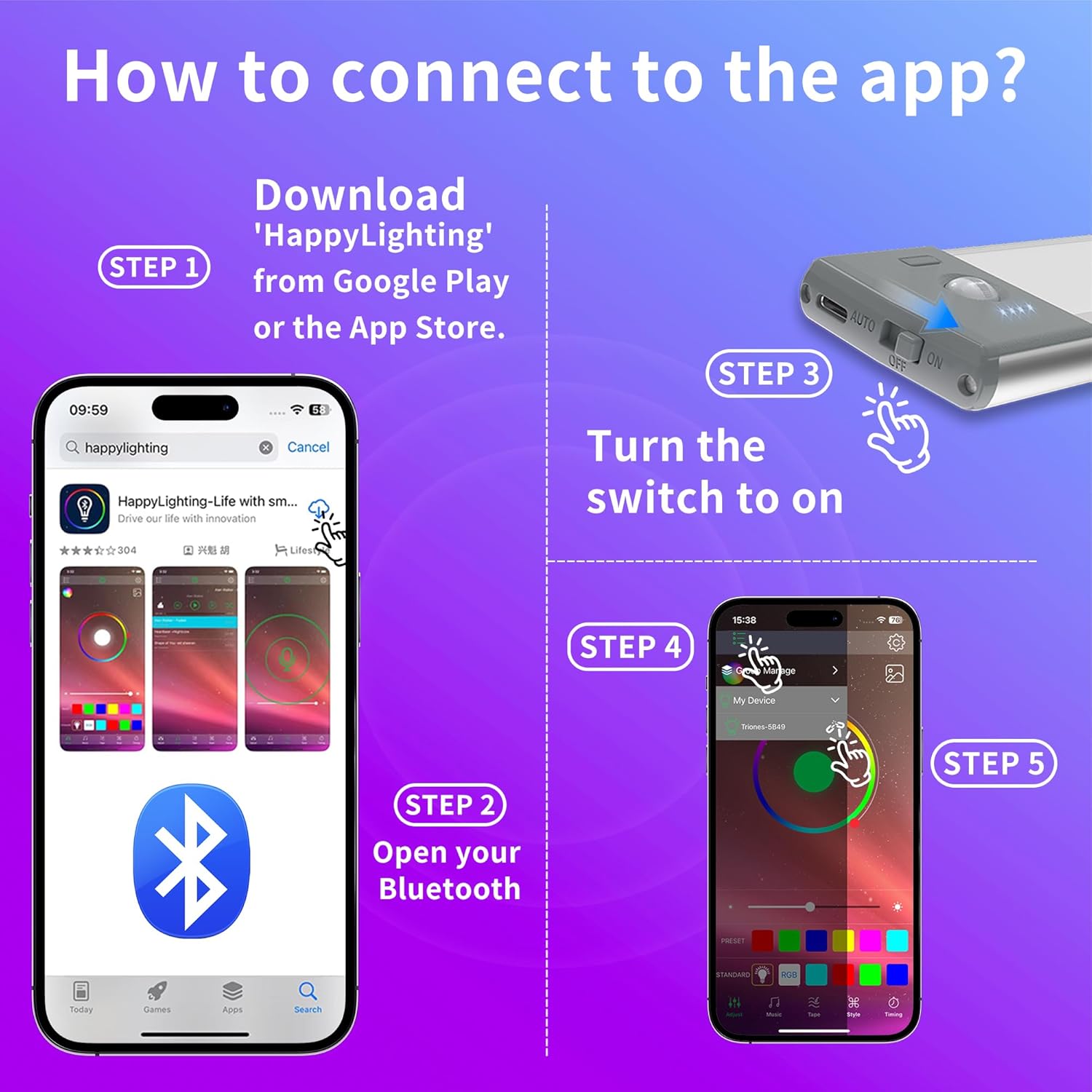
Image: A visual guide detailing the five steps to connect the LEPOTEC lights to the 'HappyLighting' mobile application, from downloading the app to controlling the lights.
Operating Instructions
1. Light Modes (On-Off-AUTO)
The lights feature a physical switch with three modes:
- ON: The light remains continuously on.
- OFF: The light is turned off.
- AUTO: Activates motion sensor mode. In a dark environment, the light will automatically turn on when motion is detected and turn off after approximately 20 seconds of no movement.

Image: A visual representation of the intelligent induction feature, showing a person walking and the light detecting motion within a 3-5m range, then automatically turning off after 30 seconds of no activity.
2. App Control Features
Once connected to the 'HappyLighting' app, you can access various functions:
- Brightness Adjustment: Remotely control the brightness level of the lights.
- Color Changing: Select from a wide spectrum of RGB colors.
- Timer Function: Set fixed on/off schedules daily for automated lighting.
- Music & Mic Synchronization: The light color can change with the sound of your microphone or the beat of music. Ensure the app has microphone access. This creates an immersive atmosphere for parties or gaming.

Image: A vibrant scene depicting people enjoying themselves in a room where the LEPOTEC lights are changing colors in sync with music, creating a dynamic party ambiance.

Image: A collage showcasing different uses of the LEPOTEC lights, such as backlighting a TV for an enhanced viewing experience and adding ambient lighting to a gaming setup.
Maintenance
- Cleaning: Wipe the lights with a soft, dry cloth. Do not use abrasive cleaners or solvents.
- Battery Care: To prolong battery life, avoid fully discharging the battery frequently. Recharge when the light indicates low power. If storing for a long period, charge the battery every 3-6 months.
- Storage: Store the lights in a cool, dry place away from direct sunlight and extreme temperatures.
Troubleshooting
| Problem | Possible Cause | Solution |
|---|---|---|
| Light does not turn on. | Battery is depleted. Switch is in OFF position. | Charge the light fully. Ensure the switch is set to ON or AUTO. |
| App cannot connect to the light. | Bluetooth is off. Light is not in ON mode. App permissions not granted. | Ensure Bluetooth is enabled on your phone. Set the light switch to ON. Grant necessary permissions (e.g., location, microphone) to the HappyLighting app. Restart the app. |
| Motion sensor not working. | Light is not in AUTO mode. Environment is too bright. Obstruction in sensing range. | Ensure the switch is set to AUTO. Motion sensor only activates in dark environments. Clear any objects blocking the sensor. |
| Battery life is shorter than expected. | Frequent use in ON mode. Frequent motion sensor activations. Battery degradation over time. | Battery life is approximately 7 hours in ON mode and 3-5 weeks in AUTO mode (10 activations/day). Adjust usage accordingly. Ensure full charges. |
Specifications
| Brand | LEPOTEC |
| Model | B0DSHVGX46 |
| Color | Multicolor (RGB) |
| Material | Aluminum |
| Power Source | Battery Powered (Rechargeable) |
| Battery Capacity | 2200mAh |
| Light Source Type | LED (30 LEDs) |
| Control Method | Phone App (HappyLighting), Physical Switch |
| Motion Sensor Range | 3-5 meters (16.4 ft effective control range via app) |
| Automatic Shut-off | 20 seconds (in AUTO mode, no movement) |
| Dimensions | Approx. 8.06 inches (length) x 1.70 inches (width) x 0.55 inches (height) |
| Mounting Type | Wall Mount (Magnetic / Adhesive) |
Warranty and Support
LEPOTEC products are manufactured with high-quality standards. For any product-related inquiries, technical support, or warranty claims, please contact the seller or refer to your purchase platform for specific warranty terms and customer service contact information.
You can visit the official LEPOTEC store on Amazon for more information: LEPOTEC Store